PC Slower Than It Used to Be?
A free scan shows the junk files, broken settings and background clutter dragging Windows down - then fixes them in one click.Free scan · Windows 10 & 11Crashes, No Sound, or Screen Glitches?
Random freezes, missing sound and display glitches usually trace back to one bad driver. Find and replace yours safely.Free scan · under a minuteYes—but not as three operating systems running natively at the same time. The NexPhone is the clearest current match for this idea: Android is its normal phone mode, Debian Linux can be launched from NexOS, and an optional Windows 11 configuration uses a separate boot that requires a restart. In practice, it is one phone that changes operating modes rather than one screen showing three independent systems simultaneously.
Nex Computer is currently taking preorders and gives an end-of-Q1 2027 (March 2027) shipment target. That date, the operating-system features, and the specifications below are manufacturer statements, not independent production-device test results.
As an Amazon Associate I earn from qualifying purchases.
What “one device” means in this setup
Android, Linux, and Windows use different software stacks and hardware assumptions. A phone can provide access to all three, but the way you switch between them matters more than the headline.
| Environment | How it starts | What switching involves | Best use |
|---|---|---|---|
| Android | Normal NexPhone mode | No special boot step | Calls, messaging, mobile apps, cameras, and everyday phone use |
| Debian Linux | Launched from NexOS | Intended as an on-demand Linux environment; the manufacturer describes desktop use and hardware acceleration | Linux desktop applications, development tools, shells, and browser-based work |
| Windows 11 | Optional Windows-on-Arm configuration | A separate boot; the technical specification says a reboot is required | Windows software that supports the device’s Arm configuration |
The practical distinction is simple: Linux is described as something you launch from NexOS, while Windows is described as a separate boot. Do not plan on keeping a Windows application open while instantly switching to an Android app without interruption. Save your work before changing modes, especially before a Windows reboot.
#1 Best Overall
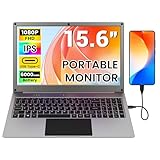
- All-in-One Portable Lapdock: More than just a monitor! This innovative device integrates a 15.6" FHD IPS screen, a full keyboard, multi-gesture touchpad, stereo speakers, and a large battery into one sleek unit. It turns your compatible devices into an instant laptop.
- Universal Compatibility with One Cable: Features a full-featured Type-C port for true plug-and-play simplicity. A single cable connects power, display, and data. Perfect for Samsung DeX, Raspberry Pi, Mini PCs, Gaming Handhelds (Steam Deck/ROG Ally), Nintendo Switch, and more.
- Unlock Your Phone's Potential: This Portable monitor with Kyboard transform your compatible smartphone into a productive laptop. Experience desktop mode (e.g., Samsung DeX) or screen mirroring on a large 15.6” display for video calls, emails, and browsing, dramatically boosting your mobile efficiency.
- Built-in Power Hub & Untethered Freedom: The integrated 6000mAh battery offers 2-3 hours of cord-free operation. It can even reverse-charge your phone or provide stable 5V/5A PD power to a Raspberry Pi 5, eliminating the need for extra power bricks.
- Premium Visual Experience: Enjoy vibrant and sharp visuals on the 15.6-inch IPS display with 1920x1080 Full HD resolution and wide viewing angles. The 180° hinge allows for perfect positioning anywhere.
What the NexPhone is advertised to support
Nex Computer’s product information describes the phone as running Android, launching Debian Linux on demand, and dual-booting Windows 11. Its official specifications list Qualcomm QCM6490 hardware, 12 GB of RAM, and 256 GB of internal storage. The same specification lists microSD expansion up to 512 GB. Nex Computer notes that specifications can vary by region and may change.
Those figures describe the planned product, not an independently measured performance level. They do not establish that every Android, Debian, or Windows application will install, run correctly, or deliver desktop-class speed.
Android mode
Android is the phone’s ordinary operating mode. It is the environment to use for cellular communication, Android applications, notifications, mobile security updates, and functions that depend on the phone’s standard user interface. Nothing in the available product information suggests that Android apps must be reinstalled each time you return from Linux or Windows, but final behavior depends on the shipping software.
Recommended Free Tools
Debian Linux mode
The manufacturer says Debian is included as an app or environment that can be launched from NexOS. It describes a desktop experience, hardware acceleration, and the ability to share folders between Android and Linux. Those are useful design goals: a shared folder could let you capture a photo in Android and open it in a Linux editor without moving storage manually.
Until independent testing of a production unit is available, treat the exact desktop, graphics, peripheral, package, and file-sharing behavior as unverified. A promotional description is not a guarantee that a particular Linux distribution package, kernel module, printer, or graphics workload will work.
Windows 11 mode
Windows is an optional Windows-on-Arm setup. Nex Computer’s technical specification explicitly says Windows 11 requires a reboot. That makes it a true alternate boot rather than a window inside Android. You should expect to close or save Android and Linux work, restart the phone, wait for Windows to load, and restart again when you want to return to the phone environment.
Windows-on-Arm compatibility also depends on the application. A native Arm build is generally the safest choice; applications relying on translation, older drivers, kernel-level components, anti-cheat systems, or unusual peripherals may not work. The manufacturer has not published an application-by-application compatibility list in the available information.
Free tools Windows power users keep installed
One-click scans. No signup required.
How to set up a three-environment workflow
The exact menus may change before shipment. The sequence below follows the capabilities Nex Computer currently describes and shows how to plan a reliable workflow without assuming unconfirmed interface labels.
- Confirm the hardware and carrier requirements. Before ordering or activating the phone, check the current regional specification, supported cellular bands, VoLTE requirements, and your carrier’s device policy. Nex Computer advises buyers to verify carrier compatibility; support can depend on local carrier rules as well as radio bands.
- Complete Android setup first. Start the phone in its normal Android mode, install system updates, sign in to required accounts, enable a screen lock, and test calls, mobile data, Wi-Fi, Bluetooth, cameras, and USB-C display output. Establishing that baseline makes it easier to tell a hardware problem from a Linux or Windows configuration issue.
- Prepare storage deliberately. Keep the internal 256 GB storage for the operating systems and frequently used applications. Use the supported microSD card, up to the manufacturer’s stated 512 GB limit, for media, installers, project archives, and backups. Do not assume that every operating system will treat the card identically; format and permissions may differ.
- Launch Debian from NexOS. Use the NexOS entry for the Linux environment when you need a shell or desktop. On first launch, allow time for account creation, package setup, and updates. If the system offers a shared Android/Linux folder, use it for documents that must move between modes rather than placing irreplaceable files inside an environment-specific directory.
- Install Linux applications conservatively. Begin with software available for the supported Debian release and architecture. Keep package sources limited to repositories you trust, and record any manual drivers or configuration changes so you can reproduce them after an update.
- Connect a display and input devices. For a desktop workflow, attach a USB-C monitor directly or use the included five-port USB-C hub. The hub is specified for HDMI monitors, keyboard and mouse connections, USB-A peripherals, and USB-C power delivery. Connect power before starting a long compile or update.
- Configure Windows only when you need it. Follow the shipping setup instructions for the optional Windows 11 configuration. Back up Android and Linux files first, because the required reboot interrupts the current session. Keep installation media, recovery information, and product support details available before changing boot modes.
- Reboot into Windows. Use the device’s Windows boot option and allow the first-run setup to finish. Install only applications that support Windows on Arm or are documented to work through Microsoft’s compatibility mechanisms. Test essential software before depending on it for work.
- Return to Android or Linux deliberately. Save Windows files, shut down or restart as instructed, and select the normal NexOS/Android path. Launch Debian again from NexOS when you need Linux. Treat every Windows transition as a full restart, not as an instant application switch.
Turning the phone into a desktop
The phone’s screen is suitable for mobile apps, but a PC-like workflow needs a larger display and physical input. Nex Computer’s specifications say the phone supports a direct USB-C monitor connection. The listed five-port hub adds HDMI, keyboard and mouse support, USB-A connectivity, and USB-C power delivery.
Monitor and hub choices
Use a direct USB-C monitor when you want the fewest components. Use the hub when you need HDMI, several peripherals, or simultaneous charging. The manufacturer lists the hub as included, so buying another one only makes sense when you need extra ports, a different connector arrangement, or a second workstation.
Rank #2

- All-in-One Portable Lapdock: More than just a monitor! This innovative device integrates a 15.6" FHD IPS screen, a full keyboard, multi-gesture touchpad, stereo speakers, and a large battery into one sleek unit. It turns your compatible devices into an instant laptop.
- Universal Compatibility with One Cable: Features a full-featured Type-C port for true plug-and-play simplicity. A single cable connects power, display, and data. Perfect for Samsung DeX, Raspberry Pi, Mini PCs, Gaming Handhelds (Steam Deck/ROG Ally), Nintendo Switch, and more.
- Unlock Your Phone's Potential: This Portable monitor with Kyboard transform your compatible smartphone into a productive laptop. Experience desktop mode (e.g., Samsung DeX) or screen mirroring on a large 15.6” display for video calls, emails, and browsing, dramatically boosting your mobile efficiency.
- Built-in Power Hub & Untethered Freedom: The integrated 6000mAh battery offers 2-3 hours of cord-free operation. It can even reverse-charge your phone or provide stable 5V/5A PD power to a Raspberry Pi 5, eliminating the need for extra power bricks.
- Premium Visual Experience: Enjoy vibrant and sharp visuals on the 15.6-inch IPS display with 1920x1080 Full HD resolution and wide viewing angles. The 180° hinge allows for perfect positioning anywhere.
Keyboard, mouse, and power
A Linux or Windows desktop is substantially more usable with a physical keyboard and mouse. Wired peripherals through the hub avoid pairing problems during first-time setup. For extended sessions, connect USB-C power through the hub if the hub and power adapter support the required delivery profile.
Lapdock option
Nex Computer also names NexDock as an optional laptop-style display, keyboard, and trackpad. It can make the phone easier to carry as a single computer, but it does not add an operating system. Linux and Windows availability still comes from the NexPhone software and boot configuration, and video-output and accessory compatibility should be confirmed before purchase.
Files, accounts, and backups across modes
Cross-platform convenience is useful only if your data remains readable and recoverable. Keep a primary copy of important work outside the phone, such as on an external drive or a trusted cloud service. A shared folder is convenient, but it is not a backup.
- Use common formats when possible: plain text, PDF, JPEG, PNG, and standard office files are easier to open in all three environments.
- Keep separate folders for Android media, Linux projects, and Windows installers so that an operating-system reset does not make the organization ambiguous.
- Back up before Windows installation, major Linux package changes, firmware updates, or storage reformatting.
- Use distinct passwords or passkeys for important accounts and enable the strongest device lock available.
- Do not copy executable files between environments and assume they are safe or compatible; Android packages, Debian packages, and Windows installers are different formats.
What application compatibility really depends on
The operating-system label is only the first filter. Compatibility also depends on processor architecture, graphics support, drivers, permissions, display scaling, storage access, and whether an application expects a conventional laptop or desktop.
Android applications
Android apps should be evaluated like apps on any other Android phone: check the developer’s supported Android version, required sensors, Google services, camera behavior, and screen layout. An app that depends on a proprietary accessory or carrier feature may not work simply because the operating system is Android.
Do these 3 things before closing this tab:
1Repair Windows errors before they cause bigger problems2Fix the driver behind crashes, sound loss and screen glitches3Clear out junk files and repair common Windows errorsDebian applications
Linux software must match the supported Debian release and processor architecture. Command-line tools are usually easier to validate than applications requiring specialized graphics drivers, audio interfaces, printers, or virtualization. The manufacturer’s hardware-acceleration claim may help desktop responsiveness, but it does not prove that every 3D application or video-editing workflow is supported.
Windows applications
Windows software should be checked for Arm support before you rely on it. Native Arm releases are preferable. x86 or x64 applications may depend on translation and can have different performance or feature limits. Applications that install low-level drivers, use hardware dongles, require kernel extensions, or enforce unusual anti-cheat rules are higher-risk candidates.
No independent production-device review has established a guaranteed list of compatible applications. Plan a trial period and keep a conventional computer available for work that cannot tolerate compatibility surprises.
Independent reader supportYour contribution helps us test, update, and keep practical guides available for everyone.Price, preorder status, and delivery risk
Nex Computer’s current FAQ lists a total preorder device price of $599. New preorder customers pay a refundable $199 reservation deposit, with the remaining balance due closer to shipping. Shipping charges and applicable taxes or duties may be additional.
Quick wins for a faster PC:
Fix the driver behind crashes, sound loss and screen glitchesFind Drivers →Repair Windows errors before they cause bigger problemsFix Now →The same FAQ gives an end-of-Q1 2027 target, meaning March 2027, for preorder shipments. It says the estimate is not a guaranteed delivery date and remains subject to development, validation, certification, and production preparation. An older reservation page showed an earlier Q3 2026 estimate; the current FAQ is the more recent statement and should take precedence.
Rank #3

- Portable All-in-One Display: The CrowView Note is a fully integrated portable monitor featuring a screen, keyboard, touchpad, and speakers in a laptop-style design. Ideal for mobile work, entertainment, and on-the-go productivity, you can enjoy efficient work and ultimate entertainment experience on the road, in a cafe, or at home
- Wide Compatibility: The display monitors feature USB-A, Mini HDMI, and Type-C ports, making it compatible with a wide range of devices, including phones, laptops, PC, Mac, Raspberry Pi, Jetson Nano, PS4/5, Xbox, and Nintendo Switch. It serves as a seamless external display, ensuring smooth integration with various devices and operating systems
- High-Resolution Display with Vivid Colors: The 14-inch Full HD (1920x1080) portable display screen boasts 100% sRGB color gamut and 300cd/m² brightness, delivering accurate and vibrant colors. Whether for work, design, or entertainment, it provides crisp visuals and a comfortable viewing experience—even in bright environments
- Smart Controls & Display Customization: With built-in function keys and an intuitive On-Screen Display (OSD) menu, users can easily adjust brightness, volume, contrast, and switch input sources. Multiple display modes, including Standard, Gaming, and Reading, allow for a personalized visual experience tailored to different needs
- Built-in Battery with Power Sharing: The portable monitor with keyboard is built with a 5000mAh battery. It not only provides power supply for the monitor but also can reversely charge your mobile phone and Raspberry Pi via type-c port, enhancing flexibility and convenience and making it a reliable travel companion
Because the phone is still in preorder, confirm the price, deposit terms, regional specifications, carrier bands, accessory availability, and shipping estimate immediately before placing an order. A reservation is not evidence that a production unit has completed independent application testing.
Chromebook: a simpler Android-and-Linux alternative
If you need Android and Linux applications on one computer but do not specifically need Windows, a supported Chromebook is a more established alternative. Google documents Android app installation on supported Chromebooks and describes Linux on ChromeOS as an environment that runs alongside ChromeOS applications.
Android compatibility is not universal. Google cautions that some native Android builds may not work well on every Chromebook architecture, so check the exact device and application requirements. The available documentation establishes Android and Linux support, but it does not establish a native Windows-app path on ChromeOS. Choose this route only if web, Android, and Linux software covers your workload or you are willing to use a separate Windows computer or remote service for Windows-only programs.
The Tool Desk
Outbyte Driver Updater FREEScan for outdated or missing drivers - takes under a minuteDriver Scan →Outbyte PC Repair FREEClear out junk files and repair common Windows errorsFree Scan →| Requirement | NexPhone | Supported Chromebook |
|---|---|---|
| Android apps | Normal phone operating mode | Documented on supported models; app and architecture compatibility varies |
| Linux apps | Debian environment launched from NexOS | Linux environment runs alongside ChromeOS applications |
| Windows apps | Optional Windows 11 boot; reboot required | No supported native Windows path established here |
| Phone-first mobility | Yes | Depends on the model; generally a laptop form factor |
| Desktop peripherals | USB-C display and included five-port hub listed by the manufacturer | Varies by Chromebook model |
How to decide whether this approach fits
Use the following decision checks before treating a three-OS phone as your only computer.
- Choose the NexPhone concept if carrying one cellular device matters, you can accept rebooting for Windows, and your essential software has been verified for Android, Debian, or Windows on Arm.
- Choose a Chromebook if Android and Linux are sufficient, you prefer a documented laptop workflow, and you do not require native Windows applications.
- Keep a conventional Windows PC if your work depends on specialized drivers, x86-only software, gaming anti-cheat systems, engineering tools, or peripherals that need desktop support.
- Wait before committing if an unreleased device must replace your only computer. The NexPhone’s feature descriptions and specifications are manufacturer claims, and independent production-unit compatibility testing is not established.
Troubleshooting common problems
Windows does not appear or will not boot
Confirm that the optional Windows configuration was installed according to the final manufacturer instructions and that the phone has sufficient storage and power. Do not repeatedly interrupt boot. Use the official recovery procedure, and preserve Android and Linux backups before attempting a reinstall.
The external monitor stays blank
Check the USB-C cable, monitor input, hub power, and the phone’s display-output support. Test a direct USB-C connection before adding the hub. If the monitor works directly but not through the hub, the issue is likely the hub, cable, power budget, or HDMI negotiation rather than the operating system.
A Linux application opens but performs poorly
Check whether the application has an Arm-compatible build, whether hardware acceleration is enabled, and whether the workload exceeds the phone’s thermal or memory limits. Try a simpler project or desktop effect before changing system packages. The manufacturer’s acceleration statement does not guarantee a particular application’s performance.
What’s actually slowing this PC down?
Pick the symptom - the matching free tool is one click away.
An Android file is missing in Linux
Use the documented shared-folder location, confirm that the file was actually copied rather than left in an app-private directory, and check permissions. Keep a separate backup; shared storage is a convenience layer, not a recovery system.
A Windows application installs but a feature fails
Look for a native Arm release, update the application, and check whether it requires a driver or hardware component. Translation can allow installation without providing complete functionality. Test printing, camera access, graphics acceleration, and external devices individually.
Bottom line for a one-device setup
The NexPhone currently offers the most direct answer to the Android-Linux-Windows premise: Android for normal phone use, Debian launched from NexOS, and Windows 11 through a rebooted alternate boot. Add a USB-C monitor, keyboard, mouse, and the listed hub for desktop work. Make the purchase only if your carrier, accessories, and essential applications are confirmed, and treat the March 2027 shipment target and all cross-platform compatibility claims as subject to change until production units are independently tested.
Quick Recap
Product prices and availability are accurate as of the date/time indicated and are subject to change. Any price and availability information displayed on Amazon at the time of purchase will apply.




