Free tools Windows power users keep installed
One-click scans. No signup required.
You can retrieve Samsung Galaxy data by restoring an existing Samsung or Google backup, copying files from a working and unlocked phone, or using Smart Switch. If the screen or touch input is damaged, an adapter, mouse, keyboard, or external display may help—provided the phone still powers on and supports the connection. If the phone will not turn on, the self-service options may not work; repair may be necessary, and recovery is not guaranteed.
Choose the recovery route that matches your situation
| Route | Does the original phone need to work? | Prior setup or access needed | Best for | Main limitation |
|---|---|---|---|---|
| Samsung or Google account restore | No, if a usable backup exists | A backup and access to the matching account | A lost, reset, or replacement phone | Only saved or synced data is available; included categories vary. Samsung UK and Samsung France |
| Smart Switch computer backup or restore | Usually, to create a new backup; no, to restore an existing computer backup | Smart Switch; a connected phone may require on-device approval | A working phone or an existing computer backup | Some secure, encrypted, DRM-protected, app, and login data will not transfer. Samsung UK and Samsung UK |
| HDMI adapter and external monitor | Yes | The phone must power on and support video output | A phone with a damaged display but working touch | Model and adapter compatibility vary. Samsung UK |
| USB mouse or keyboard and compatible adapter | Yes | The peripheral must connect, and you must know the screen-lock credentials | A phone whose touch input does not respond | Does not bypass the lock or fix a phone that will not boot. Samsung UK |
| Removable memory card and card reader | No, after removing the card | The files must have been stored on the card | Files on an inserted SD card | Does not retrieve data from internal storage. Samsung UK |
| Professional repair or data recovery | Depends on the fault and service | Service-specific | A phone that will not turn on or has hardware damage | Recovery is not guaranteed. Samsung UK |
Check account backups first if the phone is unavailable
On a replacement Galaxy, sign in to the Samsung or Google account used on the old phone and check for an existing backup. Samsung places backup and restore options under Settings > Accounts and backup in its guidance, though names and screens vary by Android version and device. Google Photos may need to have been enabled separately for photos and videos. Samsung France also lists OneDrive for Gallery synchronization and My Files backup; availability and configuration can vary by region.
As an Amazon Associate I earn from qualifying purchases.
Do not assume every type of data was included. Check the account’s backup details for the specific contacts, messages, settings, photos, or other files you need. A cloud sync is not the same as a complete copy of the phone: Samsung says it cannot retrieve data that existed only on a lost device. Samsung UK’s backup and restore instructions and Samsung France’s overview describe the account options.
Recommended Free Tools
Back up a working phone to a computer with Smart Switch
Samsung describes Smart Switch for PC and Mac as free. You need a computer and a USB cable that supports data transfer. The phone may ask you to approve the connection on its screen; a computer connection is not a way to skip that prompt or unlock a locked phone.
#1 Best Overall

- FAST CHARGING: Adaptive fast charging charges up to 50% battery level in 30 minutes, 75% faster than standard chargers.KAIMENGLONG adaptive fast charger Kit will be a good choice for your cell phone emergency, 100-240 volt input are ideal for worldwide travel.
- COMPATIBLE TYPE-C DVICES: Compatible with Samsung Galaxy S21 / S21+ / S21 Ultra 5G, Galaxy S20 / S20 FE 5G / S10 /S10+ / S10e /S9 / S9+ / S8 / S8+ / Note 8 / Note 9 / Note 10 / Note 20 / A3 / A5 / A7 /A8 / A8 Plus(2018)/ A10E / A20 / A30 / A50 / C5 Pro / C7 Pro / C9 Pro / Tab S3 9.7 and other devices.
- SAFETY ASSURANCE: Certified according to UL62368-1. Multiple built-in safeguards fully protect against over-current, over-charging, and over-heating for safe with fast charging.
- FAST SYNC & CHARGE: Fast Charger Kit charges phones and tablets with Type-C USB ports at max speed. Offers SuperSpeed transfer of 480 Mbps designed for charging and syncing smartphones, tablets, and Bluetooth speakers.
- WHAT YOU GET: 2 x Adaptive fast charger, 2 x 5 ft type C charging Cord, if there are any quality problems, please contact us.
- Install Smart Switch on the computer from Samsung’s Smart Switch support page.
- Connect the Galaxy phone to the computer with a data-capable USB cable.
- Open Smart Switch and select Backup.
- If prompted, approve the connection on the phone, then wait for the backup to finish.
If the computer does not recognize the phone, Samsung’s guidance suggests reinstalling the device driver through Smart Switch. If the phone cannot be unlocked or the on-device approval cannot be completed, this route may not be available.
Restore a Smart Switch computer backup
- Open Smart Switch on the computer and connect the destination Galaxy.
- Select Restore.
- Choose the latest backup or another available backup, then follow the prompts. Approve on the phone if asked.
Exact screens can differ by device and software version. Samsung’s backup and restore guide and Smart Switch guide provide its documented steps.
Transfer directly to another Galaxy with Smart Switch
If both phones are usable, Smart Switch can transfer data wirelessly, by USB cable, or through a computer. Samsung lists common Android categories such as contacts, schedules, messages, photos, videos, music, documents, call logs, settings, and some Galaxy-specific app data. It also describes importing selected items from iCloud, including contacts, calendar, notes, photos, videos, and documents. What transfers depends on the source and destination, operating system, and app restrictions. See Samsung’s Smart Switch instructions.
Smart Switch is not a perfect clone of the old phone. Secure or encrypted data—such as WhatsApp chats—may require the app’s own transfer or backup method. Banking app logins may need to be entered again; app data and credentials vary; DRM-protected content cannot transfer; and some OS-version combinations restrict call logs, email settings, or internet settings. Before switching phones, keep app-specific backup details and account credentials available. Samsung’s transfer guidance describes supported content and restrictions.
Rank #2

- Exclusive Dedicated cable for Xbox One/ Playstation 4/ PS4 Slim controllers etc. and Compatible with Android phones.
- Cable allows you to charge and play games at the same time. Keep the action going with the Xbox One Play and Charging. Recharge while you play or afterwards, even when your Xbox is in standby.
- Super quick charging, supports maximum 2.0 Amp current and Up to 480 megabits of data transmission. Made with 23 AWG high Gauge Low Impedance wires, the cable charging speed is 10%~50% faster than ordinary USB cable.
- This cable is 10 ft. long and is the same cable included in a Xbox One Play n' Charge kit. Let you sit on the sofa or lie on the bed, can be comfortable and convenient to play, enjoy leisure happy time.
- Customer Support: If you have any questions, please contact us. We will provide you friendly pre-sale and after-sale support service in time.
Retrieve data when the screen or touchscreen is damaged
Display is unusable, but touch still works
If the phone remains powered and its model supports video output, connect it to a TV or monitor using a compatible HDMI adapter. This can give you a visible way to operate the phone and back it up. Compatibility depends on the Galaxy model and adapter; Samsung’s broken-screen access guidance describes this option.
Touch does not respond
Connect a wired USB mouse or keyboard through a compatible micro-USB or USB-C adapter, such as a suitable USB-C OTG adapter. If the phone and adapter work together, use the peripheral to enter your PIN, password, or pattern, then operate the phone to make a backup. This does not defeat the screen lock: you still need the correct credentials. Samsung documents the adapter approach in its touchscreen access instructions.
Copy files to a computer over USB
For direct file browsing, Samsung says the phone must be unlocked. Its UK support wording is: “Your phone has to be unlocked for you to access your files this way.” That requirement applies to browsing files through a computer connection; it does not describe every backup or restore method. Samsung UK Support
Outdated Drivers Are Slowing You Down
One free scan finds every outdated or missing driver and matches the right update for your exact hardware.Free scan · exact hardware matchPC Slower Than It Used to Be?
A free scan shows the junk files, broken settings and background clutter dragging Windows down - then fixes them in one click.Free scan · Windows 10 & 11Check for a removable SD card
If the phone has an inserted memory card, remove it and use a computer slot or card reader to copy files stored on that card. This can retrieve only card contents, not files held in the phone’s internal storage. Samsung includes this option in its broken-screen data-access guidance.
Rank #3
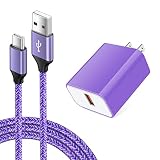
- 【Type C Charger Set】: USB Type C Fast Charging Cable compatible for Samsung Galaxy S26 S26+ S26 Ultra S25 S25+ S25 Ultra S25 FE S23 S22 S21 S20 FE S10E S9 S8 Note 20/10/9/8, A16 A15 A25 A14 A13 A12 A37 A36 A35 A57 A56 A55 A54 A53 A52 A26 A25 A24 A23 A06 A05s A04s A03s A02s A10E A11 A20 A21 A51 A50 A71, LG Stylo 6/5/4, LG K51 K92 K52 K61 K62 K42, LG G9 G8 G7 G6 G5, LG V60 V50S V50 V40 V35 V30 ThinQ,Google Pixel 10/9/Pro/XL/8/8 Pro 7a/7/7 Pro/6a/6/6 Pro, and more.
- 【Quick Charge 3.0 Wall Charger】: 18W Adaptive Fast Charging Wall Charger charges up to 50% battery level in 30 minutes with 4 times faster than traditional charger.(★Note: Quick Charge 3.0 wall charger only supports fast charging for QC 3.0 enabled devices up to 18W/3A. It does not support Quick Charge for Non quick charge devices and work as a usual charger. The Charging speed may vary based on different phone device. )
- 【Safety Charger Adapter】: Sidpro's USB Power Adapter built with high-grade fireproof PC materials to offer multiple protection against Short Circuiting, Over-Heating, Over-Current, Over-Voltage and Over-Charging. And Intelligent circuit system to maximize charging efficiency.
- 【Data Sync & Fast Charge】: Fast Charger Kit provides the fastest charging speed to QC 3.0 devices with 75% faster than standard chargers. (Note: Do not support quick charge on iPhone and Google Pixel series devices; Fast charge only compatible with QC 3.0 enabled devices.)
- 【What You Get】: 2 in1 Type C Fast Charger Kit, including 1-Pack 18W Quick Charge 3.0 Wall Charger, and 1-Pack Type C Cable(6 feet). 24-hour friendly customer service, 30-day free refund or replacement, 12-month worry-free warranty.
Understand when remote backup can help
Samsung’s Find My Mobile remote backup is conditional, not a fallback that can be switched on after a phone is lost or damaged. The phone must be online, signed in to a Samsung account, and have the required remote-control settings enabled; you also need the account credentials. If those conditions were not met beforehand, remote backup may not be available. Check Samsung’s backup guidance for the options it describes.
If the Galaxy will not power on
A cable, adapter, mouse, or computer cannot retrieve data from a phone that cannot start. Samsung cautions that its listed methods may not work in all cases, including when a device will not switch on or the touchscreen is no longer responsive. Repair or a data-recovery service may be the next option, but neither outcome nor successful recovery is guaranteed by Samsung’s guidance. See Samsung’s damaged-device guidance and screen-access instructions.
Set up backups before you need them
- Review Samsung and Google backup settings and confirm which data categories are actually included.
- Enable photo and video syncing separately if you want those items stored through Google Photos or another supported service.
- Make periodic Smart Switch computer backups while the phone is unlocked and working.
- Use an app’s own backup or migration feature for secure chats and other data Smart Switch may not carry.
- Keep account credentials available so you can sign in to a replacement phone.
Samsung’s backup overview explains account backup options and recommends setting up automatic backups, but inclusion and availability depend on configuration and region: Samsung UK and Samsung France.
Quick Recap
Product prices and availability are accurate as of the date/time indicated and are subject to change. Any price and availability information displayed on Amazon at the time of purchase will apply.




