What’s actually slowing this PC down?
Pick the symptom - the matching free tool is one click away.
You may be able to clean or replace a single key on an HP laptop, but there is no universal method: the key mechanism and available parts depend on the exact model. If the laptop is under warranty, HP says not to remove a key. For a missing or broken key, identify the notebook and check HP’s parts listing or contact HP support before buying anything.
Decide whether to repair the key yourself
Start with the key’s condition and the laptop’s warranty status. HP’s support guidance says to have the computer serviced if it is under warranty, the key cannot be unstuck, or the keyboard does not have removable keys. The instructions below are for an out-of-warranty notebook with a removable key that is sticking—not a guarantee that a broken or missing key can be repaired at home.
As an Amazon Associate I earn from qualifying purchases.
- Key sticks, laptop is under warranty: Do not pry the key off; contact HP support or arrange service.
- Key sticks, laptop is out of warranty: Confirm the key is designed to come off before attempting HP’s cleaning procedure.
- Key is missing, broken, or will not reattach: Look up parts for the exact notebook or ask HP service. A generic keycap may not fit.
- Several keys fail or the keyboard is unresponsive: Run HP’s keyboard diagnostic and consider service or a temporary external keyboard.
HP’s support page gives this instruction: “If the computer is under warranty, if a key cannot be unstuck, or if the keyboard does not have keys that can be removed, have the computer serviced.” Read HP’s stuck-key guidance.
Clean a removable key that is sticking
Only follow this procedure if the notebook is out of warranty and you have confirmed the key is removable. HP warns that removing a key can damage the pad beneath it.
#1 Best Overall

- Compatible Model number:A1425,A1502,A1398,A1466
- Some models use an another version of the keyboard and are not compatible.
- Please make sure that the white plastic scissor hinge is exactly the same as the one in the picture.
- If you are unsure if the key will work for you please send a message with picture of either the area on the keyboard missing the key or a picture of the back of the key with the plastic hinge attached.
- Shut down the notebook and disconnect the AC adapter. If its battery is removable, take it out.
- Use a flat plastic pry tool. Slide it beneath the top or bottom edge of the key, and lift gently. HP says to insert the tool no more than 1/8 inch under the key’s edge; deeper insertion risks damaging the pad beneath it.
- Clean the key and the slot with a cotton swab. Use compressed air to clear debris from the slot.
- To reinstall the key, position it over its place and press until it snaps into place. Longer keys such as Space and Enter may use a small metal support rod; make sure it is inserted into the key before reinstalling.
These are HP’s steps for cleaning a stuck key, not a universal repair for loose, broken, or missing keycaps. See HP’s full instructions and cautions.
Find the right replacement part
For a key that has popped off, is broken, or cannot be reattached, identify the exact notebook before ordering. HP says part availability varies by model. Use the product number, serial number, or part number on the service tag on the bottom of the notebook to search HP PartSurfer or the HP Parts Store, or ask HP support to identify the correct repair.
Rank #2
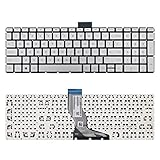
- 【Kindly Note】This keyboard is US Layout
- 【Compatible Models】Compatible with HP 15-BS 15-BP 15-BR 15-BW 15G-BR 15Q-BD 15Z-BW 17G-BR 15-RA 15-RB 17-BS 17-BR 17-AE 17-AK 17-AR 250 G6 255 G6 256 G6. Envy X360 15m-BP.Envy 17M-AE(Compatible HP Pavilion 15-CB 15-CC 15-CD 15-CK TPN-Q201)
- 【Solution of keys don't work】If some keys don't work after install ,You can try to reconnect the ribbon cable in case bad connected ,pls use a dry cloth to wipe metal head of the connect ribbon,then try to connect about few times,many customer solve this problem after did this.
Check the listing carefully. A catalog may offer a keyboard or top-cover assembly rather than an individual keycap; that is not true of every HP notebook. HP describes its certified replacement parts as tested against its quality and compatibility standards, but you still need the part listed for your exact device and region. Its illustrated catalogs are examples, while PartSurfer is HP’s source for current supported-parts information. Read HP’s parts-ordering guidance and view HP’s illustrated parts information.
Before choosing a part or repair, verify:
- It matches the notebook’s exact model and listed part number.
- The listing is for an individual keycap, a keyboard assembly, or another assembly—not an assumed interchangeable piece.
- The keyboard layout and language match your notebook.
- Any backlight or other configuration matches.
- You are comfortable with the repair, or have arranged service.
When the keyboard problem is broader
If more than one key is failing, test the integrated keyboard with HP PC Hardware Diagnostics using HP’s keyboard troubleshooting guidance. If the built-in keyboard still does not work, HP says service or replacement may be necessary in some cases. A wired USB keyboard can help you keep using the notebook while arranging a repair. Follow HP’s keyboard troubleshooting steps.
Quick Recap
Best Value

- ✅✅✅New! Industry's latest design protector with LARGE LETTERS. See every key and symbol in dim light without glasses. Great for seniors or people with poor vision.
- Designed for HP 15.6 inch Laptop 15-dw*** 15-dy*** 15-db*** 15-ds*** 15-da*** 15-ef*** 15-es*** 15-cc*** 15-cd*** 15-cs*** 15-cw*** 15-bw*** 15-bs*** series. US Keyboard Layout. ❌❌❌Not Fit HP 15.6 Laptop 15-eg 15-eh 15-er 15-fh 15-fc 15t-eg200 15-eg2373cl/eg2153cl/eg1053cl/eg1073cl/eg0025nr 15-eh1085cl,Please Search ASIN: B08TVMVPGB.
- CaseBuy own newest color and design, individual mold ultra thin thickness, with ultra clearly printing. Elaborately lower key height design to give you better type feeling, especially after long time typing
- ✅✅✅ Please make sure your keyboard has 15 FUNCTION KEYS on the top row, not 16. US Keyboard Layout. You can compare your keyboard layout with IMAGE 2 to confirm if can fit.
- Easy to apply and remove, completely washable and reusable. Risk-Free replacement warranty with CaseBuy.
Rank #4

- 【Compatible Models】Compatible with Compatible with HP Envy X360 15-ED 15-EE 15T-ED 15M-EE 15M-EE0013DX 15M-EE0023DX 15M-ED 15M-ED0023DX 15Z-EE,Envy 17-CH 17m-CH 17-CG Series Laptop
- 【Specification】This keyboard with backlight.
- 【Please cheak whether this keyboard fits your laptop or not before bidding.】
- 【Good Package】This keyboard is covered bubble bag in box,make sure you can receive a high quality keyboard.
- 【Solution of keys don't work】If some keys don't work after install ,You can try to reconnect the ribbon cable in case bad connected ,pls use a dry cloth to wipe metal head of the connect ribbon,then try to connect about few times,many customer solve this problem after did this.
Rank #3

- Compatible Model: HP EliteBook 840 G7 840 G8, EliteBook 845 G7 845 G8 or EliteBook 745 G7 745 G8 Series Laptop
- Compatible Model: HP ZBook Firefly 14 G7 or ZBook Firefly 14 G8 Series Laptop
- Keyboard Layout: Color: Black with Backlit with Pointer. US Layout
- WEAR-RESISTANT: This eliteBook 840 g7 840 g8 laptop keyboard was under UV-processed, the symbol on the keys can be still very clear after being repeated 10 million times.
- Good Quality: Each replacement keyboard was tested before shipping and working good!
Product prices and availability are accurate as of the date/time indicated and are subject to change. Any price and availability information displayed on Amazon at the time of purchase will apply.




