Free tools Windows power users keep installed
One-click scans. No signup required.
Protect a 1 PB environment by designing for the recovery your business requires—not by choosing a backup product or copy count in isolation. Set workload-specific recovery point and recovery time objectives, keep copies outside production’s failure and credential domains, preserve a trustworthy restore point, and prove the end-to-end recovery path in exercises. NIST offers planning and security guidance, but no cited source prescribes one architecture or guarantees a restore time for every 1 PB system.
Start with business impact, not the petabyte figure
Capacity tells you how much data is stored; it does not tell you which data must return first, how much loss is acceptable, or how quickly services must resume. Those are business and operational decisions. NIST guidance emphasizes planning, maintaining, and testing backup files in light of organizational needs, rather than prescribing one universal design. Its recommendations are guidance, not automatically mandatory requirements for every organization. See NIST’s 2020 guide for managed service providers.
As an Amazon Associate I earn from qualifying purchases.
Inventory the recovery units
Break the environment into data sets and services that can be prioritized and restored. For each, record its owner, dependencies, change rate, retention or compliance obligations, and consequences of loss or downtime. Include the systems needed to make the data usable: applications, identity services, network paths, catalogs, encryption keys, and compatible hardware or software. A volume-level inventory alone can miss dependencies that determine whether a restored data set actually supports operations.
Set RPO and RTO by workload
- Recovery point objective (RPO): the maximum acceptable age of recoverable data—how much recent change the business can afford to lose. NIST’s supplemental guidance describes determining the maximum age of backup files that still allows operations to be re-established with minimum acceptable interruption; it identifies this planning measure as RPO. See the NIST NCCoE extended guide.
- Recovery time objective (RTO): the maximum acceptable interruption before the workload or service must be available again.
Document the objective for each recovery unit, then have the accountable business and technical owners approve it. A single target for the whole petabyte can obscure different loss tolerances and service priorities. Translate approved objectives into backup frequency, retention, replication or transfer schedules, and restore order; then verify that the chosen design can meet them.
#1 Best Overall

- Available in capacities ranging from 2 to 24TB(1) | (1) 1GB = 1 billion bytes and 1TB = 1 trillion bytes. Actual user capacity may be less depending on operating environment.
- For RAID-optimized NAS systems with unlimited number of bays
- Rated for 550TB/yr workload rate(2) | (2) Annualized Workload Rate = TB transferred x (8760 / recorded power-on hours). The maximum rated workload is specified for operating at typical temperature of 40C. Workload Rate will vary depending on your hardware and software components and configurations.
- Designed to handle the demands of high-intensity 24x7 multi-user NAS environments
- Western Digital partners with a wide range of NAS system vendors for extensive testing to ensure compatibility with most NAS enclosures
Design copies around failure domains and threats
A backup is only useful if an organization can reach it after the event that damaged production. Consider hardware failure, operator error, ransomware, site loss, and failures of shared credentials or management systems. NIST’s ransomware advice is explicit: “It’s important not only to have secure backups of all your important data, but also to make sure that backups are kept isolated so ransomware can’t readily spread to them.” The statement appears in NIST’s May 2021 ransomware guidance summary.
Choose isolation that matches the threat model
| Copy approach | What to evaluate | Operational questions |
|---|---|---|
| Logically separate copy | Whether access controls and management paths keep a production compromise from granting control over backup data. | Are backup administration and credentials separate? Can production systems delete or alter restore points? |
| Immutable copy | Whether the selected system can prevent changes or deletion for the required retention period. | Who can set or shorten retention? How are exceptions controlled and recorded? |
| Offline or off-site media | Whether the copy is disconnected or located beyond the production site’s likely physical and operational failure domains. | How are media rotated, transported, stored, retrieved, and read during an incident? |
These approaches can be combined; none is automatically sufficient on its own. NIST’s extended guide mentions saving more than one backup and the 3-2-1 rule, but a copy-count heuristic is not a guarantee against shared credentials, destructive events, corruption, or an unworkable restore process. Evaluate isolation alongside access controls, retention, geography, integrity checks, and restore validation.
Rank #2

- USB-C (10Gbps) drive for fast backup with up to 260MB/s read and 260MB/s write (1 MB/s = 1 million bytes per second. Based on internal testing; performance may vary depending upon host device, usage conditions, drive capacity, and other factors.)
- High-capacity, enterprise-class Ultrastar 7200RPM drive inside
- Mac Ready, Apple Time Machine compatible; easily reformatted for Windows
- Stackable, anodized aluminum enclosure offers premium durability
- Three modes of brightness to adjust the LED lights
Separate copies from shared failure paths
Map where production, backup storage, identity, orchestration, network connectivity, power, and physical facilities depend on the same components or administrators. Decide which failures each copy must survive. Geographic separation can reduce exposure to a local disaster, but it does not by itself solve credential compromise or establish that a copy is clean and restorable. Document who can access, modify, expire, and recover each copy.
Make integrity and trust part of recovery
Availability is not enough if the selected restore point is corrupted or contains destructive changes. A recovery plan needs a way to identify a known-good point and verify that restored data is accurate and usable. NIST’s SP 1800-11, Data Integrity: Recovering from Ransomware and Other Destructive Events treats trustworthy, accurate restored data as central to recovery from destructive events.
Rank #3
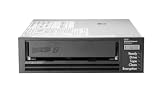
- Recording technology: lto-8 Ultrium 30750
- Capacity: 30 TB
- Host interface 6 GB/s SAS
- Restrict backup administration to specifically authorized roles and keep its credentials and control paths separate from ordinary production access where the design allows.
- Use immutability or offline copies where supported and appropriate to the threat model; define who can change retention or override safeguards.
- Record administrative actions and monitor backup jobs, policy changes, deletions, and integrity-check failures so unexpected activity can be investigated.
- Define how the team selects a clean recovery point and validates files, objects, databases, and dependent applications after restoration.
- Protect the dependencies needed to decrypt, catalog, and interpret backups, and include them in recovery procedures.
NIST SP 800-209, Security Guidelines for Storage Infrastructure (2020), addresses storage security and backup, recovery, and archiving lifecycle practices. Use it to inform storage-control decisions rather than treating backup as an isolated appliance or job schedule.
Design the restore path before choosing a recovery promise
Restoring a petabyte-scale environment is not just a matter of copying bytes. Elapsed recovery depends on the actual bottleneck across media access, catalogs, network and storage throughput, parallel jobs, compute, key availability, application dependencies, and validation. No cited NIST source establishes a universal throughput or elapsed restore time for 1 PB. Set a target only after a representative end-to-end test in the intended environment.
Rank #4

- USB-C (10Gbps) drive for fast backup with up to 250MB/s read and 250MB/s write (1 MB/s = 1 million bytes per second. Based on internal testing; performance may vary depending upon host device, usage conditions, drive capacity, and other factors.)
- High-capacity, enterprise-class Ultrastar 7200RPM drive inside
- Mac Ready, Apple Time Machine compatible; easily reformatted for Windows
- Stackable, anodized aluminum enclosure offers premium durability
- Three modes of brightness to adjust the LED lights
Restore in business-priority tiers
Identify the minimum services and data needed to resume critical operations, then define subsequent recovery tiers for less time-sensitive workloads. Specify the sequence and dependencies: for example, which identity, network, database, or application components must be available before a data set can serve users. This turns “restore 1 PB” into a prioritized recovery plan rather than an assumption that every byte returns at once.
Windows Errors? Fix Them Before They Spread
Repair common Windows errors and clear accumulated junk for a smoother, more stable PC - no reinstall needed.Free scan · no reinstallOutdated Drivers Are Slowing You Down
One free scan finds every outdated or missing driver and matches the right update for your exact hardware.Free scan · exact hardware matchPlan off-site media logistics
If the design uses removable or off-site media, document its location, rotation schedule, transport, custody, retrieval authority, and recovery procedures. Confirm that the alternate site has compatible readers and the staff know how to use them. NIST’s SP 800-34 Rev. 1 contingency planning guide discusses media locations, rotation and off-site transport, as well as readers—including tape drives—that may be needed at an alternate site. This is established planning guidance from 2010, not a current media-product specification; tape is one possible path, not a universal fit.
Best Value

- [ Enterprise-Class Reliability ] Designed for 24/7 operation with enterprise-grade components, making it ideal for servers, NAS systems, RAID arrays, and data-intensive environments.
- [ High-Capacity 6TB Storage ] Store large amounts of business data, backups, media libraries, surveillance footage, and critical files on a single drive.
- [ 7200 RPM Performance ] Fast spindle speed combined with a large 256MB cache delivers responsive performance and efficient data transfers for demanding workloads.
- [ SATA 6Gb/s Interface ] Provides broad compatibility with desktops, workstations, NAS devices, servers, and storage arrays while delivering reliable high-speed connectivity.
- [ Optimized for Multi-Drive Systems ] Built for enterprise and RAID environments with enhanced vibration tolerance and workload capabilities for dependable long-term operation.
Measure total recovery, not a device’s headline speed
Record restore duration by workload and end-to-end, including time to locate and mount media, retrieve catalog information, provision destinations, obtain keys, transfer data, rebuild services, and validate results. Measure under realistic concurrency and network conditions. If a target is missed, identify whether the limiting factor is capacity, parallelism, bandwidth, staffing, dependencies, or an untested step; then change the design or revise the approved objective.
Independent reader supportYour contribution helps us test, update, and keep practical guides available for everyone.Evaluate designs against the operating model
Compare candidate approaches using evidence from your environment, not an assumed ranking of products or media. The following criteria expose trade-offs that a raw capacity figure will not resolve.
- Isolation: offline, immutable, logically separate, or other resistance to compromise from production.
- RPO and retention: the acceptable loss window and how long useful restore points remain available.
- RTO and restore throughput: measured end-to-end recovery, including catalogs, media access, networking, decryption, and validation.
- Scale and operations: supported data types, parallelism, expected capacity growth, staffing, and operational complexity.
- Geography and failure domains: site separation and exposure to common power, credential, network, or regional failures.
- Integrity and auditability: ability to detect corruption, identify a clean point, validate recovery, and record actions.
- Cost and logistics: storage, media rotation, network or egress, transport, facilities, and recovery-site upkeep.
Exercise recovery and keep it current
Backup job completion does not prove that services can be restored. Test representative file, object, database, application, and full-system restores, including the people and dependencies needed to execute each runbook. NIST recommends planning, implementing, and testing backup and restoration and maintaining an incident recovery plan; its ransomware advice also emphasizes restoration planning and testing.
Recommended Free Tools
Capture results that improve the design
- Whether the intended restore point was available and selected correctly.
- Whether recovered data passed integrity and application-level validation.
- Elapsed time against the workload’s approved recovery objective, including manual steps and waits.
- Dependencies, permissions, keys, media, and staff required to complete the run.
- Failures, workarounds, and changes needed in policies, capacity, procedures, or architecture.
Repeat exercises after material changes to storage, networks, security controls, applications, retention rules, or recovery staffing. NIST’s SP 1339 OT Backup Quick Start Guide (June 17, 2026) specifically connects backup management with change management and recovery exercises in operational technology (OT). That guide is OT-scoped; apply it as relevant to OT environments, not as a universal rule for every storage estate.
Use exercise results to revise recovery tiers, procedures, and capacity assumptions, then have owners reapprove objectives when business needs or measured capability change. A design is credible only when the organization can demonstrate that it can retrieve a trusted copy and restore the services it has promised to recover.
Quick Recap
Product prices and availability are accurate as of the date/time indicated and are subject to change. Any price and availability information displayed on Amazon at the time of purchase will apply.




