For the Super NES Classic Edition, connect the console’s HDMI OUT port to an HDMI input on your TV or monitor, connect USB power, then select that input. An original Super Nintendo Entertainment System (SNES) is different: its hookup depends on the console’s video output and the inputs on your TV, and may require a compatible converter.
First, identify which SNES you have
“SNES” may mean the original Super Nintendo Entertainment System or Nintendo’s Super NES Classic Edition. The Classic Edition has an HDMI OUT port and a documented direct-HDMI setup. Do not assume its HDMI cable is an adapter for original SNES hardware.
As an Amazon Associate I earn from qualifying purchases.
If you are unsure, check the console itself: the Classic Edition has an HDMI OUT port and a DC IN jack. The instructions below for a direct HDMI connection apply to that model.
Outdated Drivers Are Slowing You Down
One free scan finds every outdated or missing driver and matches the right update for your exact hardware.Free scan · exact hardware matchPC Slower Than It Used to Be?
A free scan shows the junk files, broken settings and background clutter dragging Windows down - then fixes them in one click.Free scan · Windows 10 & 11Connect a Super NES Classic Edition to your TV
- Connect a Super NES Classic Controller to controller port 1 if you are using the included controller.
- Connect the included USB Type-A cable to the AC adapter and its micro-USB end to the console’s DC IN jack. Plug the adapter into a wall outlet.
- Connect one end of the HDMI cable to the console’s HDMI OUT port and the other to an available HDMI input on your TV or monitor. Nintendo documents compatibility with standard HDMI inputs. Nintendo’s Classic Edition setup instructions show this connection.
- Turn on the console and TV, then use the TV remote to select the HDMI input you used.
If you have an original SNES
Check the exact console’s video output and the inputs available on your TV. If the TV has a matching input, consult both devices’ instructions for how to connect them. If it does not, you may need a compatible converter or upscaler between the console and TV.
#1 Best Overall

- 【Enhance Your Gaming Experience】This product includes a N64 HDMI adapter converter, HDMI cable, and USB cable to bring your old-school games into the modern gaming world. Note: Depending on the TV device, this HDMI cable cannot increase the screen resolution.
- 【Enjoy High-Quality Graphics】RuntoGOL HDMI converter compatible with Gamecube/N64/SNES/SFC, which supports 1080P/720P aspect ratio output switch, allowing you to fully experience the stunning graphics of your classic games.
- 【Easy to Use】Simply plug and play with our HDMI adapter to instantly upgrade your gaming setup, no driver is needed. Note: Only for N64, NGC, SNES, SFC.
- 【Versatile Compatibility】The N64/NGC/SNES/SFC compatible design allows you to connect your favorite classic game consoles using this N64 to HDMI adapter.
- 【Multiple Uses】With the GameCube HDMI converter, this set is complete for gaming or streaming your favorite vintage games on any HDMI-equipped device. Don't miss out on this must-have Gamecube adapter/N64 HDMI converter set!
Before buying a converter, verify that its documented input supports your specific SNES output and that its output format is accepted by your TV. Also check what it says about aspect ratio, scaling, latency, and image quality. The Nintendo Classic Edition setup information does not establish compatibility, performance, or a recommended model for converters used with original SNES hardware.
Troubleshoot a Classic Edition with no picture or sound
Blank screen
- Make sure the console is switched on and the TV is set to the HDMI input connected to it.
- Check that both HDMI connectors are fully seated. If there is still no picture, try another HDMI port, cable, or TV or monitor.
- Use the original AC adapter if possible. Nintendo notes that an underpowered power source can result in a blank screen or no sound. If replacing a verified working HDMI cable, Nintendo says the cable should be no longer than 10 feet. Nintendo’s blank-screen troubleshooting steps cover these checks.
Picture but no sound
- Check the TV volume, then try a different HDMI port or cable.
- Connect the console directly to the TV temporarily rather than routing it through a sound bar or DVI adapter. Nintendo states that the SNES Classic Edition is compatible with HDMI inputs only. Nintendo’s no-sound troubleshooting steps provide additional guidance.
Use the Classic Edition’s CRT Filter if you want an old-TV look
The Classic Edition includes a CRT Filter display mode. Nintendo describes it as looking “like an old TV, scan lines and all.” It is a built-in display effect: you still connect the console to the TV over HDMI, and you do not need a CRT television. See Nintendo’s display-mode information for the setting.
Rank #2

- 🎮HD LINK🎮Convert and upscale the analog RGB signals from Super NES/Super FC to digital HDMI signals for modern HDTVs/monitors/projectors
- 🎮EASY TO USE🎮Plug and play with well-prepared cables. Detachable design, so high-end or extended HDMI cables can be used
- 🎮AWESOME IMAGE🎮Provide the best upscaled signal processing with great precision, colors, resolution and details at this price
- 🎮ASPECT RATIO SWITCH & LOW LATENCY🎮Support 4:3 and 16:9 with a toggle switch & unnoticeable lag when playing games
- 🎮ONE-YEAR WARRANTY🎮Offer the free replacement without asking and helpful customer service
Replacing the Classic Edition’s HDMI cable
If you need a replacement, choose a cable identified as compatible with the Super NES Classic Edition. Nintendo lists a replacement HDMI cable for the Super NES Classic Edition. That accessory listing does not describe the cable as an adapter for an original SNES.
The Tool Desk
Outbyte PC Repair FREEClear out junk files and repair common Windows errorsFree Scan →Outbyte Driver Updater FREEScan for outdated or missing drivers - takes under a minuteDriver Scan →Quick Recap
Best Value

- Composite to HDMI Converter: Converts analog AV composite (Yellow, White, Red) input to HDMI 720P/1080P (60HZ) output, displayed on smart TV, Projector or HD Display, which bring back your old and cherish memories.
- Plug to Play: This HDMI Converter no extra drivers need, just plug and play,easy to use. Please hook up the USB Power Cable (included) to 5V power source during use. Note: The Video Converters only support converts AV to HDMI, can't converts HDMI to AV.
- Widely Used: This composite to hdmi adapter is widely applied to PS1, PS2, PS3, Xbox, N64, Wii, STB, VHS, VCR, DVD Players and other devices with standard composite AV input. Note: It can only be used when PS2 is set to RGB output.
- Wide Compatibility: This Video Audio Converter Adapter supports source formats of PAL, NTSC3.58, NTSC4.43, SECAM, PAL/M, PAL/N standard TV. Provide advanced signal processing with great precision, colors, resolutions, and details. Important Note: This converter can't improve video quality!
- Attention & Package: Please ensure to connect this av hdmi converter to power source to make it work. Package include: 1*AV to HDMI Adaptor, 1*USB Power Cable(adapter not included), 1*User Manual.
Rank #4

- 【HDMI Cable Included】Nintendo 64/ Game Cube/SNES to HDMI converter,Support 720P/1080P Convert on HDTV.
- 【Easy to Use】Plug and play with HDMI adapter,no screen lag.Note: External power supply required.
- 【Clear and Smooth Picture Quality】For legacy systems to run on newer tvs,better gaming experience.
- 【Note】No sound or blue screen appears, please check if the connection is successful.
- 【Customer Service】 We have undergone strict testing before leaving the factory to ensure normal use. If you have any questions, you can contact us.
Rank #3
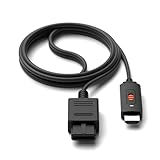
- ※Convert N64 Video signal to HDMI signal, make it easy to connect the Game console to TV.
- ※Plug and play with HDMI adapter,no screen lag.No additional power supply required.
- ※N64 HDMI Adapter Support 16:9/ 4:3 Switchover.
- ※N64 to HDMI Adapter Provide advanced signal processing with great precision, colors, resolutions and details.
- ※Note: N64/ Game Cube/SNES to HDMI converter,Support 16:9 Convert on HDTV.
Product prices and availability are accurate as of the date/time indicated and are subject to change. Any price and availability information displayed on Amazon at the time of purchase will apply.




