Windows Errors? Fix Them Before They Spread
Repair common Windows errors and clear accumulated junk for a smoother, more stable PC - no reinstall needed.Free scan · no reinstallOutdated Drivers Are Slowing You Down
One free scan finds every outdated or missing driver and matches the right update for your exact hardware.Free scan · exact hardware matchTo make a Samsung Galaxy louder, raise the volume category for the sound you’re playing, check whether a headphone or Bluetooth volume limit is active, and make sure audio is going to the intended output. If the built-in speaker is already at its maximum and unobstructed, settings cannot guarantee more hardware loudness; use an external speaker if you need sound to carry farther.
Raise the volume for the sound you want
Galaxy phones keep media, ringtone, notifications, and system sounds on separate sliders. Start playing the sound that seems too quiet, then press a volume button. Open the expanded volume controls or go to Settings > Sounds and vibration > Volume and raise the slider that matches what you’re hearing. Menu names and available controls vary by model and software version. Samsung’s sound and volume guidance describes these separate categories.
As an Amazon Associate I earn from qualifying purchases.
- Music, video, or game: Media
- Incoming call ring: Ringtone
- Message and app alerts: Notifications
- Interface noises: System sounds
If the sound is quiet only in one app, check its in-app volume as well as the Galaxy media slider.
Check the media volume limit for headphones or Bluetooth
If you see “Volume limit reached,” or connected listening stays capped, look for Settings > Sounds and vibration > Volume > More options > Media volume limit. Samsung says this limit applies when using headphones or Bluetooth speakers and is intended to protect hearing. Depending on the device, you may be able to adjust the custom limit or turn the feature off. Samsung’s instructions for setting the maximum volume limit give this path for supported devices; your labels or options may differ.
#1 Best Overall
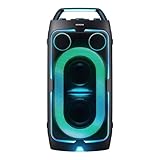
- POWERFUL PARTY SOUND: From the first drop to the final track,this powerful speaker hits hard. Dual 6.5-inch woofers deliver deep,thumping bass paired with dual 1 inch tweeters that provide crisp, clear high notes. Perfect for outdoor parties, backyard BBQs, tailgates, picnics, and more.
- PARTY LIGHTS+: Bring the vibe with five customizable modes and six lighting patterns that let your speaker shine. Match the mood settings and lighting to the beat or the atmosphere through the Samsung Sound Tower app.*
- UP TO 18 HOURS OF PLAYTIME: Let the beat blast for up to 18 hours* with the built-in battery -perfect for late-night gatherings or on-the-go adventures. When the battery runs low, just plug in your Sound Tower to keep the music going without missing a beat.
- BUILT TO ROLL WITH YOU: Take the party wherever you go with built-in wheels and an adjustable telescopic handle that extends up to five different levels. Whether you're at a tailgate or cozy movie night, effortlessly bring the party with you.
- UNLEASH YOUR INNER ROCKSTAR: Turn your party into a jam session. Plug in two mics* —or a mic and a guitar —and get ready to sing, play and perform with friends. With the Sound Tower App, unlock special DJ effects so your playlist hits harder than ever.
Samsung also notes that headphone volume can drop when headphones connect as a safety measure. After connecting, raise the volume only to a comfortable level: prolonged listening at high volume can damage hearing. Samsung’s guidance on acoustic shock and hearing safety explains the precaution.
Make sure audio is playing through the right device
If audio comes from an unexpected device, check the phone’s Bluetooth connection and audio output. Also review Settings > Sounds and vibration > Separate app sound, if available. This feature can send media from a chosen app to a Bluetooth device while other audio continues through the phone’s main output. It changes where sound plays; it does not amplify the Galaxy’s built-in speaker. Bluetooth choices may appear only while a device is connected. Samsung’s Separate app sound instructions explain the routing feature.
Rank #2

- 25 Watts
- 3" Ceramic driver
- Freq. Response 150Hz - 17kHz
- 24VDC phantom power; 18VDC power supply
- Stand/wall mount included
Supported Galaxy models may also offer sound-profile settings such as Dolby Atmos under Settings > Sounds and vibration > Sound quality and effects. These can change how audio is perceived, but they are not a guaranteed way to increase maximum loudness. See Samsung’s sound quality and effects guidance for options and availability.
The Tool Desk
Outbyte Driver Updater FREEScan for outdated or missing drivers - takes under a minuteDriver Scan →Outbyte PC Repair FREERepair Windows errors before they cause bigger problemsFix Now →Troubleshoot weak or missing speaker sound
If the built-in speaker is unexpectedly quiet or silent, work through these checks:
Rank #3

- Compatibility: The loud speaker only for Samsung Galaxy S23 Ultra 5G SM-S918U, SM-S918U1, SM-S918B , SM-S918W replacement.(Not For Samsung Galaxy S23 ) Please make sure your phone model before purchase.This product only for Galaxy S23 Ultra loudspeaker replacement, not include other phone accessories. Please transfer them from old screen
- Application: When your S23 Ultra loud speaker no sounds when played music or calling, voice to small or phone have noice, etc. Our loudspeaker for Samsung S23 Ultra 5G replacement could help you to solve that problem
- Quality Guarantee: All for Samsung Galaxy S23 Ultra loudspeaker have passed strictly QC double tested before shipment and comes with good packing to make the parcel in good condition. Durable and stable, restore to the new phone voicing quality
- Easy to Install: Necessary professional repair tools for Samsung Galaxy S23 Ultra loud speaker are included. Professional repair tools make it easier to replace S23 Ultra loud speaker replacement part of Instruction manual are not included. There are many guides are available on YouTube for your reference. Just search for Samsung S23 Ultra loudspeaker replacement and follow the video to replace. You can install it successfully
- Suggestion Tips: Please take care to install the loud speaker and keep all the accessories well. If you have any problem about the loudspeaker for Samsung Galaxy S23 Ultra , please leave a message
- Confirm the relevant volume slider is raised and that Do not disturb is not silencing calls or notifications.
- If all sound seems muted, check Settings > Accessibility > Hearing enhancements > Mute all sounds, if that option is present.
- Disconnect headphones and other audio accessories. Temporarily switch Bluetooth off to see whether sound returns to the phone.
- Check that the speaker openings are not covered by a case, debris, or dirt. Avoid inserting objects that could damage them.
- Restart the phone, then test the same sound again.
Samsung identifies settings, connected devices, blockage or physical damage, and temporary system errors as possible causes of speaker problems. If sound remains weak after these checks, consult Samsung’s speaker troubleshooting guidance.
Independent reader supportYour contribution helps us test, update, and keep practical guides available for everyone.When to use an external speaker
If the phone’s own speaker is unobstructed and already at its usable maximum, a portable Bluetooth speaker is an option for listening across a room or with a group. Pair it through Bluetooth and select it as the output. That gives you a separate speaker; it does not make the phone’s built-in speaker louder. Samsung documents Bluetooth audio and app-specific routing, but does not quantify a loudness gain or compare speaker models.
Quick Recap
Rank #4

- Contents: 1pcs Loud speaker
- Compatibility: The Loud Speaker Replacement is designed for Galaxy A16 5G SM-A166 and A16 4G SM-A165 (NOT for S23 Plus/ S23 Ultra) . Please check the Model Number of your device before purchasing this Item. Check your phone model in the settings: Settings -About Phone - Model name/Model number.
- this is Loud speaker not Ear Speaker
- installation instruction is not included
Product prices and availability are accurate as of the date/time indicated and are subject to change. Any price and availability information displayed on Amazon at the time of purchase will apply.
Quick wins for a faster PC:
Clear out junk files and repair common Windows errorsFree Scan →Scan for outdated or missing drivers - takes under a minuteDriver Scan →



