Crashes, No Sound, or Screen Glitches?
Random freezes, missing sound and display glitches usually trace back to one bad driver. Find and replace yours safely.Free scan · under a minutePC Slower Than It Used to Be?
A free scan shows the junk files, broken settings and background clutter dragging Windows down - then fixes them in one click.Free scan · Windows 10 & 11Claude can become a useful productivity hub when you connect it to the places where your work already lives—such as files, calendars, messages, notes, and task boards. The key is to treat each connection as a way to bring specific context into a task, not as a guarantee that Claude can read or change everything in every service.
Start with the information you need Claude to find
List the places you rely on for work: a document store, calendar, chat app, knowledge base, issue tracker, or task board. Choose one source that would remove the most friction from a recurring task, then look for it in Claude’s connector directory. The directory’s productivity-filtered listings include Google Drive, Google Calendar, Microsoft 365, Notion, Slack, Asana, Linear, monday.com, Atlassian MCP, and Zapier. Its catalog changes over time; the directory showed 379 connectors when accessed in 2026, a total for the catalog rather than for productivity tools alone.
As an Amazon Associate I earn from qualifying purchases.
After connecting a service, ask a question that identifies both the source and the job you want done. Anthropic recommends naming the connected tool—for example, asking Claude to search Google Drive for a particular document—rather than leaving the source implicit. A more involved Anthropic example combines Linear sprint tickets and Notion to draft release notes; it is an example of a possible workflow, not a guarantee of a particular result.
Understand what a connector can—and cannot—do
A connector may let Claude retrieve information from an external service and use it as context. Depending on that connector, authentication, and granted permissions, it may also support actions such as creating an Asana task. Read access and write access are different capabilities: do not assume that connecting a service enables every action, or that every connector can create or update records. Anthropic explains the distinction in its guidance on using Claude with tools.
#1 Best Overall

- AI CODING USAGE AT A GLANCE Dedicated WiFi desk display for Claude Code users showing your 5 hour session usage and weekly usage as clean color gauges.
- RUNS ON ITS OWN OVER WIFI No laptop app, no browser tab, and no background daemon needed. Once connected, codeMeter updates automatically from your own Claude account.
- FAST GUIDED SETUP Ships pre flashed and ready to configure. Plug in, join the setup WiFi, enter your home WiFi, paste your Claude Code token, and start tracking.
- COLOR LIMIT WARNINGS Easy visual cues shift from green to amber to red as you approach usage limits, with reset countdowns to help you plan your work.
- MULTIPLE VARIATION OPTIONS Choose from available finish and power options, including USB powered and battery equipped versions depending on the selected model.
For consequential changes, make the requested action explicit and review what Claude proposes or does in the connected service. The permissions granted during setup determine what access is available; Anthropic says custom connector setup typically includes OAuth authentication and permission granting.
Choose connectors by the job you want to streamline
There is no single stack that suits everyone. Pick the service where the relevant information or work already lives, then add another only when a workflow genuinely needs it.
Rank #2

- AI CODING USAGE AT A GLANCE Dedicated WiFi desk display for Claude Code users showing your 5 hour session usage and weekly usage as clean color gauges.
- RUNS ON ITS OWN OVER WIFI No laptop app, no browser tab, and no background daemon needed. Once connected, codeMeter updates automatically from your own Claude account.
- FAST GUIDED SETUP Ships pre flashed and ready to configure. Plug in, join the setup WiFi, enter your home WiFi, paste your Claude Code token, and start tracking.
- COLOR LIMIT WARNINGS Easy visual cues shift from green to amber to red as you approach usage limits, with reset countdowns to help you plan your work.
- MULTIPLE VARIATION OPTIONS Choose from available finish and power options, including USB powered and battery equipped versions depending on the selected model.
| Work context | Example connector | Useful starting point |
|---|---|---|
| Files and documents | Google Drive | Ask Claude to locate or summarize a named file or set of documents. |
| Scheduling | Google Calendar | Bring calendar context into a question about a meeting or schedule. |
| Workspace knowledge | Notion | Search workspace material or, where supported and permitted, update it. |
| Team communication | Slack | Find relevant messages or use supported messaging and canvas actions. |
| Tasks and projects | Asana or Linear | Use task or project context; Asana’s directory description includes coordinating tasks, projects, and goals. |
| Work across multiple apps | Zapier | Consider an automation layer when the workflow needs to connect services; its directory description says it can automate workflows across thousands of apps via conversation. |
These are examples listed in Anthropic’s connector directory, not independent product evaluations. Check the current listing for each service’s available features before building a workflow around a particular read or write action.
Do these 3 things before closing this tab:
1Clear out junk files and repair common Windows errors2Scan for outdated or missing drivers - takes under a minute3Repair Windows errors before they cause bigger problemsUse an interactive connector when seeing the work helps
Some connectors can display an interactive app—such as a task board or dashboard—inside a Claude conversation, rather than returning only a text response. Anthropic’s Help Center article “Use interactive connectors in Claude,” dated August 11, 2026, says interactive connectors are available on Claude, Cowork, Claude Desktop, and Claude for iOS and Android. The feature is connector-specific; a directory listing alone does not mean that a service renders an interactive interface.
Rank #3
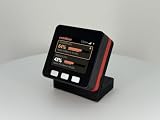
- AI CODING USAGE AT A GLANCE Dedicated WiFi desk display for Claude Code users showing your 5 hour session usage and weekly usage as clean color gauges.
- RUNS ON ITS OWN OVER WIFI No laptop app, no browser tab, and no background daemon needed. Once connected, codeMeter updates automatically from your own Claude account.
- FAST GUIDED SETUP Ships pre flashed and ready to configure. Plug in, join the setup WiFi, enter your home WiFi, paste your Claude Code token, and start tracking.
- COLOR LIMIT WARNINGS Easy visual cues shift from green to amber to red as you approach usage limits, with reset countdowns to help you plan your work.
- MULTIPLE VARIATION OPTIONS Choose from available finish and power options, including USB powered and battery equipped versions depending on the selected model.
Check the connection type and Claude surface
Remote connectors link Claude to cloud services. Local MCP connections have different support: Anthropic’s connector surface guidance says local MCP references work in Cowork and Claude Code, not in chat. If a connector is missing or behaves differently than expected, verify that you are using a supported Claude surface and connection type before troubleshooting the service itself.
Build one repeatable workflow at a time
- Pick a recurring bottleneck. For example, finding project decisions, preparing for a meeting, or turning meeting notes into follow-up tasks.
- Connect the source that contains the needed context. Use the connector directory and complete the service’s authentication and permission steps.
- Give Claude a specific request. Name the service, relevant project or time period, and desired output. For instance, ask it to find the latest project decisions in a connected source and organize them for a meeting brief.
- Decide whether the workflow needs an action. If you want a task created or a record updated, state that clearly and confirm the connector supports the operation.
- Review the result in its destination. Check source context and any changes made before relying on the output.
Anthropic gives another example: turning meeting notes into Asana tasks. Treat it as a suggested use case, not evidence that every notes source or Asana setup supports the same operation.
Quick Recap
Product prices and availability are accurate as of the date/time indicated and are subject to change. Any price and availability information displayed on Amazon at the time of purchase will apply.




