The Tool Desk
Outbyte Driver Updater FREEScan for outdated or missing drivers - takes under a minuteDriver Scan →Outbyte PC Repair FREERepair Windows errors before they cause bigger problemsFix Now →To turn down bass on a Bose soundbar, first identify its model: the controls differ. The Bose Soundbar System Bundle uses the Bose Music app, the Bose TV Speaker uses its remote, and the SoundTouch 300 has its own app or remote controls. Which Bose soundbar model do you have? Check its label or the Bose app before following a button sequence.
Lower bass on the Bose Soundbar System Bundle
-
Open the Bose Music app and select your soundbar from the My Bose screen.
As an Amazon Associate I earn from qualifying purchases.
-
Tap the soundbar image in the bottom-right corner of the screen.
Special offer. See more information about Outbyte and uninstall instructions. Please review EULA and Privacy policy. -
Tap Adjustments and lower the bass setting.
These are the steps in the System Bundle owner’s guide; menu names and controls may differ on other soundbar models. Bose Soundbar System Bundle owner’s guide
#1 Best Overall

- HEAR YOUR TV BETTER: Designed with simplicity in mind, the Bose TV Speaker is an all-in-one soundbar that clarifies speech and is a simple fix for better TV sound
- WIDE, NATURAL SOUND: 2 angled full-range drivers deliver a more realistic, spatial audio experience for overall better TV sound from a small soundbar
- ENHANCED DIALOGUE: This sound bar for smart tv is designed to specifically focus on clarifying and elevating vocals and pronunciation
- BLUETOOTH TV SPEAKER: Pair your device to this Bluetooth soundbar to wirelessly stream your favorite music and podcasts. Connect up to 3 devices through the inputs (HDMI, Optical in, and AUX in); the first powered on device will automatically connect
- SIMPLE SETUP: A single connection from this compact soundbar to the TV via an optical audio cable (included) or an HDMI cable (sold separately) has you up and running in minutes
Lower bass on the Bose TV Speaker
-
On the remote, press Bass.
-
Press − to decrease the bass.
-
Press Bass again to save the setting.
The Bluetooth light blinks white three times to provide feedback during the adjustment and save process. Bose TV Speaker tone-control instructions
Lower bass on the SoundTouch 300
The SoundTouch 300 supports bass adjustment through the SoundTouch app or its remote. Its documented scale runs from −4 to +4, with 0 as the default. Choose a lower setting and use the save control shown in the official guide.
Rank #2

- YOUR FAVORITE CONTENT NEVER FELT THIS DEEP: Bose Smart Ultra Soundbar with Dolby Atmos and Voice Control is a top-of-the-line bluetooth speaker, surround sound system for TV, and so much more
- DOLBY ATMOS SOUNDBAR: This sound bar for smart tv features Dolby Atmos and Bose TrueSpace technology which separates sounds and places them in different parts of a room for an immersive spatial audio experience
- ULTRA-CRISP DIALOGUE CLARITY: A.I. Dialogue Mode balances voice and surround sound for ultra-crisp vocal clarity, so you never miss what your favorite characters say again with this surround sound speaker
- SURROUND SOUND SYSTEM: With six transducers, including two custom-engineered upward firing dipole speakers, it will feel like your space is filled with sound from every direction, even overhead
- AMAZON ALEXA VOICE CONTROL: Control your entertainment, daily tasks and access information using your voice with Amazon Alexa
The guide’s remote-button icons are not clear in its text, so use the guide’s illustration rather than guessing which buttons to press. It also explains how to restore the original bass setting. SoundTouch 300 owner’s guide
What’s actually slowing this PC down?
Pick the symptom - the matching free tool is one click away.
If you cannot find a bass control in the app
Bose lists the Bose app as compatible with products including the Smart Soundbar, Smart Soundbar 300, 600, 700 and 900, Smart Ultra Soundbar, and Soundbar 500. That compatibility listing does not confirm that every model has the same bass control or menu path. Check the instructions for your exact model rather than applying another model’s steps. Bose app compatibility information
Rank #3

- TOTAL IMMERSION, FOR EVERYTHING YOU PLAY: The Bose Dolby Atmos Soundbar features shockingly immersive sound for its size and utilizes proprietary TrueSpace technology so you can feel everything you watch like you're in the theater
- ONLY TRUESPACE ELEVATES IT ALL: Bose TrueSpace technology intelligently analyzes signals other than Dolby Atmos, like stereo or 5.1, and upmixes them to create an immersive multi-channel sound experience
- BIG-TIME TECH FOR A SMALL SOUNDBAR: This compact soundbar speaker features an acoustic architecture that fits five transducers into its small frame, including two that fire upward, for spacious, realistic sound
- ULTRA-CRISP DIALOGUE CLARITY: Never miss out on what your favorite characters are saying, this sound bar for smart tv uses A.I. Dialogue Mode to balance voices and surround sound for ultra-crisp vocal clarity
- STREAMING, ANY WAY YOU WANT: Stream songs and video via Bluetooth, Apple AirPlay 2, Spotify Connect, or Chromecast built-in, if you can get it on your phone, you can hear it through your Bluetooth soundbar
Reduce bass from a Bose Bass Module 500
If the low-frequency sound is coming from a Bass Module 500, Bose recommends pulling it away from walls and corners for less bass. This changes the module’s placement; it is separate from adjusting the soundbar’s electronic bass setting. Bose Bass Module 500 placement and compatibility
Independent reader supportYour contribution helps us test, update, and keep practical guides available for everyone.If the remote is missing or does not work
Use the app if your model supports the adjustment there. Bose lists a replacement remote on the Smart Soundbar 900 support page, but that listing does not establish compatibility with every Bose soundbar. Confirm the remote is specifically compatible with your model before ordering. Bose Smart Soundbar 900 support and accessories
Quick Recap
Best Value
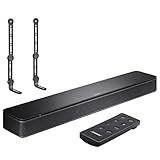
- COMPLETE SOUNDBAR BUNDLE: Includes the Bose TV Speaker, remote control, power cable, optical audio cable and a pair of universal adjustable soundbar mount brackets.
- CLEARER TV DIALOGUE: The compact soundbar is designed to clarify vocals and pronunciation, while the dedicated dialogue mode further enhances speech during movies, shows, sports and news.
- WIDE, SPACIOUS AUDIO: Two angled full-range drivers help deliver natural, room-filling sound from a low-profile speaker that fits neatly beneath compatible televisions.
- VOICE-ENHANCING SOUND: Bose TV Speaker features dedicated dialogue enhancement technology to help make voices clearer during movies, shows, sports, and news broadcasts.
- FLEXIBLE ADJUSTABLE BRACKETS: Multi-angle articulating mount arms allow positioning adjustments for improved compatibility with different TV mount layouts and soundbar placements.
Rank #4

- STUNNING AUDIO QUALITY: Everything sounds better with Dolby Atmos and TrueSpatial tech creating dynamic, multichannel sound that feels expansive. Meanwhile, Bose PhaseGuide speakers project and reflect sound to fill your room with spacious audio.
- CLEANBASS TECHNOLOGY: CleanBass Technology gives deeper, more powerful bass that stays crisp at any volume.
- ATTUNE TO ANY ROOM: CustomTune Technology automatically adjusts the sound to your space and position for consistently balanced, optimized performance.
- SETUP MADE SIMPLE: Just plug it in and use the Bose app for easy setup. Configuration is quick, intuitive, and ready in minutes.
- EASY CONTROL: Enjoy complete control by touch, app, or voice commands. Making it easy to play, pause, and personalize your surround sound from anywhere in the home.
Product prices and availability are accurate as of the date/time indicated and are subject to change. Any price and availability information displayed on Amazon at the time of purchase will apply.




