To use an Android phone as a webcam in Windows 11, link it to your PC, then go to Settings > Bluetooth & devices > Mobile devices and turn on Use as connected camera. Select the phone in the camera settings of the Windows app you want to use. The documented requirements are a Windows 11-or-later PC, Android 10 or later, and Link to Windows version 1.24022.0 or later. Microsoft’s camera setup instructions cover this feature.
Check that your phone and PC meet the requirements
Microsoft’s instructions for using a phone camera on a PC specify an Android device and these minimum requirements:
As an Amazon Associate I earn from qualifying purchases.
- A PC running Windows 11 or later.
- An Android phone running Android 10 or later.
- Link to Windows app version 1.24022.0 or later on the phone.
These are the requirements for the connected-camera feature, not a complete list of compatible phone models. Microsoft’s separate supported-device information covers particular Phone Link experiences and does not establish which models support webcam use. Availability can vary by device, market, and software.
The Tool Desk
Outbyte PC Repair FREEClear out junk files and repair common Windows errorsFree Scan →Outbyte Driver Updater FREEScan for outdated or missing drivers - takes under a minuteDriver Scan →Link the phone and enable its camera
- Link the phone if needed. On the PC, open Settings > Bluetooth & devices > Mobile devices and select Add device. Follow the prompts to link the Android phone.
- Open the linked device’s settings. In Settings > Bluetooth & devices > Mobile devices, find and select your phone.
- Turn on the camera option. Enable Use as connected camera.
- Select the phone in your app. Open the Windows Camera app or another app that uses a camera, then choose the phone in that app’s camera selector or settings. Enabling the Windows setting makes the phone available as a camera; the app still needs to use it.
- Allow camera access on the phone if prompted. Grant Link to Windows permission to use the camera.
Fix common connection and video problems
The phone does not appear in Mobile devices
Check that the phone is linked to the PC. If it is not, use Settings > Bluetooth & devices > Mobile devices > Add device to start linking. For general Android Phone Link setup, Microsoft describes opening Phone Link on the PC, signing in with the same Microsoft account on the PC and phone, scanning the QR code in Link to Windows, and following the permission prompts. See Microsoft’s Phone Link requirements and setup guide.
#1 Best Overall
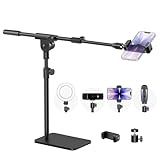
- Built with a robust 3.62 lb metal base (total stand weight: 5.07 lbs), this webcam stand eliminates the off-balance issues common with lightweight extendable arms. Its heavy-duty construction lowers the center of gravity, while the non-slip base absorbs vibration and prevents scratches—keeping your equipment rock-solid during use.
- Universal Compatibility: Equipped with a standard 1/4-inch universal thread, this overhead phone stand is compatible with a vast array of devices, including smartphones, Logitech webcams, LED lights, and even pico projectors. This webcam mount serves as an all-in-one mounting solution for content creators, streamers, and professionals who use multiple devices.
- Precision Angling: Featuring a fully adjustable universal ball head, the flexible phone holder allows for 180-degree rotation and multiple angle adjustments, helping you capture the perfect shot from any perspective. Whether shooting overhead videos or participating in video conferences, you can achieve the ideal viewing angle with ease.
- Versatile Application: From teachers and artists to chefs and streamers, this overhead phone stand works for live streaming, tutorials, baking, crafting, online classes, and video calls. This overhead phone stand is compatible with iPhone 16, Samsung Galaxy, Google Pixel, and more—with a 2.5–5.5" padded clamp that prevents scratches and holds your phone firmly, hands-free.
- Tool-Free Setup: Choose between two installations—use the boom arm for maximum flexibility, or remove it for a simple, compact setup. The detachable, tool-free design assembles in minutes without complex hardware, making the overhead camera mount portable and intuitive.
The phone is linked, but the app shows another camera
Open the camera selector or camera settings in the app you are using and choose the phone. Microsoft advises selecting the camera in the application itself.
The video is blank or permission is missing
If no permission prompt appeared, open the phone’s Settings app, find Link to Windows in the app list, and check that camera permission is enabled. If video remains a black placeholder, look for a taskbar window with a camera icon. Microsoft says this window identifies the phone and guides the next steps; if the stream does not resume after permission is granted, use its refresh button.
Rank #2

- 360° Rotation for Camera Framing: The 360° rotating head helps adjust phone angle and camera framing on a stable desktop monitor without moving the monitor. For monitor use, the phone remains in landscape orientation. For Apple Continuity Camera, the rear camera remains the webcam source and the phone screen faces away. The magnetic surface is fixed on one side only.
- Designed for Desktop Monitors, Not Notebook Screens: This 360° rotating phone webcam holder is designed for stable desktop monitors with flat top edges, including iMac, Studio Display, and other desktop monitor setups. It rests on the monitor top edge and is not a spring-loaded clamp. Thick, curved, uneven, very narrow edges, narrow bezels, or side mounting may affect fit. 【Important Note: Not designed for direct mounting on notebook screens or side edges.】
- Open-Cut Aluminum Body with Silicone Pads: The open-cut aluminum alloy body keeps a clean metal look with steady support. Silicone contact surfaces help reduce marks on your phone and monitor, while firm adjustable joints help hold the selected camera angle during monitor-mounted webcam use. For larger phones, center the phone over the mount for better balance.
- Magnetic Hold with Accessory Kit: Magnetic attachment for MagSafe-compatible phones and cases. For other phones or cases, apply the metal ring only to a clean, smooth, flat, hard surface. 【Important Note: Uneven, soft, rubberized, textured, leather, fabric, wallet, ring holder, or pop-out stand cases may reduce grip or adhesion.】 To remove, support the holder and peel from one edge. Includes 1 rotating mount, 2 metal rings, 2 cleaning cloths, 2 positioning guides, and 1 user manual.
- Foldable Design with 1/4-Inch Tripod Thread: The compact foldable design is easy to store, carry, or pack for office, home, and travel. The built-in 1/4-inch thread connects to compatible tripods and camera stands with a standard 1/4-inch screw. Tripod-mounted use is landscape only. When placed directly on a flat desk, the holder supports landscape or portrait use for calls, streaming, recording, or demos. Physical holder only, not a charger.
The image orientation looks wrong
Microsoft notes that the display changes between portrait and landscape as you rotate the phone. Check that rotation lock is off on the phone.
Do these 3 things before closing this tab:
1Scan for outdated or missing drivers - takes under a minute2Clear out junk files and repair common Windows errors3Fix the driver behind crashes, sound loss and screen glitchesQuick Recap
Best Value

- Stouchi continuity camera mount is made of light and hard aluminum alloy. Compatible with iMac and most external displays/monitors (iMac/desktop from 2017 and above with OS Ventura installed), Apple TV 4K/most TVs (the latest version of tvOS).
- Works with iPhone 17, iPhone 16, iPhone 15, iPhone 14, iPhone 13 & 12 models. Please remove your phone case before using (excluding Mag-Safe compatible cases).
- You can easily mount your Mag-Safe-compatible iPhone securely to your Mac desktop or display with this durable mount for FaceTime, capturing content, video conferencing and more. The magnetic attachment allows for easy, seamless, hands-free camera streaming. Easily adjust viewing angles from vertical to 30 degrees downward.
- Compatible with 1/4" tripod screw.
- There is a 2-year Warranty on Stouchi iPhone Continuity camera mount.
Rank #4

- 2024 Upgraded: This cell phone tripod is upgraded in 2024 with stronger material for peerless durability, the defect rate is down more than 80% from this year. And your purchase is guaranteed by UBeesize lifetime service.
- Get The Perfect Angle - Adjustable OCTOPUS style legs help to capture clean shots from any angle even in the move. Want a view difficult to get with common tripod. This is your best choice.
- Stable On Any Surface - Made of very strong durable foam and plastic, the ball head and no-slip feet make positioning and straightening devices easy
- Universal Compatibility - Works well with smartphones, digital cameras, GoPro and webcams up to 3.7 inches wide
- Control it from distance - The wireless remote serves a wireless range up to 30 ft. Ideal for taking individual, group photos & wide angle views.
Rank #3

- Magic Arm with Super Clamp: This aluminum alloy low profile camera mount fits DSLRs, action cams, webcams, microphones (mics), and phones up to 500 g/17.6 oz; for Zoom calls, overhead photography, gaming, streaming, video recording, and podcasts
- Articulating Arm with Ball Heads: The friction boom arm offers a 55 cm/22" extended length and 3 sets of 360° dual ball head adapters for angle and height flexibility; each ball head has multiple padded rings for firm grip and drop prevention
- For Flat & Round: Mount flat surfaces up to 2"/50 mm thick or cylindrical objects up to 1.6"/40 mm in diameter; compatible with SmallRig magic arm DJI Ronin M MX Freefly Movi 25/30 mm camera stabilizer rod, desk, tripod, light stand, shoulder rig, pole
- Anti Twist & Stable Grip: The overhead camera and phone mount has an anti twist pin at each mounting interface to firmly connect the mounted device; the super clamp also has nonslip pads to protect your device from scratches and unwanted wobbling
- For Phone & Camera: Mount action cam and mount adapter accessory compatible with DJI Osmo 360 Pocket 4P 4 3 Xtra Muse Action 6 5 Pro Insta360 X5 X4 Go 3S GoPro Hero 13 12 11; holder compatible with iPhone 18 Pro 18 Pro Max 17 16 15 Samsung S26 S25 Ultra
Product prices and availability are accurate as of the date/time indicated and are subject to change. Any price and availability information displayed on Amazon at the time of purchase will apply.
Independent reader supportYour contribution helps us test, update, and keep practical guides available for everyone.



