The Tool Desk
Outbyte PC Repair FREEClear out junk files and repair common Windows errorsFree Scan →Outbyte Driver Updater FREEFix the driver behind crashes, sound loss and screen glitchesFind Drivers →If you keep a passport photo or another sensitive record in Google Photos, you have options: use Google Photos’ Locked Folder, or make a PDF with a browser tool whose documentation says the specific operation is performed on your device. These choices solve different problems. Local PDF processing can keep a file from being uploaded for that operation, but it does not decide where the finished file is stored or whether that location syncs to the cloud.
What Google Photos’ Locked Folder does
Google Photos lets you move sensitive photos and videos into Locked Folder, which is protected by your device’s screen lock. Google’s example includes a photo of a passport. See Google Photos Help’s Locked Folder instructions for current steps and platform-specific details.
As an Amazon Associate I earn from qualifying purchases.
Locked Folder behavior depends on its backup setting. Google describes cloud backup as an option for accessing Locked Folder items across devices; without backup, items remain on the device and may not be available if it is lost, damaged, or reset. Google explains the cross-device option in its announcement about Locked Folder cloud backup. Check the current setting and help page before moving a record, especially if you need it available on another device.
Free tools Windows power users keep installed
One-click scans. No signup required.
Google’s own privacy statements are relevant context, but they should be read precisely. Google Photos Help says: “We don’t sell your personal information to anyone or use the content you store in Photos for ads purposes.” Google also describes encryption in transit on its Photos Safety & Privacy Features page. Those statements describe Google’s stated practices; they do not establish that stored content is end-to-end encrypted or that Google cannot access a backed-up item.
#1 Best Overall

- Ultimate Fireproof & Water-Resistant Protection: Keep your valuables safe with our DocSafe Hard-Shell fireproof file organizer. It is made of thickened silicone coated fireproof heat insulated cotton material and hard-shell material which can stands up against fire and passed the UL94 -V0/5VA flame retardant test. Fireproof box is both fireproof and water-resistant, ensuring your documents stay protected during fires, floods, or wet weather. It may fit both letter and legal-size files
- Upgraded Hard-Shell Design Fireproof Box: Our fireproof document box combines hard-shell construction with fireproof materials, offering unmatched protection and durability. Unlike traditional soft case, our design withstands extreme conditions while maintaining a sleek, professional look. The Non-dusty material actively repels dust,hair and stains, keeping your box clean and tidy for years. It’s the ultimate solution for safeguarding your important documents, laptop, and valuables
- Large-capacity: Outside size: 15.5" x 11.5" x 3"(Thickness can be expanded up to 4"). Our Accordion fireproof document box adopts a multi-layer design that can meet all your storage needs. These include 13 accordion Pockets with labels,1 zipper pocket,4 pen slot,14 card slots,4 passport holder,4 small mesh bags,2 mesh bags,and 1 main pocket. It can store your important documents,money,passport,U Disk,cards,laptop,certificates in a safe and orderly way. Perfect for daily file filing and storage
- Fireproof File Organizer with Lock: Protect your valuables with the built-in high-quality combination lock (No keys required). Featuring a double metal zipper for convenient opening and closing. Design with a strong handle for carrying everything you needed easily. The fireproof file folder is suitable for business, travel, office, school, home storage, you can be 100% sure that your important documents are in a safe place. Of course, giving it as a gift to your family is also a good choice
- Trusted after sales service: Nothing is completely foolproof, but added protection is always a good idea. In an emergency, our fireproof document organizer ensures your files stay intact, giving you time to save your important documents. It is lighter, easier to carry than fireproof safes and quick to grab and go. If there any quality problem, please feel free to let us know. We are committed to solving your problem immediately, your suggestion has a great impact on the upgrade of our products
When a browser-based PDF workflow may help
A PDF workflow can be useful if you want to combine, view, edit, or OCR a document image without sending the document to a service for processing. But “browser-based” does not by itself mean “processed locally.” A web app might upload the file to its servers even though you use it in a browser.
UnboundPDF says its files are processed in the browser using your device’s resources and that OCR for scanned images runs on-device. That is the vendor’s description, not an independent audit or a guarantee about other PDF websites. Review the privacy explanation for the exact feature you intend to use at UnboundPDF’s privacy page.
Rank #2

- 5200°F Fireproof & Water-resistant Safe: The upgraded important document organizer is made of thickened silicone-coated fireproof cotton material and aluminum foil (double safe protection). Its 8 fireproof layers can withstand temperatures up to approximately 5200°F. The aluminum foil lining does not easily melt at high temperatures. The main material has passed the 5VA flame retardant test. The bag is fireproof & water-resistant, which can protect your important files in a fire&wet weather
- Soft Box: Large-capacity(15"x11"x4.1"),Compared with other bags,our fireproof file organizer adopts a multi-layer design that can meet all your storage needs. These include 8 passport mesh bags,16 card slots, 4 U Disk pockets, 7 folder layers and one main pocket with a large space. It can store your important documents,files,money,passport,U Disk,cards,laptop,certificates in a safe and orderly way.Great way to organize your files easy for you to find whatever files you looking for quickly
- Combination Lock Protection: Compared with other bags,our 5200°F fireproof document organizer can lock files and items inside the bag for safety. High-quality password lock provides maximum security for your valuables such as contracts, cards, certificates, conference materials, passports, etc. More wider strap handle design on the back allows you to insert a suitcase handle. Fireproof bag for files is sealed with professional waterproof zippers that can withstand high speed spray of fire hose
- Innovative Humanized Design: Design with a strong handle for carrying everything you needed easily.Not only can you put it in your home, office, car,storage cabinet, you can also take it to camping, travel and various outdoor activities. Of course, giving it as a Christmas gift to your family, customers or employees is also a good choice.The newly designed fireproof bag is lighter,easier to carry than a fireproof safe, and easy to fold
- Trusted after sales service: The Upgraded Non-dusty material can prevent dust and pet hair from sticking to the outside of our bag,always keep it neat and tidy. In the event of an emergency, our fireproof file bags are lighter, easier to carry than fireproof safes and quick to grab and go. We only wish to present the best to customers,to protect your valuables. If there any quality problem, please feel free to let us know. We are committed to solving your problem immediately
Mozilla PDF.js is an open-source project for viewing and rendering PDFs in JavaScript. Its existence does not certify how an unrelated online PDF service handles files. The project is described at Mozilla PDF.js.
Choose a workflow by task and storage destination
| Workflow | Processing path | What it suits | Output and storage decision |
|---|---|---|---|
| Google Photos Locked Folder | Photo or video stays in Photos under the device screen lock; cloud backup is an optional setting. | Keeping a sensitive image separated from the main Photos view. | Check whether Locked Folder backup is enabled and whether that cloud behavior fits your needs. |
| Browser PDF tool that documents local processing | The vendor says the specific operation runs on-device in the browser; confirm this for the exact feature. | Viewing, editing, or OCR, if the selected tool supports that task. | Save the resulting PDF to a deliberate destination and check whether that location syncs. |
| Browser PDF service that uploads files | Document contents are sent to the service for processing. | Only if the service’s handling terms and your needs make uploading acceptable. | Read its retention, deletion, and output-storage terms before submitting a sensitive record. |
For a sensitive document, assess three things separately: the tool’s processing route, whether it supports the job you need, and where the finished file will live. “Runs in your browser” concerns document processing; it does not necessarily rule out page loading, analytics, or other network requests. No traffic inspection or independent audit is established for the named tool here.
Quick Recap
Rank #4

- Ultimate Fireproof & Water-Resistant Protection: Keep your valuables safe with our Hard-Shell fireproof document box. It is made of thickened silicone coated fireproof heat insulated cotton material and hard-shell material which can stands up against fire and passed the top-level UL94 -V0/5VA flame retardant test. Choose a fireproof water resistant box that stands the test of time,it is the ultimate solution for protecting important documents,valuables
- Upgraded Hard-Shell Design Fireproof Document Box: Our fireproof document box combines hard-shell construction with fireproof materials, offering unmatched protection and durability. Unlike traditional soft case, our design withstands extreme conditions while maintaining a sleek, professional look. The Non-dusty material actively repels dust,hair and stains, keeping your box clean and tidy for years. It’s great for protecting your important documents, laptop, and valuables
- Large-capacity: Outside size: 15.2" x 11.22" x 5.3".Internal size: 14.8" x 10.8" x 4.5". Our fireproof document box adopts a multi-layer design that can meet all your storage needs.These include 13 accordion colorful pockets with labels,1 zipper pocket,4 pen slot,14 card slots,4 passport holder,4 small mesh bags,4 mesh bags,and 1 main pocket. It can store your important documents,money,passport,U Disk,cards,laptop,certificates in a safe and orderly way. Perfect for daily file filing and storage
- Fireproof Box with Lock: Protect your valuables with the built-in high-quality combination lock (No keys required). Design with a strong handle&a detachable shoulder strap for carrying everything you needed easily. The fireproof box is suitable for business, travel, office, school, home storage, of course, giving it as a gift to your family is also a good choice. Fireproof box is both fireproof and water-resistant, ensuring your documents stay protected during fires, floods, or wet weather
- Trusted after sales service: Nothing is completely foolproof, but added protection is always a good idea. In an emergency, our fireproof document box ensures your files stay intact, giving you time to save your important documents. It is lighter, easier to carry than fireproof safes and quick to grab and go. If there any quality problem, please feel free to let us know. We are committed to solving your problem immediately, your suggestion has a great impact on the upgrade of our products
Rank #3
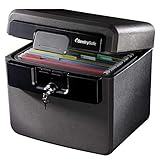
- FIRE AND FLOOD PROTECTION FOR ESSENTIAL PAPERS: UL Classified to withstand high temperatures for up to thirty minutes and ETL Verified to protect contents during water exposure, helping safeguard critical paperwork during common home emergencies
- DESIGNED FOR IMPORTANT DOCUMENT STORAGE: Spacious interior fits hanging file folders and is ideal for organizing passports, birth certificates, insurance records, and legal paperwork
- KEY LOCK SECURITY YOU CONTROL: Durable key lock helps prevent unauthorized access and keeps the lid securely closed during fire events. Two keys are included for backup access
- HOME FRIENDLY SIZE WITH PORTABLE DESIGN: Compact footprint fits easily in closets, offices, or under desks while remaining portable enough to relocate when needed
- BUILT FOR EVERYDAY PEACE OF MIND: Black exterior offers a clean, neutral look that blends into home or office spaces while providing dependable document protection year round
Make and keep a PDF without confusing processing with storage
- Decide what you need to do. If you only need a private copy of an existing photo, a PDF conversion may be unnecessary. If you need OCR, editing, or a combined document, confirm that the chosen tool supports that exact operation.
- Read the feature-specific privacy description. Look for an explicit statement that the document is processed locally and not uploaded for the operation. Do not infer this from the word “online,” “browser,” or “secure.”
- Process only what you intend to keep. Use the tool to create or edit the PDF, then check the result. If the source is a paper record, a document scanner is one optional way to create a digital image; it is not needed for files you already have digitally.
- Choose the destination deliberately. Save the PDF to a location you understand. A local-processing workflow does not prevent a later cloud sync if you save into a folder backed up by a cloud account.
- Plan access and retention. Keep the file somewhere you can retrieve when needed, and know how you will protect access and maintain a usable copy. A temporary browser session is not an archive or records-retention plan.
Which option fits your situation?
- You want a sensitive photo out of the main Photos view: consider Locked Folder, then decide whether its optional cloud backup is appropriate.
- You need searchable text or a document assembled from images: use a PDF tool only after checking that the specific OCR or editing feature is described as local if avoiding upload is important to you.
- You need access across devices: account for the destination’s sync behavior rather than assuming that local processing also means local-only storage.
- You have a paper original: scanning is an optional digitization step; choose a scanner only if that need applies, since no particular model or scan quality is established here.
Product prices and availability are accurate as of the date/time indicated and are subject to change. Any price and availability information displayed on Amazon at the time of purchase will apply.




