The driving journal you will keep is the one that takes less than a minute after you park. Record the date, where you went, why you went, and how far you drove; add odometer readings and business-use details when the trip may matter for taxes or reimbursement. Use paper or a digital file, but keep entries close to the drive, store them in one predictable place, and review them regularly instead of trying to rebuild a month of travel from memory.
Decide what your journal is for
A personal driving journal can be as simple as a running list of trips, distances, fuel stops, maintenance observations, or memorable routes. That is useful for understanding how you use a vehicle and for making future planning easier. It is not automatically a tax record, a legal driving-hours log, or proof that every trip was business-related.

As an Amazon Associate I earn from qualifying purchases.
Three record-keeping situations are often confused:
Free tools Windows power users keep installed
One-click scans. No signup required.
- Personal trip notes: A low-friction record for your own reference. You choose the fields and how long to keep it.
- Business-mileage records: Documentation that may support an employer reimbursement, business accounting, or a tax position. The required detail depends on the jurisdiction and circumstances. U.S. federal guidance from the Internal Revenue Service is more specific than a casual personal diary.
- Commercial-driver compliance records: Hours-of-service and duty-status records required in regulated commercial operations. These are governed by rules such as the Federal Motor Carrier Safety Administration’s electronic logging device (ELD) requirements, not by the needs of an ordinary private driver.
Start by choosing the narrowest purpose that meets your need. A personal journal should not become an elaborate compliance project, while a business log should not omit the information needed to connect a trip to its business purpose.
#1 Best Overall

- KEEP PERFECT RECORDS: Adams Vehicle Mileage and Expense Journals help you log business use of your car or truck with year start and year end odometer readings and flawless daily records
- GET THE BEST DEDUCTION: 588 entries capture the date, odometer readings, total miles and business purpose—everything you need to document business use for the IRS
- SUMMARIES MAKE TAX TIME EASY: Annual summary pages hold monthly mile totals to calculate percentage of business use; monthly maintenance totals help you deduct unreimbursed vehicle expenses
- INCLUDES 6 RECEIPT POCKETS: Don’t forget to save receipts; you get 2 double-sided pockets for oil changes and other service; 2 pockets for repairs, and 2 pockets for parking and tolls
- KEEP IT IN THE CAR: This portable 5-1/4 x 8-1/4 booklet was meant to travel with you; keep one in each glove compartment for a complete record of business use
The minimum entry that survives a busy day
For an ordinary driver, use one short line per trip or driving session:
- Date: Use an unambiguous format such as 2026-10-13.
- Start and destination, or route: “Home–client office–home” is more useful than “work.”
- Purpose: Errand, appointment, school run, personal visit, delivery, client meeting, or another plain-language reason.
- Distance: Record trip miles or kilometres, and note the unit.
- Optional note: Parking paid, unusual traffic, a warning light, weather, or another fact you may need later.
Write the entry immediately after parking, before opening another app or walking away from the vehicle. If several stops belong to one outing, either list each leg or record the complete route with a clear total. Do not rely on a map-history screen alone; it may show where a phone travelled without explaining why the trip occurred.
Fields to add when the record supports business use
For U.S. federal business-mileage records, IRS Publication 463 describes an adequate record as one that identifies the date of use, business mileage, business destination, and business purpose. It also calls for total mileage for the year. The sample daily log includes starting and ending odometer readings, miles for the trip, and expense type and amount.
PC Slower Than It Used to Be?
A free scan shows the junk files, broken settings and background clutter dragging Windows down - then fixes them in one click.Free scan · Windows 10 & 11Outdated Drivers Are Slowing You Down
One free scan finds every outdated or missing driver and matches the right update for your exact hardware.Free scan · exact hardware match| Field | Personal journal | Business-mileage record |
|---|---|---|
| Date | Recommended for every entry | Record the date of each business use |
| Origin and destination | Use a route or short description | Identify the business destination clearly |
| Purpose | Optional but helpful | State the business reason, not only “work” |
| Distance | Trip miles or kilometres | Business miles for the trip, with the unit |
| Odometer | Optional start and end readings | Useful supporting detail; the IRS sample worksheet includes both |
| Annual total | Optional summary | Keep total miles for the year, including personal miles where required for allocation |
| Expenses and receipts | Only when useful to you | Retain relevant receipts or documents and connect them to the trip record |
The table describes a practical way to organize the information; it does not turn a journal by itself into a guaranteed deduction. Tax treatment depends on the applicable rules and your facts.
A one-minute routine that is easier than reconstruction
1. Put the journal where the trip ends
Keep a small notebook in the console, or put a shortcut to your digital log on the first screen of your phone. A predictable location removes the decision of where to write. If more than one person drives the vehicle, decide who records shared trips and how the driver is identified.
2. Make the entry before leaving the parking space
Use a compact pattern such as “date | route | purpose | distance.” For example: “2026-10-13 | Home–Northside clinic–home | appointment | 18.4 mi.” Add a start and end odometer reading when you are tracking total vehicle use or business allocation.
3. Mark mixed-purpose trips honestly
If a trip combines business and personal stops, record the route and identify the business portion. Do not label the entire drive “business” merely because one stop was work-related. A note such as “client meeting, then grocery stop” creates a contemporaneous explanation that a bare mileage number cannot.
Rank #2
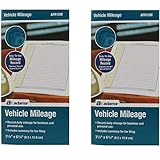
- Sold As 2 Journals
- Adams Vehicle Mileage 3 1/4 x 6 1/4
- Record daily mileage for business and personal use
- Includes summary for tax filing
4. Capture receipts while they are still identifiable
Photograph or file a parking, toll, fuel, or other relevant receipt according to your local requirements. Use a matching date, trip number, or file name so the document can be found beside the journal entry. Keep the receipt and the mileage record as complementary evidence rather than substitutes for one another.
5. Close the week with a short review
Check that every driving day has an entry, that units are consistent, and that totals add up. Correct an error transparently by striking through a paper mistake or preserving an edit history in a digital system; do not silently overwrite a material figure. The IRS says a weekly log accounting for the week’s use can be timely in its federal business-record context, but closer-to-the-drive entries are easier to recall accurately.
Paper or digital: choose the format you will maintain
IRS guidance recognizes an account book, diary, log, statement of expense, trip sheet, or similar record. It also says a computer-prepared record can qualify. The practical choice is the format that lets you make a complete entry promptly and later produce a readable, organized copy.
| Consideration | Paper notebook or logbook | Digital record |
|---|---|---|
| Entry after parking | Fast when the notebook stays in the vehicle | Fast when a phone shortcut or form is ready |
| Required fields | Use printed headings or draw a repeatable line format | Use fixed fields so date, destination, purpose, distance, and units are not forgotten |
| Review and correction | Easy to scan; corrections remain visible if made cleanly | Search and totals are convenient; preserve a reliable history for material edits |
| Retention and export | Store the original in a dry, secure place and make legible copies when needed | Back up the data and export a readable copy that can be retrieved later |
| Privacy and access | Physical access is limited, but a lost notebook exposes every entry | Convenient across devices, but cloud accounts, phone access, and sharing create additional privacy considerations |
A vehicle mileage logbook or small notebook is optional convenience, not a special form required by the IRS. A digital mileage tracker is worthwhile only if it lets you review, export, and preserve complete records. Automatic location capture can reduce typing, but you still need to add the purpose and classify business versus personal use.
What U.S. business-mileage guidance actually asks you to preserve
IRS Publication 463 says records should be made at or near the time of the expense or business use. Its reason is practical as well as evidentiary: A timely kept record has more value than a statement prepared later when there is generally a lack of accurate recall.
For transportation, the record should show the mileage for each business use, total miles for the year, the date, the business destination, and the business purpose. The publication’s Table 5-2 illustrates a daily business mileage and expense log with:
- date;
- destination;
- business purpose;
- beginning and ending odometer readings;
- miles for the trip; and
- expense type and amount.
IRS Publication 583 adds a broader recordkeeping principle: a business may choose a system suited to its operations if the system clearly shows income and expenses. For electronic storage, it describes indexing, storing, preserving, retrieving, and reproducing complete and accurate data in a legible format accessible to the IRS. A spreadsheet that cannot be opened, a file with missing rows, or a cloud account you can no longer access defeats that purpose.
Rank #3

- Comprehensive Package for Long Term Use: this package comes with 6 auto mileage and expense notebooks; Each mileage log book for car contains 32 pages; This sufficient quantity enables you to keep track of your expenses for a longer period
- Ideally Sized for Convenience: with dimensions of 6.3 x 3.3 inches, the vehicle mileage log book is the ideal size to carry around; Its compact nature ensures you can easily tuck it into your glove compartment or bag, ready to jot down important information whenever the need arises
- Quality Material for Ease of Use: the vehicle book is made from quality paper, providing a smooth writing surface for all your record keeping needs; This ensures clear documentation of all your auto mileage and expenses for easy reference
- Organized Layout for Detailed Record Keeping: each car mileage log book boasts an organized layout with appropriate categories; You can track different types of expenses like mileage, oil changes, parking charges, and even cleaning and repair costs; The 2 page layout allows you to track expenses by day over a 12 months period, with monthly and annual summary pages on the back for easy accurate recording; This gives you a clear and broad view of your vehicle's running costs
- Ideal for Divers: the mileage tracking book constitutes the ideal tool for divers with features specifically designed for auto mileage and expense logging; They provide a systematic way of recording mileage, gas usage, oil changes, and other vehicle related expenses incurred
These publications address U.S. federal matters. An employer’s reimbursement policy, a state rule, or another country’s tax system may request different information. Treat the IRS fields as a strong U.S. business-mileage baseline, not universal legal advice.
Recommended Free Tools
Separate business and personal driving correctly
When a vehicle is used for both personal and business purposes, the IRS says expenses must be divided between those uses. Allocation may be based on miles driven, and actual-expense claims require the business-use portion to be calculated against total miles driven.
The IRS uses an illustrative example of 20,000 total miles: 12,000 business miles and 8,000 personal miles. That example demonstrates the allocation method; it is not a typical-driver statistic. Your journal should therefore capture enough information to establish both sides of the ratio:
- Record each business trip with its date, destination, purpose, and miles.
- Record personal mileage or beginning and ending odometer readings so total annual use can be established.
- At the end of the period, add business miles and total miles using the same unit.
- Apply the relevant tax or reimbursement method only after checking the current rule and your organization’s instructions.
A journal supports the calculation; it does not decide whether a trip is deductible or replace receipts, invoices, appointment records, or other evidence that may be relevant.
What makes a record strong if someone asks about it?
Strong support is coherent, contemporaneous, specific, and retrievable. A reviewer should be able to follow a line from the mileage entry to the reason for the trip and, where relevant, to supporting documents.
- Contemporaneous: Written at the time or soon after the drive, rather than reconstructed at year-end.
- Specific: Names a destination and purpose that distinguish this trip from a personal journey.
- Complete: Includes the required fields and annual totals, with personal use accounted for when the vehicle is mixed-use.
- Consistent: Uses one unit, date convention, and rounding approach; unexplained gaps invite questions.
- Corroborated: Fits receipts, calendars, invoices, parking records, or appointment details when those documents exist.
- Readable and retrievable: Can be produced in a legible form for the period you must retain it.
If you missed a trip, label the later addition with the date it was reconstructed and explain the source used, such as a calendar or receipt. A late entry is less persuasive than a timely one, but an honest, documented correction is better than pretending the original record was made on time.
Do not use a personal journal as a commercial ELD
FMCSA ELD guidance concerns commercial motor-carrier operations and a driver’s duty-status record. It deals with statuses such as driving, on-duty not driving, off-duty, and sleeper-berth time, along with annotations and location information. It also addresses events such as adverse driving conditions, sudden bad weather, or crashes.
Rank #4

- Sold as 1 EA.
- Mandatory records for all who use their automobile for business purposes. Records mileage, parking fees and tolls.
- Features a detachable year-end summary for tax advisor.
- Undated-start any time.
- Good for one full year.
Those requirements exist for regulated commercial driving. They do not make an ELD-style duty-status log necessary for an ordinary person tracking errands, commuting, family trips, or occasional business mileage. If you operate under commercial motor-carrier rules, follow the applicable fleet, carrier, and FMCSA requirements instead of adapting this personal-journal routine.
Independent reader supportYour contribution helps us test, update, and keep practical guides available for everyone.Retention periods depend on place and purpose
There is no single worldwide retention period for driving journals. Keep records for the period required by the tax system, employer, contract, insurance matter, or legal proceeding that gives the record its purpose. Preserve the original electronic data and a readable export when your system allows it, and keep backups separate from the device that created the log.
South Africa illustrates why geography matters. The South African Revenue Service 2025–26 eLogbook guidance for its travel-deduction system asks for the travel date, kilometres, destination and reason, plus opening and closing odometer readings. It accepts electronic logbooks and describes a five-year retention period for that logbook. That is a South African rule for the stated tax-year guidance, not a general requirement for drivers elsewhere.
For a U.S. business record, confirm the current federal and state requirements and any employer policy before deleting a file. If a tax return, audit, insurance claim, or dispute is open, preserve relevant records until the matter is resolved even if a routine retention date has passed.
Common failure modes and practical fixes
“I will fill it in on Sunday.”
Weekly catch-up can be timely in the IRS federal context, but a stack of identical trips is difficult to distinguish. Fix it by entering a one-line note after each drive and using the weekly review only for totals, receipts, and omissions.
“Every trip says work.”
That label does not identify a business purpose. Replace it with “deliver signed contract to [destination],” “meet client about project,” or another accurate description. Keep variable text inside the journal itself; do not rely on a template that leaves the reason blank.
What’s actually slowing this PC down?
Pick the symptom - the matching free tool is one click away.
“My navigation history proves everything.”
Location history can support where and when a vehicle moved, but it may not establish the business purpose, passengers, or personal stops. Export it if useful, then connect it to a complete journal entry.
“I lost the notebook.”
Reconstruct from calendars, receipts, service records, and appointment confirmations. Mark reconstructed entries as such, preserve the source documents, and start a replacement log immediately. A clear account of what was reconstructed is more credible than unmarked backfilling.
“The spreadsheet total is wrong.”
Check whether miles and kilometres were mixed, whether a return leg was entered twice, and whether odometer readings were transcribed correctly. Keep the original row, record the correction, and add a note explaining the adjustment.
“The app changed or stopped working.”
Export the journal on a schedule rather than waiting until you need it. Save a readable copy and verify that dates, destinations, purposes, units, and totals survived the export. If the app cannot produce a usable copy, switch to a spreadsheet or notebook that can.
The Tool Desk
Outbyte PC Repair FREEClear out junk files and repair common Windows errorsFree Scan →Outbyte Driver Updater FREEScan for outdated or missing drivers - takes under a minuteDriver Scan →Protect the information without making the routine difficult
A driving journal can reveal home and work addresses, medical appointments, clients, children’s activities, and regular absences. Limit sharing to people who need the record. Lock a phone or notebook, use account security appropriate to the device, and avoid putting unnecessary sensitive details into the purpose field. For a family vehicle, agree on whether all drivers can read the complete history or whether separate logs are more appropriate.
Digital convenience is valuable only when access remains dependable. Keep an offline or independently stored export, name files by period, and test that you can open them. Paper users should photograph or scan pages if loss would create a serious problem, while retaining the original when it may matter.
Copyable journal formats
Simple personal line
Date | Start–destination or route | Purpose | Distance and unit | Note
2026-10-13 | Home–library–home | Borrow books | 7.2 mi | Heavy rain
Business-mileage line
Date | Destination | Business purpose | Odometer start | Odometer end | Business miles | Expense/receipt reference
2026-10-13 | Northside client office | Project meeting | 42,118.6 mi | 42,136.9 mi | 18.3 mi | Parking receipt 1013-A
Use the second format as an organizing example, not as a promise that every jurisdiction or employer uses exactly those columns. Add personal mileage and annual totals when needed to establish mixed use.
A monthly and annual review that keeps the log useful
Once a month, scan for missing dates, inconsistent units, unexplained jumps in the odometer, and receipts that are not linked to entries. Total the period and compare it with the vehicle’s odometer when that comparison is available. Investigate discrepancies while the details are still recoverable.
Do these 3 things before closing this tab:
1Fix the driver behind crashes, sound loss and screen glitches2Repair Windows errors before they cause bigger problems3Scan for outdated or missing drivers - takes under a minuteAt year-end or at the close of the relevant tax period, preserve the complete journal, supporting documents, and a summary of business and total miles. Record the period covered and the vehicle identifier if you use more than one vehicle. Then check the current rules for the jurisdiction and purpose before applying a deduction, submitting reimbursement, or disposing of older records.
The simplest standard to follow
Every entry should answer five questions without guesswork: When did you drive? Where did you go? Why did you go? How far was the trip? What evidence can you retrieve if the trip matters later? A short, timely line that answers those questions is more useful than a sophisticated system filled in from memory.
Quick Recap
Product prices and availability are accurate as of the date/time indicated and are subject to change. Any price and availability information displayed on Amazon at the time of purchase will apply.




