To make your Google Pixel 10a last longer between charges, keep Adaptive Battery and app optimization on, find unusually heavy use in Settings → Battery → Battery usage, lower screen brightness, and switch off hotspot or tethering when you are not using it. Use Battery Saver when you need extra runtime; use charging optimization and avoid excess heat to support battery health over time.
How long should the Pixel 10a battery last?
Google lists the Pixel 10a with a typical 5,100 mAh battery capacity (minimum 5,000 mAh) and estimates 30+ hours of battery life. It also advertises up to 120 hours with Extreme Battery Saver, a restrictive mode rather than ordinary-use runtime. These are estimates, not guarantees: Google says actual life depends on use. Its general battery tests used pre-production hardware and software in a California lab on a major US carrier network in late 2025, with a mix of talk, data, standby, and other use. Google’s Pixel 10a specifications and battery testing disclosures provide the model figures and test context.
As an Amazon Associate I earn from qualifying purchases.
How do I find what is draining my Pixel 10a?
- Open Settings → Battery → Battery usage.
- Review the chart, then switch between the app and system views to see where power went.
- If an app stands out, inspect its background use before restricting it. Battery-use percentages may be rounded, so treat them as a guide rather than precise measurements.
This helps target the change to an observed source of drain instead of limiting apps indiscriminately. Google’s battery usage help explains the screen and its breakdown.
Do these 3 things before closing this tab:
1Fix the driver behind crashes, sound loss and screen glitches2Clear out junk files and repair common Windows errors3Scan for outdated or missing drivers - takes under a minuteWhich settings can reduce everyday battery use?
Keep Adaptive Battery and app optimization enabled
Google says the Pixel learns usage patterns and can limit how less-used apps run in the background. As Google puts it, “The Pixel battery continuously learns your behaviors and optimizes itself based on your most recent app usage.” After setting up a new phone or factory resetting it, allow a few weeks for that learning to settle. App optimization can reduce an app’s performance or delay notifications, so consider those trade-offs if a particular app needs timely background activity. See Google’s Adaptive Battery and battery optimization guidance.
#1 Best Overall

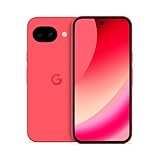
- 6.3" pOLED Actua Display, HDR, 120Hz, 422.2 PPI, 1080x2424px, up to 3000 nits, Gorilla Glass 7i, Bluetooth 6, 5100mAh battery, Android 16, 7 years of OS and security updates
- 128GB, 8GB RAM, Google Tensor G4 (4nm), Octa-core (1x3.1 GHz Cortex-X4 & 3x2.6 GHz Cortex-A720 & 4x1.9 GHz Cortex-A520), Mali-G715 MP7 GPU
- Rear Camera: 48MP, f/1.7 (wide) + 13MP, f/2.2 (ultrawide), Front Camera: 13MP, f/2.2, 4K video recording
- 4G LTE:Global bands, 5G: 1/2/3/5/7/8/12/14/20/25/26/28/29/30/38/41/48/66/70/71/77/78 SA/NSA/Sub6, Nano-SIM + eSIM
- Fully unlocked for all Carriers. Compatible with major US carriers including Verizon, AT&T and T-Mobile, plus supported MVNO networks. Carrier Unlocked models do not provide an unlocked bootloader.
Reduce screen demand where it suits you
Lower screen brightness, try Dark theme, and turn off live wallpapers if you do not need them. How much these changes help depends on your apps and use; Google does not publish a fixed Pixel 10a savings figure for any one setting.
Turn off hotspot and tethering when idle
Disable hotspot or tethering when you are not sharing the connection. These features are useful when needed, but leaving them on unnecessarily adds avoidable power use.
Rank #2

- [Safe charging and protection design] Passed CE, FC, RoHS certification to ensure your charging safety. Use high-quality battery cells to ensure power, safety and reliability, and long-term use will not reduce the health of the battery life.
- [100% or more power] The 10000mAh long-lasting battery can double the daily use time of your Pixel 10a and keep the power of Pixel 10a longer. Enjoy more talk time, music, movies, and internet surfing. The best choice for travel, camping and work. The portable design, charging anytime and anywhere.
- [Fully compatible with Pixel 10a] This battery case is compatible with all functions of Pixel 10a. Use the original data cable to charge and/or synchronize data. The certified charging chip ensures 100% compatibility with your Pixel 10a.
- [One-piece design, easy to use] The shell adopts ergonomic design and is comfortable to hold. The soft rubber on the curved top makes the installation and disassembly of the mobile phone easier. 4 LED battery power indicators, let you know how much power you have (0--25%--50%--75%--100%).
- [12 months after-sales and technical support] Customer satisfaction is our top priority. If you have any questions, problems or concerns, please send an email to our after-sales team, we will be more than happy to help you to ensure that our products work the way you need.
When should I use Battery Saver?
Turn on Battery Saver when the charge is running low and you need the phone to last longer. Extreme Battery Saver is the more aggressive option and can extend Google’s estimate to up to 120 hours, but it limits features and connectivity; Google’s disclosures note, for example, that it disables 5G. Treat it as an emergency or extended-use mode, not a way to preserve normal operation. Google describes the available options in its Battery Saver help.
How can I support long-term battery health?
Battery Saver addresses how long the current charge lasts; charging optimization is aimed at battery health over time. Google offers Adaptive Charging, which can finish charging near your usual unplug time, and an 80% charge limit. The best fit depends on your routine:
Rank #3
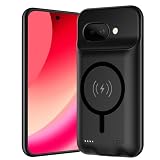
- [Safe charging and protection design] Passed CE, FC, RoHS certification to ensure your charging safety. Use high-quality battery cells to ensure power, safety and reliability, and long-term use will not reduce the health of the battery life.
- [100% or more power] The 10000mAh long-lasting battery can double the daily use time of your Pixel 10a and keep the power of Pixel 10a longer. Enjoy more talk time, music, movies, and internet surfing. The best choice for travel, camping and work. The portable design, charging anytime and anywhere.
- [Fully compatible with Pixel 10a] This battery case is compatible with all functions of Pixel 10a. Use the original data cable to charge and/or synchronize data. The certified charging chip ensures 100% compatibility with your Pixel 10a.
- [One-piece design, easy to use] The shell adopts ergonomic design and is comfortable to hold. The soft rubber on the curved top makes the installation and disassembly of the mobile phone easier. 4 LED battery power indicators, let you know how much power you have (0--25%--50%--75%--100%).
- [12 months after-sales and technical support] Customer satisfaction is our top priority. If you have any questions, problems or concerns, please send an email to our after-sales team, we will be more than happy to help you to ensure that our products work the way you need.
| Option | Charge available for the coming day | Health and routine considerations |
|---|---|---|
| Adaptive Charging | Can charge to full near your usual unplug time. | Useful when your charging and unplugging routine is predictable enough for it to learn. |
| 80% limit | Leaves less charge available that day. | Prioritizes long-term battery health; best when you usually finish the day with charge remaining. Turn it off when you need more runtime. |
Google’s charging optimization guidance explains these choices. Heat matters, too: Google says a hot battery drains faster, even when the phone is not in use, and heat can damage it. Avoid leaving the phone charging longer than needed in hot conditions.
Does a faster charger improve battery life per charge?
No. A charger changes how quickly the phone recharges; it does not extend the time the phone runs after you unplug it. Google specifies a 45W USB-C PPS charger or higher for the advertised rate of up to 50% charge in about 30 minutes, and says the adapter is sold separately. That figure is about charging speed, not endurance. See the Pixel 10a specifications and Google’s charging guidance for charger and cable details.
Independent reader supportYour contribution helps us test, update, and keep practical guides available for everyone.What if battery drain started after an update?
A little extra drain for a few days after a software update can be normal while the phone downloads and optimizes software. If unusually high drain continues beyond that, check Battery usage for a specific app or system source and follow Google’s battery-drain troubleshooting guidance.
Quick wins for a faster PC:
Repair Windows errors before they cause bigger problemsFix Now →Fix the driver behind crashes, sound loss and screen glitchesFind Drivers →Clear out junk files and repair common Windows errorsFree Scan →Quick Recap
Best Value

- [Auto- Dusting Removal Installation] Includes everything you need with innovative automatic positioning, dust removal, and absorption technology, making the installation is just effortlessly easy in seconds. The installation tool is exclusively designed for the Google Pixel 10a 6.3 inch, it will help you to install screen protectors without air Bubbles or imperfections, even if you don't have any experience.
- Military-Grade Shatterproof Protection: IMBZBK’s screen protector sets a new industry standard with Aerospace-Grade Glass and Nano-Ceramic Fusion technology, providing 10X stronger protection than standard 9H glass. Certified by international Military Standards and SGS, it offers 10X stronger protection against scratches, bumps, and drops. Rigorously tested with 220 lbs impacts, 10-foot drops, and 10,000+ scratches, it ensures your phone remains unscathed in any environment.
- Support Fingerprint Reader & Original Touch Sensitivity: Simply re-register your fingerprints after installation to ensure fast unlocking [IMPORTANT]. Engineered with exclusive high-transparency coating technology, this protector enhances light transmittance, preserving true colors, and exceptional clarity for an immersive viewing experience. The innovative 9th-gen oleophobic nano coating reduces fingerprints and oil residue by 98%, offering a smoother touch experience than original screen.
- HD Camera Lens Protector: IMBZBK’s 9H tempered glass lens protector shields your camera from scratches, drops, and daily wear. With nano electrostatic adsorption, it installs easily without bubbles and stays firmly in place. The Anti-Fingerprint coating keeps the lens clean, while 99.99% light transmittance ensures crystal-clear photos. Support with night shooting, it preserves original image quality in any lighting. Keep your camera protected and pristine at all times.
- Case Friendly & Support Face ID: We pay attention to every detail. Laser-cut screen protectors and camera lens protectors precisely cover the device, with carefully spaced edges to ensure compatibility with most phone cases while maintaining full Face ID functionality.
Product prices and availability are accurate as of the date/time indicated and are subject to change. Any price and availability information displayed on Amazon at the time of purchase will apply.




