PC Slower Than It Used to Be?
A free scan shows the junk files, broken settings and background clutter dragging Windows down - then fixes them in one click.Free scan · Windows 10 & 11Crashes, No Sound, or Screen Glitches?
Random freezes, missing sound and display glitches usually trace back to one bad driver. Find and replace yours safely.Free scan · under a minuteFor audience ambience in a recording or broadcast, start with one or two flat-response cardioid condenser microphones above and somewhat in front of the audience, aimed at faces and pointed away from the main PA speakers as much as the room allows. Record them on separate channels and blend them into the program; do not send them to the main PA. Crowd mics capture the room’s applause, singing, laughter, and reactions—not intelligible speech from an individual audience member.
Choose the goal before placing a microphone
A crowd mic is an ambience channel: it adds the sound and scale of the audience to a recording or broadcast. It is not a dependable way to capture one person’s question, and distant overhead microphones should not be used to amplify an audience member through the house PA. For speech that must be heard clearly, put a microphone close to the person.

As an Amazon Associate I earn from qualifying purchases.
Crowd mics are for atmosphere. Audience Q&A needs a close mic. Shure’s congregation recording and broadcast guidance recommends one microphone, or two for stereo, above and somewhat in front of the people. Aim toward faces and away from the main PA loudspeakers as far as the venue permits. It recommends flat-response cardioid condensers for this use.
Quick wins for a faster PC:
Clear out junk files and repair common Windows errorsFree Scan →Fix the driver behind crashes, sound loss and screen glitchesFind Drivers →Repair Windows errors before they cause bigger problemsFix Now →Where to place crowd microphones
Start above and in front of the audience
Choose a position with a clear view of the area whose reactions you want to capture. Aim the microphones toward the audience rather than at the stage or PA speakers. There is no universal mounting height or distance: the right position depends on the room, audience layout, loudspeaker coverage, and the sound you hear at the microphones. Listen during setup and adjust for PA spill, reflections, and unwanted steady noise.
#1 Best Overall

- MorTime Mic Kit - MorTime Condenser Microphone Bundle is ideal for chatting and calling with friends, singing on Youtube, taking video on TikTok, etc. It offers you better recording experience and more creative live broadcast.
- High Sound Quality - The cardioid pickup pattern is more suitable for recording, communicating, creating and other voice works. All the filters prevent unwanted noises and provide you with a clear, rich, mellow vocal performance.
- Condenser Microphone Bundle - This Mic Kit contains microphone, live sound card, adjustable boom arm, shock mount, metal mic pop filter, sponge pop filter cover, earphone, power cable and audio cables.
- High Stablility - Clamp the adjustable boom arm on your desktop and use the shock mount to make condenser microphone isolated from your desk for more stability. The boom arm can be adjusted by 180 degrees to best meet your recording demand.
- High Compatibility - MorTime Condenser Microphone Bundle is compatible with computer, laptop, smart phone, iPad thanks to the audio cables. Besides, it can be used in most mainstream operating systems such as Windows and Mac OS.
Keep microphones out of the main PA mix
Route ambience microphones to recording or broadcast channels, not to the house PA. Overhead pickup is distant from individual speakers, so it is a poor way to reinforce audience speech. Sending it through the PA can also create feedback problems and muddy intelligibility. Shure’s conference microphone guidance notes that overhead coverage has limits in reinforced rooms: each open microphone can add noise and another opportunity for feedback.
Use only as many open mics as the job requires
Start with one microphone for a mono ambience channel, or two when you want stereo. More open microphones mean more potential noise and feedback paths, so add them only when the coverage goal calls for them. Shure’s conference guide gives the three-to-one spacing rule as a starting point for multiple open microphones: spacing between open microphones should be at least three times the distance from each microphone to its nearest talker. This is a spacing guideline, not a guarantee against feedback or a crowd-mic placement formula.
Rank #2

- All-in-One Podcasting Kit: Enjoy effortless content creation with our recording studio package including a pro mic, V8K audio interface, sturdy shock mount, pop shield, scissor arm, and power cables. Designed as a comprehensive recording equipment solution for podcasts or streaming needs.
- Dynamic Effects & Multi-Voice Modification: Elevate your podcasts using the podcast equipment bundle's mixer featuring four gendered voice changer settings and ten built-in sound effects. Multiple sound modes and functions make this hanging condenser microphone kit suitable for any audio scenario.
- Premium Metal Condenser Microphone: The hanging condenser microphone kit uses advanced chipsets and a metal mic construction, delivering a frequency response of 100Hz-20kHz for clear sound. The cardioid pickup ensures accurate voice capture, making it excellent for vocals and podcast voiceovers.
- Effortless Plug-and-Record: Setting up the voice changer microphone kit is simple - connect to your computer, phone, or gaming system and start recording instantly. Multiple connection pathways let you stream concurrently on different platforms, simplifying online performance.
- Universal System Connectivity: The podcast equipment bundle supports mainstream operating systems such as for Windows and for Mac OS, along with most smartphones. Dual-device support lets you produce content or livestream anywhere, including music, games, and voiceover projects.
Choose mono or stereo coverage
A single mic provides a mono audience feed. A pair can capture stereo, but the left and right channels must correspond to their physical positions. Check orientation while monitoring or recording: sounds from the left side of the room should appear in the left channel. Keep the pair’s channels distinct through recording and mixing so the stereo image is not accidentally reversed or collapsed.
Free tools Windows power users keep installed
One-click scans. No signup required.
Capture audience questions with a close microphone
If audience questions need to be intelligible in the room or on a remote feed, provide a microphone close to the speaker. Shure’s conference guidance gives a dedicated Q&A stand or a wireless microphone passed by a moderator as examples. Use an existing suitable Q&A mic if the venue already has one; an ambience setup does not automatically require a separate wireless system.
Rank #3

- RETRACTABLE & CONVENIENT ACCESS: This CB mic holder delivers smooth, consistent retraction that keeps your mic always within easy reach while driving. Designed for effortless use, it lets you quickly grab the mic to talk, then automatically retracts it out of the way when you're done—keeping your truck cab clean and uncluttered for a more focused, safer ride.
- 28" STAINLESS STEEL CORD: Built with a reliable 28-inch stainless steel cord, this CB mic hanger delivers dependable extension and retraction. The sturdy stainless steel material ensures long-lasting use without fraying or losing tension over time, maintaining consistent performance through daily stretching and retracting to meet the demands of regular on-road use.
- HEAVY-DUTY CONSTRUCTION:CB Mic Holder features a rugged ABS plastic shell that resists daily wear and impact.Inside, a PVC-coated steel wire core for strength and flexibility. Withstanding 9 ounces of tension, it’s built to handle constant use without snapping or sagging. Enjoy a smooth and confident pull every time—no more cheap reels that fail when you need them most.
- EASY INSTALLATION: This CB mic holder provides two straightforward installation methods for versatile use. For vehicles without existing hooks, use the included D-ring and mounting screws to securely attach it to the headliner, sun visor, or other suitable interior surfaces. For vehicles equipped with pre-installed hooks, simply use the integrated hook ring to hang the holder directly for quick setup.
- WIDE APPLICATION: This CB Mic Holder perfect not only for truck cabs but also for everyday carry. Hang it on your belt or bag to hang your badge, keys, flashligh, and other small daily essentials. Its reliable retractable design prevents loss, tangling, and misplacement, bringing added convenience and peace of mind to your workdays, commutes, travel, and daily routines.
Shure’s support guidance gives general speech-microphone placement thresholds of no farther than 30% of critical distance for an omnidirectional microphone and 50% for a unidirectional microphone. These are general talker-placement figures, not recommended crowd-mic heights. In its 2013 church-audio article, Shure also explains that halving the mic-to-mouth distance raises voice level by 6 dB when background noise is held constant. That illustrates why a close mic helps an individual voice; it is not a crowd-placement formula.
Record and mix the ambience separately
Keep the crowd feed independent
Record crowd microphones on separate channels or tracks when your system allows. This lets you adjust audience level independently of close stage microphones and add ambience only where it helps the program. Shure describes keeping audience sound lower under spoken presentation and raising it during musical sections, particularly group singing, as a mixing example—not a fixed level recipe.
Rank #4
Check the room before the event
Monitor the audience channels in the actual venue and listen for PA spill, room reflections, HVAC or other steady noise, cable handling, wind outdoors, and blocked sightlines. Reposition or re-aim the microphones if the intended audience area is not being captured cleanly. The sources do not establish a universal gain, EQ, high-pass filter, or compressor setting, so set processing by listening to the recording and the needs of the production rather than treating a preset as mandatory.
What’s actually slowing this PC down?
Pick the symptom - the matching free tool is one click away.
When a steerable audience array may help
Conventional microphones need practical mounting positions and must work around loudspeaker patterns, staging, lighting, cables, and cameras. A steerable audience array can give a broadcast crew software-adjustable coverage of different crowd zones when physical placement is constrained or the desired coverage changes during a show.
Best Value
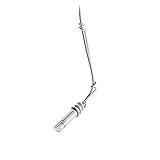
- Hi-SPL handling is ideal for suspension over choirs and orchestras
- Wide-range condenser element with low-mass diaphragm for superior performance
- Self-contained electronics eliminate need for external power modules
- Flat, smooth frequency response
- 25' (7. 6 m) cable permanently attached between microphone and XLRM-type connector
In a Shure-published case study dated September 29, 2026, broadcast mixer Matt Manix describes using DCA901 arrays at stage left and right and steering pickup toward different audience sections. He also says conventional audience microphones remain useful when a smaller microphone can be placed closer or needs to stay out of a camera shot. Manix reports that two or three arrays can cover a space where he might otherwise deploy 24–30 conventional microphones, and estimates thousands of dollars in labor savings over a 16-hour production day. Those are his claims in a manufacturer case study, not independent measurements or a controlled comparison. The case study recommends hands-on evaluation in the intended workflow for a high-cost professional array.
Compare approaches against the production’s actual constraints: the audience area and width to cover, venue scale, PA and stage geometry, camera visibility, whether coverage must change during the show, setup crew and microphone count, recording channels and software workflow, and purchase or rental budget. The available evidence does not establish a universal winner or an independent comparison of sound quality and total cost.
Quick Recap
Setup checklist
- Decide whether the goal is audience ambience, intelligible Q&A, or both; use close microphones for individual speech.
- For ambience, start with one cardioid condenser for mono or two for stereo, above and somewhat in front of the audience.
- Aim at faces and away from the main PA speakers as much as the venue allows.
- Keep crowd microphones on recording or broadcast channels, not in the main PA mix.
- For stereo, verify that left and right positions map to the corresponding channels.
- Listen in the room, adjust placement as needed, and use only enough open microphones and gain for the coverage goal.
Product prices and availability are accurate as of the date/time indicated and are subject to change. Any price and availability information displayed on Amazon at the time of purchase will apply.




