Recommended Free Tools
A changing public IP can break an active connection between your encoder and YouTube, but a stream disconnect by itself does not prove the address changed. First compare the time of the drop with your router or ISP’s WAN records. Then troubleshoot the layer that actually failed: OBS settings, Wi-Fi, upload capacity, local software, the ISP connection, or YouTube’s ingest configuration.
Confirm whether the public IP changed when the stream dropped
A public-IP change can disconnect active network sessions. NETGEAR describes this mechanism for active TCP/UDP and IP sessions, but its examples concern NETGEAR cloud products—not OBS or YouTube streams. It does not establish that your ISP changed your address or that an address change caused your particular dropout.



As an Amazon Associate I earn from qualifying purchases.
- Note the exact time of the interruption in OBS or your encoder’s logs. Record whether the encoder reported dropped frames, lost connection, or another error.
- Check your router’s WAN status, event log, or connection history for a WAN disconnect, reconnect, or public-address change at the same time. Router labels and log availability vary by model.
- If you cannot access useful WAN logs, ask your ISP whether it recorded a connection reset or address change at that time. Ask it to explain any coincident WAN reset and whether it can improve connection stability.
A matching WAN event makes an ISP-side interruption more plausible; without one, investigate other causes rather than treating a public-IP change as established.
Apply the fix that matches the evidence
Set OBS Bind to IP to Default
In OBS, open Settings → Advanced → Network and set Bind to IP to Default. OBS recommends this setting. Binding OBS to a manually selected local network interface does not pin your ISP-assigned public WAN address, so it is not a way to prevent the ISP from changing that address.
#1 Best Overall
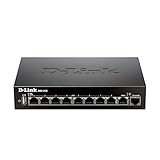
- High speed router with integrated VPN tunnel support for secure remote network access
- (8) Gigabit LAN Ports plus (1) Gigabit WAN Port; 20,000 Concurrent Sessions
- Policy based service management allows for easy configuration of firewall rules
- Supports (5) SSL VPN tunnels and (10) Generic Routing Encapsulation (GRE) tunnels
- Simultaneously supports up to (25) IPsec VPN tunnels plus (25) additional PPTP/L2TP tunnels
Test Ethernet if the encoder uses Wi-Fi
OBS advises using a wired connection because Wi-Fi can be unstable for streaming. If you are currently on Wi-Fi, test with Ethernet and compare the results across streams. A cable can help isolate a local wireless problem; it cannot prevent an ISP-side WAN reset or preserve a session through a public-IP change.
Check upload capacity and bitrate
YouTube says the total stream bitrate must fit the available upload bandwidth and recommends leaving 20% headroom beyond the stream’s total bitrate. Test outbound upload capacity under conditions similar to your stream, then compare it with the encoder’s combined video and audio bitrate. If stable upload capacity is insufficient, lower the bitrate until it fits with headroom. This can reduce congestion-related dropped frames, but it will not keep a session alive through a genuine WAN disconnection.
Rank #2
Use YouTube’s encoder settings guidance for codec and resolution-specific bitrate recommendations, test before going live, and monitor stream health while broadcasting. Avoid choosing a bitrate based only on a best-case speed test: available upload capacity can vary while the stream is running.
Free tools Windows power users keep installed
One-click scans. No signup required.
Test VPN, firewall, and network-optimization software safely
OBS recommends checking whether a VPN, security software, firewall rules, or network “optimization” software is interfering with the stream. For diagnosis, test with a VPN disconnected and review relevant firewall or security logs. Temporarily changing security controls can expose your computer or network; make only a controlled test and restore protections immediately afterward. Disable network-prioritizing utilities only if they are installed and could affect OBS traffic.
Escalate a confirmed or persistent WAN problem to the ISP
If router or ISP records show a WAN reset or address change coinciding with drops, give the ISP the timestamps and ask what caused the interruption and whether it can improve line or connection stability. YouTube and OBS both recommend contacting the ISP when outbound connectivity remains problematic after local troubleshooting. Whether the ISP can change the behavior depends on the provider and connection.
The available evidence does not establish that you are behind CGNAT, how often your ISP changes addresses during an active stream, or whether a particular encoder will reliably reconnect in this exact situation. Treat those as questions for your ISP and encoder logs, not assumptions.
Check the YouTube ingest URL and protocol only when symptoms point there
If the encoder reports a server, URL, port, or protocol error—or the configuration may have changed—open YouTube Live Control Room and use the stream URL and key shown for that stream. A stream key functions like a password for sending video to the channel; keep it private. Do not reset the key just because the network dropped unless you have evidence of a key or configuration problem.
Quick wins for a faster PC:
Fix the driver behind crashes, sound loss and screen glitchesFind Drivers →Repair Windows errors before they cause bigger problemsFix Now →If you use RTMPS, confirm that the encoder supports it and that the RTMPS URL is configured correctly. YouTube’s RTMPS troubleshooting guidance identifies server URL and protocol checks for timeout errors. Correcting an endpoint or protocol mistake can resolve an ingest configuration issue; it does not prevent WAN-session loss caused by an address change.
Best Value

- 𝐍𝐞𝐱𝐭-𝐆𝐞𝐧 𝐖𝐢-𝐅𝐢 𝟕 𝐰𝐢𝐭𝐡 𝟒-𝐒𝐭𝐫𝐞𝐚𝐦 𝐃𝐮𝐚𝐥-𝐁𝐚𝐧𝐝 𝐮𝐩 𝐭𝐨 𝟑.𝟔 𝐆?𝐩𝐬 - Designed with the latest Wi-Fi 7 technology, featuring Multi-Link Operation (MLO), Multi-RUs, and 4K-QAM, The Deco 7 BE23 delivers full speeds of up to 2882 Mbps on the 5GHz band, 688 Mbps on the 2.4GHz band with 4 streams and achieve optimized performance on latest WiFi 7 laptops and devices, like the iPhone 16 Pro, and Samsung Galaxy S24 Ultra.
- 𝐖𝐢𝐝𝐞 𝐂𝐨𝐯𝐞𝐫𝐚𝐠𝐞 𝐰𝐢𝐭𝐡 𝐒𝐭𝐫𝐨𝐧𝐠 𝐂𝐨𝐧𝐧𝐞𝐜𝐭𝐢𝐨𝐧 - Enjoy seamless max Wi-Fi coverage up to 2,500 sq. ft (1-Pack) and 150 devices without compromising performance. 4x high-gain antennas per node and 4x high-power FEMs deliver far-reaching, reliable signals for remote workers, gamers, students, and more.
- 𝐔𝐥𝐭𝐫𝐚-𝐅𝐚𝐬𝐭 𝟐.𝟓 𝐆𝐛𝐩𝐬 𝐖𝐢𝐫𝐞𝐝 𝐏𝐞𝐫𝐟𝐨𝐫𝐦𝐚𝐧𝐜𝐞 - Each Deco 7 BE23 unit is equipped with two 2.5 Gbps WAN/LAN ports, offering warp-speed connectivity for high-performance wired devices. Integrate with a multi-gig modem for gigplus internet.
- 𝐎𝐮𝐫 𝐂𝐲𝐛𝐞𝐫𝐬𝐞𝐜𝐮𝐫𝐢𝐭𝐲 𝐂𝐨𝐦𝐦𝐢𝐭𝐦𝐞𝐧𝐭 - TP-Link is a signatory of the U.S. Cybersecurity and Infrastructure Security Agency’s (CISA) Secure-by-Design pledge. This device is designed, built, and maintained, with advanced security as a core requirement.
- 𝐒𝐭𝐫𝐨𝐧𝐠𝐞𝐫, 𝐌𝐨𝐫𝐞 𝐑𝐞𝐥𝐢𝐚𝐛𝐥𝐞 𝐁𝐚𝐜𝐤𝐡𝐚𝐮𝐥 - The Deco 7 BE23 enhances stability with simultaneous wireless and wired backhaul, leveraging Wi-Fi 7 MLO for stronger, more stable connections.
Why DDNS and a static IP usually are not the fix
Dynamic DNS (DDNS) updates a DNS record when a public IP changes so a hostname can continue pointing to the new address. That helps services reached through a hostname. It does not preserve an already established outbound encoder-to-YouTube connection when the underlying WAN session breaks. A static IP or DDNS should not be treated as a general stream-continuity remedy unless your ISP or a specific routing diagnosis identifies a reason to use one.
Troubleshoot by symptom
| What you observe | What to check | Next step |
|---|---|---|
| Encoder disconnect and router log shows a WAN reconnect at the same time | Router WAN events and ISP records | Give the ISP the timestamps and ask about the reset and connection stability. |
| Dropped frames or unstable stream, with no matching WAN event | Upload capacity, total bitrate, Wi-Fi, VPN, and network software | Test wired Ethernet, leave YouTube’s recommended 20% upload headroom, and investigate local software interference. |
| OBS is bound to a named interface rather than Default | OBS network settings | Set Bind to IP to Default and test again. |
| Server, URL, port, or protocol error | YouTube stream URL, key, and RTMPS support | Verify the Live Control Room settings and encoder protocol; change the key only if there is a key-specific reason. |
| Connection remains poor after local checks | Outbound connectivity and ISP connection records | Escalate to the ISP with timestamps and encoder symptoms. |
Or let it run in the cloud
If your goal is to keep an uploaded video looping on YouTube, StreamNeo runs the stream from the cloud rather than from your home computer and connection. The setup is: upload a recording or build a playlist, add your YouTube stream key once, then go live. Nothing needs to stay on at home; it streams your upload as made, up to 4K 60fps, at one price per slot, and automatically recovers if YouTube drops the stream. The first day is free with no card. Monthly: $9.99 per month.
StreamNeo is for uploaded videos and YouTube streaming, not live camera broadcasting. Learn more at StreamNeo, or start the free first day.
Quick Recap
Product prices and availability are accurate as of the date/time indicated and are subject to change. Any price and availability information displayed on Amazon at the time of purchase will apply.




