Do these 3 things before closing this tab:
1Fix the driver behind crashes, sound loss and screen glitches2Repair Windows errors before they cause bigger problems3Scan for outdated or missing drivers - takes under a minuteIf your tablet has no sound, first raise media volume while audio is playing, then check whether the problem affects one app or every app and confirm audio is routed to the tablet rather than a connected accessory. On iPad, Silent mode does not mute music, videos, podcasts, or TV shows. The steps below start with checks that do not change your data or settings broadly.
1. Raise the volume while audio is playing
Start a song or video, then press the tablet’s volume-up button. This matters because the buttons may adjust different sound types depending on what is happening on the device. Apple says iPad volume buttons can adjust alerts, sound effects, songs, and other media.
As an Amazon Associate I earn from qualifying purchases.
On iPad, you can also check the volume slider in Control Center. If sound is present but unusually quiet, check whether a built-in speaker volume limit is enabled. Menu names and locations can vary by model and software version.
Recommended Free Tools
2. Find out whether one app or the whole tablet is silent
Play audio in a second app, such as a video or music app. If sound works there, the tablet’s speaker and general audio path are likely functioning; look for a mute button, in-app volume control, or sound setting in the silent app. Lenovo’s Yoga Smart Tab support guidance likewise recommends checking an app’s sound when the issue occurs only in a specific application.
#1 Best Overall

- Wide Compatibility: The 1Mii Computer Speakers can work with any devices that has a standard 3.5mm AUX audio out jack, any brands or models of Windows(7/8/10/11) or Linux PCs, MacOS laptops, desktop monitors, laptops.
- Enhanced Stereo Sound: Built-in dual 3W stereo speakers of the desktop speakers can deliver you loud, clear vocals and all the details you want to hear clearly, providing immersive Hi-Fi audio listening and immersive gaming experience. The 3.5mm wired speaker is perfect for you to enjoy wonderful movies, videos, music and games. For best audio quality, use a USB power adapter to reduce static.
- Rotary Volume Control Knob: With the front rotary knob of the PC speakers, you can steplessly adjust the volume level as you wish. No matter loud and immersive action movie or quiet and peaceful music, the desk speakers can always satisfy your needs. No need to find out the volume setting on your device and no complicate operations, just rotate and enjoy.
- Mini and Space-saving for Desk: The PC speaker size is only 26 x 6 x 6.3 cm/ 10.2 x 2.4 x 2.5 in, it can fit into any corner on your desk, table, shelf or other narrow space under your desktop monitor or PC. Under the laptop speakers are anti-slip silicone pads to prevent unwanted scratches from your furniture or electronics. Elegant and delicate design, simple but classic to match your room style.
- Plug and Play: Just connect the speaker with your powered device or DC power adapter via USB-A cable, then plug the 3.5mm audio cable into the 3.5mm AUX out jack, rotate the volume knob to moderate volume level. For some device you might need to switch the audio output to the speaker. Then the computer speakers for desktop pc are ready to play stereo music for you. The USB-A and AUX audio cables are connected as one for neat organization, also you can divide them as you like. Warm Tips: The speaker is not compatible with some products, please check whether your device has an AUX outport before purchase. The USB charging cable and 3.5mm audio cable must be inserted at the same time to work.
If multiple apps are silent, continue with the tablet-wide checks below.
3. Check where the audio is being sent
Bluetooth headphones or a speaker can remain connected and receive audio even when you expect to hear it from the tablet. Check the selected playback destination and choose the tablet’s built-in speakers or the accessory you intend to use.
Rank #2

- External computer speaker in Black (set of 2) for amplifying PC or laptop audio
- USB-Powered from USB port of PC or Laptop
- In-line volume control for easy access
- Blue LED lights; metal finish and scratch-free padded base
- Bottom radiator for “springy” bass sound
On iPad
Open the playback screen, Lock Screen, or Control Center and check the Playback Destination control. Select iPad to use its built-in speakers, or select the Bluetooth accessory you want to hear. Apple’s instructions are platform-specific; other tablet makers use different controls.
The Tool Desk
Outbyte Driver Updater FREEScan for outdated or missing drivers - takes under a minuteDriver Scan →Outbyte PC Repair FREERepair Windows errors before they cause bigger problemsFix Now →On Android tablets
Check the Bluetooth connection and the audio-output controls provided by your tablet’s manufacturer. Android menu labels and locations vary, so use the maker’s instructions for your specific model rather than assuming every tablet has the same path.
Rank #3

- 【Loud Sound,Small Size】This speakers for computer desktop,providing Loud sound,crisp and distortion-free Hi-Fi sound,sound to meet your audio needs for watching movies, listening to music and gaming.
- 【Plug and Play】Equipped with a USB cable and 3.5mm audio cable, the computer speakers for laptop is USB plug-and-play setup (no drivers needed).
- 【Delicate Design】Unique column-shaped desktop computer speakers, high quality plastics and matte metal panel and anti-slip foot pads design. perfect for any modern homes, offices and work spaces.
- 【Easy to Control】This usb computer speakers ,In-line volume control for easily adjusting the volum.Cables Up to 31.5 inches cable length between two laptop speakers,can be conveniently placed next to your PC.
- 【What You Get】1 x pc speakers, 1 x User Manual, 30-Day money-back guarantee, 18-Month worry-free warranty and life-time free user support.
If you are using a Bluetooth accessory, raise its volume as well as the tablet’s. Panasonic’s Bluetooth troubleshooting guidance recommends checking that the intended output is selected and that both the tablet and accessory have adequate volume.
Independent reader supportYour contribution helps us test, update, and keep practical guides available for everyone.4. Check mute and notification settings without confusing them with media volume
On iPad, check Silent mode if alerts or sound effects are missing. But Silent mode does not mute music, podcasts, movies, or TV shows, according to Apple’s iPad user guide. Do Not Disturb is also not a general media-mute switch: it suppresses calls, alerts, and notifications.
Rank #4
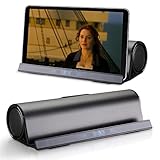
- 【TRUE PORTABLE DOCKING SPEAKER】Wireless Bluetooth speaker with stand function makes it convenient to watch movies or videos and play games. Easy and convenient to carry with for use at home and travel. Let your hands free!
- 【BLUETOOTH AND AUX INPUT】Standard 3.5 mm Auxiliary input for you to connect external non-Bluetooth audio devices, such as MP3/4, computer, Notebook, PSP (cable included). Stereo bluetooth and support wire input, The speaker power 3w x 2, sound quality is great.
- 【PROF DESIGN FOR STATION SPEAKER】Professional stereo sound design with perfect sound enables to enjoy music and movie at any moment. Its sleek, clean lines and small footprint allow the speaker to sit beautifully on any desktop. The speaker does not have a volume control button, and the volume can only be adjusted via Bluetooth devices.
- 【Long Playtime】This is a rechargeable speaker for up to 10 hours of playtime, which provides on-the-go convenience. Reminder, Please fully charge the speaker before using it for the first time, which will prolong the life of the speaker. Humanized design of card slot fits for iPad, Mini, tablets, iPhones, Samsung phones, and other smartphones.
- 【Charging Note】Please use our type-C USB cable or stander type-C USB to charge the speaker, it will work well. If you use any FAST charging USB-C cables to charge it, it may not work. If you have any problem with the speaker, hope you can contact us when free, we will try our best to help you solve it.
On Android, check the sound controls for the type of audio that is missing—media, calls, or notifications—because these can have separate volume settings. Exact controls vary by manufacturer and software version.
5. Make sure the speaker opening is not blocked
Remove a case or protective film temporarily if it might cover the speaker opening. Inspect the opening for visible blockage. Apple recommends cleaning an obstructed speaker opening with a clean, dry, small soft-bristled brush. Do not use liquid or a sharp tool, and do not push debris farther inside.
6. Decide whether the tablet needs service
If more than one app remains silent after you check media volume, app controls, audio destination, and the speaker opening, contact the tablet manufacturer or an authorized service provider. On iPad, Apple says a speaker may need service if no sound is heard from the Ringtone and Alerts slider test or if the speaker control is dimmed. Persistent silence across apps is not something a settings change can always fix.
Headphones or a compatible Bluetooth speaker can help you compare external playback with the built-in speaker, but they do not repair a failed internal speaker.
Quick Recap
Product prices and availability are accurate as of the date/time indicated and are subject to change. Any price and availability information displayed on Amazon at the time of purchase will apply.




