First, identify which Moto G Stylus you have: Motorola’s settings differ across the original model, the 2021 and 2022 versions, and the 2024/2025 models. Then separate two symptoms: the phone may not show a menu when you remove the stylus, or the stylus may fail to write or tap on the screen. A missing menu can be a setting; failed screen input needs separate checks.
1. Identify your Moto G Stylus model
Check your phone’s model name in its About settings or device documentation before following steps. Motorola publishes separate instructions for different generations, and available options and labels vary. Use the guide for your model: Motorola’s model support page (select your device), plus its model-specific settings guides for the original Moto G Stylus, Moto G Stylus (2021), Moto G Stylus (2022), and Moto G Stylus 5G (2024) and Moto G Stylus (2025).
As an Amazon Associate I earn from qualifying purchases.
2. Check what happens when you remove the stylus
Remove the stylus and note whether anything changes. If the phone responds but the menu or note you expect does not appear, check the removal behavior in Settings > Stylus. The configured action may show nothing, or the stylus menu may be turned off; either can look like the phone failed to notice removal.
Recommended Free Tools
2024 and 2025 models
On the Moto G Stylus 5G (2024) and Moto G Stylus (2025), Motorola’s instructions include a When device is unlocked option. Turn it on if you want the stylus menu to appear when you remove the stylus while the phone is unlocked. The guide also describes controls for the menu and removal behavior: Adjust stylus settings for the 2024 and 2025 models.
#1 Best Overall

- Compatibility: This case Fit for Moto G Stylus 2026(6.7 Inch, Released in 2026) and Moto G Stylus 2025(6.7 Inch, Released in 2025). Please confirm your phone moderl before purchasing
- Strong Magnetic Charging: This Moto G Stylus 2026 Case has built with 38 super-strong N52 magnets, delivering 2400 gf magnetic attraction—over 7× stronger than standard cases. Ensures a secure, stable connection to Magnetic chargers, car mounts, and wireless charging stands. Perfectly aligned for fast, stable charging every time
- Tempered Glass Screen Protector: Includes 1× premium tempered glass screen protector that preserves original touch sensitivity and HD clarity. Offers reliable scratch and drop defense for your Moto G Stylus 2025 Screen, without compromising responsiveness or display quality
- Translucent Matte Back: This Moto G Stylus 2026 Phone Case crafted from high-quality matte TPU and translucent PC, this case reveals the phone logo with an elegant, refined finish. The frosted texture delivers a comfortable, non-slip grip, while the nano antioxidant layer effectively resists stains, sweat, and minor scratches—keeping your case clean and clear longer
- 14FT Military Grade Drop Protection: Phone Case Moto G Stylus 2025 has rigid polycarbonate backplate paired with flexible, shock-absorbing TPU bumpers around the edges, plus 4 built-in corner airbags. Provides comprehensive protection against accidental drops, bumps, and impacts
Original, 2021 and 2022 models
These generations also have model-specific stylus settings and removal actions, but their available controls are not identical to the newer models. Open Settings > Stylus and review the options shown on your phone rather than assuming a newer-model label is available. Consult Motorola’s guides for the original model, 2021 model, or 2022 model.
3. If the stylus is noticed but does not write or tap
A menu appearing when you remove the stylus does not establish that the screen is accepting stylus input. Try writing or tapping in more than one app and in different areas of the screen, then compare with finger touch. This is a basic way to describe where the problem occurs; Motorola’s reviewed guides do not provide a validated test that distinguishes a failed stylus from a phone-screen fault.
Rank #2

- 【Compatible with Moto G Stylus 5G 2026/Moto G Stylus 5G 2025】【Not for Moto G 5G 2026/2025 or Moto G Power 5G 2026/2025 or Moto G Play 2026/2025 or Moto G Stylus 5G 2024】【wireless charging is not supported!】Package includes Soft HD Screen Protector (Plastic) and install them according to the instructions.
- 【Camera Lens Protection】 This phone case use lens slide design, it easy to slide and not to loose, and enhance protective of your phone camera from scratches, collision, scuffs and impact, not only improve safety, protect your privacy but also has a sense of fashion.
- 【360° Rotable Magnetic Kickstand】 Advanced Ring Metal kickstand can rotate 360°, easy to rotate and sturdy on the phone case. Built in kickstand gives you the convenience to watch videos and movies hands-free with desired comfort and stability.
- 【Full Body Protection】The phone case is made of anti-scratch hard rigid PC bumper and shock resistance soft TPU, with Air-Cushion Technology for all corners and the raised TPU bezel design, provide all around double protection of your phone from drops, scratches and bumps.
- 【High quality after sales service】SunStory provides 180 days warranty. If there is any problem with Your product, please feel free to contact us by email,we will provide you with the most Reasonable solution.
4. Check the handwriting control only if it is missing
On supported 2024 and 2025 models, Motorola documents a separate Stylus Writing setting. If the handwriting control bar does not appear after you tap a text field, open Settings > Stylus > Stylus Writing and turn it on. This setting addresses the handwriting control bar; it does not establish or repair stylus input that fails across the screen. See Motorola’s stylus usage guide.
Outdated Drivers Are Slowing You Down
One free scan finds every outdated or missing driver and matches the right update for your exact hardware.Free scan · exact hardware matchPC Slower Than It Used to Be?
A free scan shows the junk files, broken settings and background clutter dragging Windows down - then fixes them in one click.Free scan · Windows 10 & 115. Escalate persistent input problems
If the phone still does not respond to the stylus after checking the relevant settings, contact Motorola support for your exact model. The Moto G Stylus (2025) support page provides troubleshooting, hardware testing, and repair or service options. Use the support page for the correct device rather than applying another generation’s procedures.
Rank #3
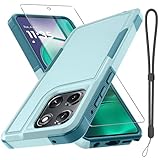
- Compatible Model: Only compatible with Moto G Stylus 5G 2025 & Moto G Stylus 5G 2026. Package included: 1 x phone case,1 x separate HD tempered glass screen protector,1 x nylon wrist wtrap lanyard.
- Military Grade Protection: Hard PC back cover,soft TPU bumper combined to provide dual layer protection. The shock-absorbing TPU bumper keep your phone safe from the occasional drop,while its PC back will protect your phone from daily wear and tear.
- Comfortable Grip: The new super cool dual layer design adds non-slip stripes to the side of the case,and the surface of the hard PC back cover is specially frosted. It makes the phone slim and easy to hold for a natural and comfortable feel.
- Precise Cutting: Precise clipping ensures easy access to all buttons and ports. Besides,0.08 inch raised screen bezel and 0.12 inch raised camera bezel to provide extra protection for your Moto G Stylus 5G 2025/Moto G Stylus 5G 2026.
- Full Body Protection: This two-in-one combination of military grade tough protective case, Four-corner grooved airbags, unique shock absorption design. Raised lips keeps camera lifted to prevent your lens from shock, collision and scratch.
Before buying a replacement stylus
Do not assume that a generic capacitive pen, Moto Pen, Moto Pen Pro, or Moto Pen Ultra will replace the built-in stylus for a Moto G Stylus. Motorola’s Moto Pen compatibility table lists supported devices for those separate pen families; it is not a cross-generation Moto G Stylus replacement list. Confirm compatibility for your exact phone with Motorola or the seller before purchasing. No particular replacement part or listing is established here.
Quick Recap
Best Value

- Compatibility: Moto G Stylus 2025/2026 Case cares for every detail with precise cutouts allow easy access to all ports, speakers, cameras, buttons, and other functions. Won't compatible with any other phone models. Notice: Due to the metal ring on the back, the case will 𝗡𝗢𝗧 𝘄𝗼𝗿𝗸 𝘄𝗶𝘁𝗵 𝗪𝗶𝗿𝗲𝗹𝗲𝘀𝘀 𝗖𝗵𝗮𝗿𝗴𝗶𝗻𝗴 𝗳𝘂𝗻𝗰𝘁𝗶𝗼𝗻
- 𝗜𝗻𝘀𝘁𝗮𝗹𝗹𝗮𝘁𝗶𝗼𝗻 𝗧𝗶𝗽𝘀: This case has a 2-in-1 polycarbonate front cover, frame, and back cover. 𝗖𝗿𝘂𝗰𝗶𝗮𝗹𝗹𝘆, 𝗱𝗲𝘁𝗮𝗰𝗵 𝘁𝗵𝗲 𝗳𝗿𝗼𝗻𝘁 𝗰𝗼𝘃𝗲𝗿 𝗳𝗶𝗿𝘀𝘁. After applying the film, install the front cover onto your phone. 𝗜𝗳 𝘆𝗼𝘂 𝗲𝗻𝗰𝗼𝘂𝗻𝘁𝗲𝗿 𝗱𝗶𝗳𝗳𝗶𝗰𝘂𝗹𝘁𝗶𝗲𝘀 𝗶𝗻𝘀𝘁𝗮𝗹𝗹𝗶𝗻𝗴 𝗶𝘁, 𝗰𝗼𝗻𝘁𝗮𝗰𝘁 𝗰𝘂𝘀𝘁𝗼𝗺𝗲𝗿 𝘀𝗲𝗿𝘃𝗶𝗰𝗲
- Tempered Glass Screen Protector : The Moto G Stylus 2025/2026 phone case presents [2 Packs] advanced HD clarity 9H hardness ultra resistant tempered glass screen protector. The cellphone case front cover provides 360-degree all-round protection for your phone, effectively prevents screen scratches, supports fingerprint recognition, and improved touch-smooth surface for better handheld experience
- Premium Material Construction: Our phone cases are made of high - quality, impact - resistant polycarbonate. This combo offers great durability, withstanding daily bumps, drops, and scratches to protect your phone long - term. The materials are robust, rarely cracking or deforming
- Weather and Chemical Resistance: Our phone cases are built to withstand physical impacts, elements, and common chemicals. They resist sunlight, humidity, and spills of water, coffee, or hand - sanitizer. This protection against environmental factors and chemicals enhances durability and longevity, ensuring optimal performance and year - round phone safety
Rank #4

- Compatible With: Specially designed for Motorola Moto G Stylus 5G 6.8"(2021
- Military Grade Drop Protection: Double combination of soft TPU frame and anti-scratch hard PC back achieves military grade drop protection. Perfectly passed thousands of high altitude drop tests to ensure forceful protection after an accidental drop
- Extra Screen and Camera Protection: Subtly enhanced 2mm lifted bezel on screen and camera lens can prevent daily scratches when you put cellphone face down. Ensuring every aspect of your phone is protected with uniquely
- Built in Metal Kickstand: Built in kickstand gives you the convenience to watch videos and movies hands-free with desired comfort and stability. Additional, magnetic stand can be directly stably attached to the magnetic car phone mount. You will love how convenient it is with such powerful functions
- Warranty: Our products come with 30 days warranty. If you have any questions or anything you feel unsatisfied, please feel free to contact us by E-mail. LeYi will happy to solve for you within 12 hours.
Product prices and availability are accurate as of the date/time indicated and are subject to change. Any price and availability information displayed on Amazon at the time of purchase will apply.




