Write down each incident while the details are fresh, keep relevant records intact, and save copies of any report you make. A clear record can help you remember events and explain them to an employer or agency; it does not by itself prove that conduct was unlawful or guarantee a particular outcome. Reporting routes and legal deadlines depend on where you work and the laws that apply.
What to write down after workplace harassment
Create a separate entry for each incident as soon as you reasonably can. Be specific and factual: distinguish what you personally saw or heard from what someone else told you, and label an uncertain time or approximate quote rather than filling gaps with a guess.


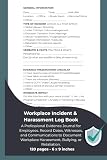
As an Amazon Associate I earn from qualifying purchases.
Incident-log template
- Date and time: Give the date and approximate time. If you are unsure, say so.
- Place or channel: Note where it happened or whether it was in person, by email, chat, phone, or another channel.
- People involved: Record names and roles, including anyone who may have witnessed the event.
- What happened: Describe words and actions as precisely as you remember them. Mark direct quotations as exact only when you are confident; otherwise identify them as approximate.
- Your response: Note what you said or did, and whether you told anyone about the incident.
- Impact and follow-up: Record immediate work-related effects and any later discussion or action.
- Related records: Identify relevant messages, schedules, policies, or other records, where each came from, and where an intact copy is stored.
- When you wrote the entry: Add the note’s creation date. If you later amend it, preserve the original and label the amendment with its date.
This is a practical format, not a required form. The U.S. Equal Employment Opportunity Commission (EEOC) says complaint processes may ask for dates, locations, people involved, and a description of what happened. Its evidence guidance also emphasizes authenticity, original records, and documents made at or near an event. A contemporaneous note may help refresh your memory, but it is not automatically proof of every statement in it. See the EEOC Compliance Manual, Section 602: Evidence and the EEOC’s harassment guidance.
Free tools Windows power users keep installed
One-click scans. No signup required.
How to preserve messages and other evidence
Keep relevant records in their original form where possible, with dates and surrounding context. Maintain a simple inventory so you can locate items later; note each item’s source and when you obtained it. Avoid editing a message or screenshot to remove context. If you need a redacted copy to share, retain the unaltered original securely.
#1 Best Overall
- Preserve relevant emails, chats, schedules, policies, and other work records without changing the original.
- Keep enough surrounding context to make a message identifiable and understandable.
- Note which people have firsthand knowledge and what they personally saw or heard. Do not coach witnesses or ask them to align accounts.
- Store your notes and copies somewhere secure and retrievable. Paper and digital records can both work; choose a method that lets you preserve context and protect access.
Be careful with confidential employer, customer, patient, or coworker information. The sources cited here do not establish a universal right to export workplace files or a universally safe storage method. Follow applicable workplace policies and law, avoid taking unrelated sensitive information, and seek qualified local advice if you are unsure whether you may lawfully preserve or transfer a particular record.
How to report harassment and keep a record of the report
- Check the policy or handbook. Identify the employer’s stated reporting channels and follow the applicable process where possible.
- Choose an available channel. The EEOC advises workers to follow workplace policy if one exists and notes that a worker may speak with a supervisor or HR. If the person implicated controls the usual route, look for another channel in the policy; EEOC promising-practices guidance describes multiple complaint avenues, including a route for concerns involving senior leaders.
- Keep a copy and note delivery. Save the written report and any acknowledgment or response. Record when and to whom it was sent.
- Make a factual follow-up when useful. After a conversation, a brief email can confirm what you reported and any response or next step discussed.
Do not assume the report will remain completely confidential. An investigation may require the employer to share information with people who need to respond or provide information. The EEOC recommends protecting privacy to the greatest extent possible while allowing a thorough, impartial investigation. Its Promising Practices for Preventing Harassment describes an effective complaint system as one that welcomes concerns, encourages early reporting, treats those involved respectfully, and responds promptly, thoroughly, and impartially.
Rank #2
Document later workplace changes separately
If duties, schedules, evaluations, or treatment change after you report, record each change as a separate event with its date and any supporting record. Describe what changed without assuming that every unfavorable event is legally retaliation. Under U.S. federal laws enforced by the EEOC, protected reporting and participation in an investigation or proceeding are protected from retaliation; the EEOC states, “The law protects you from retaliation (punishment) for complaining about harassment.” Read its worker guidance on what to do if you believe you have been harassed at work for the federal context and applicable process.
Recommended Free Tools
Deadlines depend on your location and process
For U.S. federal discrimination charges, the EEOC’s general worker guidance gives filing periods of 180 or 300 days, depending on location. Federal employees and job applicants use a different process and have different time limits. These are not universal deadlines for every claim, internal complaint, or jurisdiction. Contact the relevant agency or a qualified local adviser promptly rather than relying on this guide to calculate a filing date.
For UK readers, Acas says records can be useful if a complaint is raised formally later or becomes an employment tribunal claim. Its guidance is about handling complaints in the UK; it should not be treated as a statement of U.S. law. See Acas: After handling a complaint (last updated 29 August 2025).
Independent reader supportYour contribution helps us test, update, and keep practical guides available for everyone.How long to keep your records
The EEOC says covered employers generally must keep personnel or employment records for one year, subject to exceptions. Once a charge is filed, records related to the issues must be kept through final disposition of the charge or related litigation. Those are employer recordkeeping requirements, not a prescribed retention period for an individual’s incident notes. Keep relevant records securely while seeking advice and follow any applicable preservation instruction. See the EEOC’s Recordkeeping Requirements.
Quick Recap
Product prices and availability are accurate as of the date/time indicated and are subject to change. Any price and availability information displayed on Amazon at the time of purchase will apply.
Quick wins for a faster PC:
Clear out junk files and repair common Windows errorsFree Scan →Fix the driver behind crashes, sound loss and screen glitchesFind Drivers →Repair Windows errors before they cause bigger problemsFix Now →



