Match the console’s video output to an input on your TV. If the TV lacks that input and has only HDMI, connect the console through a compatible HDMI adapter or a retro-gaming scaler. For older systems that output 240p, a scaler designed for retro signals is often a better fit than an unspecified composite-to-HDMI converter. Check the console’s exact model and revision before choosing a cable or adapter.
Choose a connection that matches both devices
Start with the console’s video port and the TV’s available inputs. The best connection is the highest-quality signal the console can produce that the TV or an adapter can accept; there is no single cable that works best for every classic console.
As an Amazon Associate I earn from qualifying purchases.
| Connection route | How it works | Useful when | What to check |
|---|---|---|---|
| Direct analog input | Connect the console to a matching composite, S-video, or component input on the TV. | The TV has the exact input and handles the console’s signal. | Many modern TVs lack analog inputs, and TV scaling and input lag vary by model. [RGM Retro guide] |
| Composite-to-HDMI converter | Feed composite video and stereo audio into a converter, then connect its HDMI output to the TV. | You want a simple trial with a composite-only connection. | An advertised HDMI output resolution alone does not establish good 240p handling, clean scaling, or low latency. Elgato documents 720p or 1080p output for its Mini AV2HDMI in a legacy capture workflow, not as proof of retro-gaming performance. [Elgato support] |
| Console-specific HDMI adapter or cable | Use an adapter that connects to the console’s AV or digital port and outputs HDMI. | You want a convenient setup for a specifically supported console and revision. | Check model compatibility. For example, the cited Hyperkin cable uses S-video for supported systems and does not fit every revision. [RGM Retro guide] |
| Dedicated gaming scaler or line doubler | Send the console’s analog signal into a scaler, which processes it and outputs HDMI. | You use multiple consoles or need better compatibility with 240p signals. | Confirm supported inputs, 480i handling, resolution changes, regional standards, and aspect ratio. [RetroTINK 2X Pro reference] |
| Internal HDMI modification | A hardware modification adds HDMI output inside the console. | You are comfortable modifying hardware. | This requires opening and altering the console, so it is not the simple first setup path. [RGM Retro guide] |
Understand the signal before buying an adapter
Composite combines brightness and color in one video signal. S-video separates them. Component carries video across YPbPr channels and is available on some later analog consoles. RGB/SCART can provide a high-quality analog route, but in North America it usually needs a compatible display or a scaler. Which options are available depends on the console model and region. [RGM Retro guide] [RetroRGB’s 240p explainer]
The Tool Desk
Outbyte PC Repair FREERepair Windows errors before they cause bigger problemsFix Now →Outbyte Driver Updater FREEScan for outdated or missing drivers - takes under a minuteDriver Scan →Many older consoles output 240p, a progressive signal that is not the same as 480i. RetroRGB describes 240p as approximately 320×240; its examples include 256×224 for SNES and 320×224 for Genesis. These are format examples, not a guarantee of each game’s exact active resolution. [RetroRGB]
#1 Best Overall
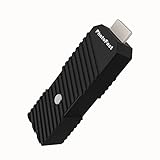
- 💬【Notes Before Purchase】4K Gamer Pro is only compatible with 1080p input and HDMI 2.0a or higher version cable (the original HDMI 1.4 cable that comes in the Nintendo Switch package doesn't work with 4KGP). **Please contact us if you see a black screen when turning the dongle on because it's an issue of preference or the HDMI cable.
- 🎮【Upscale Your Video Game From 1080p To 4K】 4K Gamer Pro photofast enhances the resolution while also making the image delicate, clear, and three-dimensional. It accomplishes this by using image processing technology for image sharpening, color processing, and depth of field without any lag or drop in FPS.
- 📺【3 Levels Of 4K Optimization】With 3 different levels of visual optimization, you can find the perfect quality to suit your TV, game, and needs. Find the right enhancement level so you can get the most comfortable visual experience for your favorite games.
- 👍【No Lag Or Drop In FPS】Enjoy high-resolution video quality without sacrificing FPS or suffering any lag.
- 🕹【Video Game Accessory】You can push your Nintendo Switch / Nintendo Switch OLED / Wii U / PS4 / PS3(1080p) / Xbox One / Xbox 360(1080p) / mClassic / RetroTink 5x for retro game console & more beyond 1080p and experience your favorite games in 4K
Some modern TVs and capture devices do not handle these older signals reliably. Elgato’s official support documentation, updated June 11, 2026, notes that older systems may produce non-standard video signals that modern TVs cannot display. [Elgato support]
Check your console’s model and output
Console ports and cable compatibility can change between revisions and regions. Check the model number on the console itself, not just the name on the box.
Rank #2

- AV To HDMI Converter 3.0 - Convert & Upscale RCA / S-Video / Analog Video Input to HDMI (TV or Monitor) at 1080P or 720P - Plug and Play Adapter with No Computer or Drivers Required
- Upscaler Compatible with VCR, VHS, Camcorders, Hi8, Gaming Systems, Set-Top Boxes, DVD Players, & More. RCA/AV/Composite and S-Video Input. HDMI Output. Works with PAL and NTSC. (Important Note: Does NOT Downscale HDMI to RCA/AV/S-Video)
- NEW! Remote Control Included - Fine Tune Your Video's Image Quality By Adjusting Brightness, Contrast, Saturation, Hue, Resolution (1080P or 720P), Aspect Ratio (Preserve Original 4:3 Look with Black Bars or Stretch To 16:9 HD Widescreen To Fill Your TV Screen)
- NEW! S-Video Input - Allows S-Video Input From Camcorder, VCR, DVD Player, & More - Providing The Highest Possible Video Quality From These Sources (S-Video Cable Not Included - RCA/AV Cable Required For Audio Signal)
- Includes 2-Year Warranty & Tech Support from ClearClick, a USA-Based Small Business (Extendable to 3 Years for Free - See User's Manual)
NES and other early systems
Many early consoles output 240p. Confirm the system’s actual video output and regional cable standard. If your TV struggles to display the signal, look for a scaler designed to handle 240p. [RetroRGB] [RetroTINK 2X Pro reference]
SNES and Nintendo 64
The cited guide describes the first US SNES model as supporting composite, S-video, and RGB, while the SNES Jr. (SNS-101) is composite-only unless modified. It describes US Nintendo 64 systems as supporting composite and S-video without modification; RGB requires an internal mod. Check the revision before buying an S-video or RGB cable. [RGM Retro guide]
Rank #3

- Y.D.F 3 HDMI 2.0/4K@60Hz/18Gbps to HDMI Switcher + 2 RCA to HDMI Converter (2 in 1).Designed for Multiple Gaming Consoles !!!
- 3 HDMI2.0 to HDMI Compatible with PC, Computer, Macbook, Xbox 360, Xbox One, PS4/5, Blu-Ray DVD, Chromecast, Switch, Apple TV, Fire Stick, Roku, etc.
- 2 Way AV to HDMI Converter Compatible with Sega, WII, N64, NGC, SNES, PS1, PS2, PS3, Xbox, STB, VHS, VCR DVD Players, TV and Projector, etc. Support 4:3/16:9 Switching.
- Output compatible devices: HD-Ready or Full HDTV, projector, monitor, etc.
- Plug & Play with One Key Switch. Provide advanced signal processing with great precision, colors, resolutions, and details. Durable aluminum build makes for a longer lifespan.
GameCube
Look for the model number on the underside. DOL-001 has a Digital AV port; DOL-101 does not. The cited guide also notes that progressive scan requires a compatible game and a selection at startup. [RGM Retro guide]
PlayStation 1 and PlayStation 2
PS1 games often output 240p. PS2 supports composite, S-video, and component, with 480p available in supported games. When using component on PS2, set Component Video Out to Y Cb/Pb Cr/Pr. [RGM Retro guide]
Rank #4

- 【Enhanced Retro Gaming Experience】This RCA to HDMI converter brings classic video games to life on modern HDTVs, supporting 1080P (60Hz) and 720P (60Hz) output. Relive your childhood memories with retro consoles like PS1, PS2, Wii, and N64
- 【4:3/16:9 Aspect Ratio Switch】This AV to HDMI hdmi converter is featuring a convenient aspect ratio switch, easily toggle between 4:3 for classic game consoles or 16:9 for widescreen viewing. Enjoy games as they were originally designed
- 【Ready to Use with Included HDMI Cable】This av to hdmi adapter comes with a 50cm (1.5ft) HDMI cable, so you don’t need to buy extra cables. Just plug it in and start gaming without any hassle
- 【Plug and Play】The hdmi converter is no drivers required! Simply connect the included USB power cable to a 5V power source, and you're good to go in minutes. It’s the perfect hassle-free solution for connecting retro consoles
- 【Broad Compatibility】This rca to hdmi cable is ideal for connecting classic game consoles like PS1, PS2, N64, and DVD players to modern TVs and monitors. Offers high-quality video and audio output, ensuring your games look and sound great
Wii
Component is the route to 480p described in the cited guide; Wii Mini is composite-only. Check the Wii’s output settings after connecting. [RGM Retro guide]
Do these 3 things before closing this tab:
1Repair Windows errors before they cause bigger problems2Scan for outdated or missing drivers - takes under a minute3Clear out junk files and repair common Windows errorsDreamcast
VGA can provide 480p for most of the Dreamcast library, but not every game supports VGA. Verify the game and, for an HDMI-only TV, choose a scaler with VGA input. [RGM Retro guide]
Best Value

- All-in-One Retro to Modern: Accepts RGBS / YPbPr / VGA and outputs HDMI or VGA up to 1080p—connect classic consoles and DVD players to today’s TVs and monitors with one compact box.
- True CRT Compatibility: Outputs authentic 240p analog (RGBS/YPbPr via Saturn interface); 15 kHz over VGA is supported (manual enable). Enjoy the look and timing your retro games were designed for.
- Sharper, More Authentic Picture: Image Sharpness Enhancement plus TV LINE scanlines deliver crisp detail and nostalgic CRT aesthetics; physical R/G/B knobs let you dial in color to taste.
- Low-Latency, Smooth Switching: Near-zero-delay 240p/480i switching with dynamic de-interlacing keeps action fluid and responsive—ideal for twitch platformers, shmups, and fighters.
- Easy Control & Flexible Audio: Adjust resolution and image settings via Wi-Fi web UI or IR remote; separate audio in/out integrates with headphones, speakers, or amps. Compact, durable design with 5V/2A power.
Connect the console and set the picture
- Identify the console revision. Read its model number and inspect its video port so you can choose a cable or adapter that actually fits and supports its output.
- Inspect the TV inputs. Check the rear and sides for composite, S-video, component, or HDMI. Do not assume that component inputs include a yellow composite jack.
- Choose the signal path. Use a matching TV input if available. For an HDMI-only set, choose a compatible console-specific adapter or a scaler that accepts the console’s signal.
- Connect video and audio. Plug the console into the TV or converter. If using a scaler, connect its HDMI output to the TV. Supply USB or external power if the adapter or scaler requires it.
- Select the inputs. Choose the matching input on the TV and, if applicable, the correct input on the scaler.
- Adjust display settings. Enable the TV’s Game Mode if available. Set the aspect ratio to 4:3 if the image is stretched and the game was designed for that frame. Select progressive output when the console and game support it.
Choose a scaler with the right signal handling
For a multi-console setup or a collection with 240p systems, a retro-gaming HDMI scaler is a more targeted choice than assuming a generic converter will process every signal well. Match the scaler’s inputs to the console: a scaler cannot accept S-video, component, RGB/SCART, or VGA unless it supports that connection. [RetroTINK 2X Pro reference]
The RetroTINK 2X Pro is one example, not a universal recommendation. Its reference lists composite, S-video, and component inputs, and line-doubling supported 240p/480i input to 480p, with PAL-family formats output at 576p. It does not support 480p input; its Bob deinterlacing for 480i can flicker, and resolution changes can briefly interrupt video. That makes input and game compatibility especially important for consoles and games that use 480i or switch resolutions. [RetroTINK 2X Pro reference]
Game Mode reduces picture processing, but it does not guarantee a specific latency. RGM Retro gives 5 to 10 frames as an illustrative estimate for lag that a TV’s 480i deinterlacing can add; actual behavior varies by television and settings. This is a retailer guide’s estimate, not an independent measurement across TV models. [RGM Retro guide]
Quick Recap
Troubleshoot a blank screen or wrong-looking image
- No picture: Confirm the TV is on the input you connected, the scaler is on the right input, and the converter or scaler has power if required. Recheck the console revision and whether the cable matches its port.
- The signal is not accepted: A converter’s HDMI output does not guarantee compatibility with every display. Elgato’s legacy support article notes that some displays fail to show a retro signal through its capture device’s HDMI passthrough. [Elgato support]
- The image is stretched: Set the TV to 4:3 when appropriate for the game rather than forcing a widescreen fill.
- The image flickers or briefly disappears: Check whether the game outputs 480i or changes resolution during play. Some basic line doublers accept 480i but deinterlace it with visible flicker; a resolution switch can briefly interrupt the picture. [RetroTINK 2X Pro reference]
- Controls feel delayed: Try Game Mode and check whether the signal is being processed by the TV or scaler. Lag varies by device, input, and settings; the available estimate for 480i deinterlacing should not be treated as a measurement for your particular setup. [RGM Retro guide]
Product prices and availability are accurate as of the date/time indicated and are subject to change. Any price and availability information displayed on Amazon at the time of purchase will apply.




