Quick wins for a faster PC:
Fix the driver behind crashes, sound loss and screen glitchesFind Drivers →Clear out junk files and repair common Windows errorsFree Scan →Scan for outdated or missing drivers - takes under a minuteDriver Scan →To connect a phone to a Bose Wave SoundTouch IV, select its Bluetooth source and choose the Wave system in the phone’s Bluetooth settings. Older Wave radios may need a model-compatible Bose Bluetooth music adapter. First identify the exact model: a Wave that receives Bluetooth audio does not necessarily transmit it to another speaker.
Identify your Bose Wave model first
Check the product label before following connection steps or buying an accessory. Wave radios differ by generation, controls, software requirements and supported connections. The instructions below give button-by-button guidance for the Wave SoundTouch IV; adapter compatibility applies only to the models and conditions listed by Bose.

As an Amazon Associate I earn from qualifying purchases.
Bose lists the Wave SoundTouch IV as sold from 2015 to 2021, and the earlier Wave SoundTouch system as sold from 2013 to 2015. Those dates identify product generations; they do not establish whether an app or online service is available today. See Bose’s product support for model-specific guidance.
How do I connect my phone to a Bose Wave radio?
Wave SoundTouch IV: pair a phone or computer over Bluetooth
- Use the remote’s SoundTouch source button to select Bluetooth on the Wave system.
- Turn on Bluetooth on your phone or computer and open its Bluetooth device list.
- Select the Wave system from the available devices to pair.
The SoundTouch IV can store paired devices and may reconnect to the most recently used device when it is available. Bose says reconnection can take a minute or two. If pairing continues to fail, use the Bluetooth-list clearing procedure in the Wave SoundTouch IV owner guide; clearing the list means you must pair the device again.
#1 Best Overall
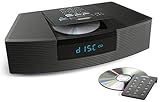
- Ideal for home or office listening
- CD player, FM/AM tuner, headphone jack, alarm clock
- Convincing sound and impressive lows, especially for its size
- Contemporary design with all controls on convenient remote
Select another source on the SoundTouch IV
The SoundTouch source button cycles among SoundTouch, Bluetooth and AUX. The RADIO button toggles between AM and FM, while CD selects disc playback. The SoundTouch app also provides source selection and speaker settings. Button labels and behavior may differ on other Wave models.
Can an older Wave radio receive Bluetooth audio?
For certain older compatible Wave systems, Bose offers a Wave Bluetooth music adapter. It acts as a Bluetooth input for a supported Wave host, allowing audio to stream from a phone to the radio. It is not a general-purpose Bluetooth transmitter.
Bose’s compatibility listing names these hosts and conditions:
Crashes, No Sound, or Screen Glitches?
Random freezes, missing sound and display glitches usually trace back to one bad driver. Find and replace yours safely.Free scan · under a minuteWindows Errors? Fix Them Before They Spread
Repair common Windows errors and clear accumulated junk for a smoother, more stable PC - no reinstall needed.Free scan · no reinstall- Acoustic Wave II: software version 02.x or later; older units may have power-supply conditions.
- Wave Music System: software version 03.x or later; older units may have power-supply conditions.
- Wave Music System III and IV.
- Wave Radio II: date of manufacture 9293 or later. Bose says software cannot be updated on earlier units.
- Wave Radio III and IV.
Bose also specifies date-of-manufacture conditions for some adapter revisions. Check the current adapter compatibility information against the host’s exact model, software and date code before purchasing; not every Wave Radio II qualifies.
Rank #3

- Lifelike sound from Bose waveguide speaker technology
- Plays all your music sources: CDs/MP3 CDs, FM/AM--plus your iPod, smartphone, computer, tablet or Bluetooth device with optional accessories
- Includes CD player, advanced FM/AM tuner, headphone jack, remote, clock
- Now with: Touch-top on/off/snooze controls; dual independent alarms; displayed song/artist radio info
Can I connect two Bose speakers together?
Ordinary Bluetooth pairing connects a transmitting device, such as a phone, to a receiving device, such as a speaker. Bose says its Wave Bluetooth adapter-equipped products receive Bluetooth audio but do not send it onward to another Bluetooth device. Pairing two receivers directly therefore will not make one relay sound to the other.
SimpleSync is a separate Bose feature, not ordinary Bluetooth forwarding. Bose lists the Wave SoundTouch Music System IV as compatible for synchronized playback with qualifying Bose smart speakers or soundbars and compatible Bluetooth speakers or headphones. Check Bose’s current SimpleSync supported-product list and the other device’s compatibility before relying on it; support for this feature does not extend to every Wave radio or Bluetooth speaker pair.
Rank #4
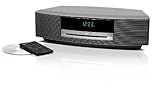
- Lifelike sound from Bose waveguide speaker technology
- Plays all your music sources: CDs/MP3 CDs, FM/AM--plus your iPod, smartphone, computer, tablet or Bluetooth device with optional accessories
- Includes CD player, advanced FM/AM tuner, headphone jack, remote, clock
- Now with: Touch-top on/off/snooze controls; dual independent alarms; displayed song/artist radio info
What if I want to use wired external speakers?
Wired-speaker connections depend on the exact Wave model. Consult that model’s manual and inspect its labeled ports rather than assuming a connector’s function: a headphone jack or AUX input is not necessarily a speaker output. The connection guidance here does not establish wiring or output behavior for every Wave generation.
Quick Recap
Best Value

- Powerful 30W RMS Audio: Dual tweeters and bass units deliver rich, room-filling sound with crystal-clear highs and deep bass. This bluetooth home speaker system is perfect for audiophiles and everyday music lovers.
- Built-In CD Player: Enjoy your CD collection with integrated CD player with bluetooth playback. Seamless Bluetooth Connectivity: Stream wirelessly from any smartphone or tablet via Bluetooth. Compatible with Spotify, Apple Music, and all major streaming
- FM Radio with 20 Presets: Built-in FM radio tuner stores up to 20 preset stations for easy access to your favorite channels and local broadcasts. Optical Digital Input: Connect your TV via the optical digital input for enhanced home theater audio quality.
- Multiple Input Options: Connect via Bluetooth, optical digital, or auxiliary input for versatile use with TVs, phones, computers, and streaming devices. One speaker system for your entire home entertainment setup.
- Included IR Remote Control: Control volume, playback, and input selection from across the room with the included infrared remote. Perfect wireless bluetooth speaker for living rooms, bedrooms, and home offices.
Choose the connection that fits the job
- Phone to Wave SoundTouch IV: use its built-in Bluetooth source and pair from the phone or computer.
- Phone to a compatible older Wave: check the host’s model, software and date-code requirements for the Bose Bluetooth music adapter.
- Wave to a second speaker: do not expect Bluetooth reception to transmit audio onward; check whether the specific devices support SimpleSync.
- Wired speakers: follow the manual for the exact model and use only a port documented as an output for that purpose.
Product prices and availability are accurate as of the date/time indicated and are subject to change. Any price and availability information displayed on Amazon at the time of purchase will apply.




