LiteLLM Auto Router lets a client send requests to one router model name while LiteLLM selects among the models configured for that gateway. To set it up, make sure the destination models are available in LiteLLM, add an Auto Router entry that maps task-complexity tiers to those model names, choose a classifier and default, then test the routing before sending production traffic.
What Auto Router does—and what it does not
Auto Router makes a task-level choice: given an incoming prompt, it selects a configured model based on a complexity tier. Your application can call a single name, such as smart-router, rather than choosing a destination model for every request. See LiteLLM’s Auto Router documentation.
As an Amazon Associate I earn from qualifying purchases.
This is separate from deployment load balancing. Load balancing distributes requests among deployments of a model and can involve routing strategies, retries, cooldowns, and fallbacks; it does not make the same prompt-complexity choice. LiteLLM documents that separately in its Router – Load Balancing guide.
Check availability and configure destination models first
Confirm that Auto Router is available in your LiteLLM account or installation and that your version supports the documented setup. LiteLLM presents the feature as an add-on and refers to early access and design partnerships, so availability may vary by environment.
#1 Best Overall

- 【Powerful Load-bearing】12U Network Rack Open Frame is constructed from durable cold rolled steel; Rack shelf supports enhance stability, wall-mounted capacity of 130lbs, the ground-mounted up to 260lbs
- 【Considerate Designs】Open-frame layout, including a top panel adding space, anti-slip shelf stops fixing devices and compatible racks for stack and expansion to meet requirements of home server rack
- 【Complete Accessories】A 12U open frame server rack, two ventilated shelves, four shelf stops, four velcro straps and a set of equipment mounting screws
- 【Versatile Application】Ideal for space-efficient multi-device setups in warehouses, retail, classrooms, offices and more; Excellent choices as AV Rack/IT Rack
- 【Effortless Setup】 Network Rack includes hardware, a comprehensive manual, mounting hole drilling template and an online assembly video to simplify setup
Before defining the router, configure the destination models in LiteLLM’s model list. The names used in the router’s tier mapping must match the model names your gateway serves. Replace the illustrative provider identifiers and environment variable below with values supported by your deployment.
Set up Auto Router in the dashboard
- Open Models + Endpoints and choose to add a model.
- Select Auto Router.
- Configure the router automatically or start from a template.
- Review the tier-to-model assignments and choose a classifier.
- Use Test Routing with sample prompts, then save the configuration.
Dashboard labels and availability can vary by LiteLLM version and account. Consult the official setup instructions if the documented options do not appear in your environment.
Rank #2

- Adjustable Depth: 23-40'' adjustable depth is used for servers and network equipment, ensuring enough space for AV equipment, components, and cabling, while allowing you to access ports and equipment from multiple sides.
- Strong Load Capacity: Ground-Mounted Load Capacity: 500 lbs, Wall-Mounted Load Capacity: 150 lbs. The av rack is made of carbon steel for better weldability performance and can help save space while meeting your need to place multiple devices.
- User-friendly Design: Ergonomic design makes the open frame av rack easier to use. The additional top panel is able to place other items with more available space. Roller design moves anywhere and anytime, is convenient, and is more energy-saving.
- Complete Accessories: We provide the accessories you need, including 2 x Pallets, 145 x M5*10 Cross Head Screws, 4 x Casters, 4 x M10*50 Expansion Screws,10 x M6*12 Cage Nuts, 1 x Grounding Wire, 1 x User Manual.
- Wide Application: The server rack wall mount maximizes the use of available space, suitable for retail venues, classrooms, offices, and other places where space is limited.
Configure Auto Router in config.yaml
The documented YAML integration uses auto_router/complexity_router. This example defines two destination models and a router that sends simple requests to one and the other tiers to a stronger configured model:
What’s actually slowing this PC down?
Pick the symptom - the matching free tool is one click away.
model_list:
  - model_name: small-model
    litellm_params:
      model: provider/small-model
      api_key: os.environ/PROVIDER_API_KEY
  - model_name: stronger-model
    litellm_params:
      model: provider/stronger-model
      api_key: os.environ/PROVIDER_API_KEY
  - model_name: smart-router
    litellm_params:
      model: auto_router/complexity_router
      complexity_router_config:
        tiers:
          SIMPLE: small-model
          MEDIUM: stronger-model
          COMPLEX: stronger-model
          REASONING: stronger-model
        classifier_type: heuristic
      complexity_router_default_model: stronger-model
The provider/model identifiers and names are examples, not a promise of current provider availability. Use model identifiers and credentials valid for your environment. The router’s tier values must refer to model names defined in the same configuration. Select a default that is also configured; the example uses stronger-model through complexity_router_default_model. LiteLLM’s Auto Router guide documents this configuration pattern.
Rank #3

- 【Powerful load-bearing】 Constructed from durable Cold Rolled Steel, Rack Shelf Back Support enhances stability, wall-mounted capacity of 130lbs, the ground-mounted up to 260lbs
- 【Considerate Designs】Open-frame layout, including a top panel adding space, Anti-Slip Shelf Stops fixing devices and compatible racks for stack and expansion to meet requirements of home server rack
- 【Complete Accessories】A 16U open frame server rack, two ventilated shelves, four shelf stops, four velcro straps and a set of equipment mounting screws
- 【Versatile Application】Ideal for space-efficient multi-device setups in warehouses, retail, classrooms, offices and more; Excellent choices as AV Rack/IT Rack
- 【Effortless Setup】 Network Rack includes hardware, a comprehensive manual, mounting hole drilling template and an online assembly video to simplify setup
Choose a classifier for your routing needs
The classifier determines how a prompt is assigned to a tier. LiteLLM lists several approaches, but the documentation does not establish one as universally most accurate, fastest, or least expensive. Choose based on your workloads and validate the result against representative requests.
- Heuristic: a rule-based classification option, as used in the example configuration.
- LLM: use a language model to classify prompts.
- JEV: an option through TypeSafe System One Choice.
- Keyword rules: classify using specified words or patterns.
- Custom plugin: implement classification logic suited to your environment.
For the supported configuration details and current options, refer to the Auto Router documentation.
Rank #4
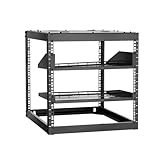
- Optimized for Small Spaces: With a depth of 23 in (585 mm), this open frame network rack allows easy access to ports and devices from multiple angles. It accommodates servers and network equipment, maximizing even tight spaces
- Strong Weight Capacity: This open frame server rack supports up to 500 lbs (226.8 kg) when floor-standing and 200 lbs (90.7 kg) when wall-mounted. Made from carbon steel with reliable weld quality, it is built to last and can handle a variety of devices
- User-Friendly Design: The open frame rack is designed with ergonomics in mind, making it more convenient to use. The top shelf gives you extra space for storage, allowing you to maximize the available area
- Widely Applicable: Maximize your space with this open frame AV rack, ideal for retail spaces, classrooms, offices, and any other area where valuable space is limited. It helps you keep everything organized without compromising accessibility
- Everything You Need: Our open frame network rack comes with a fully equipped accessory kit for easy setup and secure installation: 2 x trays, 1 x screw set, 1 x top panel, 16 x cage nuts, 1 x grounding wire, and 1 x user manual
Test routing before production
A configuration that saves successfully is not, by itself, evidence that prompts are reaching the intended models. Use the dashboard’s routing test and evaluate representative traffic before switching your application to the router.
The Tool Desk
Outbyte Driver Updater FREEScan for outdated or missing drivers - takes under a minuteDriver Scan →Outbyte PC Repair FREEClear out junk files and repair common Windows errorsFree Scan →- Prepare prompts from the actual workload, including straightforward requests and requests that need more complex reasoning.
- Check which tier and destination model the router selects for each prompt. Adjust mappings or classification rules if the selections do not fit your intended behavior.
- Use shadow evaluation on your own traffic before switching, where supported by your environment. Compare the resulting answers and measure the factors that matter to your service.
- After evaluation, track cost, latency, and answer quality as separate outcomes. LiteLLM describes evaluation and savings accounting, but published documentation cited here does not provide a result that guarantees a particular saving or quality level.
Roll out with a clear fallback plan
Once evaluation supports the change, point the client to the router’s configured model name and monitor its behavior. Keep the destination model configuration and routing policy understandable to the team operating the gateway; a tier mapping is only useful when its target names remain valid. If a prompt is assigned to an unsuitable model, revisit the classifier and tier mapping rather than treating deployment load balancing as a substitute for task-level routing.
Quick Recap
Best Value

- 22U Universal 19 inch equipment Rack Cabinet with Locking Wheels for AV, Networking, Computer Server, Home Theater Rack-mountable Gear.
- Compatible with American 5mm and European 6mm rack mount standards. Screws packs for both are included.
- Open Front and Back, 22U Rack Spacing Design with Protective-Vented Side Panels. Front and Real Rail Rack. No Door. Textured-Matte Black Finish. Holds AV/Networking Equipment up to 18-inches Deep.
- Front locking 3" Caster Wheels move easily on carpet. 1U Blank Panel is included. Dimensions Assembled: 18” x 20” x43” with wheels. Weight Capacity is 440lbs with wheels and 550lbs without wheels.
- This Standard 19" 22U Rack is Ideal for businesses, DJs, Sound Studios,home theaters with needs to organize Server/Network Equipment, Power Amplifiers, Microphones, DVD Players, Electronics etc. Compatible with ALL AxcessAbles rack drawers, shelves, rack accessories as well as all standard 19" rack accessories in the marketplace.
Product prices and availability are accurate as of the date/time indicated and are subject to change. Any price and availability information displayed on Amazon at the time of purchase will apply.




