Shut down the PC, switch off the power supply, and disconnect the power before opening the case. Clean removable dust filters separately, wipe accessible fan blades with a clean microfiber cloth, and use short bursts of upright canned air to clear loose dust from fans and cooling fins while holding fan blades still. Use a cotton swab with only a small amount of isopropyl alcohol for reachable stubborn residue; keep liquid away from electronics. Reinstall washable filters only when they are fully dry.
What you need to clean safely
For routine dust removal, gather a clean microfiber cloth, cotton swabs, isopropyl alcohol for stubborn residue on accessible fan surfaces, and canned compressed air. You do not need to apply alcohol to every fan or component: a dry cloth is the first choice for reachable blade surfaces, and the swab is for residue the cloth cannot reach. Use each item only for the job it suits. A cloth makes direct contact with surfaces you can reach, while air can loosen loose dust in narrow channels that are awkward to wipe.
As an Amazon Associate I earn from qualifying purchases.
- Microfiber cloth: for wiping accessible fan blades and other reachable surfaces. Use a clean cloth so you are not transferring collected dust back onto the fan.
- Cotton swabs and a small amount of isopropyl alcohol: for stubborn residue on accessible fan surfaces. Do not use alcohol as a general spray or wet nearby electronics.
- Canned compressed air: for dislodging loose dust from fans and narrow cooling-fin channels. Use it upright, in short bursts, and keep fan blades stationary.
- A damp cloth or running water: only for removable, washable case filters. Those filters must dry fully before reinstallation.
These methods follow practical guidance from Corsair’s fan-cleaning, general PC-cleaning, and AIO radiator-cleaning guides. They are manufacturer guidance, not independent comparative testing. No particular fan, cooler, or air-duster model is validated here; follow the current manual for your hardware when cleaning would require removing or disassembling a component.
Free tools Windows power users keep installed
One-click scans. No signup required.
An electric air duster may sound like a substitute for canned air, but the cited guidance does not compare the two or establish that a specific electric model is suitable. The safe, supported instructions here apply to canned compressed air: keep the fan from spinning, keep the can upright, and use short bursts. Do not assume that another tool has identical handling requirements.
#1 Best Overall

- Powerful Turbo Fan:WOLFBOX MegaFlow 50 electric air duster reaches speeds of up to 110,000 RPM, effectively removing dust and debris. It features three adjustable speed settings to suit different cleaning tasks.
- Economical and Reusable: Built from durable materials with a long-lasting battery, the WOLFBOX MegaFlow 50 is a sustainable alternative to disposable air cans, enhancing your cleaning experience.
- Portable and Lightweight: Weighing only 0.45 lb, this compact air duster is easy to carry. The included lanyard ensures convenient use both indoors and outdoors.
- Wide Application: WOLFBOX MegaFlow 50 electric air duster comes with 4 nozzles, making it suitable for a variety of scenes, such as pc, keyboards, or other electronic devices. It also serves well for home clean and car duster.
- 3.5 Hours Fast Charging: WOLFBOX MegaFlow 50 electric air duster recharges in just 3.5 hours with a type-C cable. Enjoy up to 240 minutes of use on the lowest setting, with four charging options to suit your needs.To ensure optimal performance of your MF50, please fully charge the battery before use.
Prepare the PC before opening the case
- Shut the computer down. Use the operating system’s normal shutdown rather than cleaning while the PC is running. This prevents you from working around fans that are actively turning.
- Switch the PSU off and disconnect power. Corsair advises shutting down the PC and switching off the PSU before cleaning. Disconnecting power before opening the case is a conservative additional precaution.
- Set up a stable, well-lit work area. You need to see where dust is being directed and keep removed filters apart from installed components. Good visibility also helps you avoid pushing a cloth or swab into an area you cannot see.
- Check the relevant manual before removing hardware. The routine below covers accessible cleaning. If a fan, heatsink, radiator, or other part must be removed to reach the dust, consult its current manufacturer manual and follow its model-specific instructions rather than forcing it.
Think of this as a surface-cleaning job, not a reason to dismantle the cooling system. The guidance covers dust that can be reached with a cloth or loosened with air; it does not establish model-independent steps for removing a cooler, taking apart a fan, or cleaning behind components. If the hardware manual is unclear or access requires force, stop at the accessible areas instead of improvising.
Do not clean installed electronics with a damp filter-cleaning cloth. Water and alcohol have different, limited roles here: water or a damp cloth is for a removable filter, while only a small amount of alcohol on a swab is suggested for accessible stubborn fan residue. Neither instruction means that liquid should be applied broadly inside the case.
Clean removable dust filters first
Case filters collect dust before it reaches some of the fans and internal surfaces. Remove only filters that are designed to be accessible, and keep them away from the open case while cleaning them. Cleaning a filter separately keeps its water or damp-cloth treatment distinct from the dry or controlled methods used on installed fans and cooling parts.
- Take out the removable filter without bending or forcing it. If you are unsure how it comes out, check the case manual.
- Clean it with a damp cloth or running water, as Corsair’s general PC-cleaning guidance allows for filters. Keep this washing method limited to the removed filter.
- Set it aside until it is completely dry. Do not reinstall a damp filter or place it against installed electronics while it is wet.
Keep water confined to the removed filter. Do not rinse or wipe installed fans, a heatsink, a radiator, or other electronics with water. If a filter does not appear washable or its removal is unclear, check the case manual before proceeding. The fact that one removable filter can be washed does not make every panel, mesh, or part of the case washable.
Clean fan blades without letting them spin
Wipe reachable dust from the blades
Start with a clean microfiber cloth and gently wipe the accessible fan blades. Corsair’s fan-cleaning guide says, “Start by wiping the fan blades with a clean microfiber cloth to remove any dust buildup.” This is a straightforward first step because it directly removes dust from surfaces you can reach without introducing liquid.
Rank #2

- Reusable Cordless Air Duster: Replace disposable compressed air cans with a rechargeable electric blower for keyboards, PC towers, car interiors and home devices
- 100000RPM Motor, 3 Adjustable Speeds: Choose lower airflow for gentle dusting or stronger airflow for keyboard gaps, PC fans, car vents and tight corners
- Smart LED Display: Check speed mode and battery level at a glance, helping you adjust cleaning power and avoid unexpected power loss
- 5 Nozzles & 3 Brushes: Detail attachments help clean laptop ports, keyboard gaps, vents, camera gear and other hard-to-reach spaces
- LED Light & Portable Safety Design: Built-in light reveals dust in dark areas; lightweight handheld body with safety protections supports daily use
Work on the surfaces you can reach without forcing the fan or reaching into a place where you cannot see what you are touching. A cloth is most useful on the accessible blade faces; it is not a reason to press hard, bend a blade, or try to push into a tight gap. If the cloth cannot reach residue between blades or along the inner frame, a cotton swab can give more precise contact.
If dust or residue remains in a reachable narrow area between blades or along the inner frame, use a cotton swab with a small amount of isopropyl alcohol. Keep the swab only slightly damp and avoid transferring liquid to nearby electronics. The alcohol guidance applies to accessible stubborn fan residue; it is not an instruction to spray or wipe the whole PC with alcohol. If you cannot apply the swab without touching adjacent electronics, do not force access.
Recommended Free Tools
Use compressed air for loose dust
Compressed air can dislodge loose dust from fan surfaces and surrounding areas that are difficult to wipe. Before using it, hold the fan blades stationary. Do not let the airflow make a fan free-spin. Keep a canned-air can upright and use short bursts rather than a sustained blast. These handling details matter together: a short burst is not a safe substitute for holding the fan still, and holding the fan still does not make it appropriate to tilt the can.
Direct the dislodged dust so it leaves the case where practical, rather than simply moving it from a fan onto another component. A cloth and compressed air therefore solve different access problems: wiping removes dust from surfaces you can reach, while air loosens dust from less accessible places. If you cannot direct the dust safely, stop and adjust your approach rather than blowing it deeper into the system.
Do not invent a required nozzle distance or pressure: Corsair’s cited manufacturer guidance does not establish one. Use controlled bursts and stop if you cannot direct the dust safely. No specific canned-air brand or electric duster has been tested in this guidance, so it does not support a performance ranking or a claim that every product behaves the same way.
Rank #3

- 110,000 RPM Power Air Duster: Engineered with a brushless motor reaching up to 110,000 RPM in third gear. This electric air duster blasts away microscopic dust and crumbs from keyboards, computer cases, and radiator fans. "1-min maintenance, 10-min deep clean" for PC gamers and tech enthusiasts.
- 3 Speeds & Long Runtime: Features 3-speed settings: Gear 1 (25K RPM) for delicate electronics, Gear 2 (60K RPM) for daily dusting, Gear 3 (110K RPM) for tough debris. With 2*2500mAh batteries, it runs up to 240 mins on Gear 1 and fully charges in 3.5 hours.
- Lightweight & Portable Design: Weighing only 0.5 lbs.Our mini air blower is exceptionally easy to handle and carry. Its compact size fits perfectly in a camera backpack or car glove box, making it ideal for on-the-go photographers and campers who need to clean lenses or clear campsite debris quickly .
- Reusable & Cost-Effective Investment: Replaces disposable canned air that run out quickly and freeze up. This cordless air blower is rechargeable and designed for repeated use, saving money in the long run by eliminating the need to constantly buy canned air . It serves as a sustainable cleaning partner for electronics, home surfaces, keyboards, and delicate gadgets.
- Versatile Cleaning Tool: The WOLFBOX MF60 Electric Air Duster comes with 5 nozzles: a flat nozzle for blowing dust off PC cases and desks, a long nozzle for deep cleaning computer keyboards and car vents, a round all-purpose nozzle, and a swim ring/air mattress nozzle for outdoor inflation and camping. From electronics to car care and outdoor life, it's an all-in-one solution.
Clear dust from heatsinks and radiator fins
Heatsinks and radiators use narrow fins to expose more surface area to airflow. Compressed air is useful for loose dust in those channels, where a cloth cannot reach. Corsair’s AIO radiator guidance identifies compressed air as a cleaning method for radiator fins; its general PC-cleaning advice also supports controlled air use for internal dust.
For fins, the goal is to loosen dust from the narrow channels and let it leave the chassis where practical. Avoid treating a heatsink or radiator like a removable filter: the filter’s damp-cloth or running-water cleaning advice does not apply to installed cooling hardware. The guidance supports air for loose dust on radiator fins, not washing, wet wiping, or a universal teardown procedure.
- Make sure the PC is off, the PSU is off, and power is disconnected.
- Use short bursts of upright canned air to loosen dust from the fin channels. Keep nearby fans stationary so the airflow does not make them free-spin.
- Where practical, aim so loosened dust exits the chassis instead of settling elsewhere inside it. Use controlled bursts and reassess if the dust is moving into another area.
- Stop if cleaning would require removing the cooler or if you cannot reach the dust without forcing or bending anything. Consult the cooler or PC manual for removal and disassembly instructions.
Do not use the removable-filter washing instructions on a heatsink or radiator. The sources support air for loose dust on radiator fins; they do not establish a need to remove the cooler for routine cleaning, a pressure setting, a nozzle distance, or model-independent instructions for doing so. A particular cooler may have its own maintenance procedure, so the current manual takes priority if you need to go beyond accessible dust removal.
Manual wiping or compressed air?
| Method | Best suited to | Contact and handling | Guidance |
|---|---|---|---|
| Microfiber cloth | Accessible fan-blade surfaces with dust buildup | Touches the surface directly; wipe only where you can reach safely. | Corsair recommends a clean microfiber cloth for fan blades. |
| Cotton swab with a small amount of isopropyl alcohol | Reachable stubborn residue on fan surfaces | Apply sparingly with the swab; keep liquid away from nearby electronics. | Corsair suggests this for areas a cloth cannot reach. |
| Canned compressed air | Loose dust on fans and in narrow heatsink or radiator fin channels | Use short bursts with the can upright; hold fan blades still so they do not free-spin. | Corsair’s general PC and AIO radiator guides support compressed-air cleaning. No specific air-duster model or alternative type is validated by those guides. |
| Damp cloth or running water | Removable, washable case filters only | Clean the removed filter separately and let it dry completely before reinstalling. | Corsair’s general PC-cleaning guidance permits these methods for filters. |
The methods address different kinds of access: wiping gives direct contact with reachable surfaces, while air can loosen dust from narrow fins. They are complementary rather than interchangeable in every location. Use the cloth first on accessible blade surfaces, reserve the swab and a little alcohol for reachable stubborn residue, and use controlled air for loose dust where a cloth cannot reach. The cited guidance does not compare canned air with electric dusters, so it does not establish that one type is better or equivalent to another.
Reassemble and check the cleaned area
- Confirm that any filter cleaned with water or a damp cloth is fully dry.
- Return removable filters to their intended positions without forcing them.
- Check that no cloth, swab, or other cleaning item remains in the case and that fans are unobstructed.
- Close the case and reconnect power only after the cleaning is complete.
The manufacturer guidance supports fully drying filters and checking components, but it does not prescribe a detailed post-cleaning test protocol. The practical check is limited: confirm removable parts are dry and correctly returned, and make sure nothing is obstructing a fan. If a fan appears obstructed or a part was disturbed, stop and consult the relevant manual before using the PC rather than assuming the cleaning went as intended.
Quick wins for a faster PC:
Clear out junk files and repair common Windows errorsFree Scan →Scan for outdated or missing drivers - takes under a minuteDriver Scan →Repair Windows errors before they cause bigger problemsFix Now →Rank #4

- Powerful Turbo Fan:CAGIWIRU Electric Air Duster have reached speed up to 130000RPM,Can efficient remove dust and debris.With LED light and Three Adjustable Speed to meet with different cleaning tasks.
- With Attached USB C Fasting Charging cable.Charing 3 hours,Enjoy up to 240 minutes of use on the lowest setting, For third speed can use for 25mins.with four charging options to meet with your needs.
- Wide Application:Upgraded attached 5 different nozzles,making it suitable for a variety of scenes, such as car,pet, pc, keyboards, and other electronic devices. It also serves for office and home clean duster.
- Handy Design & Portable:Cordless air duster electric nozzle is Light weight and small size, design and comfortable to hold and space saving, convenient to carry around. You can put it in your room or inside the car without taking up space.
- Warranty & Support: Our Electric air duster comes with 5 years warranty and 24/7 customer service. During this period, if you have any questions,pls kindly feel free to contact us.
How often should you clean PC fans and heatsinks?
Corsair gives a general rule of thumb of cleaning every three to six months, with more frequent cleaning suggested for dusty environments and homes with pets or indoor smoking. This is Corsair’s maintenance guidance, not a measured universal interval or a schedule established for every PC. Let visible dust and the conditions around your computer inform whether it needs attention sooner; check the manufacturer’s guidance for your specific system.
The interval is best treated as a reminder to inspect, not a guarantee that every machine needs exactly the same schedule. A dusty room, pets, or indoor smoking are the conditions Corsair specifically identifies as reasons to clean more frequently. If your computer is in a cleaner environment, the cited rule does not require you to clean it more often than needed; if dust visibly accumulates sooner, do not wait for a calendar date just because it falls within the range. The sources do not offer a formula connecting room conditions to an exact number of weeks or months.
Common mistakes to avoid
- Letting fans spin freely under air: hold the blades still before blowing dust away.
- Using long blasts or tilting canned air: keep the can upright and use short bursts.
- Applying liquid broadly: reserve water or a damp cloth for removed washable filters, and alcohol for a small amount on a swab for accessible stubborn fan residue.
- Reinstalling a damp filter: wait until it is fully dry.
- Forcing access or disassembly: use the device manual when a component must be removed or taken apart.
- Assuming every cooler has identical cleaning instructions: manufacturer guidance here covers common accessible cleaning, not every model-specific precaution.
- Assuming all dust-removal tools are interchangeable: the cited guidance supports canned air but does not compare it with electric dusters or validate a particular model.
- Blowing dust without considering where it goes: aim outward where practical so loosened dust exits the case rather than simply landing on another component.
Frequently Asked Questions
Can I clean PC fans while the computer is running?
No. Shut the computer down and switch off the PSU before cleaning. Disconnect power before opening the case as an additional precaution.
How do I stop a fan from spinning when I use compressed air?
Hold the fan blades stationary while using air. Keep canned air upright and use short bursts; do not let the airflow make the fan free-spin.
Can I use water to clean a heatsink or fan?
The water or damp-cloth method described here is for a removed, washable case filter only. Do not rinse or wipe installed fans, heatsinks, radiators, or other electronics with water.
Best Value
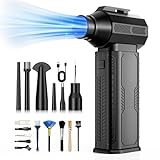
- [130K RPM Cleaning Storm] Our air duster features a 2X ultra-powerful brushless motor, delivering 52 m/s airflow, to blast even 3-year dust from keyboards in 10 seconds.
- [Cost-Effective & Reusable] The rechargeable electric air duster replaces 1,000+ disposable canned air. Only dry, stable airflow, shielding your devices from damage, blending eco-friendliness with high-tech precision.
- [4-Gear Adjustable Wind Speeds] Conquer every cleaning challenge. Level 1 for gentle dusting; Level 2 for precision clean; Gear 3 for daily clean; Gear 4 for heavy-duty clean (PS: long-press to activate storm mode.)
- [6 Versatile Nozzles & 10 Detail Brushes] Offer tailored solutions for every cleaning task, from delicate computer keyboards and sensitive electronics to car detailing, home deep cleans, and even outdoor inflation tasks. One tool, infinite mastery.
- [Safe & 2.5-Hour Fast Charge] Fully recharge via Type-C in 2.5 hours. The 8000mAh battery delivers 120 minutes of runtime on Speed 1, 2X longer than others. The upgraded AI Chip with overcharge & overheat protection.
Can I use isopropyl alcohol on PC fans?
Corsair suggests a cotton swab with a small amount of isopropyl alcohol for accessible stubborn residue, such as an area a cloth cannot reach. Do not spray alcohol broadly or wet nearby electronics.
What is the safest way to clean heatsink or radiator fins?
Use controlled, short bursts of upright canned air to loosen loose dust, directing it out of the chassis where practical. Keep nearby fan blades still. If access requires removing or disassembling hardware, consult its current manual.
How often should I clean PC fans and heatsinks?
Corsair gives a general rule of thumb of every three to six months and suggests more frequent cleaning in dusty settings or homes with pets or indoor smoking. Treat that as general guidance, not a universal schedule.
Is an electric air duster better than canned air?
The cited Corsair guides do not compare electric dusters with canned compressed air, so they do not establish that one is better or equivalent. No particular air-duster model is validated here.
Can I put a case filter back while it is still damp?
No. Corsair’s general PC-cleaning guidance says removable filters cleaned with a damp cloth or running water should be fully dry before reinstallation.
The Bottom Line
For safe routine cleaning, power down and switch off the PSU, clean removable filters separately and let them dry fully, wipe reachable fan blades with microfiber, and use short upright bursts of canned air for loose dust while holding fan blades still. Use only a small amount of isopropyl alcohol on a swab for accessible stubborn residue, and follow the hardware manual if cleaning requires removal or disassembly.
Quick Recap
Product prices and availability are accurate as of the date/time indicated and are subject to change. Any price and availability information displayed on Amazon at the time of purchase will apply.
Do these 3 things before closing this tab:
1Clear out junk files and repair common Windows errors2Fix the driver behind crashes, sound loss and screen glitches3Repair Windows errors before they cause bigger problems



