Recommended Free Tools
Turn off and unplug your iPad, then wipe the protector gently with a clean, dry, soft microfiber cloth. If that does not lift the marks, use a clean cloth that is only slightly damp with water, and dry the surface before drawing again. Keep liquid away from the protector’s edges and the iPad’s openings. Check the care directions for your exact protector before using soap, alcohol, or a screen-cleaning solution.
Clean the protector gently, starting dry
- Turn off the iPad and disconnect cables or accessories. Apple recommends this before cleaning the device. See Apple’s iPad cleaning guidance.
- Wipe with a clean, dry microfiber cloth. Use a soft, lint-free cloth and light strokes; do not scrub. Apple specifies a “soft, slightly damp, lint-free cloth” for cleaning iPad, while MOBDIK’s Paperfeel manual recommends a soft, lint-free microfiber cloth. Apple’s guidance and the MOBDIK Paperfeel manual.
- For fingerprints or residue, barely dampen a clean part of the cloth with water. The cloth should not be wet enough to drip or leave liquid pooled on the surface. Wipe gently, without pressing hard.
- Keep moisture away from edges and openings. Do not spray liquid directly onto the iPad, and do not let liquid run toward ports, buttons, speakers, or protector edges. Apple warns against moisture in openings; Paperlike also instructs users to apply liquid to the cloth rather than spray the device. Apple; Paperlike cleaning guidance.
- Dry the surface with a separate clean, dry part of the cloth. Wait until it is dry before using the Apple Pencil so moisture or loosened residue does not interfere with drawing.
Choose a cleaner only if your protector maker permits it
Water on a lightly damp cloth is the conservative starting point. Instructions differ even among products from the same brand: Paperlike’s general cleaning article describes a damp cloth with a drop of dishwashing liquid or a small amount of cleaning solution, followed by another damp cloth to remove residue. Its Paperlike 3 care article instead lists water, alcohol-free wipes, or a specialized lens-cleaning solution. MOBDIK’s manual permits water or screen-safe cleaner for stubborn smudges and warns against harsh chemicals and abrasives. Those directions are product-specific, not a universal approval for every matte film.
As an Amazon Associate I earn from qualifying purchases.
Before using anything beyond water, check the instructions for the exact protector model. Do not assume that alcohol, a branded screen solution, or soap is safe for a different film. Paperlike’s general cleaning article; Paperlike 3 care article; MOBDIK Paperfeel manual.
Avoid abrasion, pressure, and direct spraying
- Do not use paper towels, tissues, rough fabric, or abrasive pads; they can scratch or wear the textured surface.
- Avoid hard pressure, repeated scrubbing, and sharp tools. Apple warns that abrasive rubbing may scratch an iPad screen and further diminish its oleophobic performance. That is device-level guidance, but it is a sensible reason to avoid aggressive cleaning over a protector too. Apple’s iPad cleaning guidance.
- Do not spray cleaner onto the iPad or let liquid collect at the film’s edges.
- Do not use window or household cleaners, solvents, ammonia, aerosols, abrasives, or hydrogen-peroxide cleaners on the iPad; these are among the products Apple advises against.
- Do not treat Apple’s limited disinfectant-wipe guidance for certain hard, nonporous Apple product surfaces as approval to use those wipes on every third-party matte protector. Follow the film maker’s instructions.
For a removable magnetic protector, follow its removal instructions
If your protector is designed to detach magnetically, remove it only as its maker directs before cleaning the protector or the iPad screen beneath it. ESR says dirt on the iPad surface can weaken magnetic attachment and recommends cleaning the screen thoroughly, particularly around magnetic edges, before reattaching its protector. This is specific to that removable product; it is not a reason to peel up an adhesive film or wash one. ESR support guidance.
Quick Recap
Best Value
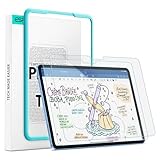
- Compatibility: only for iPad 11" (A16) 2025, iPad 10th Gen 2022, models: A3354, A3355, A2696, A2757, not compatible with any other iPad models
- No Bubbles & Easy Installation: Alignment frame and cleaning kit ensure quick and easy bubble-free application every time.
- Paper Feel & Smooth Writing: Made with premium PET material and uniform micro-grit surface, this screen protector offers a paper-like texture. Enjoy a natural writing and drawing experience, just like on real paper.The ultra-thin design ensures precise touch sensitivity and smooth gliding, making it perfect for Apple Pencil users.
- Powerful Impact Resistance: Using high-quality 9H strength glass to protect your screen from cracks and scratches on buttons and other hard objects, making it look like new.
- Anti-Glare & Pencil-Friendly Design: The matte surface reduces glare, making it ideal for outdoor use. The uniform micro-grit texture minimizes pencil tip wear, extending the life of your Apple Pencil.
Rank #4

- Compatibility: This paperfeel screen protector is compatible with iPad Air 13 M4 2026, iPad Air 13 M3 2025, iPad Air 13 M2 2024, iPad Pro 13 M5 2025, iPad Pro 13 M4 2024. Compatible with these models: A3461 A3462 A3464 A3268 A3269 A3271 A2898 A2899 A2900 A3360 A3361 A3362 A2925 A2926 A3007. Please check the size of your iPad before purchasing to ensure that when you receive this product, it will be suitable for your iPad
- Attention: This is not compatible with iPad Pro 12.9 (2022 & 2021 & 2020 & 2018)
- New Version Paperfeel: New Version Paperfeel screen protector adopts the emerging paper nanotechnology, and the micro-nano flexible particles on surface provide you with a paper-touch screen, allowing you to create freely. The paper nano surface of iPad Air 13 screen protector becomes an incredible canvas to make your writing and painting smoother, allowing the charm of paper to complement your artistic creation
- Ultra-Thin/High-Sensitivity: Made of 0.17mm ultra-thin premium Japanese PET Film material, which retains the original high sensitivity of the screen and does not affect any usage performance, ensuring quick launch of applications. Give you a fast and accurate response when touch the screen, making every touch of your finger with the screen accurate, effectively improving your work efficiency and entertainment experience
- Less Reflection & Less Fingerprint: Newly upgraded screen protector is 50% more effective at preventing glare than 1st generation, which can care for your eyes even more. The matte finish of iPad Pro 13 screen protector can effectively suppress the glare of natural and artificial light, and give you a great reading and working experience even in the sun. It has an oil-proof coating, which effectively prevents fingerprints and stains
Rank #3

- Compatibility: Compatible with iPad Air 5th Generation 2022 & iPad Air 4th generation 2020 & iPad Pro 11 inch (2022/2021/2020/2018). Compatible Model: A2588, A2589, A2591, A2316, A2324, A2325, A2072, A2377, A2459, A2301, A2460, A2228, A2068, A2230, A2231, A1980, A2013, A1934, A1979, A2759, A2435, A2761, A2762. Please check your iPad model number before purchasing
- Attention: This is not compatible with iPad 10th 2022(10.9 inch), iPad A16 2025 (11 inch), iPad Pro 11 inch (2025 / 2024) and iPad Air 11 inch (2024 / 2025)
- Paperfeel Surface: Using advanced technologies and non-slip treatment on surface of iPad air screen protector 5th generation, it enhances the touch of writing and drawing, provides unmatched precision and control, makes writing more smooth and continuous touch, and easily record your inspiration on the iPad
- Anti-Glare / Reduce Fingerprint: Suppressing screen glare with anti-glare layer, and makes you more comfortable when using iPad for a long time. Even in the sun, it does not affect daily writing and painting. The surface of iPad pro 11 screen protector has a hydrophobic and oleophobic coating, which effectively reduces the troubles caused by fingerprints and grease residues in daily use, and keeps the screen clean
- Touch Sensitivity: Ultra thin 0.17 mm of iPad pro screen protector 11 inch provides a tactile feel similar to a real screen without compromising use performance, ensuring fast startup of applications. You can easily slide your finger on the screen protector to perform various operations without worrying about delay, effectively improving your work efficiency and entertainment experience
Rank #2

- Compatibility: Specifically compatible with iPad A16 11th Generation and iPad 10th Generation & Air 11 Inch M4/M3/M2 (2026/2025/2024). Compatible with these models: A3354 A3355 A3356 A2696 A2757 A2777 A3267 A3270 A2902 A2903 A2904. Make sure the camera is on the long side of the iPad, not the short side. Please check your iPad model before purchasing short side
- Attention: This is not compatible with iPad Pro 11 (2022/2021/2020/2018) and iPad Air 5th/ 4th Generation(10.9 inch), iPad Pro 11 inch M5/M4
- Anti Glare and Fingerprint Reduction: The oleophobic coating on the surface of ipad 10th generation screen protector helps you reduce oil, smudges and fingerprints from daily use. Simply wipe it off and the screen instantly looks brand new. Meanwhile, experiencing a delicate frosted finish that reduces light refraction, without worrying about glare when drawing outdoors
- Designed for Paperfeel: This upgraded screen protector features a surface meticulously textured through detailed grinding and processing. Enjoy a sense of damping true to the touch of real paper while writing, recreating the authentic writing experience
- Ultra-Thin/Smooth Writing: Crafted from premium PET material with a uniform micro-grit surface, this screen protector delivers an authentic paperfeel texture. The ultra-thin 0.17mm design maintains precise touch sensitivity while enabling smooth gliding, making it ideally suited for Apple Pencil users
#1 Best Overall

- Compatibility: This paperfeel screen protector is compatible with iPad 11th Generation 2025, iPad 10th Generation 2022, iPad Air 11 M4 2026, iPad Air 11 M3 2025, iPad Air 11 M2 2024. Compatible with these models: A3354 A3355 A3356 A3266 A3267 A3270 A3459 A3460 A3463 A2696 A2757 A2777 A3162 A2902 A2903 A2904. Please check the size of your iPad before purchasing to ensure that when you receive this product, it will be suitable for your iPad
- Attention: This is not compatible with iPad Pro 11 2025 / 2024, iPad Pro 11 (2022 & 2021 & 2020 & 2018) and iPad Air 5th & Air 4th Generation(10.9 inch)
- Paperfeel Texture: Featuring advanced textured surface technology, ipad a16 screen protector replicates the natural friction of paper to create the perfect canvas. Designed for artists, students, and note-takers, it transforms your experience: enjoy smoother sketching, better shading, and more comfortable handwriting. Say goodbye to the slippery glass feel, whether you're illustrating or taking notes
- High Sensitivity: Crafted from 0.17mm Japanese PET film, it maintains the iPad’s original touch sensitivity. Designed for professionals and all users who require instant response—enabling fast app switching, precise gesture control, and a seamless experience—ipad air 11 inch screen protector ensures both productivity and entertainment
- Anti-Glare: The matte coating diffuses light to reduce glare interference, while the oleophobic layer effectively repels smudges. Our ipad 10th generation screen protector allows commuters, avid readers, and outdoor users to enjoy videos, reading, or work more comfortably in bright environments, keeping the screen clear and clean with colors as vibrant as ever
Product prices and availability are accurate as of the date/time indicated and are subject to change. Any price and availability information displayed on Amazon at the time of purchase will apply.
Independent reader supportYour contribution helps us test, update, and keep practical guides available for everyone.



