Do these 3 things before closing this tab:
1Scan for outdated or missing drivers - takes under a minute2Repair Windows errors before they cause bigger problems3Fix the driver behind crashes, sound loss and screen glitchesChoose an AI GPU by matching the complete system to your measured workload—not by selecting the accelerator with the largest peak-FLOPS number. Define the model, precision, memory footprint, latency or throughput target, and scale first; then compare usable memory, bandwidth, software support, interconnects, power, cooling, availability, and support.
NVIDIA H200, AMD Instinct MI300X and MI325X, and NVIDIA HGX or DGX systems occupy different points in that decision. The specifications below are manufacturer figures, not independent benchmarks, and the best choice depends on your exact model and deployment configuration.
As an Amazon Associate I earn from qualifying purchases.
The decision in one sentence
Start with the job you need to run, calculate the memory required per accelerator, and shortlist systems that can sustain your target precision, batch size, latency, and distributed topology. Only then use vendor specifications and a representative pilot to choose between candidates.
Define the workload before looking at GPUs
An accelerator that is excellent for one data-center task can be a poor fit for another. Write a one-page workload profile before requesting quotations or benchmark results.
#1 Best Overall

- 24GB Video Memory
- Fourth Generation Tensor Cores
- HALF HEIGHT BRACKET ONLY
Training workloads
Record the model architecture and parameter count, training precision, sequence or image dimensions, global and per-device batch size, optimizer, checkpointing method, expected number of GPUs, and target time to train. Optimizer states and activations can require substantially more memory than the model weights alone. Include whether you need large-scale data parallelism, tensor parallelism, pipeline parallelism, or a mixture.
Inference workloads
Specify the model version, quantization or floating-point format, maximum context length, prompt and generation mix, target first-token and per-token latency, requests per second, concurrent users, and acceptable tail latency. For a language model, the key memory terms are weights, runtime workspace, and the key-value cache. A system that fits a model at a small context length may fail when the production context window or concurrency increases.
HPC and scientific workloads
Document the numerical precision required by the application, whether the code is memory-bandwidth-bound or compute-bound, the size and movement of working sets, collective communication patterns, and the network topology. Scientific codes may need strong double-precision behavior or specific libraries even when an AI benchmark favors a different precision.
PC Slower Than It Used to Be?
A free scan shows the junk files, broken settings and background clutter dragging Windows down - then fixes them in one click.Free scan · Windows 10 & 11Outdated Drivers Are Slowing You Down
One free scan finds every outdated or missing driver and matches the right update for your exact hardware.Free scan · exact hardware matchOperational targets
State the service-level objective, expected utilization, job-mix variability, and growth horizon. A cluster sized only for today’s average load can become unusable when context lengths, users, or model versions grow. Conversely, buying capacity for an uncommitted future workload can leave expensive hardware idle.
Calculate memory capacity and bandwidth
Memory capacity is a hard constraint: if weights, activations, cache, optimizer state, and runtime overhead do not fit, peak arithmetic throughput is irrelevant. Estimate the high-water mark for one device and for the distributed job, then leave headroom for framework allocations, fragmentation, communication buffers, and failure recovery.
Separate the memory components
- Weights: model parameters multiplied by the bytes used by the stored format, plus any duplicated or converted copies.
- Activations: training activations can dominate unless checkpointing, recomputation, or sharding is used.
- Optimizer and gradients: training often keeps several additional tensors, sometimes at a different precision from the forward pass.
- KV cache: inference cache grows with context length, layers, hidden dimensions, batch, and concurrent sequences.
- Runtime headroom: reserve space for kernels, temporary buffers, graph capture, communication libraries, and operating margins.
Do not treat installed capacity as automatically usable capacity. Confirm the allocation behavior of the framework and serving stack, including whether tensors are replicated, sharded, offloaded, or copied between devices.
Capacity and bandwidth are different advantages
More capacity lets a model or larger batch fit. More bandwidth can improve workloads that repeatedly stream data from HBM, but it does not guarantee higher end-to-end throughput. Compute intensity, kernel efficiency, inter-GPU traffic, and software optimization determine how much of the theoretical bandwidth a job realizes.
Rank #2

- Discrete graphics card memory 40 GB
- Memory bandwidth (max) 1555 GB/s
- Graphics processor family NVIDIA
- Graphics processor A100
Multi-GPU memory is not automatically one pool
Vendor platforms advertise aggregate memory across a node, but your application may still need explicit sharding or parallelism. A model can fail if a single layer, tensor, or cache allocation must fit on one device even when the node has ample aggregate memory. Test the actual distributed configuration rather than dividing the model size by the number of GPUs and assuming perfect pooling.
Compare the current accelerator specifications
The following figures come from manufacturer product and platform references. They describe hardware configurations; they are not a common, independent performance test.
| Accelerator or platform | Configuration | GPU memory | Memory bandwidth | Power or system note |
|---|---|---|---|---|
| NVIDIA H200 SXM | Hopper SXM module | 141 GB HBM3e | 4.8 TB/s | Up to 700 W maximum configurable TDP; NVIDIA labels the specifications preliminary and subject to change. |
| NVIDIA H200 NVL | H200 NVL configuration | 141 GB HBM3e | 4.8 TB/s | Up to 600 W maximum configurable TDP; preliminary NVIDIA specification. |
| AMD Instinct MI300X | CDNA 3, passive OAM | 192 GB HBM3 | 5.3 TB/s peak theoretical | 750 W peak typical board power; chassis and cooling must support the passive module. |
| AMD Instinct MI325X | MI300-series accelerator | 256 GB HBM3E | 6 TB/s peak theoretical | Power figure not stated on the cited AMD MI300-series specification. |
| NVIDIA HGX H100 SXM | Eight-GPU HGX reference component | 80 GB per GPU | 3.35 TB/s per GPU | Eight-GPU reference totals: 640 GB and 26.8 TB/s aggregate bandwidth. |
| NVIDIA HGX H200 SXM | Eight-GPU HGX reference component | 141 GB per GPU | 4.8 TB/s per GPU | Eight-GPU reference totals: 1.1 TB and 38.4 TB/s aggregate bandwidth. |
| NVIDIA HGX B200 SXM | Eight-GPU HGX reference component | 180 GB per GPU | Up to 8 TB/s per GPU | Eight-GPU reference totals: 1.44 TB and up to 64 TB/s aggregate bandwidth. |
| AMD MI300X platform | Eight-OAM platform | 1.5 TB total HBM3 | 5.3 TB/s per OAM | Platform-level power and aggregate bandwidth figures are not stated in the cited AMD platform description. |
| NVIDIA DGX B200 | Manufacturer system specification | 1,440 GB total GPU memory | 64 TB/s HBM3e bandwidth | System specification; exact rack, networking, and service configuration must be confirmed. |
NVIDIA’s H200 page describes the accelerator as the first GPU in its product line to offer 141 GB of HBM3e at 4.8 TB/s and characterizes that as nearly twice the H100 capacity with 1.4 times its memory bandwidth. AMD describes MI300X as designed for generative AI and HPC. Those are vendor statements, not independent conclusions about your application’s speed or cost.
Interpret the H200, MI300X, MI325X, and B200 choices
When H200 is a candidate
H200 is available in SXM and NVL variants with the same listed memory capacity and bandwidth but different configurable power limits and system integrations. Select the exact variant that your server and fabric support; an H200 label alone does not identify the complete deployment. H200 is positioned for generative AI and HPC, but the useful result for your job depends on precision, kernels, communication, and software versions.
Free tools Windows power users keep installed
One-click scans. No signup required.
When MI300X is a candidate
MI300X offers a larger per-accelerator memory capacity than H200 in the cited specifications and uses a passive OAM form factor. That can be valuable for large models or cache-heavy inference, while the 750 W board rating makes chassis airflow, power delivery, and service design central procurement questions. Confirm that your framework, compiler, kernels, and collective-communication path support the exact MI300X platform you intend to operate.
When MI325X is a candidate
AMD lists MI325X with 256 GB of HBM3E and 6 TB/s peak theoretical bandwidth. AMD also publishes comparisons with H200; treat those as vendor comparisons rather than independent evidence. Ask for measurements using your model, precision, context, batch, and system scale.
When an HGX or DGX B200 system is a candidate
HGX and DGX figures describe complete multi-GPU designs rather than a loose collection of cards. The B200 references show substantially greater per-GPU capacity and bandwidth than the H100 and H200 entries in the same HGX table. You still need to verify the exact OEM build, networking, firmware, cooling, service contract, and software image. A platform specification does not guarantee that your application will scale linearly across all eight GPUs.
Rank #3
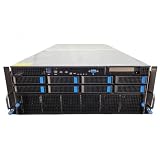
- No Processor Installed; Supports 2x AMD EPYC 9004 Series Processors
- No Memory Installed; Supports 24x DDR5 4400/4800 Regsitered Memory Modules
- 8x 3.5" Trays; (Bring Your Own SATA/NVMe Drives)
- 2x H200 NVL Tensor Core 141GB HBM3e PCI Express 5.0 x16 GPU Accelerator Card
- In Original Packaging; Includes Rails and ASUS GPU Cables
Check interconnect and network topology
For distributed training and large inference services, communication can dominate execution time. Request a diagram showing the intra-node GPU fabric, CPU-to-GPU links, PCIe or equivalent paths, network adapters, switch placement, and oversubscription. Ask how collectives are routed and whether all GPUs have symmetric paths.
Evaluate topology at the scale you will actually run: one GPU, one node, several nodes, and the expected failure domain. Measure all-reduce, all-gather, reduce-scatter, and point-to-point behavior with the same message sizes and process placement used by the application. A nominal link rate is not a substitute for observed application-level communication time.
Verify software and framework support
Compatibility is a procurement gate, not a post-purchase optimization task. For each candidate, confirm the exact versions of the operating system, driver, runtime, framework, compiler, math libraries, communication libraries, container base image, and orchestration platform.
- Confirm that the framework recognizes the exact GPU and exposes the required precision modes.
- Check that attention, convolution, collective, quantization, and communication kernels are available for your model.
- Verify distributed launch, checkpoint restart, topology discovery, monitoring, and health-management support.
- Test the production container and security controls, not only a vendor sample image.
- Ask who owns fixes when a framework update, driver update, or firmware change reduces performance.
A complete versioned compatibility matrix for a particular application must be checked against current official software documentation. Do not infer support from a GPU’s architecture name alone.
Measure performance at matched conditions
Peak FLOPS and theoretical bandwidth are useful ceilings, not workload results. Require an apples-to-apples test plan.
Make every comparison variable explicit
- Use the same model checkpoint, tokenizer, dataset, and software build.
- Keep precision, quantization, sequence or image dimensions, batch size, and concurrency constant.
- Compare the same number of GPUs and the same node and network scale.
- Record warm-up policy, compilation time, graph capture, data-loading behavior, and checkpointing.
- Report median and tail latency, throughput, GPU utilization, memory use, communication time, and power.
Run a representative pilot
Use a short production-shaped pilot before committing to a large purchase. Include the largest expected context, realistic request mixing, failure recovery, and the longest sustained interval you expect in service. For training, run enough steps to expose memory growth, communication behavior, and thermal throttling. Save the configuration, logs, software hashes, and power measurements so a supplier’s result can be reproduced.
Use vendor numbers correctly
Manufacturer specifications can identify capacity, bandwidth, form-factor, and power constraints. They cannot settle comparative application performance, total cost, or return on investment when the cited pages do not use your model and test conditions. Treat marketing claims as hypotheses to validate.
Rank #4

- Graphics Card Interface: Pci E
Validate power, cooling, and facility constraints
Plan the complete rack, not just the accelerator board. Confirm utility capacity, rack power budget, breaker and distribution limits, peak and sustained draw, airflow direction, inlet-temperature range, liquid-cooling requirements, acoustic limits, and service clearances.
Passive OAM accelerators such as MI300X depend on the host chassis for airflow. An accelerator’s board rating also excludes some server, memory, storage, network, and conversion losses. Ask the integrator for a rack-level power and thermal model under your intended workload, including startup and failover conditions.
Recommended Free Tools
Check firmware controls for power capping and performance states. A lower cap may improve facility fit but change throughput or latency. Measure the resulting performance instead of assuming that a nominal TDP is the operating draw for every workload.
Procure the right system configuration
Specify the complete bill of materials: accelerator variant, CPU and system memory, local storage, network adapters, switches, fabric cabling, chassis, firmware, operating-system image, support term, warranty response, and spare strategy. Require part numbers and revision levels so a quotation cannot silently substitute a different module or network layout.
NVIDIA’s HGX procurement guidance says: For exact BOM and part numbers, please work with your OEM/ODM partners and our NVIDIA support team depending on your specific rack and data center conditions.
Follow that approach for any platform where the accelerator is only one part of a tightly integrated node.
Compare quotations only when the configurations are equivalent. Current price, delivery time, regional availability, warranty terms, and support coverage are configuration-specific and are not established by the hardware specifications above. Ask for guaranteed delivery milestones and the process for replacing a failed accelerator or node.
A practical selection procedure
- Write the workload contract. Record model, parameter count, precision, context or sequence length, batch, concurrency, latency or throughput target, training deadline, and expected growth.
- Build the memory budget. Calculate weights, activations, optimizer state or KV cache, framework overhead, communication buffers, and safety headroom per device.
- Choose the distribution model. Decide whether the application uses replication, tensor sharding, pipeline stages, expert parallelism, or another method. Confirm that each required tensor can fit where the software places it.
- Shortlist exact SKUs. Distinguish H200 SXM from H200 NVL, individual modules from HGX or DGX nodes, and an accelerator specification from an eight-device platform.
- Pass the software gate. Verify drivers, runtime, kernels, framework, compiler, communication libraries, containers, and orchestration for the intended versions.
- Audit the facility. Confirm rack power, cooling, airflow or liquid loops, network ports, cabling, physical space, and service access.
- Request matched benchmarks. Require the same model, precision, batch, context, GPU count, software versions, and measurement definitions from every supplier.
- Run a pilot. Measure latency, throughput, utilization, memory, communication, power, thermal behavior, and recovery under representative load.
- Compare total deployment risk. Include availability, support, warranty, spare parts, software ownership, and migration effort alongside purchase price.
- Freeze the bill of materials. Put accelerator variant, firmware, network topology, and acceptance-test results into the purchase agreement.
Common mistakes and how to avoid them
Choosing by peak FLOPS alone
Peak arithmetic throughput may apply to a precision your model does not use and may ignore memory stalls or communication. Compare measured end-to-end results at the production precision.
Best Value

- 3rd generation Tensor core and 2nd generation RT core provide 1.5 times more graphic CAD performance and 3 times more rendering and generating AI performance than previous model T1000
- It delivers up to twice the real-time lay-tracing performance of previous generations, allowing you to perform complex 3D model processing and more realistic image processing in half the time
- Up to 3.6 times higher generation AI performance than previous generations, creating high-quality images/videos, and generating 3D assets quickly
- Equipped with 4 Mini DisplayPort connectors for increased productivity for multi-application workflow. 8K output can also output 2 screens simultaneously
Adding memory capacities as if they were pooled
Eight GPUs can have a large aggregate total while a per-device allocation still fails. Validate the framework’s sharding and placement behavior.
Comparing unlike configurations
An SXM module, an NVL configuration, an OAM accelerator, and a complete DGX or HGX node include different integration assumptions. Normalize GPU count, CPU, network, cooling, software, and support before drawing a conclusion.
Ignoring the cache or optimizer
A model’s parameter count is not its complete memory requirement. Test the maximum context, concurrency, checkpoint, optimizer, and activation settings that production will use.
What’s actually slowing this PC down?
Pick the symptom - the matching free tool is one click away.
Accepting an unrepeatable benchmark
Results without software versions, warm-up rules, batch and context settings, or power measurements cannot support a procurement decision. Require a reproducible script and configuration.
Leaving the facility assessment until delivery
High-power accelerators can exceed a rack’s electrical or thermal envelope. Obtain rack-level validation before signing the order.
Questions to put in a vendor request
- Which exact accelerator variant, memory configuration, firmware, and revision will be supplied?
- What are the measured latency, throughput, utilization, memory use, and power results on our model and software versions?
- How are tensors, KV cache, optimizer state, and communication buffers distributed across GPUs?
- What GPU fabric and network topology connect the devices, and what oversubscription exists?
- What sustained rack power, inlet temperature, airflow, and cooling method does the configured system require?
- Which drivers, runtimes, kernels, frameworks, and container images are validated, and who supports them?
- What are delivery dates, regional stock commitments, warranty response times, spare arrangements, and acceptance criteria?
- Can the supplier provide exact OEM or ODM part numbers and a locked bill of materials?
Bottom line
There is no universal best AI GPU for data-center workloads. H200, MI300X, MI325X, HGX, and DGX options differ in memory, bandwidth, power, form factor, and system integration, while real performance depends on the model, precision, software, topology, and operating target. Select the smallest complete system that passes your memory and software gates, meets the measured service objective with headroom, fits the facility, and comes with support you can operationally rely on.
Quick Recap
Product prices and availability are accurate as of the date/time indicated and are subject to change. Any price and availability information displayed on Amazon at the time of purchase will apply.
Quick wins for a faster PC:
Scan for outdated or missing drivers - takes under a minuteDriver Scan →Clear out junk files and repair common Windows errorsFree Scan →Fix the driver behind crashes, sound loss and screen glitchesFind Drivers →



