What’s actually slowing this PC down?
Pick the symptom - the matching free tool is one click away.
Open your phone’s Settings and look for Mobile Network, Network, or Phone Status. Check the active network or carrier field: if it names a provider other than T-Mobile, your phone may be connected to a partner network. Menu names and paths vary by device, so there is no single settings sequence that works for every phone.
Check the active network in your phone’s settings
- Open Settings. Use the Settings search box, if available, to search for “Mobile Network,” “Network,” or “Phone Status.”
- Open the relevant status or network page. Look for a field that identifies the active network or carrier. T-Mobile recommends checking Mobile Network or Phone Status in the phone settings, but the exact labels differ by device. See T-Mobile’s domestic roaming guidance or your device’s guide if you cannot find it.
- Read the network name. A name other than T-Mobile is a useful clue that the phone is using another provider’s network. The active-network field is the relevant check; an LTE or 5G icon indicates connection technology, not who owns the network.
Use the coverage map as context, not confirmation
Check T-Mobile’s coverage map to see whether your location is shown as a T-Mobile or partner area, especially before traveling. The map can help explain why roaming may occur, but it is not a live reading of your phone’s connection. Check the active network in Settings for the phone’s current status.

As an Amazon Associate I earn from qualifying purchases.
Location alone does not settle the question: a phone may attempt to roam on another U.S. network even when it is within T-Mobile coverage. If the network name is unexpected, verify it on the phone rather than relying only on the map.
Outdated Drivers Are Slowing You Down
One free scan finds every outdated or missing driver and matches the right update for your exact hardware.Free scan · exact hardware matchPC Slower Than It Used to Be?
A free scan shows the junk files, broken settings and background clutter dragging Windows down - then fixes them in one click.Free scan · Windows 10 & 11Understand what roaming means
Roaming means your T-Mobile SIM or eSIM is accessing another provider’s network. When you are outside T-Mobile’s U.S. network area, your phone may connect automatically to a wireless partner if data roaming is enabled. Roaming is not the same as unlocking a phone to use it with a different carrier.
#1 Best Overall

- 6.82Inches HD+ Display | 1640 x 720 pixels
- Storage Capacity -64GB | Ram -4GB | Maximum Expandable Memory -2 TB (NOT INCLUDED)
- Connectivity -Wi-Fi 802.11a, b, g, n, ac, Bluetooth 5.1, NFC, VoLTE,5G, USB
- Processor -MediaTek Dimensity 700 Processor | Operating System -Android
If the phone is roaming or service is not working
For unexpected domestic roaming
- Check the active network name and your location; use the coverage map for geographic context.
- Review T-Mobile’s domestic roaming information and the terms for your specific plan. Allowances and partner treatment vary, so one figure should not be assumed to apply to every customer.
For an international connection problem
If you are trying to connect abroad and service is failing, T-Mobile recommends trying manual network selection and choosing among the available roaming partners. This is a troubleshooting step for a connection problem, not a requirement for checking which network is already active. See T-Mobile’s international roaming instructions for the relevant guidance.
Independent reader supportYour contribution helps us test, update, and keep practical guides available for everyone.Check your plan before relying on roaming data
Domestic roaming data limits depend on the plan and partner. T-Mobile’s domestic roaming support page lists 200 MB for several recent postpaid plan categories and different amounts for other categories; that is plan-specific guidance, not a universal allowance. T-Mobile says it sends free text alerts as customers approach or reach their available allowance. Check your current plan details and account information for the terms that apply to you.
Quick Recap
Best Value
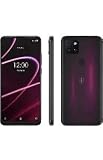
- 6.82" HD+ Display | 1640 x 720 pixels
- Storage Capacity: 64GB | Ram: 4GB | Maximum Expandable Memory: 2 TB (NOT INCLUDED)
- Connectivity: Wi-Fi 802.11a/b/g/n/ac, Bluetooth 5.1, NFC, VoLTE,5G, USB
- Processor: MediaTek Dimensity 700 Processor | Operating System: Android
- Locked for T-Mobile Carrier
Rank #3

- Professionally inspected and fully functional renewed unit — each phone has been thoroughly tested, cleaned, and certified to ensure full network compatibility, display clarity, and battery performance like new.
- Brilliant 6.5” Super AMOLED Display: Enjoy vibrant colors and smooth visuals with a 90Hz refresh rate for seamless scrolling and viewing.
- Powerful 5G performance: Stay connected with fast data speeds and reliable coverage on T-Mobile’s 5G network (carrier-locked; not compatible with other carriers).
- 64GB internal storage + expandable memory: Easily store photos, videos, and apps with microSD support up to 1TB (card sold separately).
- Triple rear camera system: 50MP main camera, 5MP ultra-wide, and 2MP depth sensor for capturing sharp photos and HD videos in any light.
Rank #2

- Connectivity technology: Wireless
- Display size: 6.82 inches
- Memory storage capacity: 128.0 GB
- Operating system: Android
- Wireless provider: t_mobile
Product prices and availability are accurate as of the date/time indicated and are subject to change. Any price and availability information displayed on Amazon at the time of purchase will apply.
The Tool Desk
Outbyte PC Repair FREERepair Windows errors before they cause bigger problemsFix Now →Outbyte Driver Updater FREEScan for outdated or missing drivers - takes under a minuteDriver Scan →



