For a U.S. pipeline overview and operator lookup, start with the Pipeline and Hazardous Materials Safety Administration’s (PHMSA) National Pipeline Mapping System (NPMS). For records about a proposed interstate natural gas project, search the Federal Energy Regulatory Commission’s (FERC) eLibrary by project name or docket number. Use FERC’s Environmental Documents index to locate its environmental assessment or impact statement, then check the relevant permitting agency’s own records for current permit status.
These sources serve different purposes: NPMS is a limited public map, while FERC’s docket and environmental index cover particular proceedings. The right path depends on the pipeline type, project stage, and location.
As an Amazon Associate I earn from qualifying purchases.
How do I find a pipeline map near me?
Use PHMSA’s NPMS public portal to open the Public Map Viewer. The viewer lets members of the public select a county and see pipeline information within NPMS scope. The portal also links to a directory for finding pipeline operators by county, state, or ZIP code, along with a data dictionary and information about what the public can access. PHMSA explains the viewer in its public map guidance.
Recommended Free Tools
What the NPMS map does—and does not—show
NPMS covers gas transmission and hazardous liquid pipelines, liquefied natural gas (LNG) plants, breakout tanks, and incident information under PHMSA jurisdiction. It does not include distribution or gas gathering pipelines, so an empty map does not establish that no pipeline is in an area.
#1 Best Overall

- MATERIAL - PVC Plastic. Transparent pouch features two-sided viewing from front and back. Includes nylon cord to carry around neck or waist. Also has 2 attached safety hooks.
- WATERPROOF - This watertight map case keeps your map and belongings safe from water and the outside elements.
- SIZE - This map case is compact and can be stored easily and is ready for your outdoor adventures or for your emergency kit. It is 12.5” long and 11” wide.
- HEAVY DUTY - This strong and durable map carrier is a perfect addition to your camping or hiking gear. Everything you need to keep your maps, documents and electronics safe from water.
- SATISFACTION GUARANTEED - We have a 30-day free return or exchange policy. Your satisfaction is our biggest concern. If you have any questions, please feel free to contact us and we’ll do our best to help you.
The public display is restricted, and PHMSA states that the minimum accuracy of NPMS geospatial data is ±500 feet. Treat it as a screening and operator-discovery tool, not a parcel-level locator. PHMSA’s warning is explicit: “The Public Map Viewer must not be used to identify exact locations of pipelines or as a substitute for contacting the appropriate One Call system or pipeline operator prior to excavation activities.” Call 811 before digging. See PHMSA’s NPMS overview and environmental compliance page for scope and limitations.
How do I find a proposed project’s permits and filings?
For an interstate natural gas project handled by FERC, identify its docket and search FERC eLibrary. Search by project name if you do not know the docket; once you find it, use the docket number to retrieve the proceeding’s applications, applicant submissions, public comments, and Commission documents. FERC says the public can view or download project records without charge. Some large-scale maps may not be viewable or printable online; follow the instructions on the record page to obtain them.
Rank #2

- 100% WATERPROOF - Keep your maps, documents or other small items safe from any amount of rain, snow, dirt, dust, sand, or even quick temporary submersion.
- SUPERIOR QUALITY - Manufactured using superior quality materials and precise fabrication. Established in 1994, AQ is the brand you can trust for maximum confidence in your waterproof gear.
- DURABLE - This case is built to last. Resilient Nylon 66 fabric + TPU lamination + Welded seams + Double Ziplock seal.
- VERSATILE & LIGHTWEIGHT - Featuring a clear window, removable strap, and multiple clips for different carrying and attachment options. Weighs only 105g (3.7 oz)
- LIFETIME WARRANTY - Included on all AquaQuest products, plus knowledgeable and responsive Customer Service based in the USA & Canada. With 30 years of experience, enjoy full confidence and no risk from a proven industry leader.
Recognize the FERC docket stage
For the natural gas process described in FERC’s landowner guidance, a pre-filing docket begins with “PF,” and its earliest document is the pre-filing request letter. A formal application docket begins with “CP,” and the application is its earliest dated document. These first records can identify agency contacts and the proposed schedule. PF and CP identifiers are clues for this FERC process; do not assume other agencies use them.
The Tool Desk
Outbyte PC Repair FREEClear out junk files and repair common Windows errorsFree Scan →Outbyte Driver Updater FREEFix the driver behind crashes, sound loss and screen glitchesFind Drivers →Where to look inside the application
Start with Exhibit F-1, the environmental report. Its resource reports can point to agency contacts and correspondence, list permits in Resource Report 1, and describe the applicant’s stated permit-application status. Then check Exhibit J for interstate facilities or Exhibit H for import/export facilities. FERC says these exhibits identify required federal authorizations, responsible agencies, filing dates, and requested or expected final-action dates.
Rank #3
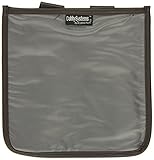
- Fits Honda GL1500
- Burgundy With UV Stabilized Clear Plastic Viewing Area
- Viewing Area is a Generous 9-1/2 inch x 9 1/2 inch
- Securely Attaches in Two Places to Your Bike
These are statements in the applicant’s filing, not a substitute for the permitting agency’s current record. If a permit’s status matters, check directly with the agency responsible for it.
Where can I read the environmental assessment or EIS?
Search FERC’s Environmental Documents index for the project’s Environmental Assessment (EA), Draft Environmental Impact Statement (Draft EIS), or Final Environmental Impact Statement (Final EIS). The index lists project names and docket numbers, which can help you match a document to the correct proceeding.
Rank #4

- Multi-functional: Kosibate map case is a professional-grade map case that boasts high quality, versatility, and durability. It is suitable for a variety of scenarios, including tactical and outdoor activities
- Durable: The military map case is made of durable 900Dn Oxford fabric, which can withstand harsh environmental conditions such as rain and wear
- Large size: The map case measures 7.4 x 6.7 inches and weighs approximately 250 grams, providing enough space to store large maps and other equipment such as flashlights, tactical pens, notebooks, compasses, and more
- Water-resistant: The map bag features a water resistant design that protects maps and other items from being soaked by rain splash
- Essential for adventure: Kosibate military map pouch is the ideal choice for your tactical and outdoor activities, offering reliability and high quality
Also search the docket in eLibrary. The index is useful for locating environmental documents, while the docket contains the broader project record, including project-specific filings and Commission decisions. Checking both helps distinguish the agency’s environmental analysis from the applicant’s reports and other submissions.
Which agency approves a pipeline?
There is no single federal pipeline siting agency for every project. Jurisdiction depends on the commodity, whether the project is interstate or intrastate, and its location, including whether federal land or waters are involved. PHMSA says it does not conduct National Environmental Policy Act (NEPA) reviews for proposed new pipeline construction.
Best Value
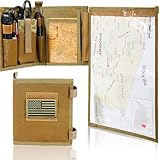
- 1. PREMIUM 1000D OXFORD & WATERPROOF TPU, ALL-TERRAIN WEATHER RESISTANCE — This heavy-duty military map case is built with tear-proof 1000D Oxford cloth and sealed waterproof TPU material, effectively resisting rain, mud, dust and daily abrasions in harsh outdoor environments. It fully protects your maps, military notebook and various EDC tactical tools from damage. Equipped with standard MOLLE webbing, it is perfectly compatible with tactical armband, tactical vests and waist belts, suitable for tactical training, field patrol and outdoor survival scenarios.
- 2. 13”X10” LARGE DOUBLE-SIDED CLEAR TPU WINDOW, WET-ERASE MARKABLE & FOLDABLE — Features an ultra-large high-transparency double-sided TPU viewing window that fits complete full-size topographic maps. The smooth TPU surface supports wet-erase marking, allowing real-time route planning and annotation without taking maps out of the pouch. Foldable and ultra-lightweight design saves valuable backpack space, ideal for hiking, hunting, camping and professional land navigation.
- 3. FULL-LENGTH HOOK-AND-LOOP SEAL, ONE-HAND QUICK ACCESS FOR FIELD EFFICIENCY — Adopts full-wrap full-length hook-and-loop closure to form a tight dustproof and waterproof barrier, completely isolating external moisture and dirt. The detachable window panel features a humanized one-hand quick tear design, enabling instant map viewing and route adjustment during field patrols, survival missions and outdoor activities, greatly improving field operation efficiency.
- 4. MULTIFUNCTIONAL LAYERED EDC STORAGE, FULLY ORGANIZE TACTICAL SUPPLIES — Designed with multi-size segmented pockets, elastic fixing straps, dedicated pen slot and transparent ID card slot. It can neatly and classifiedly store compass, protractor, tactical scissors, military notebook, marking pens and other small tactical EDC accessories. The stable fixing structure prevents tools from sliding, tangling or losing during strenuous outdoor movement.
- 5. UNIVERSAL MOLLE COMPATIBLE & PREMIUM MENS TACTICAL GIFTS — Equipped with standard universal MOLLE webbing, this map case can be stably attached to all kinds of army tactical gear, outdoor backpacks and waist packs. Paired with an exclusive US flag patch, it features authentic tactical style. Durable and practical, it is a perfect choice of army gifts for men, ideal for veterans, outdoor enthusiasts and tactical trainees, backed by 30-day return warranty.
- Interstate natural gas: FERC handles siting and environmental review for interstate natural gas pipelines.
- Interstate hazardous liquid: PHMSA describes no comprehensive federal siting or permitting authority. Other agencies may be involved when an international border, federal land, or waters of the United States are implicated.
- Intrastate pipelines: Siting is deferred to state agencies, according to PHMSA.
For the project in front of you, use its application and permit table to identify the authorities, then check the relevant state or agency records. PHMSA’s environmental compliance information describes these distinctions; it does not establish the jurisdiction or approval status of a particular project.
When the Permitting Dashboard may help
The Federal Infrastructure Permitting Dashboard can supplement—not replace—the docket and agency records for certain major projects. FERC says covered FAST-41 and Major Infrastructure Projects may be searched by project name or lead agency and list agency contacts. The FAST-41 category described in FERC’s guidance includes interstate natural gas pipeline construction or LNG terminal projects subject to NEPA and likely to require total investment above $200 million. Dashboard coverage is not universal, so a project’s absence there does not establish that it lacks a permitting process.
How to check one project without mixing up the records
- Identify the pipeline and location. Use the NPMS public viewer for a county-level overview and operator lookup where the asset is within the system’s scope. Do not use the map to locate a line precisely.
- Determine the project type and stage. Establish whether it is natural gas or hazardous liquid, interstate or intrastate, and whether it is proposed, in a FERC pre-filing, or under formal review.
- Find the proceeding record. For an interstate natural gas project, search eLibrary by project name, then use the docket number to find the relevant filings. Check the earliest record for stage and schedule clues.
- Trace permits in the application. Read Exhibit F-1 and Resource Report 1, then Exhibit J for interstate facilities or Exhibit H for import/export facilities. Note which agencies are named and what status the applicant reports.
- Locate the agency’s environmental analysis. Search the FERC Environmental Documents index and the eLibrary docket for the EA, Draft EIS, or Final EIS and related decisions.
- Verify current status with the authority. An applicant’s filing may describe a permit application or expected action date; confirm current status in the issuing agency’s own records. For public participation, check the current docket for comment deadlines and filing instructions.
For other pipeline types or intrastate projects, do not assume FERC’s docket system is the right records source. Use the project’s stated agencies and applicable state or federal records to identify the proceeding.
Quick wins for a faster PC:
Repair Windows errors before they cause bigger problemsFix Now →Scan for outdated or missing drivers - takes under a minuteDriver Scan →Quick Recap
Product prices and availability are accurate as of the date/time indicated and are subject to change. Any price and availability information displayed on Amazon at the time of purchase will apply.




