There is no defensible savings figure for a “free” AI stack without dated usage logs, account-tier details and a clear paid-price comparison. Free access is model- and account-specific; rate limits are not cash credits, and zero API charges do not mean zero operating cost. The useful calculation separates what you actually paid, what the same logged usage would have cost at published rates, and any broader operating costs you choose to count.
What “free” means—and what it does not
API providers distinguish model eligibility, rate limits, billing tiers, per-token prices, tool charges and data-use terms. A free tier may expose only certain models or features, and a published limit is not proof that the same quota applies to every account. Google says new API accounts start on the Free Tier for certain models, subject to each model’s free-tier limits; OpenAI directs customers to their organization’s account settings for current limits. Check the model and account actually used, rather than treating a provider-wide label as a guaranteed allowance.
As an Amazon Associate I earn from qualifying purchases.
Throughput limits and billing controls solve different problems. Requests per minute and input or output tokens per minute can constrain how quickly a workload runs. Per-token rates and spend caps determine or constrain charges. Anthropic documents request, input-token and output-token limits, and says its API usage pauses when a tier spend cap is reached until the next monthly reset unless the cap is raised. These controls do not establish a monthly free balance. Google’s Gemini billing documentation, OpenAI’s rate-limit guide and Anthropic’s platform limits describe different providers’ current arrangements; check the relevant account and model.
Recommended Free Tools
Build an auditable usage record
Choose a date range and preserve the raw usage export, invoice and account settings that support your calculation. Record each provider and model separately: a provider-level total can hide different model prices, free eligibility or tool use. Include the account tier and geography where relevant, since eligibility and limits can vary.
#1 Best Overall

- Improved Measurement Accuracy: Our USB C Tester can accurately measure accuracy: ± (1%+5). The data is more accurate for detecting charging devices such as chargers, mobile phones, tablets, and power banks. Make this Type-C meter suitable for more 3C digital peripheral products, making it the first choice for digital gamers and electronics enthusiasts.
- Wide Applicability: This USB power meter is equipped with a 12A high current terminal, which is more stable. Measuring current: 0-12A; measuring voltage: 4V-30V. The wide test range makes this USB meter suitable for more 3C digital peripheral products, and it’s a cost-effective solution for anyone looking to optimize their electronic devices’ charging performance.
- Detect Various Fast Charging Protocols: The USB power meter supports PD2.0/3.0, QC2.0/3.0, FCP. SCP, AFC, PE, DASH VOOC and Super VOOC protocol charging. Whether you’re testing chargers, power banks, or any USB-C device, this tester is up to the task.
- Upgraded Curve Function: This USB C tester has upgraded curve function to better record real-time voltage and current. You can set the time of curve page (5mins/15mins/60mins/2hrs) by long press button to monitor the real-time voltage and current. In addition, the voltage and current of each cell will be automatically adjusted according to the actual voltage and current.
- ISP Color Display Interface: This USB C Power Meter features a 1.06-inch ISP color high-definition display with high resolution and clarity. It can display voltage, current, power, capacity, energy, time, maximum voltage, maximum current, maximum power, current direction, and CPU temperature. You can easily switch between interfaces by pressing a key. Double-click the button to rotate the displayed content.
| Record for each model and interval | Why it matters |
|---|---|
| Provider, model, account tier and geography | Identifies the applicable eligibility rules and price row. |
| Date range, input tokens and output tokens | Rates can change over time, and input and output may have different prices. |
| Requests, retries, failures and tool calls | Shows workload volume and captures separately billed tools where applicable. |
| Free-tier eligibility and paid input/output rates | Makes the counterfactual’s model and pricing assumptions visible. |
| Special usage such as cached, audio, image or grounding | Include special rates only when that feature was actually used and a matching rate is documented. |
Keep account-level evidence with the record: a dated screenshot or export can substantiate what was available to that account, while the provider’s documentation explains the rules. Do not infer an individual quota from a general help page.
Calculate paid-rate equivalents without calling them savings
For each model and date range, calculate input and output separately using the price that applied to that model and tier:
Rank #2

- Various Monitoring Parameters: The power meter plug can monitor the power (W), energy (kWh), volts, amps, hertz, power factor, cost, minimum and maximum power (W), cumulative days and time of your appliances. By switching 7 display modes, you can easily know the various parameters while the appliance is working. The home energy monitor can also calculate and display how much power your appliance uses and how much electricity bill it cost in cumulative time
- Upgraded LCD Display: With large screen size 2.36 inch x 1.85 inch, clearer monitor backlit, our electrical usage monitor can display the data clearer and more visible no matter day or night. 180°full wide viewing angles is great for reading and recording the data in any angles. No need to stand on the front of the display and bend over to read the numbers
- Adjustable Backlight Time: Our upgraded watt meter has 5 options of backlight time. The default backlight time duration is 10 minutes(bL-0). If you want to change the backlight time, you can press and hold "UP" and "DOWN" button at the same time to enter backlight time setting, then press "UP" and "DOWN" to select the backlight time (bL-0 =10 minutes, bL-1=1 hour, bL-2=4 hours, bL-3=8 hours, bL-4=always on), finally press the "COST" to save the backlight time settings
- Overload protection: When the power of the appliance exceeds the overload power, the LCD will display “OVERLOAD” to warn the user. All the buttons will quit working and can only be workable when you lower or remove the load power. The default overload power is 3680W and is adjustable from 0 to 3680W. In general, you need to set the overload power to 1800W before using. Just press the "function" button for more than 3 seconds to enter the setting
- Data Memory Function: The wattage meter will record your power consumption data when you remove it from socket, or remove appliances from the electricity monitor. You can directly see the last data when you use it next time. This function can also automatically save the data when there is a sudden power failure
Input cost = input tokens ÷ 1,000,000 × input rate per million tokens
Quick wins for a faster PC:
Repair Windows errors before they cause bigger problemsFix Now →Fix the driver behind crashes, sound loss and screen glitchesFind Drivers →Output cost = output tokens ÷ 1,000,000 × output rate per million tokens
Rank #3
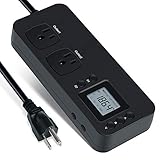
- NEW DESIGN: Our new electricity usage monitor with 2 outlets design can allow you monitor the power consumption of two electronic devices at the same time. Monitor each machine independently, without affecting each other
- POWER OFF MEMORY FUNCTION: With standard memory function, the CT and EC-KWH of electrical power consumption can be retained in the event of a power failure. And you can clear them manually
- SAFETY & OVERLOAD TIP: Full ABS flame retardant material housing, and equipped with 14AWG heavy duty extension cord, performances excellent heat resistance. When the rated power exceeds 1200W, a warning will remind you to cut off the power in time
- ACCURATE MONITORING: Electricity analyzer monitoring device equippeds with a high-precision current sensor and high-resolution real-time monitoring. You can measure power(W), volts, amps, hertz, kilowatt-hours(EC), cumulative time(CT) and power factor accurately
- WIDE APPLICATION & EASY TO USE: Watt voltage amps meter tester can connected to TV, refrigerator, water purifier, HIFI System and other household appliances. It can be monitored easily when the device is connected
Add separately billed tools and any other matching charges, then sum the model rows. Keep the arithmetic tied to actual logged usage; do not multiply a daily limit by a month and describe the result as guaranteed monthly capacity.
For example, Google’s pricing page showed Gemini 3 Flash Standard paid-tier text rates of $0.75 per million input tokens and $4.50 per million output tokens when checked in 2026. Those are model- and tier-specific rates, not a price for every Gemini model or a statement about any account’s free eligibility. Google also listed Google Search grounding at $14 per 1,000 requests after the specified free allowance; the applicable model-family terms and allowance matter. See Google’s model-specific pricing table and verify the row and effective date before using it.
Rank #4

- Multi-function power monitor: Our electric usage monitor can monitor the power (W), electricity(kWh), voltage(V), frequency(Hz), current(A), power factor(PF), unit price($/kWh), total cost($) of your appliances. By switching 8 display modes, you can easily know the various parameters while the appliance is working. The “electricity” mode can calculate and display how much power your appliance uses. And the “total cost” mode will show how much electricity bill it cost in cumulative time
- Overload protection: When the loading power of the appliance is over the default overload threshold 1800W, the whole display with backlight and the word “OVERLOAD” will keep flashing to warn the users. Please turn off the appliance for safety concern
- Premium Material: The whole body of our energy meter is made of high-quality ABS material. It makes our home electricity usage monitor more long lasting, fireproof and anti-drop. The standard US socket and plug is suitable for all US standard appliances
- Backlight Display: With white backlight and black words, the LCD display of our home power monitor can display the data clearer and help you to read the data easier no matter day or night. The backlight will only lights up when the device is connected to AC power. If no button is pressed, the backlight turns off automatically after 10 minutes. You can also press the "UP" button to turn off the backlight manually, and press any button to turn on backlight again
- Easy to reset: No reset tool needed, our appliance power usage meter is easy to reset. You can press the “M” button for 5 seconds directly to reset the device. After reset, all cumulative data (electricity quantity, cost) will be cleared, and all settings will be restored to factory settings
Keep three different totals separate
- Actual cash spent: what invoices and billing records show for the chosen interval.
- Paid-rate equivalent: what the same logged usage would cost at a named model’s published rates, under stated assumptions. This is a counterfactual, not automatically money saved: the paid and free cases may differ in model access, tools or data terms.
- Total operating cost: actual API spend plus any subscriptions, infrastructure, hardware or labor you deliberately include. Say what is counted; time spent managing throttles, retries and fallbacks can be relevant even when it is not an invoice charge.
Never present token volume as dollar savings without naming the counterfactual model, price and logged usage. If records omit retries, tools, special modalities or some token counts, label the comparison incomplete rather than silently treating the missing usage as zero.
Account for tools and data terms
Tool calls can add costs beyond model tokens. Anthropic lists API web search at $10 per 1,000 searches, in addition to standard token charges for generated content; it counts each search as one use regardless of how many results it returns. Apply that rate only to search calls actually made under the applicable pricing terms. Anthropic’s pricing documentation provides the provider’s current details.
Best Value

- Various Monitoring Parameters: The power meter plug can monitor the power (W), energy (kWh), volts, amps, hertz, power factor, cost,minimum and maximum power (W), cumulative days and time of your appliances. By switching 8 display modes, you can easily know the various parameters while the appliance is working. The wattage meter can also calculate and display how much power your appliance uses and how much electricity bill it cost in cumulative time
- Premium Material: The whole body of our power monitor is made of high-quality PC material. It makes our home power consumption monitor more long lasting, heat resistant and fall resistant. The standard US socket and plug is suitable for all US standard appliances
- Overload Protection: When the power of the appliance exceeds the overload power, the word "OVERLOAD" and the LCD display will keep flashing, the buzzer will keep making a bi sound to warn the users. All the buttons will quit working and can only work again when the overload alarm has been cleared by raising the setting value or removing the appliance. The default overload power is 3680W and is adjustable from 0 to 3680W. In general, you need to set the overload power to 1800W before using. Just press the "MODE" button for more than 3 seconds to enter the setting
- KWH Alarm: Our power monitor plug has a upgraded power consumption alarm function. You can set the alarm power consumption for the appliances you monitored. Once the accumulated power consumption reaches the set alarm power consumption, the word "kwh alarm" will be displayed and keep flashing, the LCD will also keep flashing, and the buzzer will keep making a bi sound all the time to warn the users
- Data Memory Function: The watt meter plug in will record your power consumption data when you remove energy meter from socket, or remove appliances from the electricity monitor. All setting data and cumulative data(electricity quantity, cost, unit price, time) will be saved. You can directly see the last data when you use the electric usage meter plug next time(NOT including current, voltage, power, power factors). This function can also automatically save the data when there is a sudden power failure
Also check the terms for the exact model and tier rather than generalizing across a provider. Google’s pricing page labels data use differently for free and paid tiers in relevant model rows: it says data is used to improve Google products on the free tier and not on the paid tier as displayed there. Verify the row and current terms that apply to your usage before drawing a broader conclusion.
Why a quota is not a production guarantee
Rate limits govern throughput, and spend caps govern billing exposure; neither alone tells you how much work will reliably fit into a month. Anthropic says exceeding its API limits can return a 429 response with a retry-after header. OpenAI says organizations may move to higher usage tiers as API spend increases, which usually raises limits across most models, while spend limits are separate controls at organization or project level. Those mechanics make account settings and failure behavior part of the cost picture: throttling can add retries, delays and fallback work even when the rate card is unchanged.
Keep coding-assistant workspace limits separate from API platform limits. Anthropic’s platform documentation treats Claude Code workspace limits separately from API rate and spend limits; one product’s allowance should not be used to describe the other.
For each reporting interval, note the date rates were checked and retain the rate-card row alongside the usage record. Providers can change prices, eligibility and limits, so an old calculation is a dated snapshot, not a permanent claim about the stack’s cost or capacity.
Quick Recap
Product prices and availability are accurate as of the date/time indicated and are subject to change. Any price and availability information displayed on Amazon at the time of purchase will apply.




