Benchmark storage with the I/O patterns your AI deployment will actually generate—not a single peak-bandwidth test. Training reads, checkpoint writes and restores, inference-time KV-cache activity, and vector search stress storage differently, so test each relevant workload and compare systems only under the same workload, software, access path, client topology, and configuration.
Choose tests that match the AI workload
Start by mapping the data paths in the deployment. Training commonly needs sustained reads; checkpointing adds large writes and later reads; inference may read model weights and features, access a KV cache, or query a vector index. Fine-tuning can add its own data and weight-update patterns. A result for one path cannot stand in for another.
As an Amazon Associate I earn from qualifying purchases.
NVIDIA’s storage certification documentation lists different I/O profiles by use case, including sequential training reads, checkpoint writes, inference reads, random KV-cache I/O, and random vector lookups. NVIDIA-Certified Storage is a useful checklist when identifying the paths to include.
Recommended Free Tools
MLPerf Storage v3.0 organizes its suite around training, checkpointing, vector database, and KV-cache tests. Its command reference describes training and checkpointing tests using DLIO, with separate test paths for the other families. Consult the mlpstorage command reference for the described families, but verify the release rules you plan to use: the reference warns that its version is not final and may change.
#1 Best Overall

- 【Advanced Home Data & Media Hub】For advanced home users who need phone backup, file storage, and centralized data management. Centralize family photos, 4K videos, movies, computer backups, and personal files in one place while running multiple apps for home entertainment and everyday data management. Suitable for households with growing digital libraries and multiple NAS use cases.
- 【Built for Creators, Media Servers & Advanced Apps】Powered by the Intel N100 Quad-Core CPU, 8GB DDR5 RAM, 2.5GbE networking, and dual M.2 NVMe slots, DXP2800 handles large files and heavier workloads with ease. Run Docker, virtual machines, and media server applications compatible with Plex—ideal for content creators, tech enthusiasts, and advanced home users managing 4K videos, RAW photos, personal media libraries, and multiple NAS apps.
- 【Up to 80TB for Growing Digital Libraries】 Supports up to 80TB of storage using two HDD bays and two M.2 NVMe SSD slots for family photos, movies, RAW photos, 4K videos, work files, and device backups. AI photo management supports recognition of people, objects, scenes, and locations, album organization, and duplicate photo detection. HDDs and SSDs are not included.
- 【AI-powered Home Surveillance】Turn DXP2800 into a centralized home surveillance hub by connecting compatible network cameras and storing recordings locally on your NAS. AI-powered features include Face Recognition, People Detection, and Pet Detection, helping advanced home users review important events more efficiently while managing home surveillance and personal data in one place.
- 【One data Center Across Your Devices】Keep files from desktops, laptops, phones, tablets, and other devices together instead of scattered across cloud accounts and external drives. Access, back up, organize, and share data across Windows, macOS, Android, iOS, web browsers, and compatible smart TVs—ideal for creators and advanced home users working across multiple devices.
Pick metrics that expose the bottleneck
Training data supply
For training reads, report aggregate read bandwidth and how many simulated accelerators stay at or above the workload’s accelerator-utilization threshold. MLCommons defines these as key results: each simulated accelerator demands roughly a fixed data rate, so more bandwidth can support more accelerators above threshold. The MLPerf Storage results page gives the test-specific definitions and thresholds.
Checkpointing, metadata, and inference
For checkpointing, measure both save and restore/read behavior. If saves are synchronous, record how long the training job is blocked while they complete. For small-file or metadata-heavy tests, include operations per second, tail latency, and namespace behavior where the test supports them. For cache and retrieval workloads, measure the actual read/write or query behavior under the expected concurrency. These metrics complement suite results; not every MLPerf test reports all of them.
Rank #2

- Entry-level NAS Home Storage: The UGREEN NAS DH4300 Plus is an entry-level 4-bay NAS that's ideal for home media and vast private storage you can access from anywhere and also supports Docker but not virtual machines. You can record, store, share happy moment with your families and friends, which is intuitive for users moving from cloud storage, or external drives to create your own private cloud, access files from any device.
- Smart Photo Backup & AI Album: Automatically back up photos and videos from your phone in real time and keep growing family memories organized with AI-powered photo albums. Semantic search, custom learning, and recognition of people, objects, pets, and similar photos help you quickly find the moments you want. Duplicate photo removal also helps keep your library organized—ideal for families and users with large photo collections.
- User-Friendly App & Easy Setup: Connect quickly via NFC, set up simply and share files fast on Windows, macOS, Android, iOS, web browsers, and smart TVs. You can access data remotely from any of your mixed devices. What's more, UGREEN NAS enclosure comes with beginner-friendly user manual and video instructions to ensure you can easily take full advantage of its features.
- More Cost-effective Storage Solution: Unlike cloud storage with recurring monthly fees, A UGREEN NAS enclosure requires only a one-time purchase for long-term use. For example, you only need to pay $629.99 for a NAS, while for cloud storage, you need to pay $719.88 per year, $1,439.76 for 2 years, $2,159.64 for 3 years, $7,198.80 for 10 years. You will save $6,568.81 over 10 years with UGREEN NAS! *NAS cost based on DH4300 Plus + 12TB HDD; cloud cost based on 12TB plan (e.g. $59.99/month).
- Your Data, You Control:No third-party clouds, no hidden access, UGREEN NAS provides a more secure and private data storage solution. It stores data locally on your private hard drives and does automatic backups. Thus, you can keep full control over it. The advanced encryption is TRUSTe certified in the United States and is awarded the first (and only) ETSI EN 303 645 certification mark for NAS products by TÜV SÜD Group.
Do not rank systems across unlike workloads. MLCommons explicitly cautions that results are comparable within a workload, not across workloads, because each stresses storage differently. Keep workload, accelerator type, client count, data size, access layer, and configuration constant for a comparison.
Keep the benchmark measuring storage, not client RAM
For the MLPerf Storage v3.0 training measurements described by MLCommons, the dataset must be at least five times the aggregate DRAM of the client nodes, and a run must process at least 500 batches per accelerator. These are controls for those suite tests, not universal rules for every custom benchmark; they are intended to reduce the chance that the test measures client memory rather than storage.
Rank #3

- High-Performance NAS with Powerful Procesor: DXP4800 Plus is ideal for small offices, & More. You can enjoy smooth performance and seamless collaboration, while making use of advanced features like Docker and virtual machines. It works semalessly across every device inluding Windows, macOS, Linux, iOS, Android or Google services and so on.
- Better Way to Store Than External Drives: NAS offers centralized storage, automatic backups, remote access, and a wide range of RAID options for easy data recovery even if a drive fails. Massive Storage Capacity: Never worry about storage limits again. With up 144TB capacity, you can store 50 million 1MB photos or 98K 1.5GB movies,5 million 30MB songs! *Hard Drives not included.
- Super-Fast Transfers: Back up 1GB in less than a second using either the 10GbE network port or the 10Gbps USB ports.
- Secure Private Cloud: Retain 100% data ownership with advanced encryption to protect your files. Flexible permission management makes it easy to protect your privacy when collaborating with others.
- AI-Powered Photo Album: Automatically organizes your photos by recognizing faces, scenes, objects, and locations. It can also instantly remove duplicates, freeing up storage space and saving you time.
The v3.0 training test uses simulated accelerators. Each reads real data through PyTorch at the intensity of a training job, then simulates compute by sleeping for the measured per-batch compute time. The arithmetic is skipped, but the storage-to-client data path remains real. This isolates storage data supply; it does not measure GPU arithmetic, model quality, or end-to-end training time.
Record dataset size relative to client memory, cache state, client count, and whether the path uses POSIX or S3. MLPerf v3.0 supports an S3 access layer alongside POSIX for training, checkpointing, and some vector database tests—not every workload. Check the rules for the exact test rather than assuming S3 support is universal.
Rank #4
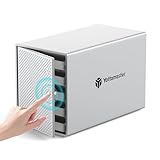
- 【110TB Large Storage Capacity】Yottamaster 5-bay hard drive enclosure supports up to 5 drives, with single disk capacity of 22TB (MAX). The 110TB total expanded capacity helps you easily manage tasks like digital imaging, video editing, duplicating footage, and creating/archiving files.
- 【For 2.5"/3.5" SATA HDD & SSD】Yottamaster 5-bay USB-C HDD enclosure supports 2.5" and 3.5" SATA HDD/SSDs. It features 5 removable trays for easy drive installation and replacement, compatible with desktop and laptop drives. Included screws securely attach the drives to the trays, protecting against shock and interface damage.
- 【Stable and Durable】Powered by a 78W (12V 6.5A) power adapter, it supports simultaneous read/write across multiple disks. The front door features a user-friendly PUSH-latch design for easy hard drive installation and replacement.【Hard Drive Usage Note】If you are using a brand new hard drive, it may need to be formatted and partitioned before it can be recognized by the computer. Please remember to back up your data.
- 【Aluminum-Alloy Enclosure & 80mm Cooling Fan】The 5-bay SATA enclosure features a durable aluminum shell for heat dissipation, with cooling holes at the front and back. A low-noise 80mm fan inside ensures efficient air circulation and rapid cooling.
- 【5Gbps Transfer Speed】This 5-bay HDD enclosure uses the SATA III protocol and features a USB 3.1 Gen1 (5Gbps) Type-C external interface, delivering read/write speeds of up to 260MB/s for SSDs. The USB 3.1 Type-C interface connects to any computer or laptop with a Type-C port. Compatible with Windows and Mac systems, ensuring smooth performance for work, study, entertainment, or gaming.
Make runs repeatable and comparisons fair
- Freeze the test definition. Record the benchmark release and workload, software and framework versions, access path, data-generation seed, accelerator configuration, clients, network topology, and storage configuration.
- Use stable conditions. Keep storage and the client/network setup stable across runs. Document cache state and any storage tuning that could affect results.
- Repeat and report results. MLPerf rules require multiple runs for statistical significance and say results that cannot be replicated are invalid. The rules prescribe replication within five percent across five tries. The v3.0 results page describes five consecutive measured training runs being averaged; that detail applies to the described results, so follow the rules for the release and workload you run.
- Disclose the submission class. MLPerf defines CLOSED and OPEN classes. CLOSED favors comparability and restricts most benchmark or framework changes while allowing storage tuning. OPEN allows documented changes but sacrifices direct comparability; it still cannot fundamentally change the workload. Label the class and disclose the code, configuration, client, network, and storage details needed for reproduction.
The MLPerf Storage Benchmark Suite rules state: “Results that cannot be replicated are not valid results.” Publishing run-to-run variation, rather than only a best result, helps readers judge whether a measured difference is dependable.
What’s actually slowing this PC down?
Pick the symptom - the matching free tool is one click away.
Interpret MLPerf Storage v3.0 results in context
MLCommons announced v3.0 on September 1, 2026, adding KV-cache and vector database tests and S3 object access alongside POSIX for supported workloads. In the round, MLCommons reported that 19 organizations submitted results, including 11 first-time submitters. Those counts describe that round, not the broader storage market.
Best Value

- Beginner-Friendly Home NAS and Private Cloud: Install compatible drives, connect the Zero1 Pro, and follow the mobile app's guided steps to register, sign in, and get started. First-time users and families can store phone photos, videos, and household files in one shared home NAS, then use remote access while away from home. Included Yxk storage, remote access, and supported transfer speeds require no monthly subscription, with no subscription-based storage or speed tiers.
- Intel N100 Performance for Home and Office: Powered by an Intel N100 x86 processor and 8GB DDR4 RAM, the Zero1 Pro handles everyday network attached storage for family backups, home-office file sharing, and personal NAS server projects. The Intel N100 has a rated processor base power of 6 W, making it well suited for an always-on home NAS.
- Up to 144TB 4-Bay NAS Storage with RAID: Four SATA 3.0 bays support up to 4 x 32TB HDDs and RAID 0, 1, or 5. Choose RAID 0 for maximum media-library capacity, RAID 1 for mirrored family files, or RAID 5 to balance usable capacity and single-drive fault tolerance for small-office storage. Two M.2 NVMe slots support up to 2 x 8TB SSDs; 144TB is combined raw capacity before formatting and RAID; drives sold separately.
- Dual 2.5GbE Home Media Server with 4K HDMI: Two 2.5GbE ports support link aggregation with compatible network equipment, helping multiple household members access shared files, videos, and a home media library. Connect the 4K HDMI output to a compatible TV or monitor for a home theater setup; playback quality depends on the media format, software, and network.
- AI Photo Album for Family Memories: The photo tools recognize faces, scenes, and objects to organize vacation photos, children's milestones, and everyday snapshots into smart albums. Search by keyword to locate an image, then review duplicate or similar photos and remove them with one click to reclaim space in your NAS photo library.
For on-premises submissions in that round, MLCommons reported median checkpointing write efficiency of 14 GB/second per watt and a maximum of 201 GB/second per watt. For on-premises UNet3D read submissions, it reported a median of 34 GB/second per watt and a maximum of 277 GB/second per watt. These are submitted results for the v3.0 round, not performance guarantees for other systems or workloads. See the MLCommons v3.0 results announcement for their scope.
For a useful comparison, retain the workload family and version, test division, bandwidth or operations per second, utilization or completion behavior, latency and variability where measured, data size relative to client memory, client and network topology, access layer, checkpoint behavior, power efficiency if measured, and the completeness of system disclosure. Compare only results produced under the same workload and ruleset.
Pair storage results with an application-level test
Storage benchmarking answers how well the system supplies data under a defined test; it does not establish model time-to-result or serving latency. Because the MLPerf training test skips arithmetic, run a separate end-to-end training or serving benchmark if the decision depends on those outcomes. Use storage results to locate and compare the storage contribution, then validate the full application path.
Quick Recap
Product prices and availability are accurate as of the date/time indicated and are subject to change. Any price and availability information displayed on Amazon at the time of purchase will apply.




