Before buying a tech deal, confirm that the exact product model can do the job you need with the exact device you own, then compare its full delivered cost and check the seller, reviews, delivery, and return terms. A familiar connector, a high star rating, or a large discount does not establish that a listing is suitable or low-risk.
Start with the job and the exact models
Write down two things before comparing offers: the device you own and the product you are considering. Record the manufacturer and exact model number for each, not just a family name such as a laptop series or a broad label such as “USB-C charger.” Product names can cover several configurations, and a shared connector does not prove that every advertised feature works.
As an Amazon Associate I earn from qualifying purchases.
Then define the task in plain terms. For an accessory, that might be charging a laptop, transferring data, outputting video to a display, or expanding storage. “Works with my laptop” is too broad to verify; “charges this laptop at the power level required by its manufacturer” is a checkable question. For a storage product, distinguish capacity from whether the device supports the relevant type of expansion. For a cable or adapter, identify the function it must carry rather than relying on its shape.
Quick wins for a faster PC:
Fix the driver behind crashes, sound loss and screen glitchesFind Drivers →Repair Windows errors before they cause bigger problemsFix Now →- Write down the full device model from its label, settings, original documentation, or manufacturer account.
- Record the exact accessory or product model shown on the offer, including any configuration or variant identifier.
- State the intended task and the feature or performance requirement that task depends on.
- Note anything that could change the match, such as an included cable, adapter, or required configuration.
This step prevents a common comparison error: treating two listings as interchangeable because their headline names look alike. If a listing omits the model number or does not identify the configuration clearly, you may not have enough information to establish that it is the same product as another offer.
#1 Best Overall

- USB C Laptop charger:Watt: 65W 45W Input :100-240V 1.5A 50-60Hz Output:5V-3A or 9V-3A or 15V-3A or 20V -3.25A,Connector:USB Type-C; VJYUIJAY Laptop Charger Fast charging Compatible with More USB C laptops,For use with compatible devices only,Do not exceed the rated power,Use certified cables,and Avoid placing in enclosed, high-temperature areas
- VJYUIJAY Computer Charger Type C Compatible with ThinkPad L390 L480 L490 L580 L590 E480 E580 E585 E490 E590 P51s P52s P43s P53s ,T470 T470s T480 T480s T490 T495 T590, X270 X380 X390 X395 X1 Carbon 5th 6th 7th Generation;Yoga S730 720 730 910 920 720-12IKB 720S-13IKB 730-13IKB 910-13IKB 920-13IKB, X270 X280 X380 X390 X395 Yoga, X1 Tablet 2nd 3rd;Flex 11 chromebook ,13 Chromebook 2nd Generation;100e 300e 500e C330 C340 S330 S340 C930 C940 C740 Yoga
- VJYUIJAY Laptop Charger Type C Compatible with Chromebook X360 11 12 14 15;14a-na0020nr 14a-na0010nr 14b-ca0013dx 14b-ca0010nr 14b-ca0015cl 14b-ca0023dx 14b-ca0025cl 14b-ca0036nr 14c-ca0000 14-ca0053dx 14-ca0043cl 14-ca003cl 14-ca0065nr 14-ca061dx 11-ae051wm 11-ae001tu 11-ae027nr 11-ae001nr 11-ae002nr 11-ae010nr 11-ae020nr 11-ae027nr;Spectre X2 X360/Elite X2/Pavilion X2/Elite x2 1012 G1 1012 G2 210 /Envy X2
- VJYUIJAY Chromebook Charger Type C Compatible With Chromebook 3100 3300 3380 3400 3500 5190 5300 5400 7200 7300,Latitude 5420 5520 5320 7410 7310 2-in-1 P28T P29T P30T P86F;XPS 12 9250 XPS 13 9300 9310 9350 9360 9370 9380 XPS 15 9550;3310 2-in-1 3390 2-in-1 5175 2-in-1 7200 2-in-1 7210 2-in-1
- VJYUIJAY 65W USB C Laptop Charger Compatible with Spin 11 13 R13 15 311 315 CP311 CP713 C933 CB5-312T R751T SF713 SP714 CB311 CB314 CB314 CB514 CB515 CB714 CB715 CP5-471 CP311 CP315 CP511 CP713 R721 R751 R752T R851
How do I know if an accessory is compatible with my device?
Check the manufacturer’s documentation for the exact device model and the product’s exact model. Look for the feature you intend to use and its requirements. A general standards page can explain what a technology is capable of, but it cannot establish what a particular laptop, phone, accessory, cable, or adapter supports.
Verify the complete connection, not just the plug
For an accessory that connects through a cable or port, check the whole path: the host device, accessory, cable, and any adapter in between. Each part must support the feature you need. A connector that physically fits answers only whether the pieces can connect; it does not prove support for charging, data transfer, display output, or a particular level of performance.
Use the manufacturer’s specifications or manual as the authority for device-specific requirements. ASUS, for example, directs users to search for their model and consult its technical specifications or manual for adapter details. Apply the same model-specific approach to other manufacturers rather than inferring a requirement from another device in the same product family.
Do these 3 things before closing this tab:
1Repair Windows errors before they cause bigger problems2Fix the driver behind crashes, sound loss and screen glitches3Clear out junk files and repair common Windows errorsCharger example: check required power and the charging feature
If you are shopping for a laptop charger, first identify the exact laptop model and look up its adapter requirements in the manufacturer’s technical specifications or manual. If you are considering USB-C charging, confirm that the laptop supports the relevant power-delivery feature and that the charger and cable meet the laptop’s requirement. A USB-C-shaped connector on both ends is not sufficient evidence.
USB Power Delivery is a flexible standard. USB-IF says USB PD 3.1 enables up to 240W over a full-featured USB Type-C cable and connector. That is an upper capability of the standard, not a statement that every laptop needs that amount or that every charger and cable supports it. Match the actual device requirement to the documented capabilities of the charger and cable.
Rank #2

- Fast Charging: ELECBRAIN 100W USB-C Power Adapter will smart identify your devices automatically. its Charging power Up to 96W, 90W, 87W, 67W, 65W, 61W, 45W, 30W, 29W, 25W, 20W,18W ; PD 20V=5A; 18V=5A; 15V = 5A; 10V=5A; 9V=3A; 5V=3A. It supports USB-C PD 3.0 Charging protocol. Quick charge for your USB-C devices
- Safety and Wide Compatibility: Super safety with fivefold protections:over-current protection, over-voltage protection, over-heating protection, short-circuiting protection,over-charge protection. Wide Compatibility, it can automatically recognize your device and provide the fastest and most efficient output current
- Widely Compatibility: ELECBRAIN 100W USB-C Power Adapter Charger specially designed for charging your USB C device, 100W USB C Charger with 4.9ft USB-C Cable, Which with E-mark Chip, Compatible with Lenovo, Acer, Dell, Asus, and all USB-C charger devices, laptops and android phones. It can automatically recognize your device and provide the fastest and most efficient output current
- Full Safety Protection: In order to let you use our USB C charger with confidence, each of our chargers has undergone professional technical inspections before shipment to ensure excellent performance and safety. ELECBRAIN charger has a built-in heat dissipation system to prevent the charger from overheating at full power output. The built-in IC chip technology provides overload short-circuit /overheat protection, so there’s no worries about damaging functional devices
- Safety Certification: The 100W USB C fast charger have passed the US charger was certificated with safety certification standards.Intelligent output and protection, avoid sparks, overheat,overcurrent.USB C Cable supports safe speed charging and fast data transfer to ensure safety for you and your device
USB-IF’s certified product search can help check products certified to bear its logo. A search result is a check on the listed product, not a substitute for confirming that the item meets your device’s specific needs. USB-IF advises contacting the manufacturer if a product is not found in its list. Do not treat absence from that search alone as proof of incompatibility, or treat certification alone as proof that a product is the right match for your device.
Use the same method for other accessories
For any accessory, translate your intended use into the feature that must be supported and check each relevant specification against the device documentation. If the task depends on more than one component, verify those components individually. When documentation leaves a material question unanswered, ask the device or accessory manufacturer before buying rather than relying on a product-family name, seller shorthand, or a review from someone with a different setup.
Free tools Windows power users keep installed
One-click scans. No signup required.
How do I compare tech deals fairly?
Compare the same manufacturer and model number, and make sure the configuration and included items also match. A lower price may reflect a different size, configuration, condition, color, or bundle. Read the complete product description and the deal conditions; do not assume a headline title captures every difference.
Compare the total cost of getting the item to you, not only the displayed price. Include shipping, handling, taxes, and other fees that apply to your location and transaction. Prices, inventory, delivery charges, and terms can change, so check the actual checkout total before deciding.
| Comparison point | What to record for each listing | Why it matters |
|---|---|---|
| Identity | Manufacturer, exact model number, configuration, and relevant variant | Establishes whether the offers are for the same item |
| Fit for purpose | Compatibility with your device and the feature or performance requirement for your task | Prevents buying an item that connects but does not do the job |
| Total cost | Item price plus shipping, handling, taxes, and other applicable fees | Reveals the amount you would actually pay |
| Condition and contents | Condition wording, product photos, and what is included | Identifies differences between new, used, refurbished, incomplete, or differently bundled offers |
| Evidence and seller | Reviews across sources and information about the seller | Helps you assess the listing and seller beyond the headline offer |
| Transaction terms | Promised delivery date, return window, return costs, restocking fee, and refund terms | Shows what happens if the offer is delayed or the product is unsuitable |
Fill in the same fields for every offer on your shortlist. If a detail is missing, look for it in the full listing or ask the seller. A comparison is not reliable when one offer’s displayed price is being compared with another offer’s total, or when one product’s exact configuration is known and the other’s is not.
Rank #3

- High-Speed Charging: The 100W USB C port pumps out enough power to charge a wide range of devices in record time. Charge your MacBook Pro 16" (M1 Max, 2021) to 100% in 1 hour and 20 minutes, so you can stay productive all day.
- Wide Compatibility: From phones to laptops and more, our proprietary PowerIQ 3.0 technology provides flawless compatibility with virtually any mobile device.
- Foldable and Portable: The charger's compact size and foldable plug make it easy to take wherever you go, while saving valuable space in your bag or pocket.
- Safer Charging Experience: Our exclusive ActiveShield safety technology provides 24/7 temperature monitoring to ensure safety for you and your connected devices.
- What You Get: Anker 317 Charger (100W), 5ft / 1.5m USB C to USB C cable (placed behind the plastic tray compartment), welcome guide, our worry-free 18-month warranty, and friendly customer service.
Can I trust online product reviews?
Use reviews as evidence to investigate, not as a substitute for specifications or a guarantee about your own purchase. Read several sources, including expert reviews and customer feedback from more than one venue. Consider who wrote each review, where it appears, what product or configuration it covers, and what is known about the reviewer.
Recommended Free Tools
The Federal Trade Commission’s online-shopping guidance warns: “And don’t rely on star ratings alone because some reviews and ratings are fake or misleading.” A high average does not establish that the reviews are genuine, that they concern the same model, or that the product has the feature you need. Misleading reviews can be positive or negative, and incentives may not be clear.
Read for useful evidence
- Check whether the review names the exact model or configuration you are considering.
- Look for specific discussion of the task you care about, such as charging behavior or whether a feature worked with a stated device.
- Compare customer feedback with expert reviews and manufacturer specifications rather than letting one source settle the question.
- Notice whether the reviewer describes their setup and experience clearly enough for you to judge how relevant it is.
- Be cautious if the evidence consists mainly of a star average or broad praise with no detail about the product’s use.
Reviews can help identify practical questions to investigate, but another buyer’s compatible device does not prove compatibility with yours. Resolve model-specific questions through the manufacturer documentation or by contacting the manufacturer.
Check the listing and seller before you commit
Inspect the condition description and photos closely, then look for complaints or reviews about the seller. Be especially cautious when a high-priced branded item is offered at an unusually low price. A compelling discount does not make an unclear listing or seller trustworthy.
For a marketplace offer, check whether that marketplace’s help process or buyer-protection terms apply to the particular seller and product. Protections can vary by item and seller, so do not assume that a marketplace name alone guarantees coverage. Read the applicable terms for the actual transaction rather than relying on a general impression of the platform.
Rank #4
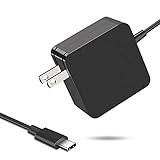
- 【Fast Charging & Safe】- USB C Fast Charger intelligently identify your devices automatically and provide the fastest and most efficient output current. Our USB type-c charger adapter have multi-protection safety features, including over-current protection, over-voltage protection, over-temperature protection, overload protection, short circuit protection, and leakage protection.
- 【Wide Compatibility】- This 65W USB C laptop Charger is compatible with Mac Book pro 13 inch 2016, Mac Book Air 2018, Dell Latitude, Lenovo, HP Spectre, Think pad, Nintendo Switch, Samsung Chrome book Pro, Acer Spin 7, iPad Pro 2018 and other smart phones devices with the USB C interface.
- 【Super Compact & Durable Charging Cable】- The charging cord passed 10000+ times swing tests, which can withstand bending at any angle and daily wear, super long bend lifespan. Stylish appearance and tangle-free cable design endow it high value.
- 【Portable & Easy to Carry】- This adapter is very portable with light weight, fitting perfectly in a small pocket inside your laptop bag and easy to carry with. It charges devices which is connected with a USB type C connection. This is an ideal type c charger for office, home and travel use.
- 【What We Offer】- Refund or replacement for you without any hesitate; If you have any question, feel free to contact us, we will make things right to you in twenty-four hours.
- Does the listing identify the precise product model and condition?
- Do the photos and included-items description match what you expect to receive?
- Can you find credible information about the seller beyond the listing itself?
- Does the marketplace say its relevant support or protection process applies to this seller and item?
- Is an unusually low price accompanied by clear, consistent product and seller information?
If important details conflict or remain unclear, pause and seek clarification. Do not let the timer, discount language, or a high rating substitute for evidence about what is being sold and who is selling it.
Read delivery, return, refund, and payment terms
Before checkout, find the promised delivery date and the terms that would apply if the product arrives late, is unsuitable, or needs to be returned. A low listed price can be a poor deal if the return costs or conditions do not work for you.
- Confirm the promised delivery date for this listing and destination.
- Read the return window and whether return shipping is your responsibility.
- Check for a restocking fee and the stated refund terms.
- For a marketplace purchase, verify the applicable help or buyer-protection process for the actual seller and item.
- Choose a payment method with protections available for this transaction.
- Keep a copy of the listing, receipt, and communications with the seller.
Save the terms while the listing is available. Product availability, seller policies, and marketplace protections are transaction-specific and can change; the terms shown for the offer you are buying are the ones to assess.
Independent reader supportYour contribution helps us test, update, and keep practical guides available for everyone.A practical decision sequence for two or more offers
Use this sequence to turn a shortlist into a defensible choice. It deliberately puts fit and evidence before discount size: saving money on the wrong product does not meet the intended need.
- Define the task. Write down the function you need and the relevant device model.
- Establish compatibility. Check device and accessory documentation for the exact models, required feature, and any cable or adapter dependencies.
- Confirm listing identity. Match manufacturer, model number, configuration, condition, and included items across the offers.
- Assess the evidence. Review several sources and scrutinize who reviewed what; do not use the star average as the deciding test.
- Calculate the delivered total. Add the item price, shipping, handling, taxes, and other applicable fees.
- Evaluate seller and terms. Check seller reputation, applicable marketplace processes, delivery promise, returns, return costs, fees, and refunds.
- Choose or walk away. Prefer an offer that is a verified fit and has acceptable terms. If a material compatibility, identity, seller, or cost question cannot be resolved, do not treat the advertised saving as enough reason to proceed.
This sequence also makes comparisons easier to explain to someone else: you can show which exact product you checked, why it suits the job, what it costs in total, and what recourse the transaction terms provide.
Best Value
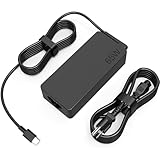
- COWOOGMZ 65W USB C Laptop Charger Input :100-240V-1.5A 50/60Hz Output: 5V-3A or 9V-3A or 15V-3A or 20V-3.25A Watts : 65W Connector Type : USB-C/Type C Compatible with 65W 45W USB C Computer Charger
- COWOOGMZ 65W USB C Laptop Charger Compatible with ThinkPad X1 X1 Fold X1 2-in-1 X12 X13 X13 Yoga X13 2-in-1 L13 L13 Yoga L13 2-in-1 L14 L16 E14 E16 T14 T14s T16 Z13 P14s P16s C14 Compatible with Chromebook A275 A285 A475 A485 T480 T480s T580 T580s T490 T590 E480 E580 E585 E490 E590 L480 L580 P51s P52s P43s P53s X270 X280 X380 X390 X395 Series Notebook
- COWOOGMZ 65W USB C Computer Charger Compatible with Yoga 7i 9i 14" 15" 2 in 1 Yoga S730 C930 C940 C740 730 730S 910 920 720-13 730-13 730s-13 s730-13Y 920 S730 C930 910-13IKB 920-13IKB C930-13IKBP720-13IKB 730-13IKB 730S-13IWL 730S-13IML S730-13IWL S730-13IML Series Notebook
- Compatible with Laptop P/N : 4X20E75131 4X20M26252 4X20M26268 4GX20N20876 4X20E75132 4X20E75135 4X20V07881 4X20E75137 GX20P92530 ADLX65YLC2D ADLX65YLCC2D ADLX65NCT2A ADLX65YCC2D ADLX65YDC2D ADLX65YLC2A ADLX65YCC3A ADLX65YDC3A ADLX65YDC2A ADLX65YLC3A ADLX65YDC3D ADLX65YCC3D ADLX65YLC3D ADLX65YAC3A ADLX65YCC2A ADLX65YAC2A ADLX65UCGU2A
- Comprehensive Protection : 65W USB C Laptop Charger with built-in safeguards can monitor temperature, voltage and other parameters in real time, protect your devices against overheating, overvoltage, Overcurrent, short-circuiting, maximumly protect your devic
Common deal-checking mistakes
Assuming a matching plug means full compatibility
A physical connection does not establish support for every function or power level. Check the feature and requirements in the exact device documentation, then verify the accessory and any cable or adapter involved.
Comparing a product family instead of a model
Broad product names can conceal different configurations or included items. Use model numbers and the complete listing description to establish that offers are genuinely comparable.
Choosing by advertised price alone
Shipping, handling, taxes, and other charges affect what you pay. Compare the delivered total and transaction terms, not just the boldest number in the offer.
Treating the star average as proof
Ratings can be fake or misleading, and a reviewer may be discussing a different product or setup. Read the review context and corroborate material claims with other sources and documentation.
Assuming marketplace protection is automatic
Check whether the applicable process covers the specific seller and product. Preserve the listing and transaction records in case you need to resolve an issue.
Keep the final check current
This method can help assess an offer, but it does not verify any particular listing in advance. Specifications, prices, inventory, shipping, return policies, and marketplace protections depend on the product, seller, and location. Recheck the manufacturer’s current documentation and the transaction terms immediately before buying, especially if a listing has changed since you first compared it.
Quick Recap
Product prices and availability are accurate as of the date/time indicated and are subject to change. Any price and availability information displayed on Amazon at the time of purchase will apply.
The Tool Desk
Outbyte PC Repair FREEClear out junk files and repair common Windows errorsFree Scan →Outbyte Driver Updater FREEFix the driver behind crashes, sound loss and screen glitchesFind Drivers →



