Do these 3 things before closing this tab:
1Scan for outdated or missing drivers - takes under a minute2Repair Windows errors before they cause bigger problems3Fix the driver behind crashes, sound loss and screen glitchesYou can add a WordPress preloader with a plugin, a shortcode, or a small custom implementation. For most site owners, a plugin is the quickest route; custom code offers the most control but should be added through WordPress’s enqueue system, not pasted untracked into theme files. Whichever route you choose, keep the loader brief, accessible, and dismissible if JavaScript fails.
Choose how to add the preloader
| Approach | Setup and placement | Controls and considerations |
|---|---|---|
| Preloader plugin | Install and activate it, then configure the Preloader menu. No coding is required. | Upload a GIF or choose a template, set display rules, enable the loader, and save. The WordPress.org listing showed version 2.0.2 and 20,000+ active installations when viewed in September 2026. Preloader plugin listing |
| LoftLoader | Configure it in the WordPress Customizer. | Its listing describes CSS3 effects, full-page-load detection, exit effects, and page-specific settings. It also warns that pages can hang if JavaScript is unavailable, so test a fallback. LoftLoader plugin listing |
| Waito shortcode | Place its shortcode where the overlay should appear; this avoids editing template files. | The listing describes a CSS overlay and a small, dependency-free JavaScript component. Waito plugin listing |
| Custom code | Add markup through an appropriate theme or plugin hook, then enqueue the stylesheet and script with WordPress. | Offers control over the design and behavior, but you must build and test accessibility, failure handling, and display rules yourself. Learn WordPress: Enqueuing CSS or JavaScript |
Use a plugin without editing theme files
Set up the Preloader plugin
- In your WordPress dashboard, open Plugins → Add New, search for “Preloader,” and install and activate the intended plugin.
- Open its Preloader menu and enable the loader.
- Upload a GIF or choose one of the available templates, then set the pages or other display rules where it should appear.
- Save the settings. If your site uses a caching plugin or server cache, clear it and check the result in a private browser window. The plugin’s instructions specifically advise clearing cache when applicable. Preloader plugin listing
Plugin labels and dashboard paths can change between releases, so use the plugin’s current settings screen if a label differs. A plugin’s popularity or version number does not establish that it improves performance or conversions; the cited listing reports installations and version, not an independent performance benchmark.
Consider the alternative plugin behaviors
LoftLoader’s Customizer-based controls are useful if you want page-specific settings and separate entrance or exit effects. Its documentation warns that a page may hang without JavaScript, which is a reason to verify the site with scripts disabled rather than assuming the loader will always dismiss. LoftLoader plugin listing
Waito uses a shortcode, a practical option when you want to place an overlay without editing a theme template. Confirm where the shortcode is supported and how its overlay behaves on the pages where you insert it. Waito plugin listing
Recommended Free Tools
#1 Best Overall

- Lock Button Avoid to Touch the button in Careless when Drawing or Diamond painting, Press dimmer up and dimmer down at the same time, hold for 3 seconds, light pad flash one time, it shows lock/unlock modes
- 13”x 9”Light Pad Super Thin, Aluminum Frame is Sturdy, Light Guide Board make The illumination is perfectly even, super bright 6000 Lux, and flicker-free, Overall dimension Size including Black Frame: 13”x 9”, Visual area Size: 12” x 8.27”
- Touch Button to Adjust Brightness and ON/OFF, Dimmer Up and Down Button to Control the Brightness Simple than One Button
- Package Included -- Light Box, Power Supplier USB cable
- Wide Application -- 2D Animation, Calligraphy, Diamond Painting,Tattoo Transferring, Sketching & Drawing, Sewing projects, Quilting, X-ray viewing
Add a custom preloader through WordPress
Choose custom code when you need a specific brand treatment, placement, or behavior that a plugin does not provide. WordPress recommends enqueuing front-end assets through the wp_enqueue_scripts hook, and its Theme Handbook documents wp_enqueue_script() and wp_add_inline_script() for scripts. This keeps assets registered with WordPress rather than scattered through template files. WordPress Theme Handbook: Including Assets WordPress reference: wp_enqueue_scripts
- Provide overlay markup early. Add the overlay near the beginning of the page output using a suitable WordPress hook or a maintained site-specific plugin. Give assistive technology a concise status message only if the loader communicates meaningful progress; hide a purely decorative spinner from screen readers.
- Enqueue a small stylesheet and script. Register them through
wp_enqueue_scriptsand enqueue only where needed. Avoid inserting loose script tags directly into theme templates. Learn WordPress: Enqueuing CSS or JavaScript - Animate conservatively. Prefer CSS transitions or transforms and keep the overlay from blocking interaction longer than necessary. WordPress’s animation guidance says animations should never block interaction and should almost always complete in less than 0.2 seconds. WordPress Block Editor Handbook: Animation guidance
- Dismiss it after load. Hide or remove the overlay when the page-load event fires, but ensure the underlying content remains reachable if the script does not run. Do not make successful JavaScript execution the only way to reveal the page.
- Respect reduced motion. Use a
@media (prefers-reduced-motion: reduce)rule to remove or simplify animation for people who have requested less motion in their operating-system settings. WordPress Block Editor Handbook: Animation guidance
WordPress provides wp_add_inline_script() for adding inline JavaScript associated with an enqueued script when that is appropriate; it is not a reason to bypass enqueueing altogether. WordPress reference: wp_add_inline_script()
Quick Recap
Best Value

- DIY Light Box - Aoutrow Cinema Light Box includes 192 letters, numbers and other symbols. You can DIY anything you want to announce, declare, or instruct on Aoutrow Light Box. Just be creative and change the message on the light box sign as often as you want!
- Warm White LEDs - Get Aoutrow Cinema Light Box and write a message on it. Then plug it in. Thanks to the super-bright white LED light of the cinematic lightbox and the thick and bold black letters, numbers and symbols, your message can be easily seen from far. You can use it with USB cable. Also, 6 x AA batteries is fine(NOT included).
- Best Design - Aoutrow A4 LED light up box is 12.1 x 8.7 x 1.5 inches. It has three lines and each line can fit 8 marquee letters. It is made from premium ABS acylic. Extra-long durable USB cable allows you to create your design wherever you want. Besides, it can stand alone or be mounted on a wall.
- Cinema Light Box - Aoutrow Cinema Light Box is designed to look like those retro cinema and theater signs that would advertise a movie and share a fun message. You can now write your own fun, inspirational or motivational message on the mini lightbox and create a black-and-white film feel to your space!
- Widely Use - Aoutrow Cinema Light Box will fit perfectly for any occasion or as a gift to your friends and family. It can be used as unique kid night light, decorative signs at birthday party, celebrations, wedding, classroom, flower shop and any other parties.
Rank #4

- 【High Brightness】Portable photography studio is built-in 120pcs high-quality LED light beads, provides enough brightness for shooting.
- 【Easy to assemble】Use it after three seconds of assembly, you can unfold this LED lightbox studio and place it on any surface to get very good backdrop for small articles business photography, taking pictures for products.
- 【CRI>95】This photo lighting studio kit Adopt CRI95 color temperature ring light board, built-in stone grain fabric, good light gathering effect.
- 【Portable and Foldable】Portable folding structure design, more convenient to install and carry, built-in led light, providing average light and prevents shadows and reflections in your photos.
- 【WIDELY USE】A box picture studio is ideal for photographing small objects, like watches, gadgets, jewelry, accessories, and toys, and is suitable for skilled persons, internet retailers, photographers, artists, and product advertising campaigns.
Rank #3

- 【High Brightness】Portable photography studio is built-in 104pcs high-quality LED light beads, provides enough brightness for shooting.
- 【Easy to assemble】Use it after three seconds of assembly, you can unfold this LED lightbox studio and place it on any surface to get very good backdrop for small articles business photography, taking pictures for products.
- 【CRI>95】This photo lighting studio kit Adopt CRI95 color temperature ring light board, built-in stone grain fabric, good light gathering effect.
- 【Multi-angle Shooting】Photo light box With one front horizontal shooting window and one vertical window, it can meet different shooting demands.
- 【WIDELY USE】Box photo studio perfect for shooting small items, Such as jewelry, accessories, toys, watches, gadgets and other items.Great for photographers, artists, online sellers, professionals and product advertising projects.
Rank #2
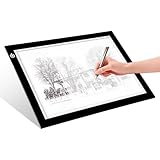
- EASY CARRYING -- Light weight super slim light pad, thickness only 0.2’’, about 5mm. Overall dimension including black frame is L12.6’’xW9.0’’xH0.2’’. The visual working area is A4.
- ADJUSTABLE BRIGHTNESS -- Simply keep pressing the touch switch for several seconds until you get the desired brightness you want. It’s gradual dimming effect.
- EYESIGHT-PROTECTIVE DESIGN -- Light tracing box with energy efficient flicker-free LED lamps, provides a perfectly even illustrated surface.
- USB POWERED -- tracer light board comes with 1pc USB power cable, it's not rechargeable, so it will work by plugged in any computer, power bank or USB adaptor easily.
- Wide APPLICATION -- Ideal for stenciling, 2D animation, calligraphy, embrossing, scrapbooking, tattoo transferring, sketching & drawing, streaming, sewing projects, stained glass, quilting, diamond art supplies etc.
Make the loader accessible and avoid slowing the page
- Do not trap keyboard focus. A loading overlay should not prevent keyboard users from reaching page content once it is available.
- Keep decorative animation out of screen-reader announcements. Mark decorative spinner content as hidden from assistive technology, for example with
aria-hidden="true". If you use a status label, make it brief and avoid an updating region that repeatedly interrupts the reader. The WP Preloader changelog documents reduced-motion support andaria-hidden="true"on dismissal as implementation examples. WP Preloader listing and changelog - Provide a failure escape. Test with JavaScript disabled or blocked and after a script error. A permanently opaque overlay is a serious failure; content must remain accessible even if the loader cannot dismiss. LoftLoader’s no-JavaScript warning illustrates this risk. LoftLoader plugin listing
- Check cache and optimization settings. After installation or changes, test with your normal cache, minification, and script-defer settings enabled. Clear caches when needed, then verify that the loader disappears and the page content is usable.
- Do not preload the spinner by default. WordPress cautions that preloading non-render-blocking resources can make them compete with render-blocking resources and slow rendering. Add a preload directive only when there is a specific, evidence-based need. WordPress reference: wp_preload_resources()
Test before keeping it live
- Open a page where the loader is enabled and confirm it disappears when content has loaded.
- Check the same page with keyboard navigation and a screen reader, and confirm focus is not trapped or repeatedly interrupted.
- Use a reduced-motion preference and confirm the animation is disabled or simplified.
- Test a slow connection, JavaScript disabled or blocked, and your production cache/minification setup. Confirm no persistent overlay hides the site.
- Check pages outside the intended display rules to ensure the loader does not appear where it is unnecessary.
Product prices and availability are accurate as of the date/time indicated and are subject to change. Any price and availability information displayed on Amazon at the time of purchase will apply.




