Outdated Drivers Are Slowing You Down
One free scan finds every outdated or missing driver and matches the right update for your exact hardware.Free scan · exact hardware matchPC Slower Than It Used to Be?
A free scan shows the junk files, broken settings and background clutter dragging Windows down - then fixes them in one click.Free scan · Windows 10 & 11Define a payment-provider boundary early if your app may sell through more than one channel—but do not force Apple, Google, and web payments into one supposedly universal flow. Normalize the concepts your product needs, such as verified purchases and user entitlements, while preserving each provider’s purchase steps, identifiers, and transaction lifecycle.
Should you abstract payment providers from day one?
Yes, when multiple purchase channels are plausible. A narrow boundary lets the app express purchase intent without coupling the rest of the product to one billing implementation. It also makes room for channel-specific rules as the product expands.
As an Amazon Associate I earn from qualifying purchases.
That is an architecture recommendation, not a requirement to add a third-party processor or billing-orchestration service. Payment paths depend on what is being sold: digital features and subscriptions, physical goods or services, and eligible external-purchase programs can follow materially different policies and flows.
What’s actually slowing this PC down?
Pick the symptom - the matching free tool is one click away.
Normalize the domain, not every provider operation
A useful shared model can represent catalog products, verified transactions, entitlements, and lifecycle events. The provider adapter should retain control of tasks that differ by platform: loading products, launching the purchase interface, verifying transactions, handling restoration or status refresh, and translating renewals, refunds, cancellations, and revocations.
#1 Best Overall

- With Square Terminal, you can ring up sales, accept payments, and print receipts, all with one device. Use it at the counter or ring up customers anywhere in your store.
- Accept all major credit and debit cards and pay one low rate with no hidden fees and no long-term contracts.
- Process chip cards in just two seconds.
- Get your money as soon as the next business day.
- Use it cordlessly with the built-in battery, designed to last all day.
Expose provider capabilities and normalized outcomes where they help the app, but do not pretend every provider supports the same operations or sequence. Store-owned purchase sheets, restoration behavior, and eligibility checks are examples of differences an abstraction should preserve rather than erase.
How do you support Apple and Google in-app purchases in one app?
Use separate StoreKit and Google Play Billing adapters behind a domain-facing boundary. Each adapter should own its platform’s purchase interface, transaction states, verification path, and server integration. Apple documents StoreKit for digital goods and services, along with App Store Server Notifications and the App Store Server API for transaction updates. Google Play Billing has its own policy and integration requirements. Apple In-App Purchase
Rank #2
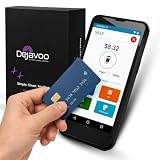
- Honest & Transparent Merchant Accounts: Brought to you by 8 Seconds Processing, a family-owned company dedicated to integrity, proven results, and zero bait-and-switch tactics. We provide seamless merchant onboarding, rapid payouts, and reliable payment infrastructure supported by our dedicated customer service team.
- Compact Payments In The Palm Of Your Hand: Driven by secure Dejavoo hardware and software technology, the P5 is an ergonomic, lightweight mPOS system designed for ultimate handheld portability. Perfect for delivery drivers, curbside pickup, line busting during peak hours, and compact retail setups.
- Integrated Barcode Scanning & Android OS: Run a highly efficient mobile checkout with a fast quad-core 2.0GHz processor running a secure Android operating system. Featuring an integrated barcode scanner, 1GB RAM, and 8GB ROM, this smart terminal allows your staff to manage inventory and transactions simultaneously on the go.
- Universal Tap, Chip, & Digital Wallets: Seamlessly accept all major payment brands and networks. The P5 features an integrated contactless NFC reader with full EMV certification and IC card capability, allowing customers to pay effortlessly via traditional chip cards, Apple Pay, Google Wallet, and Samsung Pay.
- Blazing Fast Hybrid Connectivity: Keep your mobile business moving without interruptions. The P5 is equipped with comprehensive Wi-Fi, 4G cellular network, and Bluetooth capabilities, ensuring an always-on connection to your payment gateway for lightning-fast authorizations anywhere your business takes you.
For Play-distributed apps, Google’s Payments policy generally requires Google Play Billing for paid in-app features, content, and services unless a listed exception or program applies. The policy also identifies physical goods and physical services as categories where Google Play Billing must not be used, and restricts directing users to another payment method outside applicable exceptions or programs. Google Play Payments policy
Keep a canonical entitlement record on your backend
Let the service backend make the application’s canonical access decision across channels. A useful entitlement record can unify whether a user currently has access, while retaining the original provider, product identifier, provider transaction identifiers, original transaction references, and raw or verifiable transaction data. Those source details keep renewals, refunds, revocations, and reconciliation traceable.
Rank #3

- High-Performance Android 14 OS: Powered by the Android 14 operating system and an Octa-Core 2.0GHz processor, this handheld terminal delivers smooth performance. It comes equipped with 3GB RAM and 32GB ROM, providing ample speed and storage to run demanding business apps with full access to the Google Play Store.
- Integrated 58mm Thermal Receipt Printer: Features a built-in 58mm thermal printer with a print speed of up to 80mm/s. This monochrome printer utilizes thermal technology, which only requires 58mm thermal paper rolls and completely eliminates the need for expensive ink or toner cartridges.
- Dedicated 1D/2D Hardware Barcode Scanner: Equipped with a professional, hardware-based 1D/2D scanning engine rather than a standard camera. This dedicated scanner provides rapid and highly accurate barcode reading, making it ideal for high-speed inventory tracking and checkout workflows.
- Secure NFC and Multi-Network Connectivity: Accept contactless transactions easily using the integrated NFC reader for tap-to-pay payments. Stay connected across any retail, warehouse, or field environment with robust support for 4G LTE, Dual-Band Wi-Fi, and Bluetooth 5.3.
- Handheld Design with 6000mAh Battery: Weighing only 345 grams for comfortable one-handed operation, this terminal features a built-in 3000mAh lithium polymer battery. The package includes a compatible charger and user manual, and the device is backed by a 1-year manufacturer warranty.
Receive provider events through authenticated server integrations, verify transactions according to current platform guidance, and make event processing idempotent so retries do not grant or remove access twice. If delivery or client state is uncertain, reconcile against the provider’s current status where supported. Apple documents server notifications and an API for current transaction status and history; Google’s backend guidance covers reporting authorized external purchases and subsequent transactions. This backend pattern is a design choice inferred from those surfaces, not a mandated universal entitlement schema. Apple In-App Purchase Google external transaction backend guidance
Can a mobile app use a web payment provider instead of store billing?
There is no universal yes-or-no answer. Purchase type, app eligibility, storefront or Play country, and program enrollment determine which flows are available. Do not build a global switch that assumes external checkout is always allowed.
Rank #4

- DUAL CONNECTIVITY: Supports high-speed WiFi 802.11 a/b/g/n and Bluetooth 4.0 for flexible, reliable mobile payment processing across multiple business environments. Designed for use with smart devices, the VeriFone e355 enables wireless transactions in-store, on the go, and at customer-facing checkout points.
- MOBILE PAYMENT READY: Accepts a wide range of payment types including EMV chip cards, triple-track magstripe cards, and NFC/contactless payments. Compatible with major payment schemes, the VeriFone e355 helps businesses deliver secure, convenient checkout experiences across retail, hospitality, and service settings.
- COMPACT DESIGN: Lightweight and portable, the VeriFone e355 is designed for mobile and countertop payment acceptance with standalone functionality or optional frames and cradles. Its slim form factor, durable Gorilla Glass display, and field-replaceable battery make it ideal for flexible everyday business use.
- SECURE TRANSACTIONS: Built with PCI PTS 4.0-approved security to help protect sensitive payment data during everyday transactions. The VeriFone e355 supports secure EMV, magstripe, and contactless payment processing, making it a dependable mobile POS solution for businesses that prioritize payment security.
- VERSATILE USE: Ideal for retail, hospitality, service, and mobile business environments, the VeriFone e355 is compatible with iOS, Android, and Windows devices. Its modular design supports optional stands, frames, and accessories, giving merchants a flexible payment solution that adapts to evolving business needs.
Apple external purchase programs
Apple’s External Purchase API is for qualifying apps and is subject to entitlement and region-specific requirements. It should not be treated as general permission to replace in-app purchase with an external checkout. Check the current requirements for the app and storefront before designing or shipping that path. Apple External Purchase
Do these 3 things before closing this tab:
1Repair Windows errors before they cause bigger problems2Scan for outdated or missing drivers - takes under a minute3Clear out junk files and repair common Windows errorsGoogle Play external payments integration
Google’s documented external payments integration uses an eligibility check, Play Billing Library program configuration and listener, a reporting token, and transaction reporting. The cited integration guidance specifies Play Billing Library version 8.3 or higher for these APIs. Because eligibility and program rules are part of the flow, country and program status belong in runtime decision-making rather than in a permanent product-level setting. External payments integration
Best Value

- PCI PTS 4.x certified
- Android OS
- 3G/ WiFi / Bluetooth
- Double Injection, Illuminated
- Chip Card / EMV / NFC Compatible
Google’s backend guidance also describes reporting authorized external purchases and later recurring transactions using transaction identifiers. Keep these reporting obligations in the relevant adapter and backend workflow rather than assuming an external checkout ends the integration after authorization. Backend integration guidance
Independent reader supportYour contribution helps us test, update, and keep practical guides available for everyone.How should subscriptions bought on the web and in an app share access?
Represent access as an entitlement that can be supported by a verified transaction from any allowed channel. Do not treat the entitlement itself as proof that a particular provider authorized a purchase: store the source transaction and identifiers alongside the normalized access state. Then the application can answer whether access is active, while support and reconciliation systems can trace why.
Keep lifecycle handling channel-aware. A renewal, refund, cancellation, or revocation should become a domain event the rest of the product understands, but the adapter must preserve the provider-specific evidence and state needed to interpret it correctly. Avoid assuming that a web subscription and an app-store subscription offer identical cancellation, restoration, or status-refresh operations.
How should you compare payment approaches?
Compare native store billing, an eligible external flow, and any orchestration service against the actual product and markets. No single interface makes the policy, transaction handling, or operational obligations interchangeable.
- Purchase type: establish whether the offering is digital content or services, a subscription, or a physical good or service.
- Geography and eligibility: check storefront or Play country, app eligibility, enrollment, and applicable program terms.
- Transaction lifecycle: account for verification, server notifications, renewals, refunds, revocations, restoration, and status refresh.
- Reporting and compliance: identify required user-choice flows, entitlements, reporting tokens, and backend transaction reports.
- Testing: verify tools and test cases for interrupted purchases and lifecycle changes; Apple documents sandbox and Xcode purchase testing. Apple In-App Purchase
- Operational ownership: determine which provider-specific behavior remains visible to the app and backend, and who maintains policy, integration, and reconciliation changes.
- Commercial terms: verify current terms directly for the relevant market and program. No comparable current pricing or conversion figures establish a fee-saving claim here.
A practical boundary to implement
- Model purchase intent: let the app request a product purchase without embedding a provider’s transaction format throughout product code.
- Route by context: select the adapter and flow using purchase type, platform, storefront or country, app eligibility, and program enrollment.
- Delegate execution: have the chosen adapter load products, launch the provider’s flow, verify the result, and handle platform-specific restoration or status refresh.
- Persist both views: store normalized entitlement state together with provider identifiers and transaction evidence.
- Process lifecycle updates: authenticate incoming server events, apply them idempotently, and reconcile current provider status when needed.
- Test policy branches: exercise permitted and ineligible paths, interrupted purchases, renewals, refunds, and revocations before release.
The cited Apple and Google documentation describes platform behavior and program conditions as accessed October 7, 2026. Distribution, purchase type, country, eligibility, entitlements, and program terms can affect what a particular app may do; check the current policy and API documentation before release.
Quick Recap
Product prices and availability are accurate as of the date/time indicated and are subject to change. Any price and availability information displayed on Amazon at the time of purchase will apply.




