What’s actually slowing this PC down?
Pick the symptom - the matching free tool is one click away.
Sentinel Bug Engine is presented as an open-source security scanner that combines rule-based checks with optional AI analysis, then uses a verification stage to assess findings in context. Its author, Pavan Jadav, reports six findings and no false positives in one demo scan. That result is not evidence that the scanner eliminates false positives generally: the article provides no benchmark, ground-truth method, comparative test, or independent replication.
What Sentinel Bug Engine is designed to do
In his DEV Community article, Pavan Jadav describes Sentinel Bug Engine as a scanner that looks for security issues and then asks whether each alert remains plausible in the surrounding code. The goal is to reduce noisy alerts by considering mitigating controls, rather than treating every matched pattern as a confirmed vulnerability.
As an Amazon Associate I earn from qualifying purchases.
Jadav frames the problem as deciding whether an alert is exploitable in a particular codebase. He says the tool combines deterministic pattern analysis, optional large-language-model reasoning, and a Joint Verification Engine (JVE). These are descriptions in the article; the repository and current implementation have not been independently verified here.
How the four-stage pipeline is described
- Universal Parser: identifies the language and extracts code blocks, according to the article.
- Deterministic Fast Filter: applies regex and pattern rules associated with OWASP Top 10 and CWE categories. The article claims this stage can scan in under a second; it does not provide a measurement setup or test results to establish that speed across projects.
- Optional LLM Cognitive Analysis: is described as a way to look for issues such as business-logic flaws and race conditions. The article names Gemini, OpenAI, Claude, and Ollama as options.
- Joint Verification Engine: examines local context, looks for controls that could mitigate a finding, assigns a confidence score, and gives the result one of four verdict labels. The article says findings labeled
DISPROVED_FALSE_POSITIVEare discarded.
What JVE checks—and what its verdict means
Jadav says JVE examines 20 lines of surrounding code and checks for mitigating controls such as sanitizers, parameterized queries, type guards, and allowlists. It then assigns a confidence score from 0 to 100% and applies one of four verdict labels. The article does not define the full criteria for every label or explain how the confidence score is calibrated, so a percentage should not be read as a measured probability that a vulnerability is real.
#1 Best Overall

- Upgraded AI-Powered Detection: Military-grade technology detects hidden cameras, listening devices, and GPS trackers with precision. Enjoy peace of mind in hotels, offices, and even your own home. Stay one step ahead of hidden threats!
- Simple, Fast & Effective: Just turn it on, sweep the area, and let the audible alarm + LED alerts notify you of threats. No technical skills needed - Press, Search, Relax! Skip expensive private investigators - protect yourself in seconds.
- Compact & Travel-Ready: Lightweight, rechargeable, and pocket-sized for discreet, on-the-go security. Toss it in your bag, purse, or pocket - perfect for travel, work, and public spaces.
- Total Privacy Protection: Don’t gamble with your security. Safeguard against spying in hotel rooms, changing rooms, offices, cars, dorms, and more. Know for sure if you’re being watched, recorded, or tracked.
- Trusted by Experts & Customers: Designed with cybersecurity and counter-surveillance professionals. Join 300,000+ satisfied users who rely on our detectors for ultimate privacy & safety.
The article illustrates the idea with SQL construction: a query assembled through string interpolation may raise concern, while a parameterized query may provide a mitigating control. This illustrates the claimed contextual behavior; it is not a separately validated test of JVE’s accuracy.
What the reported demo establishes
Jadav reports scanning a deliberately vulnerable Flask application and receiving six findings: two critical, three high, and one medium. He characterizes that run as six real findings and zero false positives. It is a single author-reported demo, not a measured false-positive rate.
The article does not identify a benchmark corpus, explain how the ground truth for false positives was determined, compare results with other scanners, or report an independent reproduction. Consequently, its headline claim that the tool “eliminates false positives” goes beyond what the published demo establishes. The evidence supports only that the author reported no false positives in that one scan.
Recommended Free Tools
What the article says it can detect and report
The article lists SQL injection, OS command injection, cross-site scripting, path traversal, unsafe deserialization or eval, hardcoded credentials, SSRF, resource exhaustion or leaks, race conditions, and null-pointer dereferences. It names Python, JavaScript, TypeScript, Java, Go, PHP, C/C++, Rust, Ruby, and C# as supported languages. These are author-described capabilities, not independently confirmed compatibility claims.
Reported output includes CWE classification, OWASP mapping, file and line location, a JVE verdict and confidence score, and a suggested fix. The article also shows SARIF 2.1.0 output for code-scanning and CI integrations, naming GitHub Advanced Security, GitLab, and Azure DevOps. That example does not by itself establish that every integration is available or working in a current release.
Rank #2
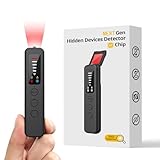
- 【AI-Powered Intelligent Detection System】Equipped with an upgraded AI chip and a patented 360° full-range real-time scanning system, this detector delivers faster scanning and enhanced anti-interference performance. 5-level adjustable sensitivity allows precise positioning of hidden cameras, listening devices, and GPS trackers within a 32-foot detection range. It captures suspicious signals quickly without omission, delivering reliable detection you can count on.
- 【7-in-1 Comprehensive Privacy Protection】This 1MHz to 6.5GHz detector integrates 7 core modes: RF signal detection, wireless camera scanning, red-light lens detection, infrared night vision, magnetic field detection, audio recording jamming, and SOS alert. It quickly locates hidden cameras, GPS trackers, and other devices, and clearly identifies reflections from pinhole lenses with its HD optical sensor. LED indicators provide clear real-time status feedback, keeping you informed at every step.
- 【Real-Time Vibration & Sound and Light Dual Alarm System】It instantly triggers sound and vibration alerts when suspicious signals or devices are detected. It performs reliably in both noisy and quiet environments, and supports a discreet silent mode for meetings and private occasions, ensuring timely warnings without drawing attention. Portable and easy to operate, it serves as a dependable privacy protector for travel, business trips, and daily use.
- 【Portable and Long Battery Life】The device weighs only 1.06 oz, is compact and portable, and can fit in your pocket. It features 1-hour Type-C fast charging and a built-in 800mAh battery, delivering up to 25 hours of continuous working time and 30 days of standby. There is no need for frequent charging during travel and daily use, and privacy protection can be activated at any time.
- 【Smart Signal Filtering & Multi-Scenario Protection】Built-in intelligent background filtering blocks interference from WiFi routers, Bluetooth devices, and microwaves, significantly reducing false alarms. Suitable for hotels, cars, offices, bathrooms, rentals, conference rooms, and public spaces. Trusted by over 1000,000 professionals and privacy-conscious users, it provides all-round privacy protection and peace of mind in any environment.
Trying the quick start described by the author
The article gives this installation and scan sequence:
- Clone the repository with
git clone https://github.com/pavan67-git/sentinel-bug-engine.git. - Change into the cloned project directory and run
pip install .. - Run
python -m src.cli scan ./your-project, replacing./your-projectwith the project path to scan.
For optional LLM reasoning, the article shows configuring a Gemini API key through an environment variable. Treat the commands and configuration as the article’s quick-start instructions, not confirmation that the repository currently installs or runs as described. The article’s repository could not be independently checked, so current installability, release status, code, and license are unconfirmed.
Outdated Drivers Are Slowing You Down
One free scan finds every outdated or missing driver and matches the right update for your exact hardware.Free scan · exact hardware matchWindows Errors? Fix Them Before They Spread
Repair common Windows errors and clear accumulated junk for a smoother, more stable PC - no reinstall needed.Free scan · no reinstallHow to evaluate the claim before relying on it
A low-noise scanner is useful only if it does not achieve quiet output by suppressing real vulnerabilities. Before using Sentinel Bug Engine as a security gate, evaluate it against projects and findings whose status you can verify:
- Test known vulnerable and fixed code, including cases with and without mitigating controls.
- Record true positives, false positives, and missed vulnerabilities separately; an empty or short alert list alone does not establish accuracy.
- Check whether the scanner reports useful file and line locations and whether suggested fixes preserve intended behavior.
- Repeat the test across the languages, frameworks, and repository sizes relevant to your team.
- Inspect how optional LLM analysis handles code sent to an external provider, credentials, and reproducibility before enabling it in a sensitive environment.
These checks do not assume a particular result; they distinguish a promising verification design from evidence that it performs reliably in a team’s own codebase.
What remains unverified
The article lists a VS Code extension, a web dashboard, more LLM rules, and benchmarking against a CVE database as roadmap items; it describes the dashboard as already in progress. Roadmap language is not confirmation that these features have shipped. Without independently available repository documentation and releases, readers should verify current status directly before planning around them.
Quick Recap
Product prices and availability are accurate as of the date/time indicated and are subject to change. Any price and availability information displayed on Amazon at the time of purchase will apply.




