Retailers can use mobile technology to put checkout, inventory lookup, fulfillment, and product guidance in associates’ hands—and give shoppers useful ways to browse, get help, and access loyalty features on their own phones. The gains depend less on the device alone than on whether it reliably connects to the retailer’s point-of-sale (POS), inventory, customer, and fulfillment systems.
What can store associates do with mobile devices?
A staff phone or tablet can serve as a portable work terminal. The right setup lets an associate move between helping a customer, checking an item, and completing a task without returning to a fixed workstation. These are capabilities to configure and validate, not features guaranteed by every device or retail app.
As an Amazon Associate I earn from qualifying purchases.
Take payment away from the fixed counter
Mobile POS can support transactions or payment interactions where the customer is shopping, which may help staff assist people away from a checkout queue. Apple describes iPhone, iPad, and Apple Pay as part of its retail POS example, including checkout from different parts of a store. The actual setup must match the retailer’s POS software, payment hardware, security requirements, and procedures for outages or failed transactions.
Free tools Windows power users keep installed
One-click scans. No signup required.
Toshiba Global Commerce Solutions reports that a survey conducted with Industry Dive found 67% of surveyed stores had implemented mobile POS alongside other checkout formats, with an average of 3.04 checkout options. The article passage does not establish the survey’s year or sample size, so these figures should not be treated as current, industry-wide adoption benchmarks. Toshiba product marketing manager Michael Connors described associates assisting customers anywhere in a store through line-busting, clienteling, or personalized recommendations; that is a vendor representative’s characterization of the use case, not independent evidence of business impact. Toshiba’s mobile POS article
#1 Best Overall

- Highly flexible - The 360° rotatable base and tablet bracket holder combined with a folding arm offer unparalleled adjustment for typing or showcasing without missing any viewing angles. Turn display in a second between cashier and shopper or switch landscape/portrait mode instantly.
- Business-oriented - Two size rubber padded bracket holders collectively fit 6" - 13" tablets or any gadgets with width or height measurement in the range of 6.6"-9.6" (Please noticed that both two clips fit cases less than 0.5" thickness), An ideal docking station stand for perfect match of large or small tablet pcs typically used at restaurant shop point of sale, office home desk, etc.
- Ergonomic design - Quick attach/detach of holder with simple push of the button creates no hassle for easy storage and carrying. A true universal ipad kiosk stand with easy pull handlebar and dedicated space for power cord charging.
- Broad application - Not only does it make your ipads/android/windows surface tablets a desktop display computer, it allows you to type, press, view, swivel with great stability. Confidently interact with customers at restaurant, check out at register, collaborate in group meeting at office, present products or services at showroom, and many more.
- Steady support - Light and smooth turning of bracket holder/arm provides high efficiency in busy settings. The weighted base plus hard folding arm offer sturdy structure to withstand weights of large tablets and heavy operation on the device, a professional grade tablet stand.
Check stock, scan items, and fulfill orders
A handheld device can help staff scan a product, look up item details, and check inventory while speaking with a customer. Apple describes iPhone use for scanning, item lookup, and access to systems of record, as well as iPhone and iPad use for inventory management. Apple also identifies pick-and-pack workflows, where a worker locates items and prepares them for an order. Camera-based scanning and augmented reality are platform-specific capabilities; retailers need compatible software and should test accuracy and speed in their own stores.
For these tasks, a useful inventory view needs to be timely and connected to the retailer’s actual stock records. A device that displays stale or incomplete data can send an associate to an empty shelf or lead to an unreliable promise about availability. Apple’s retail examples
Support assisted selling and clienteling
With a suitable application, associates can consult product specifications, available sizes or colors, store inventory, customer preferences, and prior interactions. That context can help them answer questions, suggest a relevant alternative, or continue a service conversation across visits. Samsung’s August 20, 2026 article discusses associate access to profiles, previous purchases, inventory, and product information; Apple also describes access to product information, inventory, and customer preferences.
Rank #2

- Highly flexible - The 360° rotatable base and tablet bracket holder combined with a folding arm offer unparalleled adjustment for typing or showcasing without missing any viewing angles. Turn display in a second between cashier and shopper or switch landscape/portrait mode instantly.
- Business-oriented - Two size rubber padded bracket holders collectively fit 6" - 13" tablets or any gadgets with width or height measurement in the range of 6.6"-9.6" (Please noticed that both two clips fit cases less than 0.5" thickness), An ideal docking station stand for perfect match of large or small tablet pcs typically used at restaurant shop point of sale, office home desk, etc.
- Ergonomic design - Quick attach/detach of holder with simple push of the button creates no hassle for easy storage and carrying. A true universal ipad kiosk stand with easy pull handlebar and dedicated space for power cord charging.
- Broad application - Not only does it make your ipads/android/windows surface tablets a desktop display computer, it allows you to type, press, view, swivel with great stability. Confidently interact with customers at restaurant, check out at register, collaborate in group meeting at office, present products or services at showroom, and many more.
- Steady support - Light and smooth turning of bracket holder/arm provides high efficiency in busy settings. The weighted base plus hard folding arm offer sturdy structure to withstand weights of large tablets and heavy operation on the device, a professional grade tablet stand.
Personalization depends on the retailer’s own rules for collecting, displaying, and using customer information. Limit access to what staff need for the task, train employees on appropriate use, and ensure the system follows the retailer’s privacy and data-handling requirements. These sources describe possible functions; they do not establish a complete compliance framework or prove a sales lift. Samsung Business Insights’ discussion of mobile retail
Give staff one device for several jobs
Retailers may consolidate scanning, product lookup, inventory checks, clienteling, and payment into one managed device, or use separate devices and applications. A single device can reduce handoffs, but only if the applications work together and are easy to switch between. Separate tools may fit specialized tasks better, while increasing the burden of managing devices, logins, support, and training.
What can customers do with mobile technology in a store?
Customer-facing mobile features use shoppers’ own phones rather than staff devices. Retailers can support product discovery, mobile browsing, loyalty or customer perks, and store assistance through apps or mobile-friendly web experiences. Verizon’s mobile retail technology article discusses mobile apps and inventory solutions as parts of the in-store experience.
Rank #3

- All-in-One POS Solution – Includes register base, thermal receipt printer, secure cash drawer, and stand – built for retail stores and quick-serve restaurants.
- Compatible with 10″ Amazon Fire Tablets; pairs with the Datio POS App – try free before subscribing.
- Monthly Subscription – $64/month includes Software, Updates, Support, and Warranty. No long-term contract, cancel anytime.
- Flexible Payments – Datio Credit Card Payments via Worldpay (free terminal on approval), or use your own terminal for cash-only tracking.
- Amazon Fire Tablet Not Included – POS hardware only; customer supplies a compatible 10″ Fire Tablet separately.
Historical survey data can illustrate possible uses but not current adoption. CDW’s 2015 Retail Innovators Report surveyed 314 line-of-business managers in March and April 2015; its “Retail Innovators” subset comprised 102 respondents. Within that subset, 91% used mobile apps in some capacity. Respondents cited browsing inventory (61%) and customer perks (53%) among app benefits. Those results describe a defined group more than a decade ago, not today’s retailers or shoppers. CDW’s 2015 report summary
Customer-facing features work best when they solve a clear in-store problem: for example, helping someone find product information or access a loyalty benefit without waiting for staff. They should complement, not obstruct, in-person service. Adoption rates for these specific functions are not established by the sources cited here.
How should a retailer choose devices and applications?
Start with the work the device must support, then test the complete workflow—not just the hardware. A phone cited in a vendor example is not automatically suitable for another retailer’s POS, software, or environment. Samsung names the Galaxy XCover7 Pro as an example of a device retail associates may use; that does not establish its compatibility with a particular retailer’s systems or its suitability for every store.
Rank #4

- All-in-one point-of-sale system with dual touchscreens for a superior experience: The M9 POS offers a comprehensive solution with two 15.6-inch touchscreens, optimizing customer interaction and business management. Ideal for restaurants, retail stores, hotels, and any business seeking a modern and efficient point-of-sale experience.
- High-performance Android 11 for smooth management: Equipped with the Android 11 operating system, the M9 offers fast and stable performance, allowing for smooth execution of point-of-sale applications, inventory management, payment processing, and other essential tasks for your business.
- Dual 15.6-inch flat screens for clear viewing and enhanced interaction: The two 15.6-inch flat screens offer clear and wide viewing for both the operator and the customer. The 1920x1080 (Full HD) resolution guarantees sharp images and an immersive visual experience. The 10-point capacitive touchscreen allows for smooth and precise interaction. The second screen operates in mirror mode to the main screen.
- Powerful configuration for optimal performance in demanding applications: With 4GB of RAM and 64GB of ROM, the M9 offers smooth performance even with multiple applications open simultaneously. This robust configuration ensures that your point-of-sale system runs smoothly and without interruptions.
- Integrated 58mm thermal printer for fast and efficient receipt printing: The integrated 58mm thermal printer simplifies receipt printing operations, offering a remarkable printing speed and eliminating the need for an external printer. Saves space and optimizes workflow.
| Decision | What to weigh |
|---|---|
| Staff device or customer phone | Staff devices can be managed and dedicated to store tasks. Customer experiences depend on shoppers’ own devices and the retailer’s app or mobile web experience. |
| Phone or tablet | Consider portability and ease of handling against screen size and the information or tasks employees need to see at once. The cited sources do not provide a controlled comparison. |
| Mobile POS or fixed checkout | Consider where transactions should happen, compatibility with payment hardware and software, queue management, and how staff will complete sales if the mobile workflow is unavailable. |
| General-purpose or retail-specific hardware | Assess durability, scanning and payment peripherals, device management, security support, and compatibility with store applications. |
| Integrated platform or separate apps | Check how the tools connect to POS, inventory, customer records, and fulfillment, and whether associates can move between tasks without repeated entry or confusing handoffs. |
Before rollout, verify that the device and its operating system are supported by every required application and peripheral. Check how devices will be enrolled, updated, secured, charged, repaired, and replaced. Test scanning, payment, and inventory workflows under real store conditions, and define a fallback for lost connectivity, device failure, or an unavailable application.
Independent reader supportYour contribution helps us test, update, and keep practical guides available for everyone.Why do connectivity and integration determine whether mobile tools work?
A mobile workflow is only as useful as its access to the retailer’s systems. Associates need dependable access to stock records, customer information, and payment or order tools at the moment they need them. Slow connections can make an app feel broken; however, network upgrades alone cannot fix a poorly designed application, stale data, or a weak integration between systems.
Verizon’s announcement summarizing the 2026 Connected Retail Experience Study says 61% of surveyed retailers reported revenue loss from slow digital experiences and 55% from in-store mobile app crashes. These are findings attributed to Verizon’s summary of the study, not proof that network performance alone caused the reported losses. The same announcement discusses mobile inventory-tracking apps and treats network readiness as part of connected retail. Verizon’s 2026 study announcement
Best Value
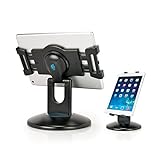
- Hands-Free Convenience – Free up your hands for multitasking during video calls, online classes, or movies. Place your tablet securely on the stand and enjoy effortless viewing.
- Perfect for POS & Business – Sturdy weighted base prevents tipping, making it ideal for point-of-sale use. Rotate smoothly to face customers for signatures or information input.
- Includes 2 Interchangeable Holders – Fits tablets from 6.6'' to 9.6'' (check side dimensions). Choose the right holder for your device to ensure a snug fit.
- Ergonomic Viewing – Raise your tablet to eye level to reduce neck strain and improve posture during extended use.
- Durable Micro-Adjustable Hinge – Adjust to the perfect angle with laptop-grade hinges tested for 10,000+ cycles, ensuring long-lasting stability.
During planning, map which system supplies each screen’s data and what happens when a connection or service is unavailable. Test coverage and performance in stockrooms, sales floors, and other areas where employees work. Coordinate application, POS, inventory, and network support so a failure can be diagnosed across the whole workflow. Verizon’s overview of mobile retail technology and inventory management also discusses network access in relation to retail tools.
How can retailers judge whether mobile technology is helping?
Define a small number of operational measures before expanding a rollout. Choose measures tied to the job being improved, such as time to check availability, order-picking accuracy, time spent completing a transaction, or the number of steps needed to resolve a product question. Compare the results with the retailer’s own baseline and account for changes in staffing, store conditions, and process design; vendor examples and survey figures do not establish what a particular retailer will achieve.
Mobile technology is most useful when it removes a real interruption in service or store work. A connected device that gives an associate trustworthy information at the point of need can support faster decisions; a device that adds logins, disconnected apps, or unreliable data simply moves friction onto a smaller screen.
Recommended Free Tools
Quick Recap
Product prices and availability are accurate as of the date/time indicated and are subject to change. Any price and availability information displayed on Amazon at the time of purchase will apply.




