Windows Errors? Fix Them Before They Spread
Repair common Windows errors and clear accumulated junk for a smoother, more stable PC - no reinstall needed.Free scan · no reinstallOutdated Drivers Are Slowing You Down
One free scan finds every outdated or missing driver and matches the right update for your exact hardware.Free scan · exact hardware matchA practical React Three Fiber voxel editor separates its world model from its rendering: store occupied integer grid cells in application data, draw repeated cubes with Three.js InstancedMesh, and use raycast intersections to translate pointer clicks into cell edits. Fiber supplies the React-to-Three.js scene renderer and pointer-event plumbing; grid coordinates, cell lookup, and add/remove behavior are editor decisions you implement.
Choose compatible React and React Three Fiber versions
React Three Fiber (R3F) is a React renderer for Three.js: its JSX components construct and update Three.js objects. The official introduction pairs R3F v8 with React 18 and R3F v9 with React 19. It identifies v10 as alpha and directs users to the stable v9 documentation, so check the compatibility guidance when choosing package versions: R3F introduction.
As an Amazon Associate I earn from qualifying purchases.
A typical scene begins with <Canvas>, inside which components such as <mesh> and <boxGeometry> describe Three.js objects. R3F also connects pointer event props to its raycaster-backed event system; this is what lets a scene respond to clicks without manually wiring a separate raycaster for every object. See How R3F works.
Keep voxel data separate from the scene
Use the editor’s application state as the source of truth, rather than treating rendered meshes or instance numbers as the voxel world. A straightforward model stores occupied cells at integer coordinates (x, y, z), with a material, color, or palette identifier as the cell value. A coordinate key such as "x,y,z" can support lookup and edits; serialization and undo/redo can then operate on stable cell data rather than on transient rendering details.
#1 Best Overall

- Advanced 3D navigation
- Wireless and USB-C connectivity
- Rechargeable battery lasting up to 1 month between charges
- 2 programmable side buttons
- Lightweight and durable carry case
This grid model is an architectural recommendation, not a data structure required by R3F or Three.js. Its practical benefit is that the same world data can drive rendering, saving, selection, and editing. Convert each integer cell coordinate to a world-space transform when producing the rendered representation. Choose a consistent convention for cell size and origin—for example, cell centers at integer multiples of the cell size—and use it in both transform generation and pointer-to-cell quantization.
Map a pointer hit to a voxel or neighboring cell
When a user clicks, R3F’s event system uses raycasting to find intersections. Three.js orders raycaster intersections nearest first, and an intersection with an instanced mesh includes an instanceId. Use the nearest relevant hit, then resolve it through your own mapping from instance index to grid coordinate. The raycaster’s returned data and behavior are documented in the Three.js Raycaster reference.
Selecting or removing a voxel
For selection or removal, use the hit’s mapped grid coordinate to address the editor model. Do not assume that an instance index is itself a persistent voxel identity: indices belong to the rendered instance arrangement and can change when that arrangement is rebuilt or compacted.
Recommended Free Tools
Adding a voxel beside a hit
A common placement method uses the intersection point and face normal. Determine which grid cell contains the hit, offset by one cell along the hit face’s outward normal, then quantize to the integer grid. This is interaction logic you implement; Fiber does not automatically infer an adjacent voxel or maintain a voxel grid.
Rank #2
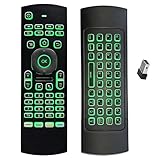
- Multifunctional&4 in 1: 2.4G Wireless Air Fly Mouse + 2.4G Wireless Keyboard + Somatic Handle + Android Remote Control
- Entertainment Talent: 1: 1 somatosensory control and motion recognition, 3-Gyro + 3-Gsensor built-in 6-axis inertial sensor, 360 ° free space motion recognition and sensing, accurate and flexible control, an extraordinary game experience
- Compatible with Devices: for Android TV Box, WIndows PC, Mac OS,Linux
- This remote is very easy to use, plug and play function makes you don't need install any driver. Adopt 2.4GHZ technology, realized quick transmission, strongly anti-interference, sensible, operation distance reach 10m
- Wide Control: 2.4G RF wireless keyboard input technology, high stability, the operation distance up to 10 meters.
Validate the result against your grid convention, especially when cells are centered at integer coordinates or when the hit lies close to a face boundary. Three.js notes two raycasting edge cases: mesh back faces are not detected unless the material is double-sided, and a ray passing along a shared triangle edge can produce duplicate intersections. Choose the intended surface behavior and avoid treating duplicate hits as separate voxel selections.
Render repeated cubes with InstancedMesh
Voxel scenes repeat the same cube geometry and often the same material, making Three.js InstancedMesh a natural rendering primitive. Rather than creating a separate mesh object for each cube, an instanced mesh shares geometry and material while assigning a transform to each instance. This can reduce draw calls and scene-object overhead compared with one mesh per voxel. The Three.js InstancedMesh reference describes instance transforms, colors, and update behavior.
Maintain an explicit correspondence between grid cells and instance indices. For example, keep an ordered array of cell coordinates alongside a lookup from coordinate key to instance index. When a raycast reports instanceId, that mapping identifies the cell to edit. If edits change the instance ordering, update the mapping at the same time; otherwise clicks can select the wrong voxel even though rendering looks correct.
Synchronize changed transforms and colors
After changing instance matrices through Three.js instance-matrix setters, set instanceMatrix.needsUpdate = true so the updated data is sent to the renderer. Likewise, after changing instance colors, set instanceColor.needsUpdate = true. These flags are necessary update details, not a substitute for keeping the application model and instance mapping consistent.
Rank #3
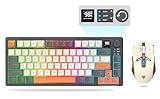
- 【Ultimate Wireless Gaming Combo w/ RGB】 - Immerse yourself in the game with vibrant RGB backlighting on both keyboard and mouse. This all-in-one kit delivers exceptional value, providing everything a PC gamer needs for both intense gaming sessions and productive work. (Includes: 1x Keyboard, 1x Mouse, 1x USB Receiver, 1x Charging Cable)
- 【75% Compact & Portable Layout】 - Free up valuable desk space for larger mouse movements! This compact keyboard features a unique Black & Orange/White MDA keycap design and dedicated arrow keys. Its portable size fits easily into your backpack, making it the perfect hybrid for gaming at home and productivity on the go.
- 【Precision Gaming Mouse w/ 3600 DPI】 - Dominate your competition with pinpoint accuracy. The gaming mouse boasts a high-performance optical sensor with 4 adjustable DPI settings (1200/1800/2400/3600). With a 4000 FPS and 10G acceleration, it ensures ultra-fast, responsive tracking with zero lag, crucial for FPS and MOBA games.
- 【Tri-Mode Connectivity & Multi-Device Pairing】 - Connect via BT 5.0, 2.4GHz wireless, or USB-C cable for ultimate flexibility. The keyboard can pair with up to 5 devices simultaneously! Easily switch between your gaming PC, laptop, tablet, or even phone with a simple shortcut (FN+Key). Perfect for multitaskers who game, work, and study.
- 【Long-Lasting Battery & Smart Sleep】 - Never worry about power during a marathon gaming session. The keyboard's 2000mAh battery and mouse's 500mAh battery offer up to 8 hours of use with lighting. Intelligent energy-saving technology automatically puts them to sleep after 2 minutes of inactivity. Press any key to wake instantly! (Fully charge before first use)
Three.js does not automatically compute an instanced mesh’s bounding box. Recompute it when needed after transformations, particularly if spatial bounds are used for frustum culling or other bounds-dependent behavior.
Independent reader supportYour contribution helps us test, update, and keep practical guides available for everyone.Choose between individual meshes and instancing
| Approach | Representation and editing | Picking and scale considerations |
|---|---|---|
| One mesh per voxel | Each cell has a distinct scene object, which can make basic per-object updates and event handling straightforward. | Hits naturally identify a mesh, but a large object count can add overhead. Measure the behavior in representative scenes. |
| Instanced cubes | Repeated geometry and material are represented by instances; the editor must maintain a cell-to-instance mapping and synchronize instance buffers. | Raycast hits expose instanceId, which must be mapped back to a cell. Instancing can reduce draw calls for repeated objects, but does not establish a universal voxel limit or performance guarantee. |
The trade-off depends on your edit patterns, scene size, target devices, and the cost of keeping mappings and buffers current. R3F’s performance guidance recommends reusing geometry and materials and using instancing for repeated objects; its large-count examples illustrate the technique, not a benchmark or capacity promise for every editor. See R3F scaling performance.
Start with the simpler representation if it meets your needs. If profiling on realistic devices shows that object count, draw calls, or interaction updates are a bottleneck, test instancing and then consider chunking, culling, or merging where measurement shows a benefit. The documentation does not set a fixed maximum number of voxels that will perform well.
Handle rendering failures and context loss
Keep the rest of the editor usable when WebGL cannot start. R3F’s Canvas API uses WebGLRenderer by default, supports renderer configuration, and documents a fallback for browsers or systems without supported WebGL. The same reference advises guarding against context crashes, including those associated with disabled GPUs or faulty drivers: R3F Canvas API.
Provide a visible fallback that explains that the 3D view could not be started rather than leaving an empty canvas. Keep essential controls or saved project data accessible where feasible, and ensure a rendering failure does not silently appear to erase the voxel model. Treat rendering as a view of the editor state, not the only place that state exists.
Quick Recap
Product prices and availability are accurate as of the date/time indicated and are subject to change. Any price and availability information displayed on Amazon at the time of purchase will apply.




