PC Slower Than It Used to Be?
A free scan shows the junk files, broken settings and background clutter dragging Windows down - then fixes them in one click.Free scan · Windows 10 & 11Outdated Drivers Are Slowing You Down
One free scan finds every outdated or missing driver and matches the right update for your exact hardware.Free scan · exact hardware matchDeere’s precision technology is a connected set of machine hardware, positioning tools, wireless data links and software—not one feature installed on every tractor or construction machine. In agriculture, it links field plans and machine guidance with work and crop records. In construction, it connects fleet monitoring with machine-specific grade-management options. What a particular machine can do depends on its model, installed equipment, software setup, region and available cellular service.
How Deere’s precision system is organized
The system can be understood as four connected layers: equipment that senses or carries out work, positioning and guidance technology, connectivity for sharing data, and digital tools for planning or reviewing operations. These layers may work together, but a shared Deere platform does not mean that agricultural and construction machines use identical features.
As an Amazon Associate I earn from qualifying purchases.
- Machine hardware and sensors: Displays, receivers, modems and machine-specific components provide information or support equipment functions.
- Positioning and guidance: Satellite positioning and guidance features help locate a machine or guide its movement.
- Connectivity: JDLink can transmit supported machine data when equipment, account setup and network coverage allow.
- Digital tools: Operations Center supports agricultural planning and records, while construction tools emphasize fleet information and grade management.
Data visibility and machine capability are separate things: seeing a machine’s location remotely does not itself control the machine. Deere’s Operations Center, Precision Upgrades and Precision Construction materials describe different parts of this system.
The Tool Desk
Outbyte PC Repair FREERepair Windows errors before they cause bigger problemsFix Now →Outbyte Driver Updater FREEFix the driver behind crashes, sound loss and screen glitchesFind Drivers →How the agricultural workflow works
Plan, send, monitor and analyze field work
John Deere Operations Center is the digital organization and analysis layer for supported agricultural operations. A farm manager can set up farms, equipment, fields, products, teams and advisor access; prepare work plans; send those plans to supported in-cab displays; monitor machine position and field progress; and review data collected after work.
#1 Best Overall

- Fitment: Compatible with John Deere StarFire 3000, 6000, and other StarFire GPS receivers, Replace part number PF81190
- Versatile Application: Ideal for tractors, combines, sprayers, and other precision agriculture equipment requiring GPS guidance
- Material: Made of high-quality materials, durable and reduces the need for frequent replacement
- Secure & Stable Mounting: Provides a rigid and vibration-resistant platform to maintain consistent GPS signal reception for uninterrupted field operations
- Note:If you have any problem about installation,Please contact with us.We will try our best to help you solving the problem.
JDLink-connected machine and agronomic data can flow into an Operations Center account. Deere describes field updates every 30 seconds and machine updates every five seconds. Those are stated feature intervals, not a guarantee for every machine or network condition: the equipment must support the feature, be set up appropriately and have cellular coverage for JDLink data transfer. Account permissions also affect who can view information. See Deere’s Operations Center overview for its described workflow.
Hardware turns plans and position data into in-cab tools
Deere’s Precision Essentials example combines a G5 or G5 Plus display, a StarFire 7500 receiver and a JDLink modem. The display manages functions such as guidance lines, application rates and input placement; the receiver supplies positioning information; and the modem enables data transfer when connected to cellular service.
Rank #2
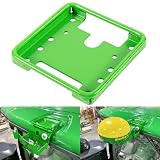
- Widely Application: The PF81190 Mounting Bracket is specifically engineered for John Deere Star Fire SF3000, SF6000, SF ITC GPS receivers, ensuring stable installation for precision agriculture guidance, but also compatible with brands like New Holland, Fendt, Case IH, Claas, and others. Part Number: PF81190.
- Compatibility: The PF81190 GPS receiver mounting bracket is designed to fit a wide range of John Deere machines, including 6R, 7R, 8R, and 9R Series tractors, as well as planters such as 1725C and 1775NT, ensuring consistent mounting across platforms.
- Easy Installation: The PF81190 mounting bracket is designed for quick and easy installation, allowing for quick installation and secure attachment without modification to cab structures. Firmly hold Star Fire GPS receivers in place, minimizing vibration for accurate field performance.
- Durable & Sturdy Construction: Manufactured with high-strength stainless steel for vibration resistance, the surface is coated with anti-rust painting, which enhances corrosion resistance and extends service life.
- After-Sale Service: If you have any problems with this PF81190 GPS receiver mounting bracket, please let us know in time. We are more than happy to help. Note: Please carefully check your model before purchasing.
Deere says the StarFire 7500 receiver with SF-RTK has accuracy within 2.5 cm. This is Deere’s product claim, not a universal guaranteed result: performance depends on the relevant signal, activation, equipment compatibility and operating conditions. Deere says the service can be activated at no charge in an Operations Center account; that does not remove the modem’s need for cellular connectivity to transfer data. Check the specific machine, region and setup with Deere or a dealer. Details are on Deere’s Precision Upgrades page.
Quick wins for a faster PC:
Repair Windows errors before they cause bigger problemsFix Now →Fix the driver behind crashes, sound loss and screen glitchesFind Drivers →AutoTrac guidance is different from Machine Sync coordination
AutoTrac provides automated guidance. Machine Sync adds coordination between machines: Deere operator help describes a follower guided relative to a leader using AutoTrac, StarFire receiver information to maintain offsets, and wireless communication through MTG 4G LTE modems.
Rank #3

- Premium Quality Construction: Designed and manufactured to exacting specifications which meet or exceed OEM performance standards
- Direct Replacement Compatibility: Fitment Type is Direct Replacement with Replacement Part Number PF81190 for seamless installation
- Durable Material Construction: Made by high quality material that is lightweight, anti-rust, colorfast and durable for long-lasting use
- Rigorous Testing Standards: Own different test machines to design exact accurate parameter for our products, and all items were tested for performance
- Wide Agricultural Equipment Compatibility: fit for John Deere, for New Holland, for Fendt, for Case IH, for Claas and others, and fits for Star Fire receiver SF3000, SF6000, SF ITC
Machine Sync requires compatible machines and correctly entered machine and implement measurements and offsets. It is not collision avoidance: Deere warns that the system does not detect or avoid obstacles or bystanders and does not bring the follower to a complete stop. Operators must stay alert and ready to take control. See Deere’s Precision Ag Technology operator help.
How the construction workflow differs
JDLink and Operations Center provide fleet visibility
For construction equipment, Deere describes JDLink as a way to access fleet location, usage, maintenance and diagnostic information remotely. Operations Center makes connected machine data available for broader review. These are monitoring and management functions; they are distinct from the controls and hardware that guide a machine’s work.
Rank #4

- 【High-Precision Positioning Technology】The SMA10 GPS for tractors for spraying integrates multiple positioning technologies including PPP,SBAS and RTK ensuring positioning accuracy up to 2.5cm for manual steering, helping users stay on the planned path and enhancing operational efficiency
- 【Versatile Guidance System】The SMA10 farm tractor GPS guidance systems offer a variety of guidance lines such as straight, curve, A+ line, pivot, and line group to cater to diverse field shapes and operational needs. Facilitates guidance line translation and seamless data transfer across various formats, ensuring top-tier performance at a competitive, budget-friendly price point
- 【Implement Management】Equipped with a wireless module, the SMA10 tractor agricultural GPS system offers VT/TC functionalities for real-time equipment monitoring and control, simplifying operations such as seeding, fertilizing, and spraying, thereby substantially increasing work efficiency and reducing waste
- 【High-Performance Hardware Specifications】The SMA10 Tractor GPS System for spraying fields feature a 10.1 inch high-resolution display, 2.0 GHz CPU, 6 GB RAM, and 128 GB ROM storage, Wi-Fi 802.11a/b/g/n/ac, and Bluetooth 5.0, ensuring smooth operation of the system
- 【Support and Warranty】Relax with the assurance of a one-year warranty and ongoing lifetime technical support for a worry-free experience. Get up to speed with ease using our comprehensive user manual and step-by-step video tutorials. The tractor guidance system's software included in the collector is permanently valid, and we offer a commitment to perpetually free software upgrades and updates to keep your system current and efficient
Grade management comes in machine-dependent tiers
Deere’s construction offerings are not a single universal grade feature. Depending on machine and configuration, the options described in Deere materials include fully integrated SmartGrade, grade-control-ready setups, grade guidance, grade-reference mounts, slope control, cross slope and grade indicate. A 2024 Deere guide listed fully integrated SmartGrade on selected dozers, excavators and compact track loaders, and on all motor graders covered by that guide; it also noted that factory connectivity was expanding and field-installed kits could connect some machines without factory connectivity.
What’s actually slowing this PC down?
Pick the symptom - the matching free tool is one click away.
That guide is useful for understanding the kinds of options, not for confirming a machine’s current eligibility. Model years and available configurations change, so verify the exact machine and option with current Deere equipment information or a dealer. Deere’s Precision Construction information describes the broader system.
Best Value

- Made of high quality material, durable and practical to use.
- High Performance,Long Working Life.Easy installation and removal.
- Designed and manufactured to exacting specifications which meet or exceed OEM performance.
- Stable performance, high reliability,suitable for replacing your broken one.
- Please check the description or use the year/make/model check finder and replace part numbers to confirm the compatibility before purchasing.
SmartGrade’s published precision figure is a Deere claim
In “Using GPS to Help Build the World,” Deere reports that SmartGrade technology allows machines to dig and grade within 1.2 inches. The figure is attributed to Deere and should not be read as a guaranteed result for every machine, task, surface or jobsite, or as an independent comparative test. The page also quotes Deere grade-management senior product manager Sean Mairet on the development work behind the technology; that commentary is Deere’s perspective, not independent performance evidence. See “Using GPS to Help Build the World”.
Independent reader supportYour contribution helps us test, update, and keep practical guides available for everyone.What is shared—and what is not
| Aspect | Agriculture | Construction |
|---|---|---|
| Primary purpose | Connect field plans, machine guidance, applications and crop or work records. | Connect fleet information with jobsite grade-management tools. |
| Typical information or equipment | Positioning receivers, in-cab displays, machine telemetry and agronomic data. | Fleet status and machine-specific grade hardware or software using designs or references. |
| Role of connectivity | JDLink can feed supported machine and agronomic data into Operations Center. | JDLink and Operations Center support remote fleet visibility and data review. |
| Compatibility factors | Machine support, installed hardware, software activation, setup, account access and region. | Machine family, model, model year, installed equipment and grade-management tier. |
| What connectivity does not establish | That a machine has every guidance or automation feature. | That fleet visibility alone provides grade control or that SmartGrade fits every machine. |
JDLink and Operations Center are shared components, but the operational tools around them differ. Deere also provides connected-software and developer/API pathways for integrations; availability and access depend on the relevant product and account. Deere’s developer portal is the source for its developer-facing pathways.
Quick Recap
How to check whether a feature fits a machine
- Identify the exact machine. Record its model, model year and relevant configuration; a broad equipment family is not enough to establish compatibility.
- Ask which tier is available. For construction, distinguish SmartGrade from grade-control-ready, guidance, reference, slope or indicate options. For agriculture, identify the display, receiver, modem and guidance features included or required.
- Confirm setup and activations. Check required software activations, signal or service requirements, machine and implement measurements, offsets and account permissions.
- Check connectivity for the operating region. JDLink data transfer depends on cellular coverage, and service availability can vary by machine and region.
- Verify current compatibility with Deere or a dealer. Product tiers and supported models change; a past guide or a feature’s presence on another machine does not establish fit.
Product prices and availability are accurate as of the date/time indicated and are subject to change. Any price and availability information displayed on Amazon at the time of purchase will apply.
Do these 3 things before closing this tab:
1Repair Windows errors before they cause bigger problems2Scan for outdated or missing drivers - takes under a minute3Clear out junk files and repair common Windows errors



