Do these 3 things before closing this tab:
1Repair Windows errors before they cause bigger problems2Fix the driver behind crashes, sound loss and screen glitches3Clear out junk files and repair common Windows errorsChoose Bot Mode for persistent conversations with named Hermes specialist profiles; choose Kanban when work needs a shared, durable task board with assignments, status, and handoffs. They solve different coordination problems, so a team can use both: keep specialist profiles available as Bots and use Kanban cards to scope and track work. The right choice depends on whether you need an ongoing specialist conversation, durable task state, or both.
Bot Mode and Kanban solve different coordination problems
Bot Mode is a desktop interface over Hermes profiles. Each Bot has a role and profile-specific settings, and the interface supports persistent Bot chats, routines, and Bot-to-Bot or group conversations. It surfaces profiles; it does not create a separate agent primitive. Nous Research’s Bot Mode guide documents the feature and its configuration.
As an Amazon Associate I earn from qualifying purchases.
Kanban is a multi-profile task board and dispatcher. A person or orchestrator creates a task, assigns it to a profile, and a dispatched worker uses Kanban tools to read and update that task. The board provides shared task state and supports handoffs and review. See the official Kanban guide and CLI reference for documented setup and commands.
In short, a Bot is a way to work with a specialist profile; a Kanban card is a way to define and track a piece of work. A named specialist chat is not a substitute for a durable task record, and a task board is not itself an ongoing specialist relationship.
#1 Best Overall

- ✔ DOUBLE-SIDED DESK BOARD (KANBAN + WHITEBOARD) Switch between a pre-designed Kanban workflow side and a blank whiteboard side for notes, brainstorming, and quick planning—right next to your laptop.
- ✔ SNAP-ON, REUSABLE TASK CARDS (NO STICKY NOTES) Includes 24 reusable task cards that let you move work visually across columns—wipe clean and reuse again and again.
- ✔ FLIP & ROTATE ON THE INCLUDED STAND Easily flip the board between Kanban mode and whiteboard mode on the stand—ideal for sprint planning, daily priorities, or meeting prep.
- ✔ PORTABLE “VISUAL COMMAND CENTER” FOR ANY WORKSPACE Compact desktop footprint for home office, classroom, and small teams—move it between rooms or take it to meetings without hassle.
- ✔ COMPLETE DESKTOP KIT (BOARD + MARKERS + ACCESSORIES) A ready-to-use productivity set built for Agile, Scrum, and project planning—keeps tasks visible, reduces mental load, and helps you execute consistently.
Which should you use?
| Your need | Best fit | Reason |
|---|---|---|
| A persistent specialist to chat with, using its own profile identity and routines | Bot Mode | The Bot roster and chats surface Hermes profiles and routines in the desktop UI. |
| A short subtask whose answer should return directly to the parent, with no human handoff | Direct delegation | The Kanban guide describes delegation as suitable for a brief reasoning answer returned to the caller. |
| Assigned work that needs visible status, comments, dependencies, or review | Kanban | The board stores task state and dispatches work to assigned profile workers. |
| Specialist profiles doing work that requires tracking and handoffs | Use both | Profiles provide the specialist roles; Kanban cards define and track the tasks. |
Use direct delegation when the answer is small, self-contained, and can return to its caller. Use Kanban when work crosses profile boundaries, should survive restarts, needs human input, or needs to remain discoverable. These are coordination choices, not a claim that one approach is universally better.
What a combined Bot Mode and Kanban workflow looks like
The following is a practical design based on documented Hermes features, not a claim that this sequence has been tested or that parallel work always improves speed or accuracy.
Rank #2

- VISUAL WORKFLOW: 4-column magnetic board featuring To Do, Doing, Verify, and Done sections for clear task progression and project management
- VERSATILE DESIGN: Magnetic surface allows easy rearrangement of tasks using included cards and markers, perfect for agile project planning
- PROFESSIONAL ORGANIZATION: Streamlined task management system helps teams track project status and workflow efficiency in office settings
- COLLABORATIVE TOOL: Ideal for team meetings, sprint planning, and daily standups with visible project status updates for all team members
- PRACTICAL SETUP: Wall-mountable board with magnetic holders and card system enables quick updates and maintains organized workspace appearance
- Set up stable specialist roles. Define a small set of profiles for distinct responsibilities—for example, source checking, audience research, and synthesis. Bot Mode can expose those profiles as named Bots for persistent conversations.
- Initialize the board and start dispatch. Run
hermes kanban init, thenhermes gateway start. Create one task for each independent workstream, assign the relevant profile, and write the question, expected evidence, and completion criteria into the task. - Separate independent tasks from dependent ones. Independent research cards can be assigned separately. If work must happen in sequence, connect the downstream task to its prerequisite using the board’s parent or dependency relationship. Put any shared decision—such as a schema or naming convention—into the relevant task instructions.
- Record findings and unresolved questions on the task. Ask workers to put evidence and open questions in their results or comments. Route finished work to an analyst or synthesis task, then to a writer task; add a review state when the workflow needs a quality gate. The board supports handoffs and review, while this particular editorial sequence is a suggested design.
- Keep conversations and task records in their appropriate places. Use Bots for ongoing specialist conversations and routines; use the board as the durable record for assigned work. The Kanban watch, list, and stats surfaces let you inspect activity.
What to know before enabling Kanban
The gateway must be running for default dispatch
In the documented default configuration, the gateway embeds the Kanban dispatcher and checks for ready work every 60 seconds. That interval is a Nous Research software default documented in 2026, not a guarantee of immediate dispatch. If the gateway is not running, ready tasks wait.
Task-management permissions depend on the profile setup
Dispatched workers receive Kanban worker tools. An orchestrator profile that needs to create or manage tasks must have the Kanban toolset enabled. The Desktop Kanban plugin can display the board, but installing it alone does not give the chat agent permission to manage tasks.
Rank #3

- Complete 4-column magnetic Kanban board kit: flex dry-erase board plus 64 magnetic Agile cards and accessories — a full board system, not a cards-only pack.
- 64 magnetic cards included: task, detail, blocker, and blank headline cards so you can run To Do / Doing / Done / custom workflows and wipe cards clean for reuse.
- Thin, light flex board (about 6 lb) with strong magnetism: hang with included hardware/adhesive or move between rooms without a bulky framed panel.
- Customize all four column headlines with blank magnetic header cards; write on the board and on the cards with the included markers.
- Built for small teams and project planning: clearer than sticky notes, ready for standups, Scrum, or personal Kanban on wall or table.
Attachments and shared boards need configuration care
For workers using remote Docker or Modal terminal backends, mount the Kanban attachment directory into the sandbox so referenced attachment paths resolve. When sharing a board across Hermes homes, take care to align profile names and dispatch-profile configuration.
Bot Mode capacity and its practical limits
The Bot Mode guide documents three warm local backends as the default, an estimate of approximately 60 MB for each warm local backend, and a default idle-reap timeout of 10 minutes. It also says a Bot may wait up to 30 seconds for a free slot before timing out. These are Nous Research documentation figures from 2026, not independent measurements or universal hardware requirements. Larger active Bot fleets may require increasing the relevant setting and providing more available memory; actual capacity depends on the deployment and configuration.
Rank #4

- Magnetic Backing: These magnetic project management tools with full magnetic back ensures it do not fall off,securely stick to any iron-containing surface, like magnetic whiteboard, fridge, and more. But not suitable for magnetic glass baords
- Writable and Erasable Kanban Magnets: These reusable dry erase cards with nano-coating allows you to erase them up to 100,000 times. Write on them with a dry erase marker, wipe them off and use them again
- Efficient Task Management: These project planning board are designed to help teams and individuals effortlessly manage tasks, boost productivity, and keep project progress clear and organized
- Powerful Scrum & Kanban Kit: Featuring fantastic columns and labels, it adapts to various workflows, making it ideal for agile development, project management, study planning, and more
- What You Get: 27 x task cards, 3 x column cards, 4 x dry erase markers, allowing you to quickly update and adjust task statuses to meet diverse needs.
A quick setup and inspection sequence
- Initialize a board with
hermes kanban init. - Start the gateway with
hermes gateway start. - Create a task, assign it to a profile, and include clear scope and completion criteria.
- Inspect the board with the Kanban watch, list, or stats surfaces.
For command details and current behavior, consult the official Hermes Kanban guide and CLI reference. Product behavior, UI details, and defaults can change between releases.
Quick Recap
Best Value
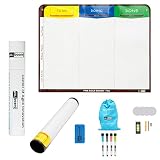
- Visualize work clearly with a 3-column workflow: Designed with a simple 3-column layout to help teams organize tasks by stage, improve visibility, and keep work moving for Kanban, Scrum, Agile planning, daily task tracking, and team workflow management
- Full magnetic dry erase writing surface: Write directly on the board and use magnets across the entire surface. This full magnetic dry erase board gives you a flexible visual workspace for project planning, task organization, and collaboration
- Ultra-thin flexible board for wall-mount use: This lightweight flexible Kanban board is easy to mount and suitable for offices, home offices, classrooms, studios, and team spaces. It delivers the function of a project management whiteboard without the bulk of a traditional board
- Versatile application for Agile, Scrum, projects, and daily planning: Use it as a Scrum board, Kanban board, project planning board, productivity board, or visual task tracker. A practical tool for software teams, operations teams, students, managers, and anyone who benefits from seeing work at a glance
- Includes essential accessories to get started: Comes with 4 dry erase markers, eraser, wall-mount hardware, and accessories shown in the product images. A ready-to-use board solution for creating a visible workflow system right away
Product prices and availability are accurate as of the date/time indicated and are subject to change. Any price and availability information displayed on Amazon at the time of purchase will apply.




