What’s actually slowing this PC down?
Pick the symptom - the matching free tool is one click away.
Headset crackling can come from Windows audio settings or drivers, a weak or interfered-with Bluetooth connection, an app using a Bluetooth headset microphone, or a dirty or faulty cable or port. The noise alone does not prove the headset is broken. Compare it across devices and audio sources, then troubleshoot the connection and software path that matches the symptoms.
Start by isolating when the crackling happens
Note whether the noise occurs in every app or just one, whether it happens on a wired, USB, Bluetooth, or USB-wireless connection, and whether it starts during calls or voice chat. Also compare stored audio with streaming. These clues help narrow the problem, but no single symptom gives a definitive diagnosis.
As an Amazon Associate I earn from qualifying purchases.
- Play a familiar audio file stored on your device, then compare it with streamed audio.
- If the headset is Bluetooth, keep the source device nearby and reduce possible interference.
- Try the headset with another source device, or try a different headset with the original device. If the crackling follows the headset, its connection or hardware may be involved; if it stays with the source, investigate that device. Treat this as a useful comparison, not a definitive test.
For Windows: check output settings, format, and drivers
Microsoft identifies audio enhancements, unsupported audio formats, driver problems, and stopped audio services as possible contributors to distorted or crackling sound in Windows. Its troubleshooting guidance covers Windows 11 and Windows 10: Microsoft’s Windows sound troubleshooting steps.
- Confirm that the headset is selected as the audio output device.
- Turn off audio enhancements for the headset and test again.
- Try a different default audio format, then check whether the crackling changes.
- Update the audio driver. If the problem remains, uninstall it and install the latest driver provided by the device manufacturer.
- If needed, restart the Windows Audio and Windows Audio Endpoint Builder services, then test again.
Microsoft also recommends checking the computer or audio-device manufacturer for current sound drivers if basic troubleshooting does not resolve the issue: Microsoft’s driver guidance. Microsoft states that Windows 10 support ended on October 14, 2025.
#1 Best Overall
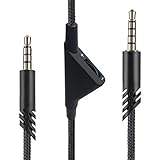
- [Inline Function] - Scroll a wheel button to control the in-line Volume. This cable has no mute mic control and no mic output function.
- [Compatibility] - Inline volume control cable is compatible with Astro A10 gaming headset and work with A40 headset.
- [Easy to Use] - 2 Meter(6.5ft) length cable compatible with PS4/PC via a 3.5mm jack.5 pole audio jack connect headset and 4 pole audio jack connect audio devices.5 pole audio jack connect headset and 4 pole audio jack connect audio devices.
- [Durable ] - The volume control cord is made of high-quality, durable, and wear-resistant nylon braided rope.
- [What You’ll Get] - 1.[1 Pack] Volume Control Cable. 2. 30 Days Worry-free Replacement or refund. 3. If there is any question, please feel free to contact us.
For Bluetooth: separate interference from streaming problems
Bluetooth audio may cut out or sound distorted when the signal is weakened or interfered with. Apple recommends testing audio stored on the device with the source nearby to help distinguish connection problems from streaming issues. Keep connected devices close and, where practical, move away from potential interference sources such as power cables, microwaves, fluorescent lights, wireless video cameras, and cordless phones. See Apple’s guidance on Bluetooth interference and Apple’s steps for sound that cuts in or out.
On Windows, check that the Bluetooth headset is selected for output. You can also toggle Bluetooth, unpair and pair the headset again, try another audio format, update Bluetooth drivers, and restart the PC. If you need higher-quality Bluetooth audio streaming, Microsoft advises checking the device documentation for A2DP support. Follow Microsoft’s Bluetooth troubleshooting guidance.
Rank #2

- Compatibility: The replacement 2.0M Astro A10 A40 Headset cable cord will allow you to connect your Astro A40TR or A40 gaming headset to your Xbox One controller, PlayStation 4 PS4 or PCs and Macs with a combined mic/headphone 3.5mm jack
- High Quality Materials: 3.5mm Golden Plated Audio Jack, Oxygen-free copper and gold plated connectors, nylon braided thread can prevent knotting and is more durable.100% copper wire core provides high-speed and stable clear sound signal transmission when gaming
- Volume Control Function: This headset cable can control the headphone volume through the built-in volume control wheel, creating a convenient environment for you whether you are playing games or learning. Note: This Cable is No Mute Button
- Easy to Use: Plug and play, The cable have two pole; 3.5mm 4 pole and 3.5mm 5 pole. The 4 pole connect Xbox One, Mp Player, Playstation 4, Mixamp, Smartphone, PC Splitter.; The 5 pole connect with the headset
- Nylon Braided and 6.5 FT Length: Nylon braided style not only let it look upscale and attractive but also provids maximum's durability; 2 Meter in length can be used for most scenes, games, listening to music, movies. It can also be widely used in other audio devices
Check whether a call or voice-chat app triggers it
If sound quality drops as a call or voice-chat app starts on a Mac, test whether the app is using the Bluetooth headphones’ built-in microphone. Apple recommends closing apps that use that microphone and checking audio again. This is a targeted test for a change that coincides with microphone use, not a general fix for every kind of crackling: Apple’s guidance on Bluetooth headphone sound quality on Mac.
For wired headsets: inspect the cable, plug, and port
A loose connection, visible cable damage, or debris in a port or cable can contribute to static or other audio issues. Reseat the connector and inspect the connection without forcing it. Follow the headset maker’s instructions for cleaning; avoid inserting anything or using a cleaning method that could damage the port.
Rank #3

- This audio wire is compatible with Logitech G433 / G233 / G Pro / G Pro X gaming headsets
- Gold plated 3.5mm plugs - Enhanced voice clarity and background noise reduction
- 6.5ft (2 meters) long nylon braided cable - strong and durable
- Replacement for Astro aux cable with volume control, and mute switch, same as the original cable
- Nylon braided
Replace a cable only if it is removable and made for the exact headset model, and your checks point to the cable or its connection. A connector that looks similar is not proof that a cable is compatible. For model-specific cleaning and troubleshooting, consult the manufacturer’s instructions. Corsair’s guidance covers several connection types and recommends contacting its support if its steps do not resolve the issue: Corsair’s headset static troubleshooting.
Quick Recap
Best Value
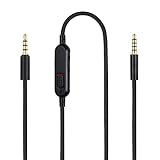
- Audio cable replacement for Logitech G Pro / G Pro X / G Pro X 2 / G433 / G233 gaming headphones
- 3.5mm(1/8") 5 poles (TRRRS) male plug to 3.5mm(1/8") 4 poles (TRRS) male plug; With inline mic mute switch and volume controller - free hands and conveniently using in gaming, listening to music and watching movies
- Premium black braided nylon and copper wire, durable and unbreakable; Gold-plated tips, make better connection, ensure pure and transparent sound quality, support sound-coloration cancellation
- Works with PS4, PS5, Switch, Xbox One, Xbox X/S, MP3 players, Laptops, PC, Cellphones, Tablets, Guitar, Amplifier and other devices with 3.5mm port interface
- Length: 2 meters( 6 feet ), wire diameter is 3.5mm
Rank #4
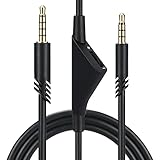
- Compatible With: Replacement aux cable for Astro A10 A40 A40 TR A50 A30 gaming Headphones, Works to Xbox-One, Car stereo, PS4, PC, tablets, laptops ,PC, smartphones and more . Length 2 Meters/ 6.5 FT
- Volume Control : Can make volume control through the volume roller wheel built-in very conveniently, Which can gain a more comfortable gaming experience
- Ultra Quality material: 3.5 mm Golden Plated Aux plug, No-Oxygen copper cord. Works perfectly and sturdy, provide a clear and stable sound transmission with high speed during your gaming and live time
- Easy to operation: There are two different size connectors , 3.5 mm 4 pole and 3.5 mm 5pole.Just plug the 5 pole into the headset and 4 pole to devices, then to play and enjoy
- Just Plug and Play : Enjoy your music time anytime, please don’t hesitate to contact us on Amazon for service if you need help or any questions
Use the pattern to choose the next step
- Crackling on one Windows computer across apps: Check the selected output, enhancements, audio format, drivers, and audio services.
- Bluetooth noise that changes with distance or surroundings: Move the source closer and reduce possible interference; compare stored audio with streaming.
- Bluetooth quality drops when a call or chat begins on Mac: Close apps that may be using the headset microphone and retest.
- Noise changes when a wired connector moves, or the port looks dirty: Reseat and inspect the connection, then follow model-specific care instructions.
- The crackling persists after these checks: Contact the headset or device manufacturer with the model and the tests you have tried.
Product prices and availability are accurate as of the date/time indicated and are subject to change. Any price and availability information displayed on Amazon at the time of purchase will apply.




