What’s actually slowing this PC down?
Pick the symptom - the matching free tool is one click away.
A reported Multi-State Registration option on the GST Portal may let applicants enter common details once, receive a Master Temporary Reference Number (TRN), and then work on separate state-wise applications. That flow is described by a practitioner article, not confirmed in an official GSTN advisory located for this topic. Check the live portal before relying on it. A Master TRN is not a GSTIN, registration certificate, or replacement for state-specific applications.
What a Master TRN means
A TRN is a temporary reference for returning to a saved registration application. In the documented standard process, the GST Portal generates it after the applicant completes Part A verification; the applicant then uses it to continue Part B. It is not the final registration approval or GSTIN. The GST Portal manual documents that standard process.
As an Amazon Associate I earn from qualifying purchases.
The reported multi-state flow is described as one Master TRN for common details, followed by a separate TRN and application for each selected state or union territory. This description comes from CAclubindia’s account of the feature, which also says it found no GSTN notification, circular, or advisory describing it. Treat the Master TRN workflow as a reported portal capability rather than an officially confirmed rule.
Recommended Free Tools
Does one TRN cover several states?
Not in the sense of one shared registration replacing state-wise applications. The official GST registration rules frame registration around a state or union territory, and the GST Portal’s standard application asks the applicant to choose the state/UT and district. Even if the live portal offers a multi-state entry point, check that each intended state has its own application record and follow the portal’s instructions for each.
#1 Best Overall

- 【Great Material】This certificate frames 8.5 x 11 is well-made, lightweight, and includes a plastic cover. The certificate frame may safely and clearly show your priceless certificates while shielding them from moisture, dust, and scratches.
- 【Vertical & Horizontal Display】The diploma frame may be hung on a wall or placed on a tabletop in horizontal and vertical orientations thanks to the saw-tooth hangers and kickstands. You are free to select how you wish.
- 【Simple to Use】The document frame incorporates flip taps that make it simple to remove the back, making picture changes quick and hassle-free.
- 【8.5 x 11 Frame】This frame is ideal for holding 8.5 x 11 inch prints, photos, credentials, diplomas, certificates, and degrees.
- 【Nice Gift & Décor】The upsimples 8.5 by 11 picture frame is a thoughtful graduation gift. Besides, picture frames complement any office or home decor with their classic yet simple style.
Registration obligations depend on the business’s facts and applicable GST law; this process guide does not determine which states a particular business must register in. CBIC’s FAQ material discusses state registration in relation to the place from which services are supplied. Do not assume that selecting multiple states is necessary—or sufficient—without assessing the business’s circumstances.
How to proceed on the portal
- Check for the multi-state option. Open the GST Portal’s registration area and see whether the live screen offers a Multi-State Registration choice. The documented standard route is Services > Registration > New Registration; the reported multi-state option is not established by the standard GSTN manual.
- If using the standard route, select the relevant state or UT. Choose the state/UT and district for which registration is required. Enter the legal name and PAN information matching the PAN record, along with the primary authorized signatory’s email address and mobile number for OTP verification.
- Complete Part A and retain the TRN. After verification, save the system-generated TRN and acknowledgment details. To resume through the standard route, return to Services > Registration > New Registration and choose the TRN option.
- If the multi-state option appears, verify the resulting records. Confirm the selected state/UT list and check whether the portal displays separate state-specific application/TRN records. The practitioner account describes that structure, but it is not official confirmation of how the facility currently behaves.
- Complete and review each state-wise application. Supply information and evidence relevant to that state, review the application tabs, and submit each application. A saved or draft record is not the same as a submitted application. The manual describes an ARN after submission and application tracking through the portal.
- Check the expiry shown for every saved application. The manual says an ordinary saved application not submitted within 15 days has its TRN and information entered against it purged. Because the reported multi-state feature may have different screen behavior, use the expiry or deadline displayed by the portal for each record.
What happens after submission
For the standard process, submission is followed by an ARN, which can be used to track the application. Keep each ARN associated with its state-wise record so you can follow the relevant application rather than treating a Master TRN as proof that all state applications were filed or approved. The portal’s live status and instructions govern the next steps.
Rank #2
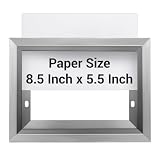
- Precise Size: the frame size is precisely 5.5 × 8.5 inches, fully meeting the statutory requirements of the New York City Department of Housing Preservation and Development (HPD) for inspection signs, avoiding inspection delays or fines due to size discrepancies, and is very suitable for common elevator sign sizes applied in commercial and public buildings
- Vandal Resistant Design: features a heavy-duty, shatterproof front cover to protect contents from scratches, graffiti and knocks, and a PVC panel to protect inserts from vandalism
- Material: durable stainless steel construction, made of brushed stainless steel, with a smooth, corrosion-resistant finish, suitable for high-traffic environments such as schools, hospitals and transportation hubs
- Simple Wall Mount: comes with pre-drilled holes for quick and easy installation on elevator walls or other surfaces, includes mounting hardware
- Horizontal or Vertical Mounting: flexible design allows for horizontal or vertical mounting, depending on your sign layout and elevator wall configuration
If registration is granted, GSTN’s Welcome Kit for New Taxpayers identifies the registration certificate as Form GST REG-06, available to download from the portal rather than issued as a physical certificate. Administrative assignment to the Centre or a State is separate from registration: the kit says taxpayers remain registered under both Central GST and State GST regardless of that assignment.
What to verify before relying on the reported flow
- Whether the live portal actually offers Multi-State Registration for your case.
- Whether it shows every intended state/UT and distinct state-wise application records.
- Whether common details are entered once, and what state-specific details or evidence remain necessary.
- The deadline displayed for each saved application; the standard manual’s 15-day period may not describe a newer multi-state screen.
- Whether each submitted application has its own ARN and can be tracked independently.
A state-wise application does not by itself establish that a separate PAN-based portal login is required. The sources cited here do not settle credential handling for every multi-state case; do not create another portal user unless official instructions for your circumstances require it. Screen labels and validations can change, so follow current portal instructions and official GSTN help content.
Quick Recap
Best Value

- TIMELESS DESIGN: Display your diplomas, certificates, and degrees in elegant black diploma frames that seamlessly blend with any decor, making them the perfect choice for showcasing your achievements in your home, office, school, or college dormitory.
- CERTIFICATE FRAME SIZE: Each frame features a display size of 8.5 x 11, providing ample space to showcase photos, college diplomas, documents, degrees, certificates, awards, artwork, and paintings.
- DOCUMENT PROTECTION: These lightweight 8.5 x 11 document frames are meticulously crafted with plastic high-definition plexiglass to provide exceptional protection against scratches, ensuring the long-term preservation of your precious documents or certificates.
- EASY INSTALLATION: With their lightweight design, these frames are effortless to hang on the wall, eliminating concerns about weight and potential damage, allowing you to display your documents horizontally or vertically with ease.
- GRADUATION GIFT: This 8.5x11 photo frame is perfect as a graduation gift to commemorate and celebrate your graduation, awards, and every significant moment. It is also an ideal choice for displaying Certificates of Recognition, Certification Awards, and high school degrees.
Rank #4

- High Quality: 8.5 x 11 picture frame made of high-definition mirror glass, excellent transparency, full of luster and sturdy enough.
- Easy to Use: Glass certificate frame 8.5x11 has a slot in the back to slide the certificate into, the opening is easy to insert the picture/certificate. The stand works for vertical or horizontal use.
- Beautiful Frame Gift: Beautiful 8.5x11 glass frames as a gift to close friends, grandparents, parents, daughter and son, the lines of the frame are so clean that they fit in any decor.
- Multi Use: Picture frame 8.5x11 are perfect for certificates, documents, diplomas, artwork, honor awards, souvenirs, and photos, collecting all kinds of beautiful pictures.
- Package: The package comes with 1 pack of glass certificate frames were packaged well and arrived intact to display award certificates in office.
Rank #3

- Versatile Set for Any Space: This 5-pack of 8.5x11 picture frames lets you create a coordinated display for family photos, art prints, or achievement documents—perfect for living rooms, hallways, or home offices.
- Durable & Kid-Friendly Design: Constructed from warp-resistant MDF with a crystal-clear, shatterproof front panel, these black picture frames offer lasting protection and peace of mind in high-traffic areas or children's rooms. (Remember to peel off the protective film on both sides.)
- Simple Setup & Adaptable Display: Change pictures effortlessly using the 4 easy-flip tabs—no tools required. Showcase your memories on a desk with the built-in easel (portrait or landscape), or hang on a wall using the included non-marring hooks.
- Secure Fit & Careful Shipping: Each photo frame precisely holds standard 8.5 x 11 documents. We pack every set in reinforced materials to prevent damage during transit, providing great protection for your products.
- Heartfelt Present for Every Occasion: The sleek matte black finish suits any décor, making this frame set a thoughtful gift for graduations, retirements, new jobs, or housewarmings. Help friends and family treasure their milestones and favorite snapshots.
Product prices and availability are accurate as of the date/time indicated and are subject to change. Any price and availability information displayed on Amazon at the time of purchase will apply.




