If Gemini is not generating images, first check that you’re signed in and that your account, country, and language are eligible. Then try a clearer image prompt and consider whether Google’s policies may have blocked the request. A missing image option or failed generation does not, by itself, point to a problem with your phone or computer.
1. Sign in to Gemini
Google lists image generation among the features that are unavailable when you use Gemini Apps while signed out. Sign in to your Google account and try again. See Google’s sign-in guidance for Gemini Apps.
As an Amazon Associate I earn from qualifying purchases.
2. Check whether your account can use image generation
Gemini image features have eligibility and availability limits. Google says availability depends on supported countries and languages, and access can differ for work or school accounts. Its current help page also distinguishes the age requirements for generating images from those for editing them. Check Google’s current image-generation and editing requirements for the rules that apply to your account and location.
Recommended Free Tools
Paid plans may provide access to certain image features or higher-resolution downloads, but Google’s documentation does not say that upgrading fixes ordinary generation failures. Don’t assume a subscription is required unless the feature or message you see specifically says so.
#1 Best Overall

- Dock Photo Printer: The KODAK Dock Plus is a home photo printer that produces high-quality 4x6” prints directly from compatible smartphones. Featuring an integrated docking station, users can place their phone on the printer for better connection while simultaneously charging the device during printing.
- Genuine 4PASS dye sublimation printing: Each photo is produced in three color layers and finished with a clear protective lamination layer. In approximately 55 seconds, you receive a smooth, detailed print designed to resist fingerprints, water, and fading for long-lasting quality.
- Easy to Use: Print photos quickly without complicated setup or technical steps. Simply power on, connect wireless bluetooth, and start printing within seconds. The Dock Plus is built for straightforward operation, making it ideal for first time users and everyday photo printing.
- Home Printing Station: Designed for stable desktop use, this dock photo printer connects to a power outlet for consistent performance and larger 4x6” prints. Ideal for home printing, photo albums, framing, family events, and everyday picture printing.
- KODAK Photo Printer APP: Featuring integrated Bluetooth connectivity, this portable printer connects to compatible iOS and Android devices through the KODAK Photo Printer app. Edit, crop, and customize your photos before printing for creative results.
3. Make the prompt unmistakably an image request
Google recommends starting with an explicit verb such as “draw,” “generate,” or “create,” then describing the image’s style and visible details. Include the subject, what it is doing, and the background or setting. For example: “Create a watercolor illustration of a red fox reading a book beside a tent in a pine forest at dusk.”
If your original request was vague or could be interpreted as asking for text, rewrite it with a clear image action and concrete visual details. Google’s image-generation help provides its prompting guidance.
Rank #2

- Professional-Grade Prints Sticker Photo Anywhere: Utilizing advanced dye-sublimation photo printing technology in a compact 3-inch portable design, this mini sticker photo printer delivers noticeably sharper resolution and more vibrant colors than other portable photo printers, ensuring you always get the brilliant photo quality—even for on-the-go, spontaneous moments.
- Discover Different Versions of Yourself with Liene Picture Printer: Upload your photo, choose from multiple artistic styles, and let AI reimagine you while keeping the subject unchanged — generating beautifully styled portraits with varied backgrounds, all within the Liene Photo App without switching platforms, so you can easily create professional-looking, AI-enhanced photos that express your unique style.
- Instantly Shoot & Print with One-Touch Simplicity: Switch to InstaPic Print mode for a true "shoot-and-print" experience, complete with built-in CCD camera filters — perfect for capturing spontaneous moments outdoors or at parties, as it lets you skip the multi-step process of selecting, editing, and printing from your phone album, delivering photos instantly in one seamless flow with Liene 2x3 mini phone printer.
- Unleash Endless Creativity Beyond Editing: With rich built-in frames, AI-powered background removal for custom fun borders, personalized watermarks & timestamps, and official stickers — our app lets you fully reimagine photos in one place, offering far more creative freedom than basic Polaroid or bluetooth photo printer apps, so you can refine and perfect every shot until it truly reflects your vision.
- Fast Bluetooth Pairing & Group-Print Ready: With quick-connect technology and multi-device pairing support, everyone at parties or gatherings can print seamlessly together—no more waiting for a single user. Plus, a single full charge delivers power for printing up to 27 stickers, so the fun keeps going without interruption.
4. Check for a policy block or image removal
Some requests may not produce an image because Gemini’s systems detect a possible violation of Google’s Terms of Service or Prohibited Use Policy. Google also says it may remove images for that reason. If you see a refusal or an image disappears, review the request against the applicable rules rather than repeatedly submitting the same prompt. Terms for work or school accounts may differ; consult your organization if you use one.
5. Report failures that remain unexplained
If you are signed in, meet the applicable requirements, and have tried a clear prompt that follows Google’s rules, use the Gemini Apps Help Center to find the official problem-reporting route. Google’s reviewed help pages do not identify one universal fix for unexplained failures.
Rank #3

- User-Friendly Portable Photo Printer for iPhone, Android & PC - Get beautiful and colourful memories with Liene 4x6 photo printer! After opening the entire package, you can find one cartridge + 20 sheets of photo paper (placed inside the machine packaging), as well as an additional box containing 80 sheets of photo paper (which includes two cartridges + 80 sheets of photo paper). Full package includes smartphone photo printer, Liene 4x6 photo printer papers (100 sheets), 3 colour cartridges, and fully sealed cassette to prevent dust. Minimalist and magnetic design for compact storage.
- Superior Quality 4x6 Photo Printer - Print photos like no other thanks to the thermal-dye sublimation tech adopted by the picture printer for iphone. The dyes deeply penetrate the paper for vibrant photo printing, and the laminated surface is resistant to water, scratches, fingerprints and fading. Clean the print head promptly if smudges are observed on printed photos during operation. Get Liene photo printers now for yourself and your loved ones, print your happy moments together and keep your love forever!
- Wi-Fi Photo Printer for Smartphone - The built-in hotspot of the photo printer makes it easy to print pictures from your phone, avoiding outside interference with a fast and stable connection. No other networks required! Simply connect your device to the independent instant photo printer 4x6 hotspot.
- Multiple Device Compatibility - Liene phone printer provides instant photo printing for up to 5 simultaneous connections. Share with family and friends or print from your different devices. No additional cables or Bluetooth required when printing photos with this picture printer. Note: Ensure the ink cartridge clicks into place before printing.
- Customize your Printing with the Liene App - Customize your photos with our specialized App! You can add a Square border, insert filters, enhance the contrast and brightness, check printing status, and more. You can even print your ID and Visa photos from home with this photo printer for iphone 4x6 prints.
What common troubleshooting suggestions can—and can’t—tell you
Community posts sometimes suggest opening a new chat, clearing the browser or app cache, or temporarily disabling a VPN. Those are anecdotal ideas, not fixes confirmed by Google’s official image-generation guidance. A Google Help Community page also cautions that community content may not be verified or up to date. See Gemini Help Community discussions.
The official documentation reviewed does not establish that clearing cache, changing VPN settings, reinstalling Gemini, or buying a plan generally resolves image-generation failures. Try such local steps only if you have a separate reason to suspect an app, browser, or connection issue; they do not replace checking account access, availability, prompt clarity, and policy restrictions.
Quick Recap
Best Value

- 2x3" Portable Photo Printer: The upgraded PP01 photo printer uses advanced inkjet technology. This portable photo sticker printer produces vivid, full-color prints on premium sticky-backed photo paper that is smudge-proof, water-resistant, and tear-resistant. The Nelko mini photo printer is pocket-sized and weighs only 308 g, making it ultra-portable for school, travel, and field trips. Each ink cartridge prints up to 80 full-color 2x3 photos on sticky-backed paper
- Easy Printing via Bluetooth: The PP01 mini photo printer is compatible with iOS and Android phones via Bluetooth. Simply download the Nelko app from Google Play or the App Store. Load the 2x3 photo paper with the smooth side facing down. Install the ink cartridge, connect via Bluetooth, and print directly using the Nelko app. A USB charging cable is included; the adapter is not included
- High-Quality Photos: This mini photo sticker printer uses advanced inkjet technology for clear, vibrant prints. This portable photo printer produces 600 DPI high-resolution images with precise colors, capturing fine details and realistic tones. Each photo comes with adhesive backing, ideal for scrapbooks and preserving your memories with this sticker printer. Personalize every photo for holidays, birthdays, or daily events
- Powerful App: The Nelko 2x3" PP01 photo printer app lets you edit photos and offers a variety of frame designs, making it perfect for personalizing your photos for projects like scrapbooking or journaling. Download the Nelko app to create collages and customize photos with filters, graffiti, borders, stickers, text, AI image editing, and many other features. Edit photos on your phone, then send them to the Nelko app for instant printing in under 90 seconds
- Versatile Uses: This portable photo printer is ideal for travel journals, party favors, and family gatherings. Students use it for planners and photo printing. Crafters use it for DIY projects, custom labels, and scrapbooking. It's a practical photo sticker printer for bloggers, small businesses, and event photographers to create instant giveaways. Create holiday surprises and capture heartfelt moments with loved ones by printing photos on Nelko sticky-backed photo paper.
Rank #4
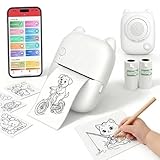
- EASY SPEAK & PRINT: Turn your child's imagination into real stickers instantly! Simply press the button, say something fun like "Print a puppy riding a bike" and our smart AI printer bring it to life in seconds. No screens, no design skills needed—just endless, instant creativity.
- PRINT, COLOR & PEEL - ULTIMATE DIY CRAFT TOOL: Go beyond a standard mini thermal printer. Instantly print custom reward stickers, lunchbox notes, chore charts, journal decals, and scrapbook elements. This pocket printer turns daily ideas into personalized, physical artwork. Kids can print out their AI creations, color them in with markers or crayons, and proudly stick them anywhere.
- ZERO INK & MESS-FREE PRINTING: Say goodbye to messy, expensive ink cartridges! Our advanced inkless thermal printer technology ensures clean, crisp black-and-white prints every time. The YPANX kit includes 2 rolls of premium, BPA-free thermal sticker paper (1 pre-installed, 1 refill) so the fun can start right out of the box. Safe, eco-friendly, and perfect for hands-on activities.
- SEAMLESS BLUETOOTH & WIFI CONNECTIVITY: Compatible with both iOS and Android, this portable sticker printer easily connects via our dedicated App using Bluetooth and 2.4G Wi-Fi. Print photos directly from your smartphone fast and hassle-free. Plus, access thousands of free templates in the App for study notes, custom labels, and photo stickers! (Note: your phone and printer must be on the same 2.4GHz Wi-Fi network or mobile hotspot; 5GHz Wi-Fi is not supported.).
- 100% KID-SAFE & THE PERFECT GIFT: Privacy is our priority. The microphone only activates when the voice button is held, and built-in smart AI filters ensure all generated images are strictly kid-friendly. Lightweight and adorably designed, this mini pocket printer is the ultimate birthday, holiday, or back-to-school gift for kids. Families and teachers will love it!
Product prices and availability are accurate as of the date/time indicated and are subject to change. Any price and availability information displayed on Amazon at the time of purchase will apply.
Free tools Windows power users keep installed
One-click scans. No signup required.




