Do these 3 things before closing this tab:
1Fix the driver behind crashes, sound loss and screen glitches2Repair Windows errors before they cause bigger problems3Scan for outdated or missing drivers - takes under a minuteA black dot on a Galaxy S22 can be a damaged display panel, even if the outer glass looks unbroken. Samsung says ink-like spots may spread and usually need display repair. A tiny, sharply defined pinpoint may instead be a stuck or dead pixel; the appearance alone cannot confirm the cause, so a persistent or growing mark should be inspected professionally.
What a black spot on a Galaxy S22 screen can mean
Samsung describes round black spots and ink-like marks as possible signs of internal display damage caused by pressure or impact. The cover glass can remain intact while the panel beneath it is affected. Samsung also warns that this type of mark may spread and usually requires screen repair. Samsung’s guidance on cracked or damaged Galaxy screens does not establish the cause of any particular phone’s spot, however.
As an Amazon Associate I earn from qualifying purchases.
A few very small, isolated dots may be stuck or dead pixels rather than a blotch. A larger irregular mark, especially one that looks like ink or changes over time, is more concerning for panel damage. If it appeared after a drop, pressure, or impact, treat physical damage as a possibility even without a visible crack.
What’s actually slowing this PC down?
Pick the symptom - the matching free tool is one click away.
What to do before arranging repair
- Look without pressing the screen. Note whether the mark is a pinpoint or an irregular blotch, whether there are lines, and whether it is changing. Do not press or rub the affected area to test it.
- Back up important data while the phone still works. A damaged display can become harder to use; securing your data is a sensible precaution, not a diagnostic fix.
- For a spreading blotch, lines, or an apparent impact defect, arrange professional inspection. Samsung advises stopping use after physical impact damage and visiting a service center for inspection. Samsung China’s display troubleshooting guidance also distinguishes physical damage from general display problems.
- If the problem is a general glitch rather than a clear blotch, try a restart and check for a software update. Samsung’s general troubleshooting guidance includes these checks because display abnormalities can have software, settings, or app-related causes. Menu labels and paths can vary with software version and region. Restarting or updating cannot repair a physically damaged panel.
Repair options and what to verify
Samsung recommends professional inspection for suspected display damage. In the United States, its support page describes walk-in and mail-in repair through Samsung Repair Services using genuine parts, and points to authorized service centers. Availability, service terms, and coverage depend on location and any applicable contract or protection plan; get an assessment for your specific phone rather than assuming a repair will be covered or free.
#1 Best Overall
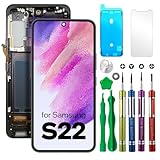
- COMPATIBLE MODELS - Compatible with Samsung Galaxy S22. Model number: SM-S901U, S901U1, S901B, S901B/DS, S901W, S901N, S9010, S901E, S901E/DS
- TOOL SET - Every order comes with a replacement screen assembly and a tool set, screen protector and adhesive for a quick and easy install.
- SOLUTION – The repair screen kits can be used to repair or replace faulty screens, display problems, dead pixels, cracked LCD screens and wrong color issues.
- QUALITY ASSURANCE - Each assembly is tested before shipping. We take care of all quality-related issues with either REPLACEMENT or REFUND. Please contact our customer support team if you have any issues with the item.
Samsung Electronics Service Korea lists the Galaxy S22 series among devices eligible for customer self-repair of the display, with parts, tools, manuals, and required return or registration processes. Its information is specific to Korea and is dated May 30, 2023; it does not establish the same availability or terms in other countries. Samsung cautions that self-repair may be difficult for inexperienced people and can cause damage that requires paid service. Samsung Electronics Service Korea’s customer self-repair information explains its local process.
If considering a replacement display assembly, confirm the complete model number and compatibility before buying. Galaxy S22 variants and parts availability can differ, and a replacement assembly is a repair component—not a product that removes a pixel defect. If you are not experienced with phone repairs, professional service avoids taking on the disassembly and damage risks yourself.
Rank #2

- 【Specifications】 Compatible with Samsung Galaxy S22. Model number: SM-S901U, S901U1 US Version ,No Fingerprint Function. Please verify your phone model before purchasing
- 【Professional Quality Assurance】 Prior to shipment, our dedicated QC team performs a thorough 100% inspection of each screen, guaranteeing its pristine condition and readiness for installation, ensuring you receive the best possible product.
- 【Fix problems】Replacing old, cracks, dead spots, damage, touch not working properly or touch response problems on the screen.
- 【Easy Installation】It’s highly recommended to install the screen with the guidance of the tutorial videos on YouTube. You can search " Galaxy S22 Screen Replacement" on YouTube for a tutorial videos of how to do the replacement.
- 【Best Service】We provide the best service to our customers.please contact us immediately via Amazon message if you need any assistance.
When a software fix is unlikely
A restart or update is reasonable for broad, temporary display abnormalities when there is no clear physical mark. But Samsung’s damage-specific guidance links ink-like black spots to possible internal pressure or impact damage and says they may spread. Software changes cannot restore a physically damaged display panel. A persistent or growing blotch calls for inspection rather than repeated settings changes.
Quick Recap
Best Value

- 1. 20 - Year Heritage: Unmatched Quality:For two decades, we've been at the forefront of this industry. Our long - standing presence has allowed us to develop an in - depth understanding and a highly refined R & D and manufacturing process. Every stage of production is meticulously monitored, ensuring that our products offer unparalleled quality and consistent performance. This means that when your enterprise chooses our products, you're investing in reliability and excellence.
- 2:This screen is designed for Samsung Galaxy S22 5G Digitizer Screen Touch Assembly Replacement Display SM-S901U S901U1 S901B/DS by pishzeo Original Super Amoled With Frame 6.1 inch LCD display(US Version with Ultrasonic Fingerprint), please carefully check your phone model before purchase
- 3:Screen Specifications: 6.1-inch Dynamic AMOLED 2X, 2340×1080 resolution, supports 120Hz adaptive refresh rate and under-display ultrasonic fingerprint recognition.
- 4.It’s highly recommended to install the screen with the guidance of the tutorial videos on YouTube. You can search " Samsung Galaxy S22 5G Screen Replacement" on YouTube for a tutorial videos of how to do the replacement.
- 5.Minimal Returns:Prompt Corporate - Focused Support:Thanks to our meticulous manufacturing techniques and stringent quality inspections, our products boast an impressively low after - sales return rate of less than 1%. This saves your enterprise valuable time and resources. we've established a dedicated after - sales service channel. Our professional team is on standby to respond within 24 hours, resolving any issues promptly and effectively, thereby safeguarding your business operations.
Rank #4

- 【Parameters】For Samsung Galaxy s22 5g LCD screen replacement, please confirm your phone model before purchasing.This screen does not include the home button, front camera, home button and front camera connecting cable, earpiece speaker. Please remove them from the old screen.
- 【Strict Quality Control】All for Samsung s22 5g LCD replacement are strictly QC tested before shipment, 100% intact. Make sure for Galaxy S22 5G replacement screen are no scratches, no dead zones, no dot pixels or lines on the screen. High color saturation, high resolution, wide color gamut and smooth hand feel.
- 【INCELL Screen】This replacement screen for Samsung s22 5G belongs to the INCELL screen, compared to the original screen, the INCELL screen has no fingerprint function,the INCELL screen is smaller in size.The INCELL screen is made of iron and is thicker than the original screen; the edge of the INCELL screen does not have a curvature. Because there is no curvature, the overall display area of the screen is smaller. But all the screens are also high-quality screens, we will test them before shipping.If you mind the fingerprint function, curvature and size, please do not buy this screen!
- 【With Silver Frame】Screen replacement for Samsung s22 5G with frame is a screen that is assembled with Touch Screen、LCD Screen and Frame. Screen with frame is easy to install and not easy to be damaged.It is less risky if you choose "screen with frame"just use a simple tool,you can replace it by yourself
- 【Installation and Service】 Please test for the Galaxy s22 5G LCD screen before installation to ensure the normal use of the s22 5G screen replacement. Non-professional installation is not recommended. If you need help and an installation instruction video, It is recommended that you watch the installation video on YouTube.
Rank #3

- 【Parameters】For Samsung Galaxy s22 screen replacement, 6.1 inches, 1080x2340 pixels, please confirm your phone model before purchasing.This screen does not include the home button, front camera, home button and front camera connecting cable, earpiece speaker. Please remove them from the old screen.
- 【Strict Quality Control】All for Samsung s22 LCD replacement are strictly QC tested before shipment, 100% intact. Make sure for Galaxy S22 replacement screen are no scratches, no dead zones, no dot pixels or lines on the screen. High color saturation, high resolution, wide color gamut and smooth hand feel.
- 【TFT Screen】This replacement screen for Samsung s22 5G belongs to the TFT screen, compared to the original screen, the TFT screen has no fingerprint function,the TFT screen is smaller in size.The TFT screen is made of iron and is thicker than the original screen; the edge of the TFT screen does not have a curvature. Because there is no curvature, the overall display area of the screen is smaller. But all the screens are also high-quality screens, we will test them before shipping.If you mind the fingerprint function, curvature and size, please do not buy this screen!
- 【With Frame】Screen replacement for Samsung s22 with frame is a screen that is assembled with Touch Screen、LCD Screen and Frame. Screen with frame is easy to install and not easy to be damaged.It is less risky if you choose "screen with frame"just use a simple tool,you can replace it by yourself
- 【Installation and Service】 Please test for the Galaxy s22 5G LCD screen before installation to ensure the normal use of the SM-S901U screen replacement. Non-professional installation is not recommended. If you need help and an installation instruction video, It is recommended that you watch the installation video on YouTube.
Product prices and availability are accurate as of the date/time indicated and are subject to change. Any price and availability information displayed on Amazon at the time of purchase will apply.




