Free tools Windows power users keep installed
One-click scans. No signup required.
Fusion-io ioDrive2 Duo SLC 1.2TB 是一张面向服务器工作负载的历史 PCIe 闪存加速卡,主打低延迟、高耐久度和双控制器设计。StorageReview 于 2013 年评测的样品在部分低队列深度、峰值吞吐和特定 4K/8K 测试中表现突出,但也出现持续负载下的延迟波动;这些结果只适用于当年的测试平台与工作负载。若考虑使用或购买旧卡,首先要核实机箱空间、PCIe 通道、VSL 驱动和卷布局,并取得该卡自身可验证的健康与剩余耐久度信息。
这张卡是什么
Fusion-io ioDrive2 Duo SLC 1.2TB 是服务器用 PCIe 闪存加速器,不是可直接按普通 SATA 或 NVMe SSD 理解的产品。StorageReview 在 2013 年 3 月 4 日评测的型号采用全高半长(FHHL)卡型、PCIe 2.0 x8 接口,内部由两个各自管理一组 NAND 的 600GB ioMemory 子系统组成;该评测样品使用 Micron SLC NAND。卡上的 FPGA 控制器配合主机端 Virtual Storage Layer(VSL)软件工作,VSL 将设备呈现为传统块设备,但会占用主机 CPU 和系统内存。StorageReview 的 2013 年评测提供了型号、结构和测试细节。
As an Amazon Associate I earn from qualifying purchases.
Fusion-io 的 FY2012 SEC 文件将 Duo 系列描述为两个 ioMemory 子系统,并列出 SLC 1.2TB 与 MLC 2.4TB 版本。文件还将 directCache 描述为把常用数据块缓存到 ioMemory 的分层软件,将 ioTurbine 描述为面向虚拟化工作负载的主机端加速软件。Fusion-io FY2012 SEC 文件中的这些产品信息不应与某张卡的实际配置或当前软件支持混为一谈。
规格数字应如何理解
下表是 StorageReview 在 2013 年列出的规格,不是本文当前实测,也不代表二手卡如今仍能达到这些数值。带宽数字对应 1MB 读写;IOPS 数字对应列明的随机块大小。
#1 Best Overall

- NVMe M-KEY DRIVES ONLY, NOT SATA: This card takes M.2 M-key NVMe SSDs in the 2230, 2242, 2260 and 2280 lengths, plus older B+M key PCIe (AHCI/NVMe) drives. It does NOT support SATA M.2 drives — if your drive says SATA on the label, it will not work here. Your motherboard also has to be NVMe-capable to boot or see the drive.
- GEN5 SPEED COMES FROM YOUR SLOT: The card connects at x4 and supports up to PCIe 5.0, for up to 16GBps bidirectional when the host slot is Gen5. In a Gen4 or Gen3 slot it runs at that slot's speed, not Gen5 — the card cannot add a generation your motherboard doesn't have. Check your slot generation before you buy if Gen5 throughput is the goal.
- ONE DRIVE, x16 CONNECTOR, NO BIFURCATION NEEDED: This is a single M.2 card with an x16 physical edge for stability, and it may fit some x4/x8 slots. Because it uses one drive it does not need motherboard bifurcation support. Confirm you have a free full-length PCIe slot and clearance around it — a tall CPU cooler, GPU or fan sitting over the slot can block the card.
- TOOL-FREE INSTALL, NO SCREWS: Drop the SSD in and lock it down without hunting for a tiny M.2 screw or a screwdriver. Nothing to lose, nothing to strip, and the drive comes back out just as fast when you want to move it to another machine.
- COOL AND QUIET, NO FAN: A built-in aluminum heatsink and thermal padding keep the SSD's temperature down under sustained load with no active cooling, so there is no extra fan noise in the case. It is SABRENT — register your product on the manufacturer's website for technical support.
| 项目 | StorageReview 列出的规格(2013) |
|---|---|
| 容量与结构 | 1.2TB;两个 600GB ioMemory 子设备 |
| 顺序带宽 | 1MB 读取 3.0GB/s;1MB 写入 2.5GB/s |
| 随机 IOPS | 512B 读取 700,000;512B 写入 1,100,000;4K 读取 580,000;4K 写入 535,000 |
| 访问延迟 | 读取 47µs;写入 15µs |
| 总耐久度 | 190PBW(每控制器 95PBW) |
| 保修规格 | 五年或达到最大耐久度为止;这是产品时代列出的规格,不表示旧卡目前仍在保修期内 |
这些参数可用于识别产品定位和理解当年的规格表,不能代替对特定卡的状态检查。尤其是总耐久度属于产品规格,不能据此推断某张二手卡还剩多少写入寿命。
2013 年评测显示了什么
StorageReview 在 Windows 和 Linux 环境中,将 ioDrive2 Duo SLC 与当年的 PCIe 加速卡进行比较,测试包含随机读写、混合负载、文件服务器和 Web 服务器等工作负载。评测称该卡在部分低队列深度测试、峰值吞吐以及特定 4K/8K 项目中表现突出;与此同时,作者观察到某些持续负载下峰值延迟会波动,Windows 测试也出现较大的延迟尖峰,Linux 整体表现更稳定。结果应限定在该评测的软件、硬件和工作负载环境内,不能直接推断现代服务器中的表现。
Rank #2

- This adapter turns your motherboard's PCIE X4/X8/X16 slot into an M.2 Key M slot for M.2 NVMe SSD installation. PCIE X1/PCI slots aren't supported. It comes with heatsinks that cool M.2 SSDs by 5 - 20°C.
- Works with PCIE 4.0/3.0 M.2 NVMe SSDs. For full PCIE 4.0 X4 speed, your CPU, slots, and SSD must all support it. Note: Intel CPUs below 11th gen don't support PCIE 4.0.
- No capacity limit for M.2 NVMe SSDs (2T, 4T work). Supports 2230/2242/2260/2280 sizes. New SSDs need initialization and formatting. M.2 SATA SSDs aren't supported.
- Compatible with Windows 11/10/8, Linux, and Mac OS. Support OS boot from NVMe SSD, except on some old motherboards (usable as storage then). Windows 7 lacks native NVMe driver; download from Microsoft or SSD manufacture site.
- Includes 12cm regular and 8cm low - profile brackets for any PC frame. FCC and CE certified. Get lifetime tech support - contact us for troubleshooting.
作者 Kevin O’Brien 在评测结论中写道:“Fusion-io has shown quite an ability to develop more than just incremental change with the ioDrive2 Duo SLC application accelerator.” 这是作者对产品代际进步的评价,不是厂商声明,也不是标准机构结论。
Quick wins for a faster PC:
Repair Windows errors before they cause bigger problemsFix Now →Fix the driver behind crashes, sound loss and screen glitchesFind Drivers →VSL、设备呈现与卷布局
VSL 是该产品工作方式的关键部分。StorageReview 描述其 VSL 3.2.2 测试配置将“双通道”呈现为四个 300GB 设备;如需一个卷,需要通过软件 RAID 组合。这是该评测版本和配置中的呈现方式,不能无条件套用到其他驱动版本或系统配置。
Rank #3

- NVMe PCIe Adapter Apply to 2280/2260/2242/2230mm M.2 NVMe and AHCI SSD, Adapter with Aluminum Heatsink Solution.
- M.2 PCIe Adapter Supports PCI-Express X4, X8, X16 slots. PCIe 4.0 lanes with up to 64Gbps bandwidth, backward compatible with PCIe 1.0 2.0 3.0, Full release the speed of PCIE 3.0/4.0 X4 Full Speed M.2 PCIe SSD, such as 64Gbps M.2 PCIe 4.0 SSD.
- PCIe NVMe Adapter Supports Windows 11/10/8、Windows Server 2012 R2、Linux、Fedora、SUSE、Ubuntu、Red Hat(no driver required) NOTE: Go to NVMe SSD manufacture website for driver installation if your PC can not recognize NVMe SSD. Win7 and Windows Server 2008 R2 need additional driver for NVMe SSD.
- PCIe NVMe 3.0/4.0 x4 Adapter with 2 thermal pads, You put one between the ssd and the carrier and one between the ssd and the heat sink.
- Package Including: ➤1-M.2 PCIe Adapter x1.➤2-SSD Spare bolt(Pre-installed on PCB).➤3-Low Profile Bracket x1.➤4-Screw Driver x1.➤5-Regular Profile Bracket x1.➤6-Heat conducting silica gel pad x2 (thick + thin).➤7-Aluminum Heatsink x1.➤8-Heatsink fixing spring nails x2.➤9-PCB fixing screws x2.➤10-Bracket fixing screws x1.
- 确认驱动和系统:评测列出的 Windows Server、Linux 发行版、Solaris、OS X 和 VMware 版本属于当年的支持列表,不构成当前支持承诺。当前驱动下载状态、固件支持和现代操作系统兼容性未由这里引用的资料确认。
- 确认卷方案:先查清目标主机上设备会如何枚举,再决定是否需要软件 RAID;如果组合成单一卷,也要验证启动、重建和故障恢复方案。
- 评估主机资源:VSL 会使用主机 CPU 和系统内存,因此它并非完全由卡本身独立承担处理工作的存储设备。
装入服务器前的兼容性检查
- 核对卡型空间:确认机箱、挡板和散热风道能容纳 FHHL 全高半长卡。不要仅凭“半长”判断高度合适;它高于常见 HHHL 卡。
- 核对 PCIe 插槽:该评测型号为 PCIe 2.0 x8,需确认槽位有足够物理空间和电气通道,并检查平台固件或服务器配置限制。
- 核对软件栈:确认目标操作系统是否存在适用的 VSL 驱动,以及驱动、固件与平台组合是否能实际工作。历史支持列表不能证明当前兼容。
- 核对呈现和 RAID:确认卡在目标系统中的设备数量、容量和布局;如需单一卷,预先规划 RAID 与恢复流程。
- 核对具体卡况:要求卖家提供可核验的健康状态及剩余耐久度信息,并确认退换条件。新品时代的规格表不能证明单卡仍能正常工作、仍有剩余 PBW 或享有保修。
不要把 Cisco UCS 适配卡当作同一型号
Cisco UCS Fusion ioDrive2 Adapter 是另一款产品:Cisco 文件描述的是 MLC、PCIe 2.0 x4 卡,其容量表、卡型和平台兼容性与 SLC Duo 1.2TB 不同。Cisco 文件还将其适用范围限定在特定 UCS C-Series 服务器。因此,Cisco 适配卡资料不能用来证明 SLC Duo 的规格或在其他服务器中的兼容性。Cisco UCS C-Series 配置文件应仅用于辨识这款平台专用的不同产品。
Independent reader supportYour contribution helps us test, update, and keep practical guides available for everyone.适合怎样的判断方式
如果你在评估这张卡,重点不应只是对照旧规格表中的吞吐和 IOPS 数字,而应先判断是否具备运行它所需的历史 VSL 软件环境,再核实机箱、PCIe 和卷布局条件。StorageReview 的旧评测能说明它在当年特定测试中的表现与局限;它不能证明某台现代主机兼容,也不能证明某张待售旧卡的健康、保修或剩余耐久度。现有资料未确认当前驱动支持、现代平台兼容性、二手库存或卖家情况。
Quick Recap
Best Value

- ENCLOSURE ONLY, SSD NOT INCLUDED: This is the case you put your own M.2 SSD into, not a drive with storage inside. 100% tool-free, so the SSD installs and comes out in seconds with no screwdriver.
- FITS M.2 NVMe AND SATA: Works with both M.2 PCIe NVMe and M.2 SATA SSDs in 2242, 2260 and 2280 lengths. Bare drives only, no room for a drive with a pre-installed heatsink. It does NOT take 2.5in SATA drives or mSATA.
- 10GBPS USB 3.2 TYPE-C: Up to 10Gbps, and up to 1000MB/s in real transfers. Backward compatible with USB 3.1 and USB 3.0 at their own speed limits. Bus powered, no drivers and no external power supply.
- SLIM ALUMINUM BUILD: Ultra-slim aluminum case with an ABS frame, with a thermal pad to move heat off the drive. Light enough to live in a laptop bag, solid enough to survive it.
- IN THE BOX: Enclosure, 8in Type-C to Type-C cable and user manual. Works with Windows 7 or later, macOS 10.5 or later and Linux. Register on the manufacturer's website for extended warranty service.
Rank #4
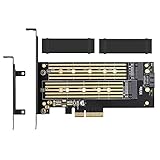
- ➤ Supports two M.2 SSD simultaneously (One SATA interface and one NVMe interface)
- ➤ Converts one M.2 NVMe SSD (M Key) interface to PCIe 3.0 x4 interface (PCIe 2.0 Compatible), Converts one M.2 SATA SSD (B Key or B+M Key) interface to SATA 6Gbps interface (SATA cable connection required).
- ➤ With advanced heat sink solution,PCB 24 X 5 copper hole effective ventilation heat dissipation,Including 2 heat sinks
- ➤ Supports M.2 SSD size 2230, 2242, 2260, 2280, 22110mm
- ➤ Including both regular size and low-profile slot brackets for flexible system chassis installation. LED power and data transfer status. No driver installation required
Product prices and availability are accurate as of the date/time indicated and are subject to change. Any price and availability information displayed on Amazon at the time of purchase will apply.




