Free tools Windows power users keep installed
One-click scans. No signup required.
For repeat payroll calculations, choose a formula-enabled Google Sheets or Excel pay stub template; for a one-off printable statement, use a fill-in PDF or document. A template can organize earnings, deductions, and take-home pay, but it does not automatically make tax calculations accurate or satisfy every state’s rules. Treat withholding as an estimate unless you have verified the workbook’s formulas against current tax procedures and the employee’s information.
Choose the right free pay stub format
| Your need | Useful format | What to check |
|---|---|---|
| Repeat calculations and automatic totals | Excel or Google Sheets | Inspect formulas and input cells; confirm the sheet has pay-period and year-to-date columns. Check whether tax withholding is only an estimate or uses current official tables. |
| One-time or handwritten statement | Printable PDF | Confirm the fields fit your needs. You must enter and check calculations yourself. |
| Digital fill-in form without calculations | Word, Google Docs, or editable PDF | Useful for presenting a record, but it will not validate tax arithmetic. |
| Recurring payroll or multiple employees | Payroll register or payroll system | Consider employee-level tracking, year-to-date roll-forward, audit trail, tax filing, and coverage for every applicable jurisdiction. |
Examples to compare include Smartsheet’s free payroll templates, which it lists in Excel, Word, Adobe PDF, and Google Sheets, and Hubstaff’s free pay stub templates, which include basic Google Docs, Google Sheets, and PDF options as well as Sheets variants advertised with a calculator or PTO and overtime features. These descriptions are from the providers; they do not independently establish formula accuracy or legal compliance. Check that a download is still free, inspect its formulas, and consider how employee and payroll data will be stored.
As an Amazon Associate I earn from qualifying purchases.
What a pay stub should show
A pay stub is the employee-facing statement for a paycheck or pay period. It is not the same thing as the employer’s complete payroll records. A general US template should make these items easy to find:
What’s actually slowing this PC down?
Pick the symptom - the matching free tool is one click away.
- Employer and employee identification.
- Pay-period start and end dates, plus the pay date.
- Earnings detail and gross pay.
- Itemized deductions and net pay.
- Current-period and year-to-date totals when needed to track payroll and reconcile amounts.
The IRS distinguishes the pay period—the days worked and being paid, often shown as start and end dates—from the pay date, the date the paycheck is issued or dated. Gross pay is earnings before taxes and deductions; it can include bonus, tips, or overtime paid during that period. Net pay is what remains after deductions. See the IRS Tax Withholding Estimator for these definitions.
#1 Best Overall
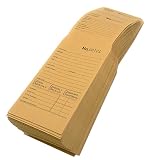
- Multi-Use Pocket: Use the envelope to store spare keys, cash deposits, documentation and other items. The pre-glued tab is securely sealed with just a little bit of moisture and will safely keep your items stored in the envelope
- Perforated Stub: The pocket stub is perforated in two locations to allow you to divide the envelope into three pieces. Use them for filing, sorting, labeling or as receipts
- Sequential Numbering: Each envelope has a clearly visible and identifiable number printed on all three parts of the ticket. All envelopes will be numbered in consecutive order for easy record keeping and quick filing
- Preprinted Information Fields: These envelopes are formatted with fields for customer information including name, address, phone, signature, payment info, repair info, instructions, lay-away info, dates and more
- Dimensions and Capacity: Each yellow envelope measures 5 11/16 inches by 3 1/16 inches, and the pocket opens wide to accommodate storage of multiple items inside
Extra fields for hourly and overtime payroll
For hourly payroll, provide space for hours worked, the regular rate, straight-time earnings, and overtime earnings. The Department of Labor’s FLSA recordkeeping list also includes employee identifiers, wage basis and rates, additions and deductions, total wages, payment date, and the covered pay period. That list concerns employer records for covered workers; it is not a single nationwide rule requiring every item on every employee-facing stub. Check the Department of Labor’s FLSA recordkeeping guidance and the applicable state guidance for your situation.
Use a pay stub calculator without overstating its accuracy
A spreadsheet can add earnings and deductions correctly and still calculate tax withholding incorrectly. Federal income-tax withholding is not a universal flat percentage: the applicable procedure uses the employee’s withholding information, pay frequency, and the tax year’s tables or percentage method. The IRS Publication 15-T for 2026 contains withholding procedures and tables for the 2026 tax year. A workbook must be checked against the applicable current-year method and the employee’s actual inputs before its withholding result is treated as more than an estimate.
Rank #2

- Include space for total cost and terms of payment
- General contract provisions are printed on back
- 3-part carbonless form
- 8.5 x 11 inches
- White, canary, pink paper sequence
Use a label such as “estimated withholding” when you cannot confirm those inputs and methods. State and local taxes, benefits, garnishments, pretax deductions, overtime rules, and wage-statement requirements may add further calculations or fields. The cited template providers describe their offerings, but their pages do not validate a particular workbook’s formulas.
Track current and year-to-date amounts
For ongoing payroll, include both current-period and year-to-date earnings and deductions so amounts can be followed across paychecks. The IRS explains in Publication 4268, Chapter 12, “Preparation of Payroll Checks” (revision August 2022) that a spreadsheet may be designed to track these details when a payroll system does not. It notes: “Employees need to be able to reconcile these items from time to time during the year to ensure that the proper amounts are being withheld.” A fill-in PDF may present totals, but it will not roll them forward automatically.
Rank #3

- QUALITY INVOICES: Adams Order books provide a professional invoice or customer receipt; a great way to create and maintain a professional image for small businesses and service providers
- 50 TWO-PART CARBONLESS FORMS: Customers get the perforated white top copy; retain the canary and pink copies for your records
- WRAP-AROUND COVER: Fold the back cover between sets to keep invoices neat and legible
- ROOM FOR CUSTOMIZATION: A blank space at top leaves room for your company stamp; a big savings over custom-printed forms
- CONSECUTIVELY NUMBERED: Large 6-digit numbers in the upper right hand corner help you thumb through orders quickly
Know the limits of a generic US template
The federal sources provide a baseline, not a complete state-by-state wage-statement guide. States and localities may add required fields or rules for delivery, so a generic free template should not be described as compliant everywhere. Consult official guidance for the jurisdiction where the employee works.
Authority also differs by subject: the Department of Labor addresses FLSA wage-recordkeeping, while the IRS handles wage taxation and W-2 matters. A pay stub covers a paycheck or pay period; Form W-2 is the annual wage and tax statement employers file and furnish under applicable rules. See the IRS About Form W-2 page for general filing context. A pay stub template does not replace applicable payroll records, tax reporting, or a W-2.
Rank #4

- Easily print W-2s, 1099s, statements, invoices, certificates, and coupons with this 3 part perforated paper. These perforated sheets help you save time by providing clean and easy tears
- Ream includes 500 bright white 8.5" x 11" sheets of 24 lb copy paper, featuring clean horizontal perforations 3 2/3" & 7 1/3" from the bottom for quick tearing and folding
- Our perforated printer paper makes payroll, shipping, and everyday business tasks easier and more efficient, reducing the stress and hassle of manual document processing
- This trifold paper is compatible with laser and inkjet printers; copiers; and most business, accounting, and shipping software that uses standard templates, ensuring simple integration
- PrintWorks Professional perforated paper has been proudly made in the USA since 1964 using domestically sourced, environmentally friendly materials for reliable quality and sustainability
When to move beyond a manual template
A manual sheet can work for presenting a simple statement or tracking straightforward calculations, but the risk and workload rise with recurring payroll. Consider an established payroll process when you need dependable year-to-date roll-forward, an audit trail, tax filing, multiple employees, or handling across jurisdictions. A pay stub generator or calculator is not a substitute for the broader payroll process.
The Tool Desk
Outbyte PC Repair FREEClear out junk files and repair common Windows errorsFree Scan →Outbyte Driver Updater FREEFix the driver behind crashes, sound loss and screen glitchesFind Drivers →Quick Recap
Best Value

- Premium grade paper with consecutive page numbers printed in red
- Areas for customer information, order number, terms, date, shipping information and salesperson
- Columns for quantity, description, price and amount
- 3-part sets (white, canary and pink paper sequence)
- 50 sets per book
Product prices and availability are accurate as of the date/time indicated and are subject to change. Any price and availability information displayed on Amazon at the time of purchase will apply.




