What’s actually slowing this PC down?
Pick the symptom - the matching free tool is one click away.
Forensic readiness matters because incident responders may otherwise alter or lose evidence while acting—but it does not mean delaying urgent containment. Organizations should prepare evidence procedures in advance, then coordinate preservation and containment according to the threat, evidence volatility and value, collection effort, policy, and legal advice.
Why forensic readiness belongs in incident response
Containment limits ongoing harm; forensic readiness helps an organization collect and preserve information needed to understand what happened and support internal or legal proceedings. These aims can conflict. Isolating a system or shutting it down may curb an active threat, but can also change the system or make some evidence unavailable.

As an Amazon Associate I earn from qualifying purchases.
That tension is why readiness matters more than a reflexive, one-size-fits-all sequence. It is an argument for preparing before an incident and making informed decisions during one—not a claim that evidence collection should always come before containment. NIST’s current incident-response guidance, SP 800-61 Rev. 3, published in April 2025, integrates incident response with cybersecurity risk management and supersedes Rev. 2.
Recommended Free Tools
How to preserve evidence during incident response
Plan before an incident
Identify likely evidence sources, assign responsibilities, establish acquisition procedures, and decide when evidence may need to be preserved for internal or legal proceedings. NIST’s SP 800-86 describes a practical acquisition process: identify sources, plan and prioritize collection, acquire the data, and verify its integrity.
#1 Best Overall

- Large Data Storage Capacity: Flash Drive with 128GB capacity, meet your needs of daily use on work, school, home and travelling for photos, music, videos, files storage and transfer
- Easy to use: The thumb drive is plug and play without any software installation; Supports Windows 7/8/10 / Vista / XP / Unix / 2000 / ME / NT Linux and Mac OS, also compatible with USB 2.0 and 1.1 ports; Storage is fast, safe and stable
- Wide Compatibility: USB flash drive support TV, desktop, notebook computer, car, audio and other device; It is your great data storage and transfer companion with traveling and working
- Retractable Desgin: The usb drive's retractable design can effectively protect the USB interface; The capless design can avoid losing of cap; Weight: 7g, Size: 2.6 × 0.8 × 0.4 inch. Portable to take your digital world anywhere
- What You Get: 1 x 128GB USB Flash Drive Thumb Drive, All of usb drives have been rigorously tested and formatted before leaving the factory; The default format of the USB stick is exFAT
Plans should be usable under pressure. Make clear who can authorize isolation or shutdown, who collects evidence, how collected material is stored, and when to involve specialists and counsel. Adapt procedures to organizational policy and applicable law rather than assuming one process fits every case.
Prioritize evidence by volatility, value, and effort
Some data is fragile. Live-system information can disappear when a machine is powered down, while certain logs may have limited retention. NIST recommends weighing likely investigative value, volatility, and collection effort, while accounting for the risks and operational impact of collection. CISA’s #StopRansomware Guide likewise highlights preserving volatile or limited-retention evidence, including memory and certain logs, and capturing system images or memory where relevant.
Rank #2

- Advanced Encryption:Built-in independent chip,using AES256 advanced algorithm,preventing brute force cracking from the hardware level,protecting your data.
- Key Unlock:Independent key design,no password trace,after ten incorrect inputs,the USB drive will automatically reset,and the data will be erased,preventing information theft at a deeper level.
- Automatic Lock: After unlocking,if the device is not connected within 30 seconds or the USB drive is unplugged from the computer,it will automatically lock to ensure that data is not maliciously stolen.
- High-speed :Equipped with 3.0 high-speed protocol,faster when transmitting and backing up large files,saving your valuable time.
- Portable Design:The size of a lighter,can be directly hung on the key ring,or put directly into the pocket,carry it with you,use it as you go.
This is not a universal ranking. A high-value, short-lived data source may justify prompt collection if doing so is safe and practical; an active threat causing immediate harm may make containment more urgent. The response team should assess both consequences rather than assume that every evidence source must be captured first.
PC Slower Than It Used to Be?
A free scan shows the junk files, broken settings and background clutter dragging Windows down - then fixes them in one click.Free scan · Windows 10 & 11Crashes, No Sound, or Screen Glitches?
Random freezes, missing sound and display glitches usually trace back to one bad driver. Find and replace yours safely.Free scan · under a minuteCoordinate containment with collection
Containment choices can include network isolation or shutdown. NIST treats these as decisions for the incident-response team, guided by established policies and procedures and the assessed risk of the incident. In practice, responders should consider:
Rank #3
- 5X Greater Life Expectancy than Premium Rotational Drives
- Works in extreme temperatures
- Freezing temps of 40 (40 ) below 0
- Searing temps of up to 158 (70 )
- Unaffected by high humidity
- How much harm is likely if the threat remains active?
- Which evidence may be lost or changed by the proposed action, and how valuable is it?
- How much time and operational disruption would collection require?
- What do policy, applicable law, and counsel’s advice require?
When feasible, coordinate a safe, targeted collection step with containment. When delay would expose people, systems, or data to unacceptable harm, contain first and document what the action may have changed or made unavailable. The right sequence depends on the circumstances, not a slogan.
Document handling and verify integrity
Record what was collected, who handled it, when and where it was handled or stored, and every transfer between handlers. Verify collected copies—for example, with message digests—and preserve chain-of-custody records when required. These practices help show that evidence was handled consistently; they do not, by themselves, guarantee legal admissibility.
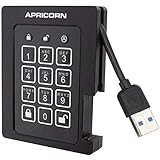
Rank #4

- Fips 120-2 level 2 validated
- Separate Admin and User mode
- Two Read-Only modes
- Programmable pin lengths
- Brute-force defense & Optional Self-Destruct pin
NIST’s NISTIR 8387, Digital Evidence Preservation: Considerations for Evidence Handlers provides additional preservation context. Requirements for admissibility and evidence handling vary by jurisdiction and case, so involve counsel when proceedings may be involved.
When specialist tools are appropriate
A write-blocker can help prevent a computer from writing to storage media during backups and imaging. As NIST SP 800-86 puts it, “Using a write-blocker during backups and imaging prevents a computer from writing to its storage media.” A write-blocker is a specialist aid, not a substitute for tested procedures, compatible equipment, and competent operators—and not a requirement for every incident.
Best Value
SP 800-86, published in 2006, remains the detailed forensic guide cited here, but NIST says it is not an all-inclusive investigation manual or legal advice. Apply it alongside current organizational policy and advice from counsel.
Use current incident-response guidance
For incident-response planning, use NIST SP 800-61 Rev. 3, published in April 2025, rather than treating Rev. 2 as current. NIST withdrew Rev. 2 on April 3, 2025. SP 800-86 supplies practical forensic procedures; its older publication date and stated scope make current policy and legal advice important companions.
Quick Recap
Product prices and availability are accurate as of the date/time indicated and are subject to change. Any price and availability information displayed on Amazon at the time of purchase will apply.




