PC Slower Than It Used to Be?
A free scan shows the junk files, broken settings and background clutter dragging Windows down - then fixes them in one click.Free scan · Windows 10 & 11Outdated Drivers Are Slowing You Down
One free scan finds every outdated or missing driver and matches the right update for your exact hardware.Free scan · exact hardware matchIf PyOdin Web reports “WebUSB not supported”, shows no USB chooser, or cannot find your Samsung phone, troubleshoot the failure stage instead of immediately reinstalling drivers. Browser support and permission errors are solved in the browser; an empty chooser usually means Download Mode, cable, port, or host-access trouble; a device that is already detected but fails during flashing usually points to firmware compatibility, an interrupted connection, power loss, or bootloader state.
This guide covers PyOdin Web, the community HTML5/JavaScript Samsung firmware flasher that uses WebUSB with phones in Download Mode. Its instructions should not be treated as instructions for Samsung’s separate desktop Odin application. The project is community maintained, so browser and project requirements can change.
As an Amazon Associate I earn from qualifying purchases.
Start by identifying the failure stage
The wording of the error tells you which layer to test. A browser cannot offer USB access until its WebUSB requirements and permission model are satisfied. A chooser can open while the phone is absent because the handset is not in Download Mode, the cable carries power but no data, another program has claimed the device, or the operating system blocks user-level USB access. A phone that appears in the chooser has passed detection, but it has not yet proved that the selected firmware is compatible or that the transfer can complete.
What’s actually slowing this PC down?
Pick the symptom - the matching free tool is one click away.
| What you see | Likely layer | First checks |
|---|---|---|
| “WebUSB not supported” or no Connect Device chooser | Browser capability, secure context, user gesture, or page policy | Use a listed Chromium-based browser, open the page in a secure context, click Connect Device, and check whether an embedded page is blocked from USB. |
| Chooser opens but the phone is not listed | Device state, cable, port, competing software, or operating-system permission | Use Download Mode, try another port (USB 2.0 may work better than USB 3.0), test a known-good data cable, close other flashing tools, and check Linux or Windows access. |
| Phone is listed but selection or opening fails | Browser permission or host access | Choose the handset and grant access for the page’s origin; inspect browser USB events and check whether another process still owns the interface. |
| Connection opens, then initialization, PIT exchange, transfer, verification, or reboot fails | Connection stability, power, firmware compatibility, or bootloader state | Verify the exact model and firmware package, identify the stage that stopped, and do not disconnect or power off during an active transfer. |
Before trying another flash: protect the phone and your data
Firmware writing is not a harmless connectivity test. PyOdin Web’s README warns: Flashing firmware is a powerful operation that can brick your device if done incorrectly.
Back up anything you can still access, confirm the handset’s exact model designation, and obtain firmware intended for that model. Do not assume that a package for a visually similar phone, a different regional variant, or a related carrier edition is interchangeable.
#1 Best Overall

- Fast Charging and Data Sync: etguuds USB A to USB C cable supports charging speed up to 3 A fast charging for quick usb-c port device charging and data transfer speeds up to 480 Mb/s, usbc cable support USB 2.0 data transfer
- Long-Lasting: The usb c charger cord uses integral seamless stretch process, high pressure resistance and nylon braided adding tangle-free, can bear 20000+ bending lifespan
- Wide Compatibility: USB Type C cable fast charging for most C -port devices, for Samsung Galaxy S26 S26+ S26 Ultra S25 S25+ S25 Ultra S24 S24+ S24 Ultra S23 S22 S21 S20 A53 A14, for LG, for Moto, for Pixel, for iPhone 18 17 16 15 Pro Max. Not compatible with iPhone older models before iPhone 15
- Friendly Tips: The USB A to C cable is not support video and media display. Not compatible with webcams, some gaming devices, laptops. Fast charging requires that your device supports fast charging and wall charger supports fast charging
- What You Get: You will get 2 pack 3 ft etguuds Gray usb-a to usb-c nylon braided charging cable
- Keep the phone charged and the computer connected to reliable power.
- Use a stable USB connection and avoid moving the cable or phone.
- Do not close the browser, unplug the cable, or power off while a transfer is active.
- If a flash has already failed, do not improvise repartitioning, PIT changes, downgrades, or bootloader bypasses from this general guide. The available project guidance does not establish those as safe recovery procedures.
There is no guaranteed recovery sequence for every handset after an interrupted or incompatible flash. If the phone no longer reaches Download Mode, obtain model-specific instructions from a qualified service source before writing anything else.
Check browser support and WebUSB prerequisites
Use a browser listed by the PyOdin Web project
The project README lists these minimums: Chrome or Chromium 61+, Edge 79+, and Opera 48+. It says Firefox and Safari do not support WebUSB for this tool. Chrome Developers separately documents WebUSB availability beginning with Chrome 61. These are source-stated thresholds, not a promise that every current operating-system and browser combination will behave identically; extensions, enterprise policy, page hosting, and later browser changes can still affect access.
| Browser family | Project guidance | How to interpret it |
|---|---|---|
| Chrome/Chromium | 61 or newer | WebUSB is documented as available from Chrome 61; use a current supported release where possible. |
| Microsoft Edge | 79 or newer | The PyOdin Web README lists Edge 79+ as compatible. |
| Opera | 48 or newer | The README lists Opera 48+ as compatible. |
| Firefox | Unsupported by the project | Switch to a listed Chromium-based browser rather than trying to force a chooser. |
| Safari | Unsupported by the project | Use a listed Chromium-based browser on a compatible host. |
Open the page in a secure context
Chrome Developers states that WebUSB works only in secure contexts: Because of this feature’s power, it only works on secure contexts.
In practice, the flashing page must be delivered from a context the browser treats as secure. If the page is hosted or embedded in a way that does not satisfy that requirement, the USB API may be unavailable even when the browser itself is new enough.
The WebUSB chooser also requires a user gesture. A page cannot reliably open the device picker on its own during load. Click the page’s Connect Device action, then select the handset in the browser’s USB chooser and grant access. Seeing a chooser is evidence that the browser reached its permission workflow; it is not evidence that the firmware is compatible.
Check page embedding and Permissions Policy
If PyOdin Web is inside an iframe, a Permissions Policy can deny the usb feature. Chrome documents controlling this through response headers or iframe attributes. A page can therefore run in a supported browser and secure context yet still produce no usable chooser because the embedding site did not delegate USB access. Test the project page directly in a top-level tab. If direct loading works but the embedded version does not, the problem is page policy rather than the handset.
Rank #2

- 【3A Quick Charge&Sync】Transfer speed up to 480Mb/s, 3A Fast Charger,This power cord alone will not provide you with fast charging alone, you will need a power block rated for fast charging and a phone capable of the same.
- 【Certified Safety 】: This USB-C cable has electronic safety certifications that comply with appropriate standards,You don't have to worry about the quality of this cable at all.
- 【Super Durable】Strong fiber, the most flexible, powerful and durable material, makes tensile force increased by 200%. Can bear 8000+ bending test. Premium Aluminum housing makes the cable more durable,and the Nylon Braided C-type cable increases the durability without tangle.
- 【WIDELY COMPATIBILITY】 USB C port Charger for Latest smart phones, Samsung Galaxy S21+, S21 Ultra 5G, S20 Ultra 5G FE, S20+, S10 Plus, S10+, S10e, S9, S9+, S8; Note20 Ultra 5G, Note20, Note10+ 5G, Note10 Plus
- 【 WARRANTY】 --- Please note that our product comes with a worry-free 12-months warranty. We are always committed to providing the best customer service. If there is anything that can help you, we will try our best to serve you.
Understand origin-based permission
WebUSB permissions belong to the site origin. The browser asks you to select a device and consent for that origin; another tab, hostname, or embedded origin may not inherit the grant. Chrome’s API documentation describes navigator.usb.requestDevice() for requesting a connected device and navigator.usb.getDevices() for listing devices previously granted to that site. A device can therefore be physically connected yet absent from the list until you run the request flow from the correct page and approve it.
When WebUSB is unsupported or no chooser appears
- Confirm the browser family and version. In the browser’s About page, verify that you are using Chrome/Chromium 61+, Edge 79+, or Opera 48+, as listed by the project. If you are on Firefox or Safari, change browsers first.
- Open the page directly in a secure context. Avoid a plain or restricted embedding while diagnosing. If you administer the page, inspect the response and iframe policy for USB permission.
- Trigger the action yourself. Click Connect Device. Do not expect a chooser to appear merely because the page loaded; Chrome requires
requestDevice()to run from a user gesture. - Choose the handset and grant access. The chooser is part of the browser’s security model. Selecting the phone and approving access is a separate step from accepting a firmware package.
- Remove permission confusion. Close duplicate tabs, return to the exact origin that hosts PyOdin Web, and run Connect Device again. A permission granted to one origin does not automatically apply to another.
- Test without an iframe. If the page was opened from another site or an embedded support portal, use a top-level tab. A restrictive Permissions Policy can block the
usbfeature before the chooser is reached.
If the browser still reports “WebUSB not supported” after these checks, the failure is still at the API or page-policy layer. Changing the cable or reinstalling a phone driver will not add WebUSB to an unsupported browser.
When the chooser opens but the phone is missing
1. Put the handset in Download Mode
PyOdin Web expects a Samsung device in Download Mode. Follow the model-specific method for entering that mode and confirm that the phone’s screen indicates downloading before opening the chooser. Button combinations differ across Samsung generations and models, so do not apply one model’s sequence to every handset. A normal lock screen, recovery screen, boot animation, or powered-off phone is not the state the project documents for flashing.
2. Change the USB port
Disconnect, try a different physical port, and reopen the chooser. The project specifically notes that USB 2.0 may work better than USB 3.0 for detection. Prefer a port directly on the computer rather than an unpowered hub while isolating the problem. A port swap is a reversible test: it does not change firmware or phone data.
3. Test a real data cable
Use a known-good, good-quality USB data cable, preferably the original cable when available. A charging-only cable can power the phone while carrying no USB data, leaving the chooser empty. If the phone uses USB-C, a USB-C data cable is a reasonable generic replacement only after checking the handset’s connector and confirming that the cable supports data, not just charging. Inspect the phone connector for debris or looseness, but do not force a plug or wiggle it during a flash.
Rank #3

- 【Wide Compatibility 】:Type C Charger for Samsung Galaxy S26 Ultra S26+ S26,S25 S24 S23 S23+ S23 Ultra,S22 S22+ S22 Ultra, A17 A16 A36 A15 A14 5G,A13 A33 A53 A54 A10e A15 A35 A55 A25 A11 A12 A20e A20 A20s A21 A21s A30 A30s A31 A32 A40 A41 A42 A50 A50s A51 A52 A70 A72 A80 A90/A71 5g/S20 FE/Galaxy S21+ 5G/S21 Ultra 5G/S20 FE 5g/S20 5G/S20 Plus 5G/ S8 S9 S10 Plus S10e/Note 9 10/Note 20 Ultra/Z Fold 6 5 4 3 2/Z Flip 6 5 4 3 2;Google Pixel 9 8 7 Pro 6 6 Pro 6a 5a 5/4XL/4/3XL/3/2XL.
- 【Fast Charge & Sync】: Type C Charger Cord Fast Charge Output power up to 5V/3A, ensured by high-speed safe charging. The USB 2.0 supports data transfer speed can reach 480Mbps, data transfer and power charging 2 in 1 Type C Cable. USB A to C type c charger cord with Qiuck Charge Wall Charger for Fast Charging.
- 【Extra Long】: With the 6ft type c charging cable, you can lie on the sofa and use your devices while charging at the same time. More convenient on traveling, office, car, power bank, several cell phones, Pods, share to families.
- 【Durable USB C Charger Cord】: Made of reinforced SR design using TPE material can withstand 10,000+ bending tests, which effectively protects s21 charger from breaking. Premium metal zinc alloy connectors made Nylon Braided samsung fast charger cable usb c phone cable without tangle.
- 【What You Get】: 2 * 6FT Type C Cord, 7x 24 Hours friendly customer service, 12-month warranty. If you have any questions, please feel free to contact us.
4. Close programs that may own the device
Exit desktop Odin, Heimdall, phone-management utilities, Android debugging tools, and any other program that might have opened the handset. Then disconnect and reconnect the cable, return to Download Mode if necessary, and run Connect Device again. A browser chooser can fail or show an unusable entry when another process has already claimed the USB interface.
5. Check Linux user permissions
On Linux, the project and Chrome documentation both point to user-level USB access and udev rules as possible requirements. If the phone appears only when the browser is run with elevated privileges, stop and fix the device permissions instead of making routine browsing run as root. Review the distribution’s USB rules for the handset, reload rules as required by that distribution, reconnect the phone, and test again as the normal user. The exact vendor and product identifiers depend on the handset and are not established by this guide.
6. Consider Windows driver trouble without assuming a Samsung-specific package
If Windows does not expose the handset to the browser at all, investigate device-driver status in Windows Device Manager and follow standard USB driver troubleshooting. Particle’s generic WebUSB guidance sends Windows users with missing devices or a “USB device not selected” message to Windows device-driver troubleshooting; that advice is not a Samsung-specific driver prescription. Do not treat installing an unrelated driver bundle as proof that the browser has permission or that the firmware is suitable.
When the browser sees the phone but cannot open it
Detection and communication are separate. After you select the device, the browser must obtain permission for the page’s origin and open the relevant USB interface. Chrome’s WebUSB documentation notes that an interface must be claimed before communication can occur. A phone can therefore be visible in the chooser while opening fails because permission was declined, another process still owns the interface, or host USB access is blocked.
- Return to the same PyOdin Web origin and click Connect Device again.
- Select the handset explicitly and approve the permission prompt.
- Close other flashing or synchronization software, then disconnect and reconnect in Download Mode.
- On Linux, correct user-level USB permissions or udev configuration; on Windows, inspect the device and driver state.
- Use Chrome-based diagnostics if available. In Chrome,
about://device-logshows USB events, whileabout://usb-internalsexposes internal USB debugging information.
These logs can reveal attach, detach, permission, or claim events on the browser side. They cannot tell you whether a firmware archive is correct for the handset, and an entry in the log is not a successful flash.
Free tools Windows power users keep installed
One-click scans. No signup required.
Rank #4

- 🚀【SPEACIAL POINTS & SUITABLE LENGTH】: The connecting part is designed with anti-slippery tread which settles the inconvenience when theu USB C cable is plugging and unplugging. USB C charger cordin assorted lengths are great replacement, charger cord provide more convenience, you can feel free while charging, when lying sofa, leaning bed, sitting backseat of car
- 🚀【USB 2.0 Fast Charging】: The USB A to Type c cable supports safe high-speed charging (5V/3A) and fast data transfer (480Mbps). USB-C fast charging cable provides up to 5V/3A safe charging current, which charging speed increased by 45%. can also sync data between two devices with this type-c cable.
- 🚀【Certified Safety & Enhanced Durable 】: This Type c cable has electronic safety certifications that comply with appropriate standards, you have no need to worry about this cable quality at all. The USB A to C cable can bear 10000+ bending test. Premium Aluminum housing makes the cable more durable,nylon braided type c cable adds additional durability and tangle free.
- 🚀【Perfect Compatibility⚡】: This USB A to USB C cable Compatible with all USB-C devices.Compatible with Phone 15 etc.
- 🚀【WARRANTY & SERVICE】: Friendly and reliable customer service will respond to you within 24 hours ! Every sale includes a 365-day worry-free Service to prove the importance we set on quality, if you have any questions, we will resolve your issue within 24 hours.
When detection succeeds but flashing fails
A detected device has passed the browser and basic USB handshake. Stop treating this as a generic device-detection problem and identify the exact stage reported by PyOdin Web: initialization or handshake, PIT exchange, file transfer, verification, or reboot. The project lists different broad causes that can surface after detection:
- Incompatible firmware: the package may target a different model or variant. Recheck the complete model designation before retrying.
- Unstable connection: a marginal cable, loose connector, bad port, hub, or movement can interrupt a transfer after the initial handshake.
- Power loss: a depleted phone, sleeping computer, accidental shutdown, or unstable power can stop writing partway through.
- Bootloader state: the handset’s bootloader condition can prevent the selected package from being accepted.
Initialization or handshake failure
Recheck Download Mode, close competing software, and establish a stable direct connection. If the browser loses the device before any files move, focus on host access and USB stability rather than changing partitions or firmware components.
PIT exchange failure
A PIT-related message identifies a communication or device-layout stage, not a license to load a random PIT file. Confirm that the firmware package is for the exact model and stop if the instructions you have do not explicitly match that model. The general PyOdin Web guidance does not establish repartitioning or PIT replacement as a safe fix.
File-transfer failure
Keep the cable connected, prevent the computer from sleeping, and verify reliable power. A transfer can fail even when the phone was detected correctly. If the connection dropped, record the message and stage before attempting another operation.
Quick wins for a faster PC:
Repair Windows errors before they cause bigger problemsFix Now →Scan for outdated or missing drivers - takes under a minuteDriver Scan →Verification failure
Check the package integrity and model compatibility using the firmware source’s own documentation. Do not infer that a verification error is solved by switching browsers; once data is being transferred, browser support is no longer the primary suspect.
Best Value
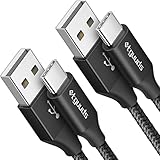
- Fast Charging and Data Sync: etguuds USB A to USB C cable supports charging speed up to 3 A fast charging for quick usb-c port device charging and data transfer speeds up to 480 Mb/s, usbc cable support USB 2.0 data transfer
- Long-Lasting: The usb c charger cord uses integral seamless stretch process, high pressure resistance and nylon braided adding tangle-free, can bear 20000+ bending lifespan
- Wide Compatibility: USB Type C cable fast charging for most C -port devices, for Samsung Galaxy S26 S26+ S26 Ultra S25 S25+ S25 Ultra S24 S24+ S24 Ultra S23 S22 S21 S20 A53 A14, for LG, for Moto, for Pixel, for iPhone 18 17 16 15 Pro Max. Not compatible with iPhone older models before iPhone 15
- Friendly Tips: The USB A to C cable is not support video and media display. Not compatible with webcams, some gaming devices, laptops. Fast charging requires that your device supports fast charging and wall charger supports fast charging
- What You Get: You will get 2 pack 3 ft etguuds Black usb-a to usb-c nylon braided charging cable
Reboot failure
A reboot-stage failure can follow a previously completed write, but the available project information does not provide a universal recovery recipe. Keep the handset connected only when the tool explicitly requires it, record what the screen and browser report, and seek model-specific service guidance if the phone cannot return to Download Mode.
Use browser and managed-device diagnostics carefully
Chrome USB logs
On Chrome-based browsers, open about://device-log to review USB attach and detach events and about://usb-internals for internal device information. Start logging before reconnecting the phone so you can correlate the event with the chooser attempt. These pages help distinguish “the browser never saw a device” from “the browser saw it but could not claim it”; they do not validate firmware.
Managed Samsung Browser policy
Samsung’s managed Samsung Browser policy reference documents WebUsbAllowDevicesForUrls, which can automatically grant a site access to devices matched by vendor and product IDs. This is an enterprise policy setting, not a normal consumer workaround. It applies to managed policy administration and should not be used to bypass a permission decision on a personal computer. The policy concerns WebUSB; it is distinct from Web Serial permissions.
What a USB cable can and cannot fix
A known-good cable is useful because it rules out one common physical cause of an empty chooser or dropped transfer. It cannot make Firefox or Safari support WebUSB, create a secure context, put a phone into Download Mode, grant browser permission, repair Linux udev access, install a Windows driver, or make firmware for the wrong model compatible. Replace the cable only after confirming the connector type and data capability, and test the replacement on a stable port without a hub.
Record these details before asking for model-specific help
Generic advice becomes unreliable when the handset, host, and firmware are unknown. Write down the following before repeating a risky operation:
- Exact Samsung model designation and regional or carrier variant shown on the handset or its documentation.
- Host operating system and whether it is a managed work computer.
- Browser name and full version, plus whether the page is top-level or embedded.
- The exact error text, including “WebUSB not supported” or “USB device not selected”.
- Whether the browser chooser opened, whether the phone appeared, and whether permission was granted.
- Whether the phone was visibly in Download Mode.
- USB port type, hub usage, and cable type or known-good status.
- Firmware build or package name and the stage at which the tool stopped: initialization/handshake, PIT exchange, file transfer, verification, or reboot.
- Any Chrome
about://device-logorabout://usb-internalsevent that coincided with the failure.
That record prevents a solved browser problem from being confused with a later firmware-compatibility problem and gives a service technician enough context to avoid repeating an unsafe guess.
A conservative decision path
- No API or chooser: change to a project-listed browser, use a secure top-level page, trigger Connect Device with a click, and check iframe Permissions Policy.
- Chooser but no phone: enter model-specific Download Mode, try a direct USB 2.0 port, use a known-good data cable, close competing software, and address Linux permissions or Windows driver visibility.
- Phone listed but cannot open: grant origin permission, reconnect after closing other USB tools, and inspect browser USB logs.
- Flash begins then stops: stop changing browser settings; verify exact-model firmware, stable connection, and power, then identify the failed stage.
- Phone no longer behaves normally: do not assume a generic retry will recover it. Preserve the error record and obtain instructions specific to that model and bootloader state.
Following the stages keeps reversible checks—browser, permission, port, cable, and host access—separate from the irreversible risk of writing firmware. That separation is the most reliable way to resolve Odin browser flashing errors without turning a detection problem into a device-bricking event.
Do these 3 things before closing this tab:
1Clear out junk files and repair common Windows errors2Scan for outdated or missing drivers - takes under a minute3Repair Windows errors before they cause bigger problemsQuick Recap
Product prices and availability are accurate as of the date/time indicated and are subject to change. Any price and availability information displayed on Amazon at the time of purchase will apply.




