Quick wins for a faster PC:
Fix the driver behind crashes, sound loss and screen glitchesFind Drivers →Repair Windows errors before they cause bigger problemsFix Now →Scan for outdated or missing drivers - takes under a minuteDriver Scan →EmuDeck 2.7 adds AutoMap, a SteamOS/Linux feature that can assign controllers automatically in Dolphin, Cemu and Ryujinx for up to four players. The release notes are split: the detailed 2.7.0 changelog appeared in an early-access repository, while the public 2.7.1 release on September 29, 2026 had no notes attached to its GitHub release.
What AutoMap does in EmuDeck 2.7
AutoMap is intended for emulators that do not detect or configure controllers automatically. EmuDeck’s 2.7 announcement describes it as a way to set up controls, including automatic setup for as many as four players. It applies to three emulators: Dolphin, Cemu and Ryujinx.
It works at emulator launch rather than during EmuDeck installation. The implementation analysis describes helper scripts that identify connected controller pads and their USB vendor and product IDs, then update the emulator’s device assignments. Dolphin’s controller ports and Wiimote sources are also adjusted to reflect the detected pad count.
AutoMap is listed as a SteamOS/Linux feature. Although the public 2.7.1 package was reported to include Linux AppImages for x86_64 and arm64 as well as a Windows installer, that does not mean AutoMap is available on Windows; the release announcement and implementation analysis scope the feature to SteamOS/Linux.
#1 Best Overall

- Precision Control: The feel, shape, and sensitivity of the DualShock 4’s analog sticks and trigger buttons have been enhanced to offer players absolute control for all games on PlayStation 4.
- Sharing at your Fingertips: The addition of the Share button makes sharing your greatest gaming moments as easy as a push of a button. Upload gameplay videos and screenshots directly from your system or live-stream your gameplay, all without disturbing the game in progress.
- New ways to Play: Revolutionary features like the touch pad, integrated light bar, and built-in speaker offer exciting new ways to experience and interact with your games and its 3.5mm audio jack offers a practical personal audio solution for gamers who want to listen to their games in private.
- Charge Efficiently: The DualShock 4 Wireless Controller can easily be recharged by plugging it into your PlayStation 4 system, even when on standby, or with any standard charger with a micro-USB port.
How do I get four controllers working in EmuDeck?
- Use a SteamOS/Linux installation. AutoMap is not described as a Windows feature.
- Enable AutoMap for a supported emulator. The settings identified by the implementation analysis are
autoMapDolphin,autoMapCemuandautoMapSwitch; the last setting corresponds to Ryujinx. The release material does not specify a user-interface path for changing these settings. - Connect up to four controllers and launch the emulator. AutoMap runs when Dolphin, Cemu or Ryujinx starts and assigns detected pads. EmuDeck does not publish a measured success rate or a guarantee for every controller and configuration.
- Check player order in the game. When Steam Input is not involved, the described logic sorts certain built-in handheld controls last so an external controller can be assigned ahead of them. If the order is wrong, the available release material does not provide a separate manual reassignment procedure while AutoMap is active.
There is an important trade-off: the implementation warning says, “AutoMap is enabled. You won’t be able to change controller settings in this emulator.” In other words, AutoMap takes over emulator controller configuration while enabled. The implementation analysis also reports that existing Steam Deck installations are left untouched if the relevant setting has never been written.
Does EmuDeck AutoMap work with 8BitDo, Xbox, or DualSense controllers?
EmuDeck explicitly names 8BitDo pads, Xbox controllers and DualSense among supported external controller types, alongside the Steam Controller and controllers connected to other Linux handhelds. That is a statement of supported categories, not a model-by-model compatibility list; the announcement does not identify specific controller models or firmware versions.
Rank #2
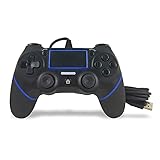
- Prodico Outstanding chips make this controller signal stable and great convenience for game players.
- Improved ergonomics means it's more comfortable to hold, while analog sticks and buttons mean more precise control.
- Upload game videos and screenshots from your system or live gaming without interfering your game progess.
- Multiple inner vibrating motors enables players a stronger feeling of pleasure and immersion.
- Third party product controller compatible with Plays-tation 4.
For a setup with both a handheld’s built-in controls and an external pad, player order can depend on Steam Input. The implementation analysis says that, when Steam Input is not involved, recognized built-in controllers are sorted last to let an external pad take player one. It describes hardware matching for Steam Deck, ROG Ally, Legion Go, AYANEO and OneXPlayer devices. It does not provide a complete account of how every Steam Input configuration affects ordering.
The release materials do not compare wired and Bluetooth connections, report latency measurements, or quantify reliability. Choose the connection mode your controller and handheld support, then verify recognition and player order in the emulator; there is no published benchmark here that establishes one connection type as faster or more reliable.
Recommended Free Tools
Rank #3

- 🎮【2 Packing】Two controllers are packaged in one box, which is less costly than buying two controllers separately. You can get two different custom designed controllers at the same time, which is very cost-effective.This will bring you a better game experience when you play with your friends, lover, family.
- 🎮【Wide Compatibility】AceGamer wireless controller compatible with PS4/Pro/Slim/Windows PC. ❗*Attention*❗: Only when connecting for the first time, you must activate the device with the USB cable for the first pairing and connection. After that, the normal wireless connection of Bluetooth can be made, and USB data cable is no longer needed. ❗*Note*❗: Connecting to PC(without Bluetooth) needs to install receiver, not included.
- 🎮【Function Highlights】360° Refined analog sticks, the new touch pad on the face of the game controller offer players precise control. Controller which built-in 6-axis gyro sensor has dual motor vibration, excellent dual shock effect design makes the tactile sense more sensitive. The optimized buttons and triggers, ergonomic design non-slip grips, which offer you fantastic gaming experience.
- 🎮【Turbo Setting】You can customize any key as a turbo key. First, hold down the 'share' key, then click the turbo key you want to set up successfully. Secondly, you can adjust the turbo frequency. First, hold down the 'share' key, then touch the joystick on the right up and down. There are three gears to adjust in total.
- 🎮【To Be AceGamer】You can get: 2x AceGamer for ps4 controllers wireless; 1x Charging Cable; 1x User Manual; Professional after-sales service. We focus on the design, production and sales of custom controllers. If you have any questions, please contact us in any time!
What else is included in the 2.7 announcement?
EmuDeck’s official 2.7 announcement lists several changes beyond AutoMap:
- RetroAchievements API changes, including Dolphin setup.
- Additional resolution selectors and fixes for embedded videos.
- An import/export tool for moving an EmuDeck installation among Steam Deck, Steam Machine, Linux and Windows.
- Steam Machine improvements that provide default 1080p or 4K setup in selected emulators.
- Automatic SteamDeckGyroDSU installation when setting up Ryujinx, specified for Steam Deck only. The announcement says Steam Controller support on Steam Machine is still being investigated.
EmuDeck is a configuration layer for emulator software, not an emulator or a source of game files. The release analysis says it does not include ROMs, BIOS files or other copyrighted game content.
Rank #4

- 【29,800 Classic Games, Instantly Find Your Favorite】 Preloaded with 29,800 retro games and a wide selection of 3D titles, covering Arcade, Fighting, Shooting, Sports, Puzzle, Racing, and more. Use the smart search bar, category view, and favorites list to jump into any game in seconds—no endless scrolling. Your entire childhood, always just one click away.
- 【Silky-Smooth 3D Gaming】 Powered by the latest Pandora Box system with an H3 chipset, Mali-450 MP2 quad-core GPU, and 2GB DDR3 RAM. Say goodbye to lag and stuttering. Whether you're pulling off stunning special effects or battling through intense multiplayer rounds, everything runs smoothly and stably.
- 【1–4 Player Multiplayer, Expandable Fun】 The all-in-one dual-joystick design lets two players jump into classic arcade battles right out of the box. Want to include more friends? Simply connect extra controllers via the USB expansion ports and turn your living room into a 4-player party. Perfect for family game nights and weekend gatherings.
- 【Total Control: Save Anytime, Customize Everything】 Life gets busy. Pause mid-game, save your progress, and pick up exactly where you left off—even days later. Customize button layouts to your playstyle, and use favorites to keep your go-to games one tap away. Search, load, and advanced settings put you in full command of your arcade experience.
- 【Worry-Free Gaming & 24/7 Support】 Every console is carefully selected to deliver a smooth, plug-and-play experience. Connect to 4K TVs, monitors, projectors, and more via the included 3-meter HDMI and VGA cables—no drivers, no setup. Should you have any questions, our professional support team is always here to help within 24 hours. Your satisfaction is our mission.
Where is the EmuDeck 2.7 changelog?
The detailed 2.7.0 changelog was published in a separate early-access repository on September 14, 2026. EmuDeck’s official GitHub releases page independently records “2.7 released for EA” on that date. Digital Citizen reports that public version 2.7.1 followed on September 29, 2026, but its GitHub release body was empty and no release notes were attached there.
So “no public changelog” needs a version distinction: the public 2.7.1 release did not include release notes, but a detailed changelog for the earlier 2.7.0 early-access release exists separately. The available release materials do not establish a public, attached changelog for 2.7.1.
Quick Recap
Best Value

- Our Let's Go Fishin' game is the original version of a well-known and well-loved fishing game that parents will remember playing as kids
- Gameplay helps develop hand-eye coordination
- Players use mini fishing poles to try to catch the most fish
- Features a rotating pond and fish that open and close their mouths
- For 1-4 players, ages 4 and up
Product prices and availability are accurate as of the date/time indicated and are subject to change. Any price and availability information displayed on Amazon at the time of purchase will apply.



