Crashes, No Sound, or Screen Glitches?
Random freezes, missing sound and display glitches usually trace back to one bad driver. Find and replace yours safely.Free scan · under a minutePC Slower Than It Used to Be?
A free scan shows the junk files, broken settings and background clutter dragging Windows down - then fixes them in one click.Free scan · Windows 10 & 11For ordinary course updates, use email as the default; reserve SMS for urgent, time-sensitive notices or situations where recipients have requested texts. The best provider depends on your school’s technology stack, user preferences, accessibility needs, consent obligations, and the consequences of a delayed message. Google Classroom, Twilio, and Amazon’s SNS and SES illustrate different approaches—not a universal provider ranking.
Choose the channel by the event’s urgency
Classwork activity, comments on posts, and invitations to join classes are examples of notifications Google Classroom can send by email. Google documents settings that let teachers and students choose notification types, while administrators can configure Gmail and Directory services and allow Classroom email in Workspace. See Google Classroom notification settings.
As an Amazon Associate I earn from qualifying purchases.
Email is a sensible default for these routine events because learners may need to revisit the information. Use SMS selectively when a delay could cause a meaningful problem, or when a recipient has chosen texts. A message’s urgency, audience preference, accessibility needs, and local requirements all matter; SMS is a channel, not a notification strategy by itself.
How the provider options differ
| Option | What it offers | Best fit | Verify before choosing |
|---|---|---|---|
| Twilio education communications | Twilio presents education messaging across SMS, voice, video, and email; it names Programmable Messaging and SendGrid Email API. Twilio education | A plausible API-based option for teams building custom, multichannel workflows. | Current pricing, country coverage, consent and opt-out handling, data terms, support, and suitability of each product. |
| Amazon SNS | Routes events to application endpoints and supports SMS, email, and mobile push. Amazon SNS documentation and SMS subscriptions | A cloud infrastructure component for teams already running workloads on AWS. | Regional and destination support, limits, configuration, current costs, monitoring, and privacy and security terms. |
| Amazon SES with SNS | SES can publish email delivery, bounce, and complaint events through SNS. SES notification documentation | Transactional email and delivery-event plumbing in a technical implementation. | Current SES limits and pricing, deliverability setup, event handling, and any separate services needed for other channels. |
| Google Classroom controls | Documented email notification types and administrator configuration. | Routine platform notices when a school already uses Google Workspace. | Organization settings, teacher and student preferences, and whether Classroom supports the events you need. |
These options are not interchangeable. Twilio markets an education communications offering; SNS and SES are cloud services that a technical team must configure and integrate, not turnkey campus notification applications. Google Classroom is a built-in platform example, not a general-purpose provider comparison.
#1 Best Overall

- [APP Notification] When the water leak detector senses a leak, the 2.4GHz WiFi gateway (Note:Not support 5Ghz WiFi) instantly sends real-time alerts to your phone/tablet (requires TUYA Smart App, compatible with iOS/Android), keeping you informed no matter where you are.
- [Drip & Flood Detection] Equipped with a top drip sensor and four bottom flood probes, the Water Leak Detector provides early alerts for drips and floor flooding. Ideal for leaks from faucet, roof, sink, bathtub, and washing machine.
- [Connect 24 Sensors, Cover 328FT] The 2.4Ghz Wireless Gateway supports pairing with up to 24 water leak sensors (Model: WD61), with a maximum transmission range of 328FT (100M), ideal for comprehensive leak monitoring across various areas like home, basement, kitchen, bathroom, toilet, and laundry room.
- [Adjustable Volume & 32-Ringtone] The Sensor offers 4 adjustable volume levels (0-120dB), while the 2.4GHz WiFi gateway supports 5 volume levels (0-100dB) and 32 ringtones. Remotely adjust the Gateway's volume and select ringtones through the TUYA Smart App for added convenience.
- [Smart Control via TUYA] Bind devices to the TUYA Smart App to receive remote alerts, control on/off functions, customize Sensor/Gateway names, adjust volume, and select ringtones—offering intelligent management and personalized settings.
What to compare before selecting a provider
- Event and preference controls: Can you set different channels by event and let recipients choose where practical?
- Integration effort: Does the option fit your existing platform and technical capacity?
- Delivery operations: Can you observe delivery failures and handle bounces, complaints, and opt-outs where relevant? SES’s SNS event notifications are one documented example.
- Reach and terms: Check regional support, data handling, security terms, and support for the specific services you plan to use.
- Total cost: Estimate costs for your expected channel mix and volume. Provider prices and terms change; confirm them directly before deciding.
No independent cross-provider performance comparison is established here, so do not treat vendor claims as proof that one option delivers better results than another.
Review student-data handling before connecting a service
In the United States, the Department of Education advises teachers to check with school or district administration before using online services that collect personally identifiable information from education records. Where a vendor handles education-record data under the school-official exception, the department describes conditions that include the school’s direct control over the vendor’s use and maintenance of the records, use consistent with the purpose for which the information was disclosed, and limits on redisclosure. Consult the department’s FERPA guidance on online services and school-official exception explanation, then review the actual service and school or district approval process.
Rank #2
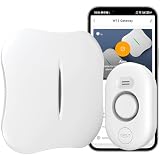
- [APP Notification] When the water leak detector senses a leak, the 2.4GHz WiFi gateway (Not support 5Ghz WiFi) instantly sends real-time alerts to your phone/tablet (requires TUYA Smart App, compatible with iOS/Android), keeping you informed no matter where you are.
- [Drip & Flood Detection] Equipped with a top drip sensor and four bottom flood probes, the Water Leak Detector provides early alerts for drips and floor flooding. Ideal for leaks from faucet, roof, sink, bathtub, and washing machine.
- [Connect 24 Sensors, Cover 328FT] The 2.4Ghz Wireless Gateway supports pairing with up to 24 water leak sensors (Model: WD61), with a maximum transmission range of 328FT (100M), ideal for comprehensive leak monitoring across various areas like home, basement, kitchen, bathroom, toilet, and laundry room.
- [Adjustable Volume & 32-Ringtone] The Sensor offers 4 adjustable volume levels (0-120dB), while the 2.4GHz WiFi gateway supports 5 volume levels (0-100dB) and 32 ringtones. Remotely adjust the Gateway's volume and select ringtones through the TUYA Smart App for added convenience.
- [Smart Control via TUYA] Bind devices to the TUYA Smart App to receive remote alerts, control on/off functions, customize Sensor/Gateway names, adjust volume, and select ringtones—offering intelligent management and personalized settings.
Check consent rules for the messages you send
SMS compliance depends on the message, technology, sender, recipient, and jurisdiction. In its 2023 order, the FCC states that the TCPA and implementing rules require consent for certain calls and texts sent using an autodialer or prerecorded or artificial voice. The FCC also distinguishes telemarketing from informational messages; that distinction does not mean every school or SaaS text is automatically exempt. See FCC 23-107 and the FCC TCPA rules overview. Get current legal review for the actual messaging program rather than relying on a general label such as “school alert.”
Quick Recap
Best Value

- SMS TEXT ALERTS FOR OUT-OF-RANGE CONDITIONS — Receive SMS notifications when temperature or humidity readings go outside your configured range. This allows you to respond to changes that may affect stored items or environments. Includes up to 30 SMS alerts per month at no additional cost.
- ADAPTIVE MONITORING FOR BETTER AWARENESS — ClimaNotify dynamically adjusts its measurement and reporting frequency when conditions change, helping ensure critical temperature shifts aren’t missed.
- MULTIPLE ALERTS SO YOU NEVER MISS A PROBLEM — ClimaNotify delivers alerts via SMS, email, mobile app notifications, and a built-in sound alarm—so you’re always informed wherever you are.
- NO HUB, NO HASSLE SETUP — Connect directly to your 2.4GHz WiFi network — no additional hub or gateway required. Easy setup gets you monitoring in minutes right out of the box.
- INSTALL IT ANYWHERE IN SECONDS — Use the adhesive backing, built-in magnet, or lanyard loop to place it exactly where you need — ideal for homes, garages, basements, storage areas, and more.
Rank #4

- Wireless alert at over 200 feet; 2.4GHz WiFi is required. Email and text message notifications are sent when continuity sensors are shorted to the ground or 0.5-50 VDC is applied to the voltage sensor. Sends a Voltage High alert when voltage rises above 0.5 VDC and a Voltage Low alert when it drops below 0.5 VDC.
- All sensors are configured independently with custom messages, email text, and addresses. Alerts are sent repeatedly, with configurable intervals. Each sensor has a corresponding OFF sensor: when the state is reverted, its OFF sensor sends one REVERTED alert. The configuration web page shows 10 independently managed sensors that can be disabled if not required.
- The rugged enclosure supports up to 250 lbs and is designed to operate in dusty and moldy environments. Use the green screw terminals for continuity sensors, the onboard screw for the DC voltage sensor, and the onboard screw for common ground.
- You are in control: you can change the text of the alert or email message and add or remove email addresses—up to 5 are available for each sensor.
Rank #3

- Breakthrough 550m/1804ft Connectivity: Engineered with advanced Sub-1G long-range wireless tech, our leak detector maintains robust signals over unprecedented distances—reaching up to 550 meters (1804 feet) even through 5 dense walls. Secure every critical space in expansive properties, from deep basements to detached garages and distant outbuildings.
- Multiple Reminder Methods: Our water leak sensor supports multiple remote alarm. It can instantly send SMS, APP, and Email notifications to your phone (no matter how many times the SMS is used, it's free). Also, the water leak sensor flashes red and sounds a 105 dB alarm. Perfect for the basement, kitchen, or vacation home!
- Feature-Rich App: Receive instant push notifications. Use the “Find Device” feature to quickly trigger audible beeps to retrieve misplaced sensors. Add multiple email addresses through the APP, and your family and friends can also receive reminders when there is a water leak at home.
- Industry Leading IP67 Waterproof: Its IP67 waterproof rating ensures durability against spills, humidity, and accidental submersion.It can be used multiple times after wiping dry.
- Four-level volume adjustment: Customize your own alarm to fit your life! Use the app to adjust the volume in 4 levels, with a maximum alarm volume of 105 decibels. Whether it's day or night, whether it's in the bedroom or the basement, you can find the right volume.
A practical notification design
- List the events: Separate ordinary course activity from events where delay would have a real consequence.
- Assign a default channel: Start with email for routine learning updates; consider SMS only for urgent events or recipients who request it.
- Expose understandable preferences: Where the platform permits, make channel and event settings clear to users. Google Classroom documents user-selectable notification settings as one example.
- Review approval and data flows: Confirm the school or district permits the service and that its handling of student information fits applicable requirements.
- Monitor outcomes: Track delivery events and failures for the channels in use, and provide a way to manage preferences or opt-outs as appropriate.
Product prices and availability are accurate as of the date/time indicated and are subject to change. Any price and availability information displayed on Amazon at the time of purchase will apply.




