Yes, Webroot describes Mobile Security as offering scam-text detection, protection against risky websites, and monitoring to check whether an email address appears in known data breaches. What it does depends on whether you use Android or iOS: automatic app scanning is described for Android, not as an equivalent iPhone feature. The app is free to download, but Webroot says it requires an active antivirus subscription.
What Webroot Mobile Security says it does
Webroot’s mobile product overview describes protection against malicious websites and phishing, Android app scanning, text-scam detection, and breach monitoring. These are vendor feature descriptions, not independent test results: the available information does not establish a detection rate or prove how effectively the app blocks threats in practice.
As an Amazon Associate I earn from qualifying purchases.
How it handles risky websites
Webroot’s Android SecureWeb guide says the browser blocks known malicious sites before they load and displays an alert when it considers a site risky, with options for responding. Webroot describes the feature this way: “SecureWeb allows you to safely surf the Internet by blocking malicious websites from loading before you access them.” That is Webroot’s description of the feature, not an independently measured result. See the Android SecureWeb guide and the iOS secure-browsing guide.
Crashes, No Sound, or Screen Glitches?
Random freezes, missing sound and display glitches usually trace back to one bad driver. Find and replace yours safely.Free scan · under a minutePC Slower Than It Used to Be?
A free scan shows the junk files, broken settings and background clutter dragging Windows down - then fixes them in one click.Free scan · Windows 10 & 11Text-scam detection and breach monitoring
Webroot’s current product material lists Text Scam Detection and breach monitoring, while its Apple App Store listing describes SMS scam detection and checking whether an email address was compromised in known breaches. The breach feature checks for an email in known breach data; it should not be read as prevention, continuous monitoring of every personal detail, or a guarantee that all breaches will be identified. Feature availability and behavior can vary by platform and operating system.
#1 Best Overall

- POWERFUL, LIGHTNING-FAST ANTIVIRUS: Protects your computer from viruses and malware through the cloud; Webroot scans faster, uses fewer system resources and safeguards your devices in real-time by identifying and blocking new threats
- IDENTITY THEFT PROTECTION AND ANTI-PHISHING: Webroot protects your personal information against keyloggers, spyware, and other online threats and warns you of potential danger before you click
- SUPPORTS ALL DEVICES: Compatible with PC, MAC, Chromebook, Mobile Smartphones and Tablets including Windows, macOS, Apple iOS and Android
- NEW SECURITY DESIGNED FOR CHROMEBOOKS: Chromebooks are susceptible to fake applications, bad browser extensions and malicious web content; close these security gaps with extra protection specifically designed to safeguard your Chromebook
- PASSWORD MANAGER: Secure password management from LastPass saves your passwords and encrypts all usernames, passwords, and credit card information to help protect you online
Android and iPhone features are not identical
Android
Webroot describes automatic app scanning and mobile threat protection for Android, alongside risky-site protection, text-scam notifications, and breach monitoring. App scanning is the clearest platform distinction in the product descriptions.
iOS
Webroot’s iOS product page focuses on secure browsing and device-vulnerability checks. The Apple listing also describes SMS scam detection and breach monitoring. Do not assume the Android app-scanning feature means iOS performs an equivalent full antivirus scan.
Rank #2

- POWERFUL, LIGHTNING-FAST ANTIVIRUS: Protects your computer from viruses and malware through the cloud; Webroot scans faster, uses fewer system resources and safeguards your devices in real-time by identifying and blocking new threats
- IDENTITY THEFT PROTECTION AND ANTI-PHISHING: Webroot protects your personal information against keyloggers, spyware, and other online threats and warns you of potential danger before you click
- ALWAYS UP TO DATE: Webroot scours 95% of the internet three times per day including billions of web pages, files and apps to determine what is safe online and enhances the software automatically without time-consuming updates
- SUPPORTS ALL DEVICES: Compatible with PC, MAC, Chromebook, Mobile Smartphones and Tablets including Windows, macOS, Apple iOS and Android
- NEW SECURITY DESIGNED FOR CHROMEBOOKS: Chromebooks are susceptible to fake applications, bad browser extensions and malicious web content; close these security gaps with extra protection specifically designed to safeguard your Chromebook
Subscription, compatibility, and what to check
Webroot says Mobile Security is free to download but requires an active Webroot antivirus subscription. Its product page lists Essentials, Premium, and Total Protection as plans that include Mobile Security; plan inclusions may change and can vary by region, so check the offer available where you live before subscribing.
Webroot’s system requirements page lists Android 11 or later and iOS 15 or later. The Apple App Store listing may specify a higher current compatibility requirement, so verify the app’s live store listing for your device before installing.
Rank #3
![Webroot Internet Security Plus Antivirus Software 2026 | 10 Device 1 Year Download for PC/Mac/Chromebook/Android/IOS + Password Manager [Online Code]](https://m.media-amazon.com/images/I/41+ccFAvY7L._SL160_.jpg)
- POWERFUL, LIGHTNING-FAST ANTIVIRUS: Protects your computer from viruses and malware through the cloud; Webroot scans faster, uses fewer system resources and safeguards your devices in real-time by identifying and blocking new threats
- IDENTITY THEFT PROTECTION: Protects your usernames, account numbers and other personal information against keyloggers, spyware and other online threats targeting valuable personal data
- SUPPORTS ALL DEVICES: Compatible with PC, MAC, Chromebook, Mobile Smartphones and Tablets including Windows, macOS, Apple iOS and Android
- NEW SECURITY DESIGNED FOR CHROMEBOOKS: Chromebooks are susceptible to fake applications, bad browser extensions and malicious web content; close these security gaps with extra protection specifically designed to safeguard your Chromebook
- PASSWORD MANAGER: Secure password management from LastPass saves your passwords and encrypts all usernames, passwords, and credit card information to help protect you online
- Confirm that your phone meets the current operating-system requirement.
- Check that your subscription includes Mobile Security in your region.
- On Android, distinguish app scanning from browser-based website protection.
- On iPhone, check the current listing for supported secure-browsing, SMS, and breach-monitoring features.
- Understand that breach monitoring checks whether an email address appears in known breach data; it does not prevent a breach.
What the available claims establish
Webroot’s materials describe the app’s intended features, but they do not provide an independently verified protection rate, comparative laboratory results, or hands-on evidence of how often it catches scam texts or malicious sites. Treat the listed protections as product capabilities claimed by Webroot, and confirm the precise features for your operating system and subscription before relying on them.
Quick Recap
Best Value
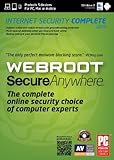
- SecureAnywhere lightweight cloud based antimalware detection is effective at blocking viruses, spyware, worms, Trojans, rootkits, and other threats
- First of its kind online security console allows you change security settings, run scans, and see alerts no matter where you are
- Quietly protects you without interruption or slowdowns. Uses a fraction of your memory and processing speed
- One-click fix solves security problems and gets you back to work quickly
- MyPasswords encrypts your passwords and automatically logs you into your favorite sites
Rank #4
![Webroot Premium 2026 with Allstate Identity Protection | 5 Device, 1 Year | Antivirus and Internet Security Software, Advanced Dark Web Monitoring, Password Manager | NEW [Online Code]](https://m.media-amazon.com/images/I/41BnWANg6aL._SL160_.jpg)
- MONITOR your identity, credit and financial accounts and get alerts if potential fraud is detected.
- ADVANCED DARK WEB MONITORING: Get notified if your personal data is found in a data breach or your credentials are compromised.
- 24/7 U.S. – BASED SUPPORT experts help you restore your stolen identity or mitigate fraud on your accounts.
- INCLUDES INTERNET SECURITY FOR 5 DEVICES to protect your family’s mobile phones, laptops, desktops, Chromebooks and tablets.
- ANTIVIRUS, Anti-phishing, malware, ransomware protection against existing and emerging threats.
Product prices and availability are accurate as of the date/time indicated and are subject to change. Any price and availability information displayed on Amazon at the time of purchase will apply.




