What’s actually slowing this PC down?
Pick the symptom - the matching free tool is one click away.
No subscription or extra accessory is required to play Nex Playground’s five included starter games. You do need Wi-Fi for initial setup and game downloads; once a game is downloaded, Nex says it can be played offline. Play Pass is optional and adds access to more games, with internet required for its activation, downloads, and full game features.
Do you need a Play Pass subscription?
No. Nex’s first-time setup guide says the Play Pass purchase or activation step is optional and can be skipped. The console includes a five-game Starter Pack; Play Pass is for accessing additional games. Nex notes that its catalog, titles, features, and content can vary over time and by region, so the included game list and Play Pass offering may change.
As an Amazon Associate I earn from qualifying purchases.
See Nex’s first-time setup guide, product page and FAQ, and Play Pass terms for the current details. The sources cited here do not establish a current Play Pass price or exact catalog count.
Does Nex Playground need an internet connection?
Yes, for initial setup and to download games. Nex says starter games download during setup, and that this process may take up to an hour depending on internet speed. Wi-Fi is also needed for system updates and new game downloads.
#1 Best Overall

- PERFECT FIT: The Official Nex Playground Game System Travel Case ensures a compact fit for your gaming console and accessories, and protects device during travel or on-the-go adventures. CASE ONLY! (Device and accessories are not included)
- SECURE, DURABLE, AND LIGHTWEIGHT: The Nex game storage carry case features a lightweight construction with super-soft lining and a sturdy foam frame, plus straps to keep accessories snug while on the go.
- EASY TO CARRY: This handy video game organizer with comfortable handle, is lightweight & compact. The small hard case can fit into a backpack. Convenient, durable protective case to take anywhere for a party, travel, home use or outdoor activities.
- BRING THE FUN EVERYWHERE: The good times don't have to stay at home. Pack up the joy for family get-togethers or friend-fueled play dates and take the laughter and smiles whenever you go.
- A STYLISH GIFT: Our hard shell carrying case is an awesome birthday or holiday gift. Crafted with precision and care, ensuring it meets the standards of durability, functionality and style for a Nex Playground game system.
After a game has downloaded, Nex says it can be played offline. That does not remove Play Pass’s separate online requirements: its terms say internet is needed to activate Play Pass, download its games, and access all game features. See Nex’s wireless-operation guidance.
What comes in the box, and do you need anything else?
For the revised packaging, Nex lists the console with magnetic privacy cover, an approximately five-foot HDMI cable, an approximately five-foot power supply, and a D-pad remote with two AAA batteries. Those are the essential items for connecting and navigating the system; the remote is for setup and navigation, not required to control games.
Rank #2
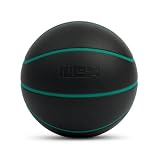
- REAL FEEL - The textured grip and premium feel of a real basketball.
- TRUE BOUNCE - A consistent, reliable rebound that’s gentle on floors and furniture.
- SIZED FOR YOUTH - Regulation dimensions and balance, tuned for training.
- QUIET BY DESIGN - High-density foam dampens the sound of every bounce.
Nex says revised packaging began in late September 2024. Older packaging included a yellow tilt stand and rechargeable joystick remote instead, so check the contents if you are buying a used or older-stock unit. The current list is on Nex’s package contents page.
What should you have ready before setup?
- A TV with an HDMI input and a nearby wall outlet.
- Your Wi-Fi network name and password.
- An email address and a smartphone or laptop to access Nex’s web portal during setup.
- About 6 ft by 6 ft of open play space, which Nex recommends on its product page.
Connect the included HDMI cable between the console and TV, then connect the included USB-C power cable to the console and wall outlet. Nex advises using the original Nex Playground power cable. Insert the included batteries in the D-pad remote; the remote is for navigation rather than gameplay. Nex’s Terms of Use describe operation with peripherals and connected devices officially produced, licensed, or authorized by Nex or its affiliates; the official setup materials do not identify another accessory required for ordinary setup or play. See the Nex Terms of Use for its peripheral requirements.
Quick Recap
Best Value

- Elevate Your Gaming with This Essential Nex Playground Accessory: This must-have tripod stand transforms your Nex Playground into a premium gaming station, delivering rock-solid stability and customizable positioning for unbeatable gameplay. Whether you're diving into solo adventures or battling friends, the adjustable design creates the perfect setup—eliminating wobbles and distractions so you can fully immerse in every session. A game-changing upgrade that takes your experience from good to legendary.
- Customizable Comfort for Extended: Designed with ergonomic flexibility in mind, this Projector Stand Tripod stand features smooth height adjustment to perfectly align with your natural playing position. Whether sitting or standing, easily customize the height to maintain optimal posture during marathon gaming sessions—reducing strain while keeping you fully immersed in the action. The intuitive adjustment mechanism ensures seamless transitions between players of different heights, making every game night comfortable for everyone.
- Premium Build for Lasting Performance: Crafted from high-quality materials, this Portable Tripod Mount delivers exceptional durability to handle frequent use with ease. Its rugged construction ensures reliable, long-lasting support, making it the perfect sturdy companion for your Nex Playground gaming setup.
- Sturdy & Adjustable Tripod: This Projector Stand is designed for effortless setup, featuring a simple yet reliable platform that allows for quick and secure height adjustments. Once you’ve set your preferred height, just place your device on top—it locks firmly in place, preventing any loosening during intense gameplay.
- Rock-Solid Stability for Uninterrupted Gaming: Featuring an ultra-sturdy base, the Nex Playground tripod delivers exceptional stability to keep your gaming machine firmly planted during even the most intense gameplay sessions. The wide, balanced support platform prevents wobbling or shifting, giving you confidence in your setup whether you're playing, streaming, or competing.
Rank #4
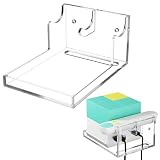
- Package Includes: 1 PCS Holder, a set of installation accessories, and 1 PCS installation instructions (Console and Remote Not Included)
- Premium Material: The wall mount holder is made of 4mm thick high-quality acrylic, which is durable, waterproof, and easy to clean.
- Perfect Compatibility: The wall-mounted bracket is specially designed for playground console and remote and can be perfectly organized whether it is a bare device or wearing a silicone case.
- Convenient Cable Management: The wall-mounted stand for Nex Playground video game is designed with cable holes, enabling effortless routing of cables directly to the socket or port beneath.
- Safe and Secure Placement: Mount your wall-mounted shelf for Nex Playground toys and games directly under the TV, keeping it out of children's reach, ensuring a safe play environment.
Rank #3

- [Attention Before Purchase] The Nex Playground Game System remote control has two versions, please pay attention to the version you purchased before purchasing this protective case.
- [COMPATIBILITY] This silicone remote case cover is specially design for Nex Playground Game System Remote. ⚠Note:Only one remote protective case cover, Nex Playground Game System Remote device not included.
- [PROTECTION] This silicone remote case cover provides comprehensive protection for your remote control, effectively preventing scratches, vibrations, and breaks. The all-in-one design prevents the back cover from falling off and losing.
- [HIGH-QUALITY] This remote case cover is made from superior quality silicone,soft and lightweight.The back adopts an ergonomic anti slip design, which increases grip strength and anti-fall function.
- [EASY TO INSTALL] Just put your Nex Playground Game System Remote into the silicone cover in few second.
Product prices and availability are accurate as of the date/time indicated and are subject to change. Any price and availability information displayed on Amazon at the time of purchase will apply.




