Quick wins for a faster PC:
Fix the driver behind crashes, sound loss and screen glitchesFind Drivers →Clear out junk files and repair common Windows errorsFree Scan →No—not always. A dash cam needs power after you switch off the ignition to record while parked, but a fuse-box hardwire kit is only one way to provide it. Depending on your camera and vehicle, a compatible OBD-II cable, an always-powered 12V outlet, or a dedicated dash cam battery may also work. Check that the camera supports parking mode and that the power method matches its instructions.
Why parking surveillance needs a separate power plan
A camera powered only by a switched accessory outlet generally stops when that outlet loses power with the ignition. Parking recording requires the camera to remain powered after shutdown, and the camera must also support a parking mode. Depending on the model, that mode may use motion or impact detection, time-lapse recording, or another setting.
As an Amazon Associate I earn from qualifying purchases.
A typical hardwire setup provides both constant power and an ignition-state signal. Thinkware describes a constant wire, an accessory wire that loses power when the ignition is off, and a ground wire. VIOFO notes that if the vehicle has no suitable accessory circuit, its hardwire method will not trigger parking mode as intended. Check the instructions for your exact camera and kit: Thinkware’s power options and VIOFO’s explanation of recording while parked.
What’s actually slowing this PC down?
Pick the symptom - the matching free tool is one click away.
Compare the ways to power a dash cam while parked
| Power option | How it works | What to check |
|---|---|---|
| Fuse-box hardwire kit | Connects to constant and switched vehicle circuits so a compatible camera can stay powered and detect ignition state. | Camera and vehicle compatibility, correct fuse selection, cutoff or timer behavior, installation skill, and draw on the vehicle battery. |
| OBD-II power cable | Plugs into the vehicle’s diagnostic port and can provide parking-mode power for supported systems. | Whether the camera and vehicle support the cable, how it manages power, and whether the port’s use suits your needs. |
| Dedicated dash cam battery | Charges while driving, depending on the model, then powers the camera while parked. | Runtime for your camera configuration, charging time, installation, cost, and reduced reliance on the starter battery. |
| Always-live 12V outlet | Can power a camera if the outlet stays on with the ignition off and the camera supports the required mode. | Whether the outlet remains live while parked and whether the setup provides suitable battery protection. An always-live outlet without adequate protection can drain the vehicle battery. |
These options are not interchangeable for every setup. Thinkware describes OBD-II and battery-pack options alongside hardwiring in its powering guide; VIOFO and BlackVue also explain the role of vehicle power in parking recording and parking mode.
#1 Best Overall

- 【Compatible for ROVE R2-4K with USB-C Port, R2-4K PRO, R2-4K DUAL, R2-4K DUAL PRO, and R3 Dash Cam with USB Type C】 This dash cam hardwire kit is specially designed for R2, R2-PRO, R2-DUAL, R2-4K DUAL PRO and R3 dash cams to be used for 24-hours parking monitor.
- 【24/7 Parking Monitoring for Supercapacitor Dash Cam】ROVE R2-4K (with USB-C Port Only), R2-4K PRO, R2-4K DUAL, R2-4K DUAL PRO, & R3 have a 24-Hour Parking Monitor feature. This hardwire kit provides continuous power to your camera when your car is parked.
- 【Clean Installation - Ditch the USB 12V Car Charger】You can use this dash cam hardwiring kit for clean installation in your car. This dashcam hardware kit connects to your car's fuse box directly hiding all the cables neately.
- 【A Complete dashcam hard wiring kit 】All necessary fuse taps, volt meter, and other components are included in our kit for an easy installation and user experience that you will only get with ROVE.
- 【Easy DIY Installation Manual Included】Our products come with a beautifully written user manual, and how-to videos are also available which you can follow easily step by step.
How to choose the right setup
Choose a hardwire kit for an integrated vehicle connection
A compatible kit can provide ignition-off power and an accessory signal without occupying the 12V outlet. Look for the kit specified for your camera, and confirm its low-voltage cutoff or timer behavior. A cutoff can stop recording before the vehicle battery reaches the configured limit, but it does not eliminate battery use.
Consider OBD-II for a plug-in installation
An OBD-II cable may simplify the connection, but support varies by camera and vehicle. Confirm that the cable is explicitly compatible with both before relying on it for parking mode.
Rank #2
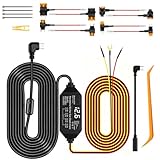
- 24/7 Parking Monitor: This power adapter system provides 24/7 parking surveillance, recording incidents like hit-and-runs, vandalism, or theft while your vehicle is off to protect your car and provide crucial evidence.
- Smart 4-Level Voltage Protection :The dash cam power cable ensures 24 hr dash cam security without a dead battery. Simply select the cutoff ((11.6V/11.9V/12.2V/12.5V) for your battery and climate; the hard wire kit set auto-disconnects to ensure your engine starts
- Real-Time Voltage Display: The built-in screen lets you monitor your battery's voltage at a glance, helping to prevent dead batteries, park with confidence, and quickly diagnose electrical issues
- Universal Compatibility: This ACC hardwire kit works with all 12V-24V vehicles—from cars and trucks to large commercial vehicles—delivering continuous power to your USB-C dash cam. Note: This hardware kit uses the standard A5B5 signal. For dash cams that require an A8B8 signal (as someVan-ture or Rediger models, Incompatible with Ro.ve ), simply connect using the included A8B8 adapter cable.
- ACC Detection: Built-in screen shows your car battery's health at a glance.Automatically switches between Parking mode and Driving mode. No manual setup! Withstands engine start-stop surges for stable performance
Consider a dedicated battery for longer parked recording
A dedicated dash cam battery is designed to power the camera while parked and can reduce reliance on the starter battery. It adds a separate device, installation, charging time, and cost; the outcome depends on the battery and camera configuration.
Crashes, No Sound, or Screen Glitches?
Random freezes, missing sound and display glitches usually trace back to one bad driver. Find and replace yours safely.Free scan · under a minuteWindows Errors? Fix Them Before They Spread
Repair common Windows errors and clear accumulated junk for a smoother, more stable PC - no reinstall needed.Free scan · no reinstallUse an always-live outlet only with suitable protection
First verify that the outlet remains powered after the vehicle is off. Then check whether the camera supports parking mode through that connection and how the setup prevents excessive battery drain. An outlet being live is not, by itself, a battery-protection feature.
Rank #3

- 【Low Voltage Protection】Power cuts off automatically at 11.6V (23.2V for 24V input) to reserve engine-start power and safeguard your car battery.
- 【Warning for Parking Monitoring】Park ≤3 days: Connect red wire to vehicle BAT power for parking monitoring;Park >3 days: Connect red wire to vehicle ACC power,Do NOT enable parking monitoring;Do not use parking monitoring if your car battery is over 3 years old.
- 【Wide Compatibility】Equipped with Low-Profile Mini, Mini, ATO & Micro2 fuse adapters, fits nearly all vehicles.
- 【Universal Specs】3.2m total length, stable 5V/2.5A output, accepts 12–24V input, works with most mainstream dash cams and Type-C USB devices.
- 【Easy Installation】No cigarette lighter wiring needed; hide cables neatly inside car seams with the included pry bar and adhesive pads for concealed setup.
Parking mode still uses power
Any setup drawing from the vehicle battery can reduce its reserve. A voltage cutoff or timer limits how long a hardwired camera runs under its configured conditions; neither makes recording power-free. Battery age and charge, vehicle circuits, camera settings, and parking duration all affect when recording stops. BlackVue discusses parking mode, while 70mai’s support page addresses product-specific operation: BlackVue parking mode and 70mai M310 support.
Manufacturer runtime figures are estimates for named products and configurations, not promises for every vehicle or a universal safe parking duration:
Rank #4

- 【Wide Compatible】Input:12V-24V; Output:5V/2A. With Type-C ports, this hardwire kit compatible with all of dash cams.
- 【EASY TO INSTALL】 With the installation tool, there's no need to use a cable from car cigarette lighter socket, instead it's a permanent hidden cable, and very easy to install.
- 【24 HOURS MONITOR】24 Hours Surveillance: The vehicle hard-wire kit connect to car battery or fuse box power, can realize continuous power supply for 24 hours. It can keep powered on even car turned off.
- 【LOW VOLTAGE PROTECTING】Multiple Security Protection - With low voltage protection, REDTIGER hardwire kit will automatically cut off the power after 60s when the voltage is lower than 11.8V(+-0.2). Not applicable to trucks with voltage above 24V. More security protection like over-current, short-circuit, reverse connection, and overheat.
- 【WORRY FREE SERVICES】 1 year free-replacement warranty for quality problems.
- Thinkware’s undated iVolt Mini support page, accessed in 2026, estimates approximately 8 hours of parking recording when hardwired, approximately 20 hours with a one-channel camera and iVolt Mini, and approximately 16 hours with a two-channel camera and iVolt Mini. These are manufacturer estimates, not independent test results: Thinkware iVolt Mini installation information.
- BlackVue’s undated parking-mode page, accessed in 2026, states up to 8 hours for a dual-channel camera and up to 12 hours for a single-channel camera using its B-112 battery pack. These are product-specific manufacturer figures: BlackVue parking-mode information.
Those estimates are not directly comparable guarantees: they describe different products and camera configurations. For any setup, consult its current manufacturer guidance and consider the vehicle’s battery condition and parking habits.
What to check before installing a hardwire kit
Vehicle wiring differs, so use the vehicle documentation and the exact kit instructions rather than assuming a fuse position or wire color is universal. Thinkware recommends professional installation and instructs installers to identify constant and accessory fuses with a circuit tester or multimeter, follow the wire markings, and attach ground to uncoated metal. Garmin warns that incorrect wiring can damage the vehicle or battery or cause injury, and strongly recommends an experienced installer with electrical-system knowledge.
Best Value
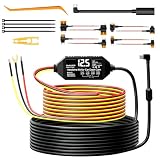
- 24/7 Parking Monitoring : Auto Switch, No Manual Operation. Our hardware kit Built-in high-sensitivity chip detects engine status. Switches to low-power parking mode within 5 seconds after engine off, resumes instantly on ignition. Captures scratches, hit-and-runs, vandalism, theft – no missed events. 24/7 protection and evidence safe. CE, FCC, and ROHS certified.
- Smart 4-Level Low Voltage Protection : Dual System ,No Dead Battery Worries.The power cable Equipped with high-precision voltage sensor chip and 4 adjustable cutoff thresholds (12V: 11.6/11.9/12.2/12.5V; 24V: 23.2/23.8/24.4/25.0V). Select the ideal level based on your battery type and climate. Auto power-off when voltage drops to preset value – supports long-term parking, ensuring your engine starts reliably every time while enabling safe 24hrs parking surveillance.
- Real-Time LED Voltage Display : Check Battery Health at a Glance, No Tools Needed Unlike basic on/off indicators, our hard wire kit features a built-in HD LED screen that functions as a precise LED voltmeter, displaying real-time battery voltage. Directly check battery health and dash cam status instantly. Even beginners can quickly diagnose electrical issues, preventing startup failure and device damage."
- Upgraded 3-Wire ACC Detection : Upgraded from 2-Wire to 3-Wire,Basic 2-wire cables often fail: no shutdown, no parking monitor, power drain. Our upgraded pro 3-wire design (Red=ACC sensing, Yellow=constant power, Black=ground) ensures seamless driving/parking mode switching. Red turns cam on/off with engine. Yellow powers continuous recording.Black stabilizes voltage & reduces interference. Supports motion detection & time-lapse.No missed footage.
- Multiple Safety Protection : Protect Your Car and Dash Cam.No more worries about short circuits, overheating, or wrong connections. Our power connection kit automatically cuts power when detecting over-current, short-circuit, over-heat,or reverse polarity – Prevents battery drain –your car starts every time. Safe, reliable, worry-free for long-term use.
- Confirm compatibility. Check the dash cam, hardwire kit, and vehicle instructions for the required connections and parking-mode support.
- Identify the circuits correctly. Use the vehicle documentation and appropriate circuit testing to find one constant-power circuit and one switched accessory circuit where the kit requires both. Follow the kit’s wire markings, not color assumptions.
- Connect ground as specified. Thinkware’s guide calls for grounding to uncoated metal. Follow the instructions for the specific kit and vehicle.
- Enable and configure parking mode. Turn it on in the camera settings and set any supported detection, timer, or voltage-cutoff options according to the manufacturer’s guidance.
- Get qualified help if uncertain. Garmin recommends an experienced installer; Thinkware also recommends professional installation because vehicle wiring differs.
Manufacturer installation guidance: Thinkware’s hardwire guide and Garmin’s parking cable instructions.
If parking recording stops early
Start with the camera’s own instructions; the cause depends on the model and vehicle. The manufacturer support pages identify these useful checks:
- Confirm parking mode is enabled and review its motion or impact detection settings.
- Check that the ACC (switched accessory) and BATT (constant power) connections are on the intended circuits, where applicable, and that the ground is secure.
- Review the cutoff or timer setting and the vehicle battery’s available reserve.
- Consider whether the wiring is incorrect or cabin heat is affecting operation.
BlackVue lists hardwire-kit troubleshooting checks, and 70mai provides model-specific support for the M310: BlackVue hardwire-kit FAQs and 70mai M310 support. If the checks do not identify the cause, use the camera and vehicle manufacturers’ guidance or consult a qualified installer.
Quick Recap
Product prices and availability are accurate as of the date/time indicated and are subject to change. Any price and availability information displayed on Amazon at the time of purchase will apply.




