No: there is no evidence that AI agents universally consume all available Linux memory by default. Memory use depends on the agent, its task, and the processes it launches. If an agent appears to exhaust RAM, diagnose which processes are growing before setting limits; Linux can contain a workload, but a hard limit may interrupt it.
Why an AI agent can appear to use all your RAM
An agent may do more than run its main program. It can launch local tools such as builds, tests, indexing jobs, or language servers, and those child processes may have different memory demands. A local model or unrelated applications can also account for usage. The fact that memory rose while an agent was running does not by itself identify which process used it or establish that the agent has a universal memory-hungry default.
A 2026 AgentCgroup preprint reports workload-dependent demand and tool-call-driven memory spikes in the tasks, runs, and models it tested. Its abstract reports peak memory spikes up to 15.4 times the average in that experimental setup. The authors also attribute 56–74% of end-to-end task latency to OS-level execution. These are study-specific findings, not expected ratios for every agent or Linux computer: AgentCgroup preprint.
Find what is actually consuming memory
Before changing limits or buying RAM, identify the process or process group that grows and whether the agent’s tools are included. Check memory use alongside swap and memory pressure, then review kernel and systemd OOM records for evidence of a prior kill. The cited Linux and systemd references explain the controls, but cannot determine the cause on your machine.
Quick wins for a faster PC:
Fix the driver behind crashes, sound loss and screen glitchesFind Drivers →Clear out junk files and repair common Windows errorsFree Scan →#1 Best Overall

- A-Tech 16GB RAM Module, DDR4 SO-DIMM 260-Pin, 3200MHz PC4-25600 (PC4-3200AA)
- Non-ECC Unbuffered, JEDEC DDR4 Standard 1.2V Operating Voltage
- Compatible with select Laptop, Notebook, Mini PC, and All-in-One (AIO) systems. Please verify your system's memory type, form factor, and maximum supported capacity before purchasing
- Not compatible with desktop DIMM, non DDR4 memory, or ECC memory types such as RDIMM, LRDIMM, and ECC UDIMM
- Increases available memory capacity to enhance system responsiveness, application performance, and multitasking capabilities.
- Separate the agent runtime from any local model, indexer, language server, build, test, or container it may have started.
- Check whether the tool processes belong to the same cgroup or systemd unit as the agent. A limit on one unit will not contain work that runs outside it.
- Observe swap use and memory pressure as well as RAM consumption; pressure-based policies respond to pressure signals, not merely to the name of a process.
- Look for kernel OOM and systemd-oomd activity to learn whether the kernel or a userspace policy already intervened.
Contain a managed agent with cgroups or systemd
Linux cgroup v2 accounts for memory use by groups of processes and allows a memory boundary. The kernel documentation describes memory.max as a hard limit: “If a cgroup’s memory usage reaches this limit and can’t be reduced, the OOM killer is invoked in the cgroup.” That can protect other workloads on the host, but it is not a guarantee that the agent finishes; the task or processes in the cgroup may be killed. See the Linux kernel Control Group v2 documentation.
For work managed by systemd, unit resource controls provide a practical way to set memory and swap constraints. A service or scope is useful only if the agent and relevant child tools remain in that unit’s cgroup; verify placement on the target machine. Directive support and behavior depend on the installed systemd version and cgroup configuration. Consult systemd.resource-control(5) for the host’s supported controls. There is no safe universal memory number: choose a limit based on available system memory and the workload’s observed needs, then test whether the task completes under it.
Rank #2

- Boosts System Performance:16GB DDR4 laptop memory that operates at 3200MHz to improve multitasking and system responsiveness for smoother performance
- Easy Installation: Upgrade your laptop RAM with ease—no computer skills required Follow step-by-step how-to guides available at Crucial for a smooth, worry-free installation
- Compatibility Guaranteed: Ensure seamless compatibility with your laptop by using the Crucial System Scanner or Crucial Upgrade Selector—get accurate recommendations for your specific device
- Trusted Micron Quality: Backed by 42 years of memory expertise, this DDR4 RAM is rigorously tested at both component and module levels, ensuring top performance and reliability for your Mac system
- ECC Type = Non-ECC, Form Factor = SODIMM, Pin Count = 260-pin, PC Speed = PC4-25600, Voltage = 1.2V, Rank and Configuration = 1Rx8 or 2Rx8
How the two Linux approaches differ
| Approach | What it does | What to check | Main risk |
|---|---|---|---|
| cgroup v2 or systemd unit resource controls | Sets a memory boundary for a process group or managed unit. | Confirm the relevant processes, including tool children, are in the limited cgroup; check host support and choose a workload-appropriate limit. | If reclaim cannot bring usage below memory.max, an OOM event in that cgroup can stop the work. |
| systemd-oomd | Uses configured memory-pressure or swap policy to act on eligible cgroups before a kernel-space OOM. | Confirm prerequisites, swap, monitored units, and policy thresholds; inspect which cgroup is eligible for action. | It can kill a selected cgroup, affecting more than the agent’s main process. |
When systemd-oomd may help
systemd-oomd is a userspace pressure-response service, not a per-process memory cap. Its documented operation relies on cgroups v2 and PSI (Pressure Stall Information), as well as memory accounting for monitored units. It acts on configured eligible cgroups, so understand the policy and the group it may select before enabling or changing it. The service manual recommends enabled swap for optimal operation; without swap, pressure can rise more abruptly and tuning may be needed. It is not necessarily active or configured on a given distribution. See the systemd-oomd.service(8) manual and, for distribution-specific policy details, Debian trixie’s oomd.conf(5) page.
Quick Recap
Best Value
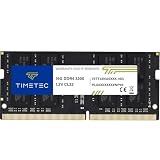
- Capacity – Single Module 16GB Speed up to 3200MHz Non-ECC Unbuffered 260-Pin 1.2V SODIMM.
- Specs – PCB Color (Green or Black, or Blue) and Rank (1Rx8 or 2Rx8) may vary depending on production batch. Performance and quality remain consistent across all Timetec products. 3200MHz Memory RAM can automatically downclock to 2933MHz or 2666MHz if system specification only supports 2933MHz or 2666MHz.
- Compatibility – Designed for selected DDR4 Laptop, Notebook, Mini PCs, and All-In-One systems(AIO) that support 260-Pin SODIMM memory. NOT compatible with Desktop DIMM slots.
- Installation – Plug-and-Play Upgrade, Quick and Easy to Install, no expertise required (please refer to your system's manual for guidelines).
- Warranty – All Timetec products are high-quality and rigorously tested to meet stringent standards. Backed by Timetec Limited Lifetime Warranty and professional technical support based in the United States.
Rank #4

- Actual memory speed may vary depending on the system, CPU, motherboard, BIOS settings, and supported memory configuration. DDR4 3200MHz modules may operate at lower speeds such as 2933MHz or 2666MHz when supported by the host system. Please check your device specifications and compatibility before purchase.
- Adherence to JEDEC and compliance to RoHS with respect to environmental protection regulation, production and manufacturing
- All new generation product of DRAM module. Strict test and verification procedures are performed for products
- Lifetime warranty and Free technical support
- Installation video is attached in product image. ※Refer to the latest version on the official website. In case of discrepancies, the official website prevails.
Rank #3

- Genuine Samsung DDR4 Memory RAM | Product may be M471A2G43CB2-CWE, M471A2G43BB2-CWE, M471A2G43AB2-CWE or an equivalent Samsung part number identical in specifications and performance
- Single 16GB RAM Module; DDR4 SO-DIMM 260 Pin; Speeds up to 3200MHz PC4-25600 (PC4-3200AA)
- NON-ECC Unbuffered; 1Rx8 - Single Rank x8; JEDEC DDR4 standard 1.2V
- Compatible for select select DDR4 Laptop, Notebook, and All-in-One (AIO) computer systems
- Expands your system's available memory resource improving performance, reducing bottlenecks, and increasing workload capacity
Choose a response based on the failure you need to prevent
- Use a cgroup or systemd unit limit when you need a defined memory boundary around a workload and accept that hitting it can terminate work.
- Consider systemd-oomd when you want configured, pressure-responsive intervention on eligible cgroups and have checked the host’s prerequisites and policy.
- Do not treat either control as a substitute for identifying whether the agent, a child tool, a local model, or unrelated work is responsible for the growth.
Product prices and availability are accurate as of the date/time indicated and are subject to change. Any price and availability information displayed on Amazon at the time of purchase will apply.




