Customer service macros are reusable replies or ticket actions that an agent chooses and applies to a support case. They can help with repeatable work—such as password-reset instructions, requests for missing information, or internal handoffs—without deciding automatically that a particular customer should receive a particular response. A good macro gives the agent a useful starting point, then leaves room to check the facts, personalize the message, and confirm any ticket changes before submitting.
What are customer service macros?
A customer service macro is a saved response, action, or combination of the two that an agent can apply to a support ticket or conversation. The agent selects it after judging that it fits the case. Macros are useful when the situation and the appropriate next step recur, but the agent still needs to verify that the template fits the individual customer.
As an Amazon Associate I earn from qualifying purchases.
In Zendesk, macros contain actions without conditions: they do not independently evaluate a ticket and fire when a rule is met. An agent chooses whether to apply one. That distinction matters: a macro is an agent-controlled shortcut, not an automatic trigger or a time-based rule.
The Tool Desk
Outbyte PC Repair FREERepair Windows errors before they cause bigger problemsFix Now →Outbyte Driver Updater FREEFix the driver behind crashes, sound loss and screen glitchesFind Drivers →A macro may do more than insert text. Depending on the platform, the configured actions, and the agent’s permissions, it may add a public reply or private note, change ticket properties or status, add or remove tags, assign the case, or attach relevant content. The available actions are product- and configuration-specific, not a universal definition of what every macro can do.
#1 Best Overall

- Full-Key Programmable On-board Keyboard: This macro keyboard supports macro recording and free assignment to any key. You can configure shortcuts, macros, and multi-step operation flows via the web-based interface or the latest VSD Craf software (reset your device after reinstallation or update). Record and edit macros to boost work efficiency and speed up gameplay
- Stream Controller Deck Function (via VSD Craf Software): Create unlimited switchable pages, with each page containing 6 LCD keys & 3 knobs. This offers unparalleled flexibility, allowing you to assign individual or series of actions to streamline your workflow. Whether executing game combos, launching apps, or controlling media, the possibilities are endless. You can even personalize each LCD key with images and animations (JPG, PNG, GIF) for easier recognition and memorization
- Smart Display Screen & Multi-function Knob: The VSD K1 Pro wired gaming streaming keyboard features a built-in intelligent TFT color display, serving as an interactive interface for real-time updates and customization. The high-definition LCD display and multi-function knobs make it simple to switch and customize GIFs, volume, date and time, backlighting, and connection modes for improved usability. Note: Screen images/GIFs and date/time calibration require software installation under Windows/macOS and a wired connection
- Hot-Swappable Custom Keyboard: The VSD K1 Pro wired macro shortcut keyboard is equipped with a hot-swappable PCB compatible with 3-pin or 5-pin switches. No soldering is required, letting you easily replace switches and keycaps for a fully personalized typing experience (keycap/switch puller included). Pre-lubed stabilizers and switches deliver a smooth, creamy typing feel and satisfying mechanical sound, ensuring fast response for intense gaming
- Gasket Mount & Advanced 5-Layer Dampening Structure: This macro pad keyboard uses an advanced structure with extended integrated silicone pads and PCB single-key slotting to optimize resilience and stability for a softer, more elastic feel. The 5-layer sound-dampening fills gaps between the PCB, plate, and switches, effectively reducing cavity noise and delivering a pure, clean sound with every keystroke
How macros differ from automatic rules
| Mechanism | Who or what applies it? | Typical use |
|---|---|---|
| Macro | An agent selects it after reviewing the case. | Insert a suitable reply, request specific information, or make a repeatable ticket change. |
| Automatic trigger or rule | The support platform applies it when configured conditions are met, or at a configured time. | Automate a workflow that should run based on defined conditions rather than an agent’s per-case choice. |
Product behavior varies. Zendesk’s documentation distinguishes macros, which contain actions without conditions, from automation and trigger workflows. Do not assume a saved reply in one support platform has the same selection, permission, or automation behavior as a macro in another.
What are some customer service macro examples?
These are adaptable patterns, not universal policy text. Replace bracketed guidance with verified case details, and configure ticket actions only to match your team’s workflow.
1. Password reset or common how-to
Use when: The customer needs a standard set of instructions, such as steps to reset a password.
Quick wins for a faster PC:
Clear out junk files and repair common Windows errorsFree Scan →Scan for outdated or missing drivers - takes under a minuteDriver Scan →Repair Windows errors before they cause bigger problemsFix Now →Reply pattern: “Hi [customer name], you can reset your password by following these steps: [verified instructions or link]. If you still can’t access your account after trying them, reply here and tell us what happens at [relevant step], so we can help further.”
Keep the instructions current and verified. Do not imply that the steps will resolve a different account-access problem without checking the case.
2. Request for more information
Use when: The team cannot investigate until the customer provides particular details.
Reply pattern: “Hi [customer name], I’m sorry this is happening. To look into it, please send [specific detail], [specific detail], and [relevant screenshot or reference, if appropriate]. Once we have those, we can check [what the team will investigate].”
Do these 3 things before closing this tab:
1Repair Windows errors before they cause bigger problems2Fix the driver behind crashes, sound loss and screen glitches3Clear out junk files and repair common Windows errorsRank #2

- 6 Functional Layers and 9 NKRO Keys:6 customizable functional layers for diferent scene. One for gaming, one for designing, it's up to you. And you can switch between layers by scrolling the mouse in the floating window area, or you can switch layers automatically based on the application you are using. 9 non-conflict Keys with macros allows you to press or hold multiple keys simultaneously, giving you accurate response with high speed and experiencing a new level of gaming and typing. Ideal Christmas gift for gamers, designers and office workers.
- User-Friendly Interface and Floating Window:With user-friendly interface and real-time floating window, you will never forget the function of the key being used at the moment. This one handed macro mechanical keyboard can make your work faster and more efficient, and make the game experience more comfortable and smooth. Besides, you can carry the macro keyboard anywhere due to the compact and elegant design.
- OTA Upgrade and Setting Sharing:The macro keyboard supports OTA online upgrade. Timely push message reminds you to update the firmware for more useful functions. Easy setting and you can export/import your settings for backup. No more set up for different computers. You can also share your settings with friends. If you have any problems with this one-handed macro mechanical keyboard, please feel free to contact us, we are sure to provide you with a satisfactory solution.
- Multifunctional Keyboard with Easy Setup:This programmable mechanical keyboard supports multimedia control, hotkeys, one-click start, real mouse, macro, etc. Simple settings achieve complex key funtions such as one-click start:folders / documents / common websites / APPs / System function, etc. Powerful but easy to set up. Just set the function you want on the key, then drag the function key to the corresponding virtual key, and remember to click FLASH THE KEYBOARD, and it's done.
- Work Partner and Game Booster:The mechanical keyboard can save a lot of time wasted during working via one-click copy / paste / delete/ one click to open the system settings, which can greatly improve the efficiency of working. Besides, it's also a great game booster.You can do multiple combos or shovel slide with one click for CSGO, OSU, etc. Four different modes of macro for better control. No repeat,Repeat by holding, trigger(upcoming),sequence(upcoming).
If the case should wait for the customer under your workflow, configure the corresponding status action where supported. Zendesk’s training examples include a request for more information that also changes ticket status; the exact status and its meaning depend on the team’s configuration.
3. Wrong item shipped: private handoff
Use when: The case needs attention from a shipping, returns, or fulfillment team.
Private note pattern: “Wrong item reported for order [order reference]. Customer expected [expected item] and received [received item]. Customer’s description: [brief relevant detail]. Please review and advise on the next step.”
A macro can add a private note and, if configured and permitted, assign or tag the ticket according to the organization’s routing workflow. Check that the note is private before submitting; a customer-facing reply and an internal handoff are not interchangeable.
4. Escalation to another support team
Use when: Another team needs a concise, usable account of the case so far.
Internal handoff pattern: “Customer’s issue: [summary]. Steps already tried: [steps and results]. Relevant details: [account, order, or error context needed by the receiving team]. Requested next step: [specific action or decision].”
Intercom’s escalation guidance emphasizes carrying forward the conversation summary, actions already tried, and a possible next step. A handoff that merely says “please investigate” leaves the receiving team to reconstruct the case.
Rank #3

- 6 Custom LCD Programmable Keys Macro Pad: Equipped with 6 fully customizable LCD visual keys, this stream controller deck acts as a compact macro keypad and programmable keyboard for streaming and gaming. Freely set custom images, JPG, PNG and GIF animations on each LCD key for easy recognition. Assign single or serial shortcut commands to simplify daily operations as a shortcut keypad and macro keyboard for streaming, gaming and office use
- One-Touch Shortcut & Macro Execution: Boost your workflow instantly with this portable macro pad and shortcut keyboard. One tap to switch OBS scenes, launch apps, open websites, input texts, control media and execute game combos. No complicated settings needed, this programmable keypad lets you finish multi-step tasks in one click for content creators, gamers and office workers to cut repetitive operations
- Dual Side Custom RGB Light Bars Ambient Lighting: Featured with 2 customized lcd light bars on left and right sides, this streaming deck supports automatic color cycling and personalized RGB color customization. The sleek side light bars add stylish desktop ambiance whether you stream at night, game in dim light or work overtime, upgrading your desk setup with immersive visual effect while keeping a minimalist compact design
- Wide System & Software Compatibility: This macro keypad and shortcut deck works with Windows and macOS via USB connection; Linux users can realize personalized adaptation by programming with our official open-source SDK files. It requires installing the exclusive VSD Craft software for full function setup instead of plug-and-play use. Seamlessly compatible with OBS, Streamlabs, YouTube, Twitch, Discord, Office, Photoshop and more mainstream apps, with built-in practical plugins like clock, weather, calendar and stopwatch
- Compact Premium Build & All-Scenario Application: Designed in mini portable size, the VSD Mini stream controller deck saves desk space while retaining full macro customization functions. Adopts high-quality durable materials for stable long-term use. Functions as a gaming macro controller, live streaming console, office shortcut keyboard and video editing auxiliary keypad. Comes with free software updates and professional customer service, delivering value for both beginner and professional users
5. Sales handoff
Use when: A conversation needs to move from support to sales and the customer should know what happens next.
What’s actually slowing this PC down?
Pick the symptom - the matching free tool is one click away.
Customer-facing pattern: “Thanks for sharing what you’re looking for. I’m passing your question about [need or product] to our sales team. [State the next step only if it is confirmed—for example, who will follow up or how the customer can continue the conversation.]”
Include useful context in the handoff, and route or prioritize the conversation only according to your organization’s process. Do not add an unverified response-time promise.
6. Confirmed service outage
Use when: The organization has verified an outage and approved what can be shared.
Reply pattern: “We’re aware of an issue affecting [confirmed service or function]. [State only the confirmed impact.] We’ll share the next update through [confirmed channel] [at the confirmed time or when one is available].”
Free tools Windows power users keep installed
One-click scans. No signup required.
Intercom describes outage-related workflow options, but a macro should not invent the outage’s scope, cause, resolution time, or next-update commitment. Update or retire outage text when the verified facts change.
How to write a customer service macro
- Choose one repeatable situation. Start with a recurring issue that can be handled with a stable reply or action, such as a common how-to question, a request for a specific missing detail, or a standard internal routing step.
- Decide whether the macro should speak to the customer. Separate public replies from private notes and internal actions. If a case calls for an investigation or an exception, create an agent-facing scaffold or checklist instead of a complete send-ready answer.
- Write the customer’s immediate answer first. Use a clear, situation-specific opening; address the actual question; and state the next step. Avoid a generic block of text that could fit unrelated cases.
- Mark what the agent must supply or verify. Leave room for case-specific facts, such as an order reference, the steps already tried, or the customer’s exact issue. Use product-supported placeholders only when you understand how they resolve in the relevant workflow.
- Add ticket actions deliberately. Decide whether the macro should change a property or status, add a tag, assign the case, add a private note, or attach content. Confirm that each action is permitted and appropriate for the agents who will use it.
- Name and organize it for retrieval. Use a short, recognizable name that identifies both the situation and, where useful, the outcome or audience. Place related macros together and limit shared availability to the teams that need them.
- Preview the result before submitting a case. Inspect the completed message and every ticket change, including visibility, status, tags, assignment, and attachments. Correct any unsupported or case-inaccurate wording before applying the update.
- Review it after release. Check whether agents routinely edit or abandon it, whether cases need correction or reopen, and what customers say about the resulting interaction. These are local review signals, not universal performance benchmarks.
How to make macros sound more personal
A macro should standardize the repeatable part of a response, not erase the details that show the agent has understood this case. Zendesk training material recommends personalizing communication so customers feel the agent is speaking to them rather than sending an automated response.
Rank #4

- Updated Software in USB Drive with User-Friendly Interface: Features user-friendly interface & real-time floating window to help you remember the function of each key being used. The one handed keyboard macro mechanical gaming keypad makes your work faster and more efficient. 12 non-conflict keys with macros on the macro pad allow you to press or hold multiple keys simultaneously, giving an accurate, high-speed response, and a new level of gaming & typing experience. NB: the setup software doesn't require installation. Please copy it to your computer, extract it, then open it. If you try to run it directly from a USB drive without extracting, there will not be enough space on the USB drive
- Programmable Keypad with Universal Compatibility: Type-C to USB interface, HID is driver-free. After setting on Windows, the macro keyboard can be plug and play on Linux, Mac OS, Windows, Pi, etc. With memory function, there is no need to set macropad again next time. After setting, the macro keypad can also be used by other computers. One computer can be plugged into multiple gaming keyboards and can be used normally. Besides, you can carry the micro keyboard anywhere due to the compact and elegant design
- Custom Configurations with Multiple Function Modes: The mini keys keyboard supports multiple function modes, each button can be set to a different function mode without affecting each other, allowing for personalized setup tailored to your specific needs
- RGB Keyboard with Individually Adjustable Backlighting: RGB led backlight can be individually adjusted for key press action display mode and on/off in configuration software. The macro pad keyboard can set a one-key macro operation in Multi-key mode. Pressing a key equals to pressing multiple single keys continuously. You can add an interval time, such as a one-key password. Just set the function you want on the key, then drag the function key to the corresponding virtual key, and remember to click FLASH THE KEYBOARD
- Work Efficiency and Gaming Enhancement: The mechanical keyboard can save a lot of time during working via one-click copy, paste, delete, or one click to open the system settings, which can improve the efficiency of working. It also enhances gaming experience by allowing you to do multiple combos or shovel slide with one click
- Address the actual issue. Identify the customer’s problem in the opening rather than starting with a canned line that could apply to anything.
- Use relevant specifics. Refer to the order, error, or step the customer mentioned when that detail is available and appropriate to share.
- Leave room for judgment. Use a checklist or editable scaffold when the answer depends on investigation, policy exceptions, or facts that are not yet confirmed.
- Remove irrelevant paragraphs. A shorter, edited reply is better than sending every section in a long template.
- Check placeholders in context. Placeholder behavior can depend on the product and ticket relationship; a populated name or field is not automatically the right one for every recipient.
How to organize and maintain a macro library
Use a consistent naming pattern
Name a macro for the issue and intended outcome, and make audience or team clear when that distinction helps agents choose correctly. Consistent wording makes a shared library easier to scan than a mixture of abbreviations, vague labels, and duplicated names.
Group related entries and control access
Organize macros by a structure agents can recognize, such as workflow or team. Restrict shared availability to agents who need the workflow. Zendesk’s guidance covers naming, access scope, placeholders, and keeping macros simple; specific controls depend on the product and account configuration.
PC Slower Than It Used to Be?
A free scan shows the junk files, broken settings and background clutter dragging Windows down - then fixes them in one click.Free scan · Windows 10 & 11Outdated Drivers Are Slowing You Down
One free scan finds every outdated or missing driver and matches the right update for your exact hardware.Free scan · exact hardware matchAudit for duplicates and stale guidance
Review existing entries before adding a new one. Consolidate duplicates, remove obsolete instructions, and revisit macros tied to changing policies, product steps, or active incidents. A smaller, maintained library is easier to search and less likely to surface conflicting replies.
Review how the macros are used
Use your own reporting and case reviews to look at which macros agents apply, how often they substantially edit them, and whether their use is followed by corrections, reopened cases, or customer feedback that points to a problem. These checks can reveal a template that is too broad, outdated, or routed incorrectly. There is no universal target for how many macros a team should have or how much time they should save.
Independent reader supportYour contribution helps us test, update, and keep practical guides available for everyone.Zendesk and Intercom: documented macro approaches
These are platform examples, not a product ranking or a complete comparison of support systems. The documented examples emphasize different capabilities; the available features in a live account may depend on edition, configuration, and permissions.
| Platform example | Documented emphasis | What an agent should check |
|---|---|---|
| Zendesk | Macros contain actions without conditions. Documented examples include replies or comments, ticket-property changes, tags, assignment, placeholders, and previews of changes. | Whether each action is permitted, whether the content is public or private, how placeholders resolve in the ticket context, and what changes will be applied when the ticket update is submitted. |
| Intercom | Examples emphasize escalation context, sales handoffs, and workflows related to outages. | Whether the handoff includes a useful summary and next step, and whether any customer-facing impact or update commitment has been confirmed. |
Important implementation checks
- Permissions and configuration: A macro can only perform actions available to the acting agent in that product and workflow. Confirm the role and account configuration before relying on an action.
- Problem and incident ticket placeholders: Zendesk warns that a requester placeholder used on a problem ticket may resolve to the problem ticket requester and appear on linked tickets. Follow Zendesk’s documented escape behavior where appropriate, then preview the resulting text in context.
- Rich content: Formatting or attachments may not behave identically in every channel. Zendesk documents an option for including a plain-text fallback; check the rendered message in the destination context.
- Submission timing: In Zendesk, previews can show macro changes, while edits are applied when the ticket update is submitted. Inspect the full result before submitting rather than assuming preview alone changed the ticket.
- Channel and audience: Confirm that a response is suitable for the channel and recipient, and that an internal note is not sent as a customer-facing reply.
Product labels and navigation can change. The examples above describe documented behaviors and do not imply one universal UI path or identical controls across editions.
When should you use a macro in customer support?
Use one when a recurring situation has a stable answer or a repeatable operational action, and an agent can quickly tell whether that pattern fits the case. Suitable uses include common instructions, targeted requests for missing information, consistent outage updates based on verified facts, and structured handoffs.
Best Value
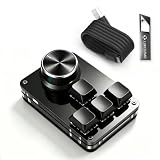
- 🖥 Update Software in USB Drive. User-Friendly Interface and Floating Window --- With user-friendly interface and real-time floating window, you will never forget the function of the key being used at the moment. This one handed keyboard/macro mechanical gaming keypad can make your work faster and more efficient. The 3 non-conflict keys with macros on this macro pad allow you to press or hold multiple keys simultaneously, giving you an accurate, high-speed response, and a new level of gaming and typing experience.
- 🖥 Programmable Keypad --- Type-C to USB interface, HID is driver-free. After setting on Windows, the macro keyboard can be plug and play on Linux, Mac OS, Windows, Pi, etc. With memory function, there is no need to set macropad again next time. After setting, the macro keypad can also be used by other computers. One computer can be plugged into multiple gaming keyboards, can be used normally. Besides, you can carry the micro keyboard anywhere due to the compact and elegant design.
- 🖥 Custom Configurations --- The mini keys keyboard supports multiple function modes, each button can be set to a different function mode without affecting each other.
- 🖥 RGB Keyboard with Macro Keys --- RGB led backlight can be individually adjusted for key press action display mode and on/off in configuration software. This macro pad keyboard can set a one-key macro operation (Multi-key mode). Pressing a key is equivalent to pressing multiple single keys continuously. Up to 15 keys are supported. You can also add an interval time, such as a one-key password. Powerful but easy to set up. Just set the function you want on the key, then drag the function key to the corresponding virtual key, and remember to click FLASH THE KEYBOARD, and it's done.
- 🖥 Work Partner and Game Booster --- The mechanical keyboard can save a lot of time wasted during working via one-click copy / paste / delete/ one click to open the system settings, which can greatly improve the efficiency of working. Besides, it's also a great game booster. You can do multiple combos or shovel slide with one click.
Use a shorter agent checklist—or no macro—when the right response depends on investigation, a policy exception, sensitive judgment, or facts that have not been confirmed. A template should make a good decision easier to carry out; it should not prompt an agent to send a confident but unverified answer.
Frequently Asked Questions
Can a macro send a reply automatically?
In Zendesk, a macro is selected by an agent and contains actions without conditions. Automatic behavior belongs to different rule mechanisms; behavior in other products may vary.
Can a macro change a ticket as well as add text?
It can in platforms that support ticket actions. Zendesk’s documented examples include changing certain ticket properties, adding or removing tags, assigning tickets, and adding comments, subject to permissions and configuration.
Should every repeated customer question get its own macro?
No. A macro is most useful when the response or action is stable and agents can identify when it applies. If a separate template would duplicate existing guidance or require frequent case-specific judgment, a maintained scaffold or checklist may be a better fit.
What should an agent check before applying one?
Check that the situation matches, the reply is accurate for this customer, the visibility is correct, and every configured ticket change is intended. Preview the result and verify placeholders in context before submitting.
Frequently Asked Questions
Can a macro send a reply automatically?
In Zendesk, a macro is selected by an agent and contains actions without conditions. Automatic behavior belongs to different rule mechanisms; behavior in other products may vary.
Can a macro change a ticket as well as add text?
It can in platforms that support ticket actions. Zendesk’s documented examples include changing certain ticket properties, adding or removing tags, assigning tickets, and adding comments, subject to permissions and configuration.
Should every repeated customer question get its own macro?
No. A macro is most useful when the response or action is stable and agents can identify when it applies. If a separate template would duplicate existing guidance or require frequent case-specific judgment, a maintained scaffold or checklist may be a better fit.
What should an agent check before applying one?
Check that the situation matches, the reply is accurate for this customer, the visibility is correct, and every configured ticket change is intended. Preview the result and verify placeholders in context before submitting.
Quick Recap
Product prices and availability are accurate as of the date/time indicated and are subject to change. Any price and availability information displayed on Amazon at the time of purchase will apply.




